Your Balance and Transaction History
This page explains how to look at your money on Onflow Ads: what each figure on the wallet page means, how to read your transaction ledger, and how to prove a payment happened.
Nothing on this page moves money. It is purely about viewing and understanding your balance.
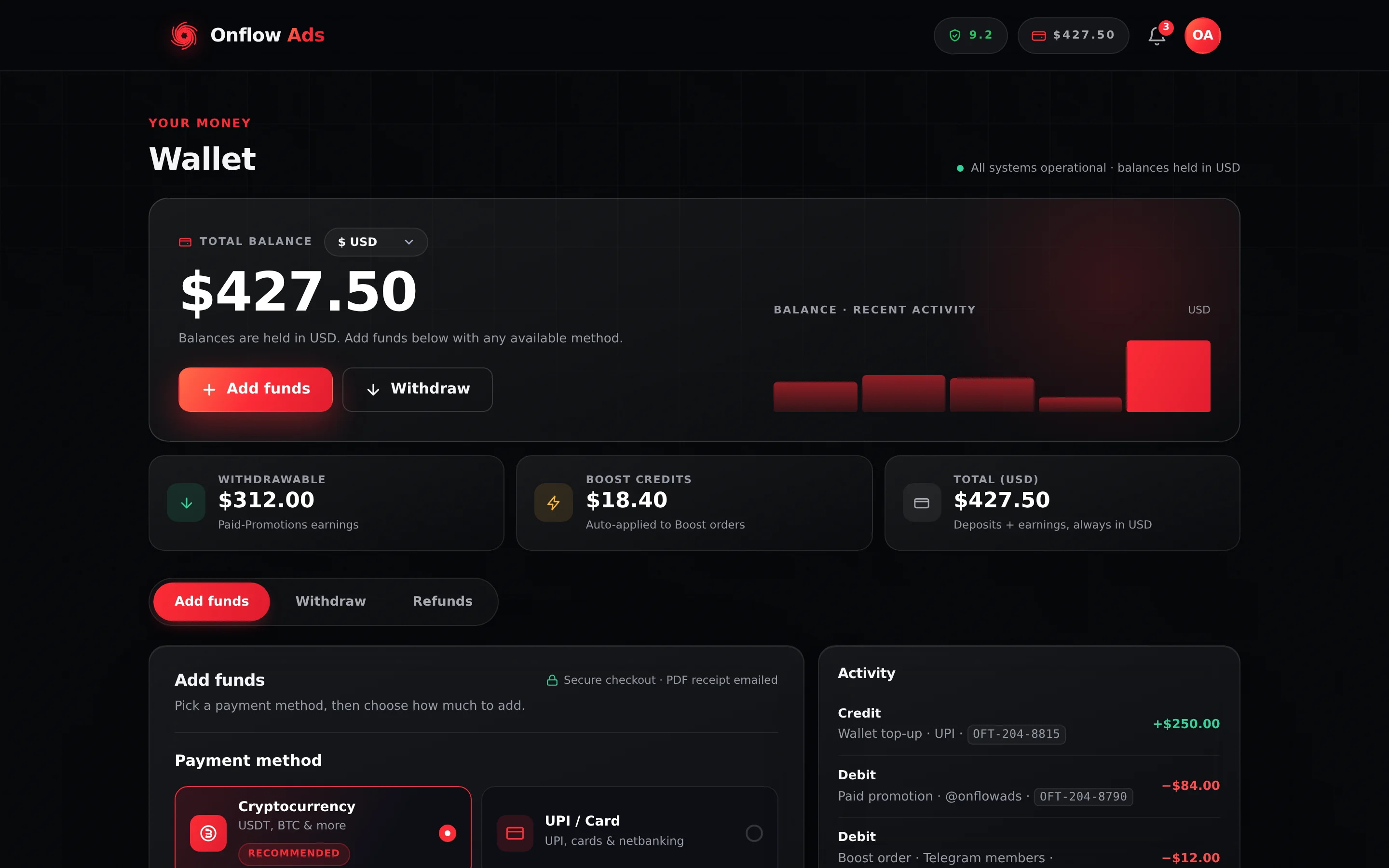
Plus plan · Advertiser. The three stat tiles under the balance are the figures explained below. The Activity and My withdrawals panels on the right are your transaction record, and they stay on screen whichever tab you select.
Why you would use this
- To check how much you can spend before booking a placement or a Boost order.
- To find out how much of your balance you are allowed to cash out.
- To work out what a charge on your account was for.
- To confirm that a top-up, a refund or a payout actually landed.
- To gather references (deposit, invoice, transaction or withdrawal) before contacting support.
Before you start
You need to be signed in with a verified email. The dashboard wallet also sits behind the onboarding gate; the Wallet tab on your Account page does not. See Wallet Overview.
Step by step: open your wallet
- Sign in at https://onflowads.com.
- Open https://onflowads.com/telegram/dashboard/wallet. Alternatively open https://onflowads.com/account and select the Wallet tab — the same balance in a more compact layout.
- The page header reads Wallet, with the eyebrow "Your money" and the line "All systems operational · balances held in USD" on the right.
- Your Total balance appears in large type, with a Display currency selector next to it. The selector lists a symbol and a code, for example "$ USD" and "₹ INR".
- Three stat tiles sit underneath: Withdrawable, Boost Credits and Total (USD).
- The Activity and My withdrawals panels load in the right-hand rail.
While a panel is loading it shows "Loading…". If something goes wrong it shows "Couldn't load your wallet." or "Could not load withdrawals." — refresh the page and it will normally recover.
The balance panel
| Element | What it does |
|---|---|
| Total balance (large figure) | Your wallet balance, converted for display into the currency you chose. |
| Display currency selector | Re-renders that one figure in another currency. Display only — see Currencies and Exchange Rates. |
| Note line under the balance | Reads "Balances are held in USD." — and, once the top-up methods have loaded, "Balances are held in USD. Add funds below with any available method." |
| Add funds button | Switches to the Add funds tab. |
| Withdraw button | Switches to the Withdraw tab. |
| Balance · recent activity sparkline | A small bar chart of how your balance has moved over your most recent transactions. |
The chart is drawn by replaying your most recent transactions backwards from today's balance, and it appears only once you have at least two transactions on record. It is decorative — the Activity list is the authoritative record of what happened.
The three figures explained
Total (USD)
Everything in your wallet: money you added, service refunds credited back, earnings paid to you, and any promotional cash credit. Any purchase on the platform draws from this.
It is the raw balance. It does not subtract anything currently frozen or held.
Withdrawable
The portion of your total that is allowed to leave the platform. On Onflow Ads only Paid-Promotions earnings — money other advertisers paid you for running their placements — are withdrawable.
Everything else is locked: spendable on Onflow Ads, but not cashable. That includes:
- money you topped up yourself,
- deposit bonuses,
- most service refunds credited back to your wallet,
- promotional, bonus or goodwill credit.
So, in plain terms:
Withdrawable = Total balance − everything that was added rather than earned
If you have never sold a paid placement, your Withdrawable figure will be $0.00 no matter how much you have topped up. That is expected, not an error.
When you spend, the locked portion is used before your earned balance. So spending your own topped-up money does not accidentally convert it into withdrawable money, and it does not eat into earnings you were planning to cash out.
The reverse is not symmetrical, and it catches people out: a refund does not always return to the pocket the money came from. On Paid Promotions in particular, a refund of a purchase you paid for out of earnings comes back locked, so your Withdrawable figure drops permanently. See Where a Refund Lands.
Boost Credits
A third, separate pocket of promotional credit that can only be spent on Boost Metrics orders, where it is spent before your wallet cash automatically. It can never be withdrawn and never converts to cash — including through a refund, which returns it as credit.
You can earn Boost Credits from a deposit bonus on a qualifying top-up, from discount rebates, from the referral programme and from delivery guarantees. The itemised credit ledger lives on the Boost orders page — see Boost Credit and Referrals.
What the Total does not tell you
Several things make money unspendable without removing it from your balance. When one is in force, Total (USD) still shows the money — it is still yours — but a checkout will refuse to spend that part of it.
| Mechanism | What it looks like on this page |
|---|---|
| An open top-up refund request | Nothing on this panel. The frozen figure is shown only as a banner on the Refunds tab. |
| A withdrawal in the queue | The gross has already left the Total, as an Activity debit reading "Withdrawal hold OFW-…". |
| An auction bid hold | An Activity debit reading "Auction bid held: …". |
| A good-faith deposit on a placement | An Activity debit reading "Good-faith deposit: …". |
| A fraud review freeze on the account | Nothing here; it surfaces when a withdrawal is refused. |
A withdrawal hold and a bid hold both show as debits, so the Total you see is already net of them. A top-up refund freeze is different: the money is still in the Total, and the only place the frozen figure is printed is the banner on the Refunds tab. If a checkout tells you there is not enough balance and the arithmetic looks wrong, open the Refunds tab first.
The whole picture is on Frozen and Held Funds.
The Activity ledger
Activity in the right-hand rail is your wallet's transaction history. It shows your most recent 25 transactions, newest first. Each row shows:
- Credit or Debit as the row title,
- the reason underneath, followed by the transaction's
OFT-reference, - the amount on the right: a green +$0.00 for a credit, a red −$0.00 for a debit.
If a reason was not recorded, the row shows the date in its place. If you have never transacted, the panel reads "No transactions yet."
Amounts here are always in USD, whatever your display currency is set to.
Every line has its own ID
Each row in Activity is a transaction in its own right, and every one of them carries a reference of the form OFT-XXX-XXXX — one of the Onflow Ads IDs. Every credit and every debit gets one: top-ups, boost charges, payouts held and released, refunds, plan renewals, admin adjustments. Nothing moves in your wallet without a line, and no line exists without an ID.
That is what makes a single charge quotable. Instead of "a debit for $12 sometime last Tuesday", you can send support the exact OFT-… and there is no ambiguity about which movement you mean — useful when several similar amounts landed on the same day.
OFT- references can be longer than mostBecause there's one for every single movement of money, OFT- is the busiest reference on the platform, and its last group sometimes runs longer than four digits. That's expected — copy the whole string as shown.
Reasons you may see
This list is illustrative rather than exhaustive — every entry always states what it was for.
| Reason | Direction | What happened |
|---|---|---|
| Wallet top-up | Credit | A top-up of yours was confirmed and credited. |
| Deposit bonus | Credit | A wallet deposit bonus applied to that top-up, as its own separate line. |
| Boost: service xquantity | Debit | You placed a Boost Metrics order. |
| Boost refund: … | Credit | A Boost order could not start, was cancelled, or under-delivered. |
| Subscriber Exchange delivery refund (ad cancelled before delivery) | Credit | You cancelled a paid Subscriber Exchange ad before anything ran. |
| Paid promotion: N placement(s) | Debit | You checked out a Paid-Promotions cart. One line for the whole cart, however many channels were in it. |
| Paid promotion payout: channel | Credit | You were paid for a placement you ran as a channel owner. |
| Paid promotion cancelled — refund | Credit | A placement you booked was cancelled before it ran. |
| Paid promotion declined / expired / not posted — refund | Credit | A booking did not go ahead, so the held money came back. |
| Good-faith deposit: placement | Debit | A deposit was staked for a booking you accepted. |
| Good-faith deposit returned | Credit | That stake was released back to you after a clean delivery. |
| Good-faith deposit awarded: placement | Credit | The other side's stake was awarded to you because they caused the failure. |
| Auction bid held: reference | Debit | Your bid amount was held while an auction ran. |
| Auction bid returned: reference | Credit | A held bid was released — you were outbid, or the auction produced no placement. |
| Withdrawal hold OFW-… | Debit | You requested a payout; the gross amount left your available balance. |
| Withdrawal refund OFW-… | Credit | A payout request was rejected, so the hold came back. |
| Top-up refund order (paid externally) | Debit | An approved top-up refund removed the deposit from your wallet to pay it out. |
| Top-up refund order (paid externally) — incl. $0.00 deposit bonus reversed | Debit | The same, on a top-up that had earned a wallet deposit bonus: the deposit and its bonus left together. |
| Verified Delivery Insurance — automatic refund | Credit | An insured placement did not deliver, so the cover paid out. |
| Premium tier (billing) | Debit | You bought or renewed a Premium plan. |
| Paid promotion — priority review | Debit | You paid to have a listing or booking reviewed ahead of the queue. |
A Paid-Promotions checkout writes one debit for the whole cart, and several things are folded into it that are not the slot price:
- The pin, if you bought it. It is a platform-priced product the owner chose to offer: $6.00 per pinned placement on your side, of which the owner receives $4.00, so two slots in the same channel with the pin on both is two pin charges.
It is not written as its own Activity line. The pin charge is added to the placement's charge, and the owner's $4 is added to their payout, at the platform's published figures — both are operator settings, so the checkout is the number that binds. It is also added after every percentage lever on the cart — your volume discount, the owner's discount, a promo code — so no discount ever moves it.
The mirror image applies to the "Paid promotion payout: channel" credit above. If you sold the pin, that credit silently includes your $4 share, which is why a payout can be larger than your published slot price. Break a specific placement down on the booking itself rather than from this list. If the pin comes down early, the owner's payout shows the recouped $6 taken out of it — see Owing money.
When our team credits or debits your balance by hand, the reason recorded is whatever the operator typed, written to the ledger verbatim with no prefix. If nothing was typed, the row shows the date instead of a reason. So there is no "Admin adjust" label to look for.
An admin credit is also the one credit on the platform that lands withdrawable — unlike a top-up, a deposit bonus, or a Paid-Promotions refund. If your Withdrawable figure rose without a placement payout behind it, that is usually why.
Match the amount and date against your emails first: purchases, bookings and plan renewals all send their own confirmation. If it still does not make sense, quote the row's OFT- reference to [email protected] — that identifies exactly one movement and saves a round of questions.
The reversal lines a refund writes
When a top-up refund is approved, more than one ledger can move, and the wording tells you which pocket you are looking at:
| Ledger | Line you will see |
|---|---|
Wallet (OFT-) | "Top-up refund", the top-up's reference and "(paid externally)", with " — incl. $X deposit bonus reversed" appended when a wallet deposit bonus went back with it |
Boost credit (OFBT-) | "Deposit bonus reversed", naming the refunded top-up |
Boost credit (OFBT-), on whoever referred you | "Referral commission reversed — the deposit it came from was refunded" |
Those are the lines people most often ask about, because they appear after the fact rather than at the moment of a purchase. All three are explained in Requesting a Top-up Refund.
The My withdrawals list
Below Activity, My withdrawals shows your most recent 25 payout requests. Each row shows:
- the method — Telegram Stars, UPI ID, or USDT (BEP-20),
- the destination you entered, the request date, and the
OFW-reference, - the gross amount as a red debit,
- net $0.00 — what you receive after the service fee,
- a coloured status pill carrying the raw status word.
If you have never requested a payout, the panel reads "No withdrawals yet." The meaning of each status is documented in Withdrawing Your Earnings.
Proving a payment
You have four independent paper trails, and they never contradict each other:
- Activity on the wallet page — the ledger of every movement, each line with its own
OFT-reference. - The receipt email with the PDF invoice sent for every credited top-up — see Invoices and Receipts.
- My withdrawals, where every payout request carries an
OFW-reference. - Your refund requests on the Refunds tab, where every request carries an
OFR-reference plus theOFD-andOFI-of the deposit behind it.
When you contact support, quote whichever reference you have. It makes everything faster.
Rules and limits at a glance
- The Activity list and the withdrawals list each show your 25 most recent entries. The Refunds tab shows your 10 most recent credited top-ups and your 25 most recent refund requests. Older entries are not shown on the page; ask support if you need history beyond that.
- Balances and ledger amounts are always in USD, regardless of your display currency.
- A purchase can never take your balance negative — one that exceeds your spendable balance is refused rather than overdrawn, and the checkout will offer to top you up first. Two things that are not purchases can: a paid pin you took down early, and a cross-promotion insurance cover you declared and then forfeited. See Owing money.
- Wallet pages require you to be signed in; there is no public view of a balance.
If something goes wrong
| What you see | What it means | What to do |
|---|---|---|
| "Loading…" that never resolves | The page's request for your wallet has not come back. | Refresh. If it persists, sign out and back in. |
| "Couldn't load your wallet." | The wallet request failed. | Refresh. If it keeps happening, check the status page, then contact support. |
| "Could not load withdrawals." | The withdrawals request failed; the rest of the page is fine. | Refresh. Your requests are unaffected — nothing was lost. |
| "No transactions yet." on an account you know has spent | You may be signed in to a different account. | Check the email on the Profile tab of your Account page. |
| A balance that changed with no matching row | Activity is fetched when the page loads. | Reload the page; a movement made in another tab appears then. |
| A Total you cannot spend | Something is frozen or held. | Open the Refunds tab to see any freeze, and read Frozen and Held Funds. |
FAQ
My Total went up but my Withdrawable did not. That is correct for a top-up, a deposit bonus, a service refund or promotional credit — those are spendable but locked. Only Paid-Promotions earnings raise the Withdrawable figure.
My Withdrawable went DOWN and I have not withdrawn anything. You spent earnings on something that was then refunded, and it came back locked. Paid Promotions credits every refund as locked platform credit, whatever funded the original charge. See Where a Refund Lands.
My Boost Credits went up after a top-up. A boost-credit deposit bonus applied. The live ladder is +5% of the deposit on a $50.00-or-larger top-up and +10% on a $200.00-or-larger one, highest threshold only. It is granted at the moment the top-up is credited and itemised in your boost-credit statement as Deposit bonus. The payment page shows it beforehand, in the Boost Credits bonus box — see Deposit Bonuses.
My Total went up by more than I deposited. A wallet deposit bonus applied. It lands as its own credit reading Deposit bonus, is spendable but not withdrawable, and does not count toward your lifetime funding — see Deposit Bonuses.
Why does my balance look different after switching currency? Only the display changed. Your money is held in USD and the other currencies are live conversions for readability — see Currencies and Exchange Rates.
I need a statement covering more than the last 25 movements. Ask [email protected] for the period you need, and quote the dates.
Show my wallet balance and my transactions answer from your live wallet, as a card. The assistant never moves money — top-ups, withdrawals and refunds stay on their pages. What the assistant can do for you has the full list and the confirmation rule.
Related
- Frozen and Held Funds — why the Total and the spendable amount can differ.
- Where a Refund Lands — which pocket a refund returns to, per product.
- Invoices and Receipts — the paper record for every top-up.
- Adding Funds — put money into the balance you have just learned to read.