What the Bot Checks
Onflow Ads only works because a deal can be checked. Telegram tells the website nothing about what is happening inside a channel, so the bot — which you have added as an administrator — is the thing that looks, and reports back.
That is its third job, alongside notifying you and carrying out what the website decided. It is worth understanding, because it is how the platform knows a deal was honoured, and it is where a reliability penalty comes from.
The bot records what it saw — into a queue the website owns, as a fact that names the placement or campaign it is about. Everything that follows from an observation — a score moving, compensation being paid, a payout being held — is decided and applied by the website against the one account it already holds, usually within a minute. The bot never sends an amount, only what happened; the website prices it from its own published table, and a fact it does not recognise is held for a human rather than guessed at. There is no separate bot-side record to argue with, and no bot-side score to appeal to.
Before you start
- Your channel must be public. Only public Telegram channels can be verified. A group or a user account cannot.
- You must be an administrator of it. Not the owner necessarily, but an administrator — the check confirms it.
- The Onflow Ads bot must be an administrator of it too, with the rights below. Nothing can be confirmed before that, because a channel nobody has posting rights in cannot be delivered into.
The four checks
| Check | When it runs | What it is for |
|---|---|---|
| Is this channel real, and do you administer it? | When you enroll or re-verify a channel | Nobody can list a channel they do not control |
| How much reach does it actually have? | At enrollment, and on a refresh | Buyers see measured numbers instead of claims |
| Is the agreed post still there? | Repeatedly, for as long as an agreed placement is running | A deal that was paid for was actually delivered |
| Did the channel stay clear during a paid ad's window at the top? | Once, shortly after that window closes | A placement sold as "an hour at the top" was actually at the top |
Verifying a channel
Every "add a channel" surface behaves identically, because the rule and its wording live in one place.
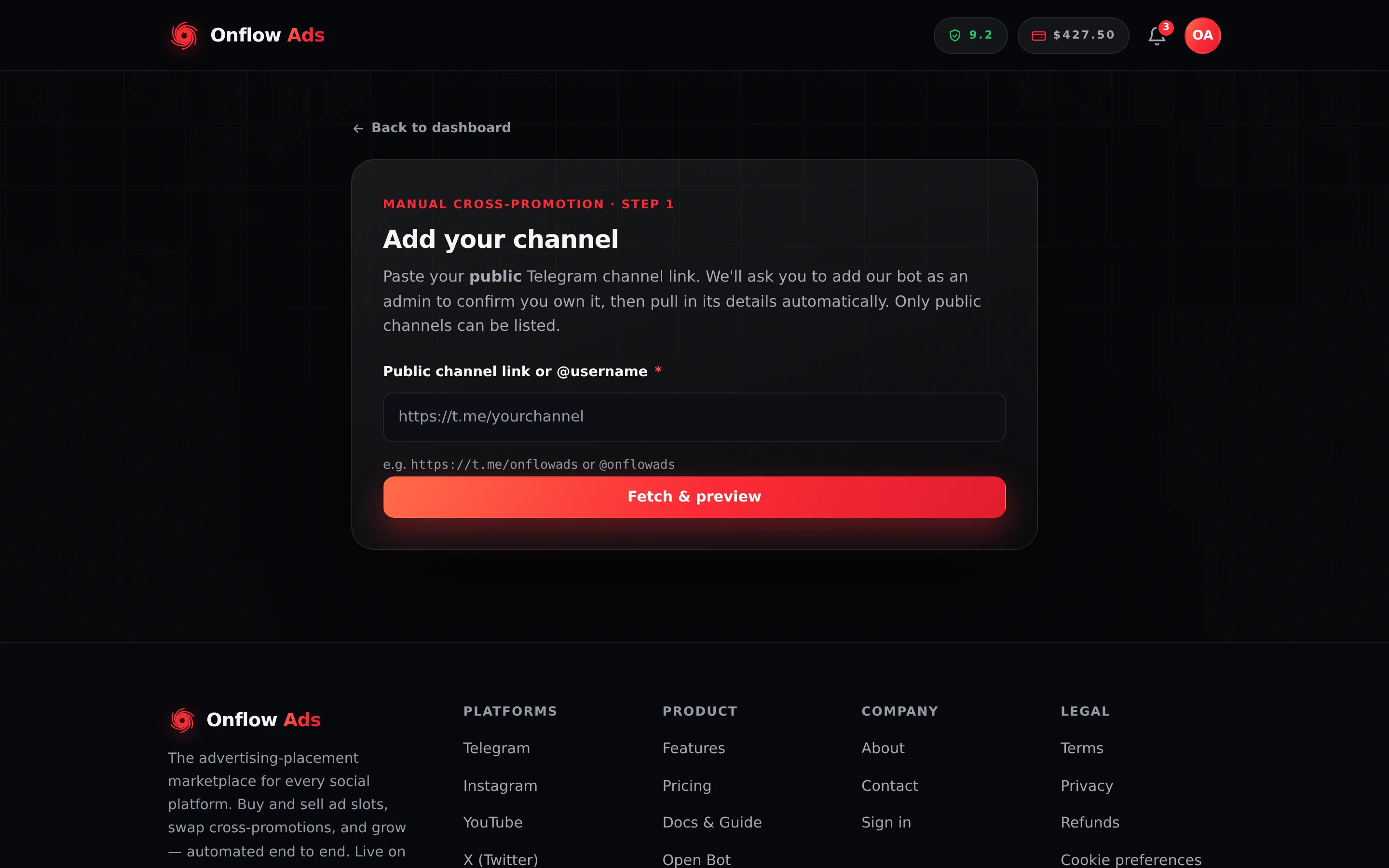
Plus plan · Advertiser. Where a channel is added. Paste the link first; the add-the-bot panel appears next if the bot is not an administrator yet.
Step by step
- Paste your public channel link or
@usernameand submit it. - If the bot is not yet an administrator, an amber panel appears headed Add our bot to verify your channel — "To confirm your channel exists and go live, add our bot to it as an administrator with the rights below. We verify instantly — no waiting." It shows the bot's
@usernameas a chip with a Copy button, and a checklist of the rights. - Press ➕ Add @… as admin. Telegram opens with the exact rights pre-ticked, so you do not have to find them by hand.
- Back on the page, press I've done it — check again. The button shows Checking… while the platform asks Telegram for the channel and its administrator list.
- On success the channel is confirmed and its details are pulled in automatically.
The rights it asks for
| Right | Required? | Why |
|---|---|---|
| Post Messages | Always required | So the bot can publish the sponsored or cross-promotion post it is being trusted to deliver |
| Edit Messages | Recommended | So the bot can fix or refresh a post it published |
| Delete Messages | Required in every engine | The bot removes every placement it publishes when the run ends — a Paid Promotions post at the end of its booked duration, both cross-promotion posts, every exchange placement after its 24 hours |
Every engine now promises the advertiser that a placement comes down on schedule, and the bot cannot keep that promise without permission to delete its own post. The Subscriber Exchange enforces it at enrolment — a channel that clears the ordinary check can still be refused by the exchange for exactly this reason — and on Paid Promotions a channel where the bot cannot delete cannot honour a booking's end.
Granting all three rights everywhere is the reliable setup: the bot can then put the post up, correct it if needed, pin it where that was paid for, and take it down at the end, without you having to remember. In a channel, Edit Messages is also what lets the bot pin — see below.
Telegram splits this by chat type, and its own API documents both halves:
can_pin_messagesis "for groups and supergroups only". A channel administrator's record does not carry the field at all.pinChatMessagerequirescan_pin_messagesin a supergroup, orcan_edit_messagesin a channel.
So for a channel, the switch that grants pinning is Manage Messages → "Edit Messages of Others". There is no separate pin toggle to find.
The platform checks the right one for the chat type when you switch a pin product on in your rate card, and refuses the save naming the toggle to grant. If the check itself cannot run — Telegram unreachable, for instance — the save is allowed through rather than blocked on our own outage.
What a failed check tells you
| Message | What it means |
|---|---|
| "We couldn't find that channel. Add @… to your channel as an administrator, then try again." | The channel could not be read at all — usually because the bot is not in it yet |
| "Only public Telegram channels can be verified — that looks like a group or user." | The link points at a group or a personal account |
| "Add @… to your channel as an administrator (with “Post Messages”), then try again." | The bot is in the channel but is not an administrator |
| "@… is an admin but is missing the “Post Messages” right. Turn it on in the channel's admin settings, then try again." | The bot is an administrator with the wrong rights |
| "You must be an administrator of this channel to list it. Add yourself as an admin, then try again." | The channel is fine, but your own Telegram account is not an administrator of it |
The full walkthrough is on Verifying your channel.
If you remove the bot as an administrator part-way through a placement, it can no longer read the channel — so it can no longer confirm your post is still there. Keep it an administrator for the whole of any run you have agreed to.
Measuring reach
At the same moment, Onflow Ads reads two things: the channel's subscriber count, taken directly through the bot, and a sample of its recent public posts, from which an average view count is worked out.
It reads only public channel content and the posts our own placements created — never your subscribers' messages, and never their identities.
Alongside that, a separate reading of the public channel fills in the figures a bot cannot see: reactions and shares per post, how often the channel posts, when it was created, and how many people are online. Those live only where that reading succeeds.
Measured, or as stated by you
Some figures on a channel start life as something you typed into the listing wizard — subscribers, views per post, reactions per post, shares per post. When a live reading succeeds, it overwrites your figure and the number is a measurement. When it does not, what remains is your own claim, and the product says so: the tile carries the label "As stated by the owner — not measured by us".
Those four are the only figures that can ever carry that label. Everything else — engagement, posting cadence, admin and online counts, lifetime posts — either comes from a live reading or is not shown at all.
A figure that could not be measured is shown as absent — a dash — rather than as a fabricated zero. "We did not measure this" and "nobody saw it" must never look the same in a report somebody is paid on. A tile with no value simply does not appear.
Your channel's picture is served from Onflow Ads' own address, not from Telegram's. A Telegram file address is short-lived and carries a credential inside it, so one is never stored or handed out.
Watching an agreed post stay up
Once a post is live, a background monitor returns to it for as long as the agreed term runs. Every 30 minutes it asks one question: is the post still there?
For a cross-promotion it also checks that each partner is still a member of the other's channel, since leaving mid-run defeats the swap just as thoroughly as deleting the post.
The monitor is deliberately timid
A wrong flag would cost somebody a reliability penalty they did not earn, so the bar is proof rather than suspicion.
| Rule | What it means |
|---|---|
| Every reading is one of three things | The post exists, the post was deleted, or the check could not be completed |
| A "deleted" reading is never enough on its own | It takes two consecutive conclusive deleted readings before anything is recorded. Waiting one more 30-minute cycle costs nothing; a wrong penalty is irreversible in practice |
| Four failed checks are tolerated | A network blip, a rate limit or lost access is counted and retried, not punished |
| A failed check only counts when our own probes are healthy | If the checking machinery itself is down, every probe on every campaign reads as inconclusive. Those cycles are not counted against anyone |
| Persistent ambiguity is only a violation when it is attributable | After four inconclusive cycles, a penalty follows only if the bot was removed or demoted in the host channel — something only that channel's own administrators can do. Anything else goes to human review once, with no automatic penalty |
| Leaving a partner's channel needs confirming too | A first "left" reading proves nothing; it takes two consecutive readings, and only after the person was actually seen as a member first |
| The end of a run is left alone | Checking stops 10 minutes before the scheduled end, because the platform itself removes both posts at that moment and a slow probe could read a legitimate takedown as a violation |
| One violation, one flag | A placement can be flagged once. It cannot be penalised twice for the same failure |
A paid placement is held to stricter rules again — see Delivery monitoring and your reliability.
"1 hour at the top", "2 hours at the top", the native and month formats — none of them are pinned, and none of them are pin-checked. What they promise is the section below.
A pin is only checked where a pin was bought: the Pinned for the whole campaign extra, or the 7 days in feed · pinned throughout format. Placements booked before the two were separated keep the older "pinned for N hours" meaning and are still checked as pins, because that is what their owners agreed to.
Where a pin is checked, what is read is whether that ad's own message is still pinned. Pinning something else alongside it does not unpin it and is not a violation.
Watching the top-of-feed window
A format like "1 hour at the top" sells one thing: for that hour, the ad is the newest post in the channel, so anyone who opens the channel sees it first. The owner agrees to publish nothing else in the window.
The window is the "at the top" half of whatever format was booked — one hour, two, or three. Two formats carry no window at all and are never checked this way: Forward / repost, and 7 days in feed · pinned throughout, which sells the pin instead.
This can only ever be a promise that is checked, never one that is prevented. No bot can stop a channel's own administrators from posting, and Telegram's slow mode does not apply to them. So the check happens afterwards.
| How the check works | Detail |
|---|---|
| Once, after the fact | About 5 minutes after the window closes, the channel's recent history is read once. One read reconstructs the whole window — including anything posted and then deleted inside it, which no repeated polling could catch |
| What counts as a breach | Any message published in the channel after the ad, dated inside the ad's window |
| What does not count | The ad's own extra images when it is an album; service messages such as a pin, a join or a title change; forwards of the ad itself; and edits, because editing does not make a new message |
| The verdict has three states | Clear, breached, or unknown. "We could not look" is never filed as clear and never as a breach |
| Unknown is retried, not punished | An unresolved placement is re-read on later passes for up to 25 hours after the ad went live. If it is still unresolved then, it is closed as unknown — permanently, with no penalty |
| It needs the public reading to be working | Where that reading is unavailable, this check does not run at all |
The delete-early monitor waits for two consecutive readings before it records anything, because a live probe can catch a channel mid-blip. This check is different: it is a single look back at an hour that has already happened and cannot change. A second read of the same history would return the same answer, so an uncertain result gets its own verdict — unknown — and is retried, rather than being confirmed by a second probe.
What a breach costs
0.40 points off the 0-to-10 reliability score, applied once, to the channel owner. It is deliberately far lighter than the 1.50 for an ad that was deleted or not kept pinned: posting one extra message forty minutes into a window is a smaller wrong than removing the ad, and the ladder has to say so.
There is no money consequence. The payout is untouched. It still depends only on leaving the ad up for its full run.
Both sides are told, and this one is told in the product, not in Telegram — there is no DM for it. It lands in your Paid Promotions notification feed:
| Who | What they see |
|---|---|
| The channel owner | "Your channel posted during an ad's exclusive window", with how many posts went up and how far into the window the first one was, linking to your bookings desk |
| The advertiser | "Your ad did not get its full time at the top", with the same detail, and a note that the ad is still running for its full booked duration |
What happens when a post comes down early
This is the heavier violation — the ad was removed, or a partner left the other's channel, before the agreed end. Three things follow, in this order:
- The fact is recorded. The bot writes what it saw — which campaign, which side, whether the post came down or the partner left — into the website's queue. Removing a cross-promotion post before the campaign ends is recorded as CP post removed early; leaving (or leaving and rejoining) the partner's channel while their post was still up is recorded as Left the partner channel early. The same act is one fact: a restart or two monitors racing on the same campaign cannot record it twice.
- Both sides are told. The account at fault gets an Anti-Cheat Violation Detected DM naming the campaign code and the channel, saying what happened, and stating what was recorded — "−1.50 recorded (your 0-to-10 track record) — it is applied on onflowads.com within a few minutes" for a removed post, "−1.00 recorded…" for leaving the channel. If nothing could be recorded, the line says logged for review — no change has been applied to your score yet. The DM carries a See why & appeal button straight to your reliability page. The other party gets a Partner Removed Their Post Early or Partner Left Your Channel Early DM telling them it was logged and that there is nothing for them to do.
- The website prices it, and settles any insurance. The website applies −1.50 or −1.00 to the 0-to-10 reliability score, once, and writes the ledger entry. Where the party at fault had declared insurance cover, the bot records the claim and the injured party gets a Campaign Insurance Claim Recorded DM; the website then moves the declared amount from the party at fault to the partner's wallet — into debt if the wallet cannot pay it. The check reports; the website moves the money and the score.
There is not a bot score and a website score. What the monitor observes is priced by the website into the same 0-to-10 reliability score and the same ledger every other event lands in, and it is contested the same way — see Your reliability score and Appeals and fraud concerns. The same is true of a paid placement: the bot's retention check records Post removed early, the website applies the −1.50, and a paid pin taken down early is recorded, refunded and priced at −0.75 by the website. And it is true of the Subscriber Exchange: the bot records an early removal, a demotion or a no-show as a breach, and the website decides — from that record — the grace pass, the strike, the cooldown, the suspension and the price. See Rules and fair play.
How your submission is reviewed
Automatic checks confirm a channel exists and that you administer it. They do not judge whether a listing or an ad should go live. That part is a person.
| What you submitted | Who sees it, and how |
|---|---|
| A Paid Promotions listing | The moderation team is sent the full listing card in Telegram, headed "🆕 New Paid Promotions listing" — or "🔁 Re-verification request" if you edited an already-verified one. It carries ✅ Approve and list it and ❌ Decline and send back buttons, which open a signed, single-purpose confirmation page on the website. The decision is made there, not in the chat |
| A Subscriber Exchange ad | The ad becomes a card in a private review area with two buttons. A tap is relayed to the website in a signed call — the website verifies the reviewer, records the decision, refunds a declined ad's charges exactly once, and notifies you. If it is declined, the reviewer's reason is carried back to you word for word — in the bot and by email. If the relay is unavailable, the reviewer decides on the website's admin console instead |
Each review link is bound to the exact submission it was sent for. Editing your listing and submitting again silently retires every earlier Approve or Decline link, so a stale message in somebody's chat history can never approve a version of your listing that no longer exists.
You hear the outcome as a DM either way — Your channel is live!, Channel needs attention with the reason, or Your ad was not approved with the reviewer's words. A decline on an exchange ad does not affect your reliability.
If something goes wrong
| What you see | What it means | What to do |
|---|---|---|
| The add-the-bot panel keeps reappearing after you added the bot | The bot is an administrator but without Post Messages, or Telegram has not propagated the change yet | Open the channel's admin settings, confirm the rights, wait a few seconds and press I've done it — check again |
| The channel verifies but the Subscriber Exchange still refuses it | Delete Messages is missing, which the exchange requires | Grant it and re-check |
| A subscriber or view figure shows a dash | That figure could not be measured | Nothing to fix on your side. It refreshes on the next measurement |
| You were flagged for a post you did not remove | Two consecutive conclusive readings said it was gone | Use See why & appeal on the DM, or open your reliability page. You are contesting a ledger entry on your own account |
| A DM says a penalty was recorded but your ledger does not show it yet | The website prices the bot's record on its next sweep, usually within a minute | Reload the page shortly. Logged for review means nothing was applied at all |
| Your post came down a minute or two early and nothing happened | Checking stops 10 minutes before the scheduled end | Working as intended. Removing a post hours early is what the check exists to catch |
| Telegram was down and you were not penalised | A check that could not be completed is never a violation on its own | Working as intended |
| You lost 0.40 points and your ad was never touched | Something else was published in your channel during a paid ad's window at the top | The window is what the placement was sold on. Hold your own posts until it closes — the length is on the booking |
| A booking's pin never happened | Most often the bot does not hold Edit Messages of Others in that channel | Grant the right. A pin the platform failed to apply is recorded as our fault and is not turned into a penalty against you |
Short FAQ
Does the bot read my channel's messages?
No. It reads whether the channel exists and whether you administer it, its subscriber count, a sample of recent public posts to measure reach, whether a post it published for an agreed placement is still there, and — once, after a paid ad's window at the top closes — the public posts published in that window. It does not read your subscribers' messages or their identities.
Can I be penalised for something Telegram broke?
No. A check that could not be completed is counted and retried, never treated as a violation on its own — and if the checking machinery itself is unhealthy, the failed cycle is not counted at all.
Why does the bot need to stay an administrator after the post is up?
Because its access is how the platform can tell the post is still there. Remove it mid-run and the placement can no longer be confirmed.
The check flagged me and I disagree.
Use the See why & appeal button on the DM, or open your reliability page on the website. See Appeals and fraud concerns.