Starting the Bot
Pressing Start in the Onflow Ads bot chat is the single action that lets Telegram become a working part of your account. It takes one tap, you only ever need to do it once, and everything the bot sends you afterwards depends on it.
This page covers that first tap on its own: how to reach the genuine bot, what you will see, what changes the moment you press Start, and what it does not do.
The bot is how Onflow Ads reaches you and acts for you inside Telegram. It messages you when something happens, publishes and removes the posts you agreed to, and checks that they stayed up. It is not a second place to work: nothing is bought, created or supported inside it. See Bot vs Website: Who Does What.
Why you need to start it
Telegram has a firm rule: a bot may not open a conversation with a person. Until you press Start, Onflow Ads has no channel to reach you on at all — even if the platform already knows your Telegram account exists.
That rule is why the platform keeps two separate facts about you:
| Fact | What it means | Who can set it |
|---|---|---|
| Linked | Onflow Ads knows which Telegram account is yours | The website, when you connect or sign in with Telegram |
| Reachable | The bot is permitted to send you a direct message | Only you, by pressing Start in the chat |
Pressing Start is the only thing in the whole platform that sets the second fact. It is the one piece of information the bot observes on its own and writes back to your account.
Log in with Telegram never opens the bot chat, so it links your account without permitting a single message. That is why your account page can say your Telegram is linked and still show an amber line asking you to open the bot. Only Start clears it. See Connecting Your Telegram.
What starting the bot switches on
| What it enables | Why it matters |
|---|---|
| Direct messages | Order updates, payment alerts, campaign news and rewards can now be delivered to you in Telegram, alongside your emails. |
| Deep links | The one-time links the website hands you — Connect Telegram most of all — need a live chat with the bot to land in. |
| The connection requirement | For an email signup, Start is what satisfies the platform's one-time reachability requirement. See Why You Must Connect. |
There is nothing to configure and nothing to set up in the chat.
How to open the right bot
Onflow Ads never asks you to search Telegram by hand, and you should not. Every entry point on the website carries the official link, so you always land on the genuine bot.
- From your account page — Connect Telegram on onflowads.com/account opens the bot with a connection link attached. See Connecting Your Telegram.
- From the connection screen — Open Telegram and connect on the one-time requirement screen does the same thing.
- From the Subscriber Exchange page — its Connect Telegram button offers the flow in context, and advances the page for you once the bot confirms.
- From any message the bot has already sent you — the chat is already open, so there is nothing to find.
Anyone can create a Telegram bot with a similar name and picture. Open the bot from a button on the Onflow Ads website, in your own browser. If a stranger sends you a link to "the Onflow Ads bot", ignore it. The real bot never asks you for a password, a payment detail or a code somebody else sent you.
Step by step
- Press one of the buttons above on the website. Telegram opens a chat with the Onflow Ads bot.
- Tap Start at the bottom of the chat. If you have used the bot before, the Start button is not shown — the chat is already active, and the link works anyway.
- Read what the bot replies. Which message you get depends on what the link was carrying.
| You arrived via | The bot replies |
|---|---|
| Connect Telegram, or Open Telegram and connect | Telegram connected — "Your Telegram is now linked to your Onflow Ads account. You will get order updates, payment alerts and rewards right here." |
| A plain Start, with no link attached | Onflow Ads — official assistant — the redirect card described below |
| A button on a Subscriber Exchange placement published before links were planned by the website | "🔗 Here you go —" and a single button carrying the advertiser's own label. Newer placements open their destination without a chat |
| Anything else at all | The same redirect card |
- That is the whole flow. Leave the chat in place — it is now where your alerts land.
The redirect card, explained
If you open the bot and press Start without coming from a website button, the bot answers with a single card:
- Title: Onflow Ads — official assistant
- Body: "This bot is the Telegram side of Onflow Ads: it publishes and verifies the campaigns you book, and brings your order updates, payment alerts and reports to this chat."
- Second line: "Your account, channels, campaigns, wallet and support all live on the website. Own a channel? Add this bot as its admin from the website and it handles the rest."
- Button: Open Onflow Ads, which takes you to your dashboard.
- Follow Onflow Ads: one quiet Follow us button inside the message itself, under the text. Tap it and the message unfolds, in place, into a row of icon buttons — the Updates channel first, then each social profile, every one wearing its own animated icon — and Hide folds them away again. They open the genuine accounts, and they are the same list the website's footer shows. The button appears only while Onflow Ads has at least one official account switched on; otherwise the card ends at the text. The Telegram connected reply carries the same button.
You will see this same card whenever you send the bot any message. It is not an error — it is the bot telling you where the controls are.
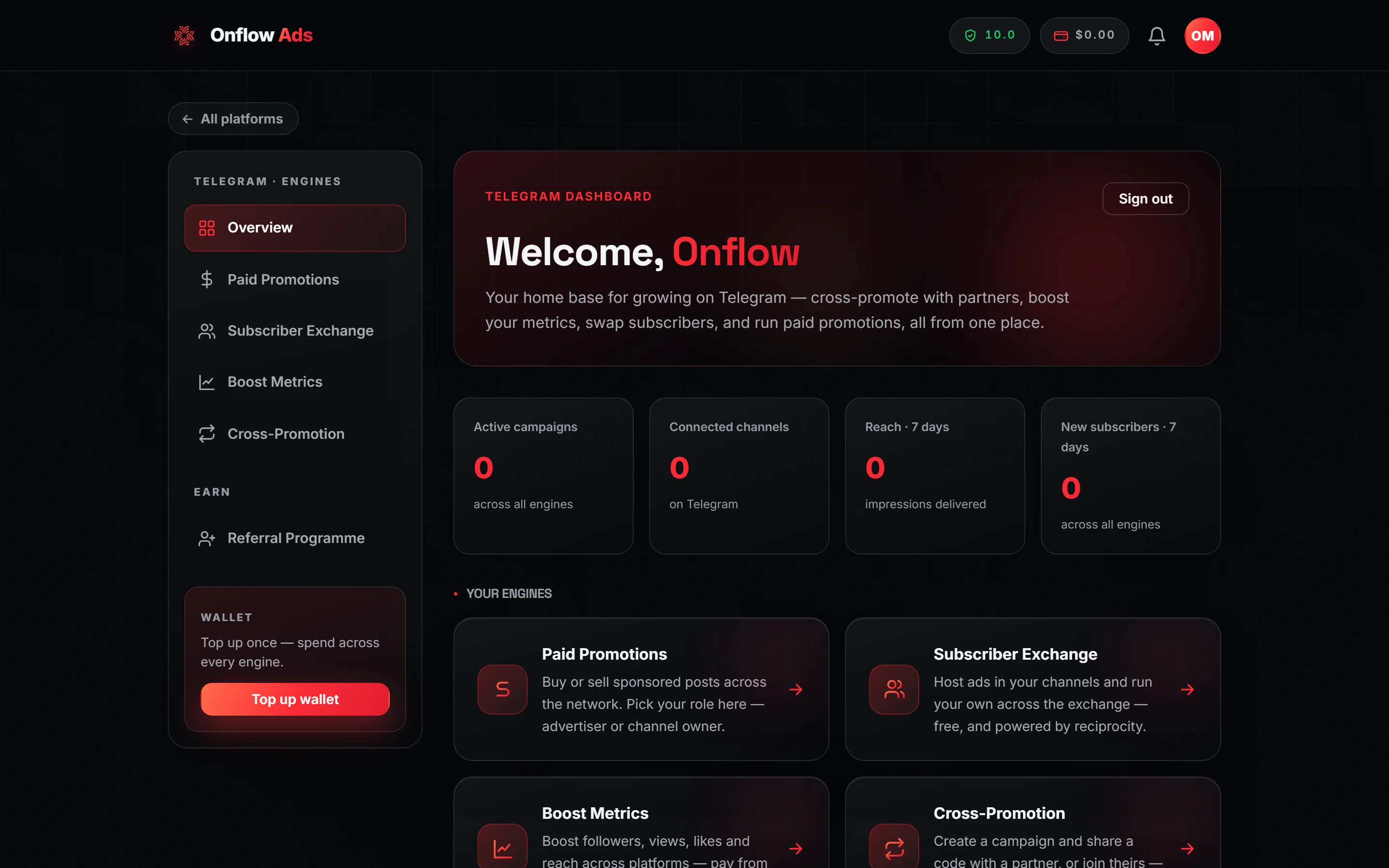
Free plan. Where the Open Onflow Ads button lands. On a new account every tile reads zero until your first campaign or channel.
What starting the bot does not do
This is the most common misunderstanding, so it is worth stating plainly.
A bare Start only opens the chat. It does not tell Onflow Ads which website account belongs to you, so notifications still have nowhere to go.
To pair the two identities you must either open the bot from Connect Telegram on the Account page, or sign in through Log in with Telegram. Both are covered on their own pages: Connecting Your Telegram and Signing In with Telegram.
The bot also has no menus, no commands and no wizards. There is nothing to explore in the chat — the Follow Onflow Ads buttons are plain links out of Telegram, not a menu. Typing /help, /menu or anything else returns the same redirect card.
After you have started it
- Messages the bot sends arrive in this chat, each with a button that opens the exact page it is about. See Notifications from the Bot.
- Nothing else is expected of you here. The bot works in the background from now on — delivering messages, publishing and removing the posts you agreed to, and checking they stayed up. See What the Bot Checks.
- The way onward is always a button inside a message the bot sends you.
Rules and edge cases
One Telegram account, one Onflow Ads account. The pairing is strictly one to one in both directions, and it is enforced in the database rather than by a check that could be worked around.
Starting again is harmless. Pressing Start a second time, or opening the bot from a fresh link, never resets anything, never creates a duplicate account and never charges you. The reachability stamp is written once and then left alone.
If you blocked or deleted the chat. Telegram stops all delivery immediately, and Onflow Ads has no way to detect or override that. Unblock the bot and send /start once — the redirect card confirms the chat is live again, and your notifications resume. Your link, wallet, channels and history are untouched throughout.
Groups and channels. The bot is not designed to be chatted with in a group. You add it to your channels as an administrator from the website when you enroll a channel, so it can publish and remove the posts you agreed to and confirm they stayed up. It does not read or reply in your channel, and it does not read your subscribers' messages. See What the Bot Checks.
Ad clicks never touch the chat. Every link in an Onflow Ads post is now its own short link on onflowads.com, which counts the tap and sends the reader straight on: a Telegram destination opens back in Telegram (an advertiser's own connected channel through a campaign invite link, so Telegram counts the join), and a web destination opens the page. Only Subscriber Exchange placements published before links were planned by the website still route through the bot chat, with one line and one button. See Ad Posts and Click Tracking.
Premium styling. On Plus and above the bot's messages arrive with animated icons and coloured buttons. On Free and Lite the same messages arrive plainly. The wording, the figures and the buttons are identical either way.
If something goes wrong
| What you see | What it means | What to do |
|---|---|---|
| Nothing at all after pressing Start | The message did not go through, or the chat is blocked | Send any message in the chat; the redirect card should appear. If it does not, unblock the bot in Telegram and try the website button again |
| Link expired | The connection link was over ten minutes old, or had already been used | Press Connect Telegram again on the website and tap Start promptly |
| The redirect card, when you expected a connection | You opened the bot directly instead of from a website button | Go back to onflowads.com/account and press Connect Telegram |
| Your account page still says you are not connected | The page was loaded before you tapped Start | Refresh the account page |
Related
- Why You Must Connect
- Official channels and social media — the accounts the bot's Follow buttons open, and how to spot a copy
- Connecting Your Telegram
- Signing In with Telegram
- Notifications from the Bot