Notifications from the Bot
Once your Telegram is connected and you have started the bot, Onflow Ads delivers your updates on three channels at once.
| Channel | Timing | Can you turn it off? |
|---|---|---|
| In-app — the notification feed on the website | Instant | No. The feed always records everything |
| Instant, or batched into an hourly or daily digest | Yes, per category | |
| Telegram DM — sent by the bot | Instant, never batched into an email digest | Yes, per category |
A DM is never a dead end. Every notification carries a button that opens the exact page on the website it is about — the message tells you; the page is where you act.
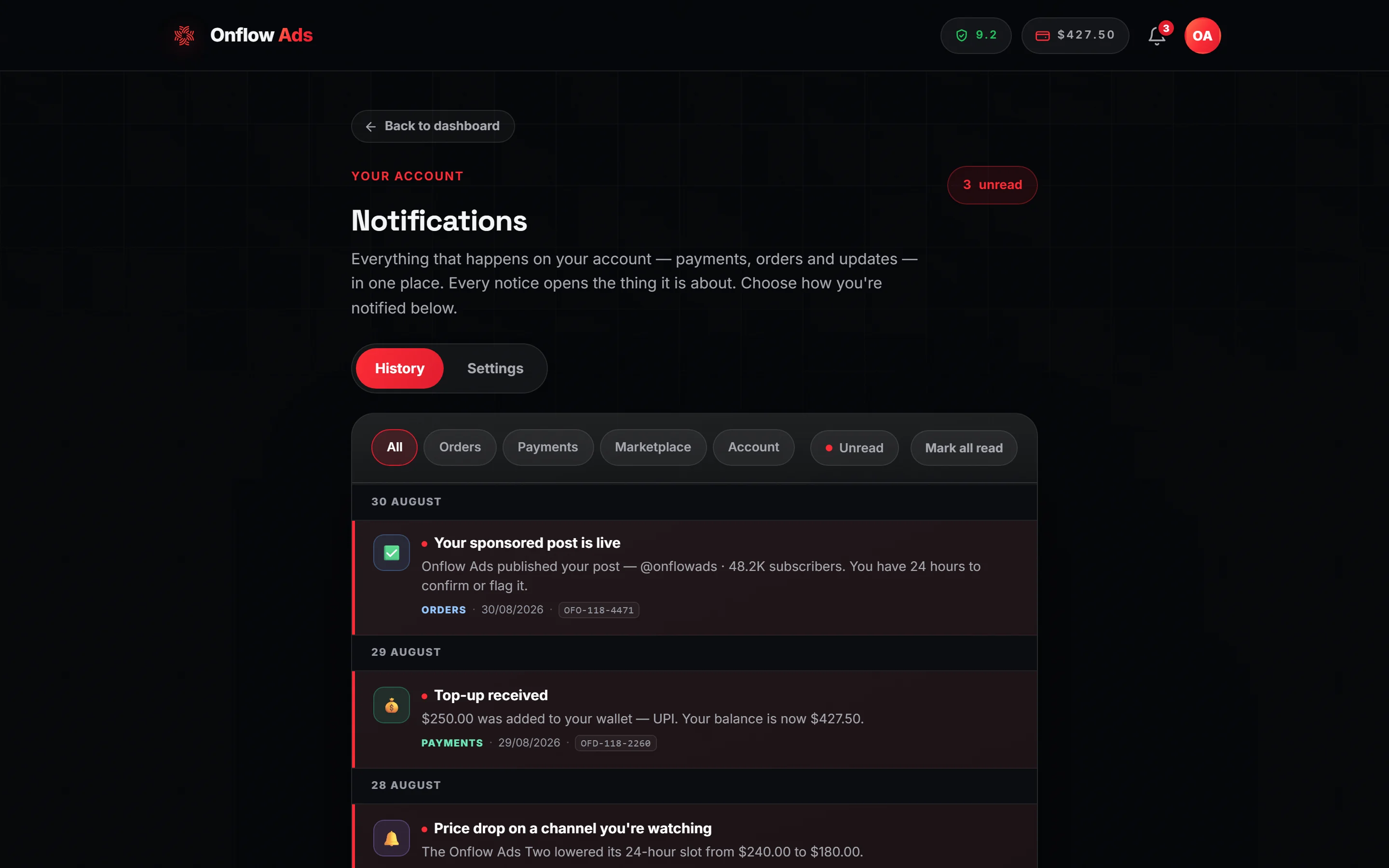
Plus plan · Advertiser. The History tab. The Settings tab beside it is where the Email and Telegram toggles live.
Both must be true: your account is paired with your Telegram, and you have started the bot at least once. Connecting from the website satisfies both in one go, because the connection flow opens the chat and you tap Start in it.
If only the first is true — the usual state after Log in with Telegram — Telegram refuses the delivery and the message is simply lost. Nothing tells you. Check the amber line on your account page: see Connecting Your Telegram.
When an update concerns one specific record — an order, a campaign, an exchange ad, a support ticket — its Onflow Ads ID is printed on the message on a line of its own, in monospace. In Telegram that makes it tap-to-copy: one tap puts the ID on your clipboard, ready to paste into a support message.
The same ID rides the other two channels of the same event — appended to the email as a Reference: line, and shown on the row in your in-app feed — so it does not matter which one you happen to read.
What you receive
Cross-promotion campaigns
These come from the bot as it runs your campaign.
| Message | When | What is in it | Buttons |
|---|---|---|---|
| Partner Post Review | Your partner submitted the ad they want placed in your channel | Three separate messages — see below | ✅ Approve this post and ❌ Ask for changes |
| Post approved | You approved your partner's post | The control message rewrites itself in place: "You approved the post from your partner. We are now waiting for your partner to review yours — the cross-promotion starts once both sides have approved." | — |
| Changes requested | You asked for changes | The control message rewrites itself: "You asked for changes. Your partner has been notified to rebuild and resubmit their post before the cross-promotion can go ahead." | — |
| Changes requested on your post | Your partner asked for changes to your ad | "Your cross-promotion (CP) partner asked for changes to the ad you submitted. It has not been placed — rebuild it and submit again to continue.", plus the campaign code | Rebuild my post on the website |
| Campaign Scheduled! | Both posts approved | The campaign code, start time and duration, and that it will go live automatically | View Campaign |
| Campaign is Live! | The moment both posts go up | The campaign code, campaign name, duration and the exact end time | See Watching a Live Campaign |
| Campaign Complete! | The run finished and both posts were removed | The campaign code, duration, your ad opens, your partner's ad opens, the subscriber change for each side, and any campaign credit earned | View Campaign, and Open Wallet where credit was earned |
| Blitz Campaign Complete! | A Blitz run finished | The same figures plus a Slot Breakdown — per-partner opens — and the total across all slots | View Campaign |
| Monthly CP Report | Once a month | Campaigns completed, total ad opens and campaign credits earned for the month | — |
If a violation was flagged on your account during a run, the completion message says so on a line of its own, rather than letting you find out later.
The Partner Post Review, in detail
This is the one decision the product lets you make inside the chat, because you are looking at the thing you are judging. It arrives as three separate messages, deliberately — so a media preview that fails to render can never swallow the buttons underneath it.
- A header — "📝 Partner Post Review", then the italic line "Your cross-promotion (CP) partner made the ad they want placed in YOUR channel. Please check it, then approve it or ask for changes.", the campaign code in monospace, and "Your partner has submitted their promotional post. The exact post — photos, caption and buttons — is shown below, just as it will appear."
- The post itself — the exact creative: media, caption and the advertiser's own buttons.
- The controls — "ℹ Approve this post to let the cross-promotion move ahead, or ask for changes to send it back to your partner to redo.", with two buttons labelled exactly ✅ Approve this post and ❌ Ask for changes. On a Blitz each gains " (partner slot N)" so you always know which pairing you are judging.
If the media preview could not be rendered, the control message adds "⚠️ We could not render the media preview here. Open the campaign on the website to view the exact post before approving." and a third button, View the exact post.
A pending review is auto-approved after about six hours, so a partner who never opens Telegram cannot strand a campaign indefinitely. If you are not sure about a post, ask for changes rather than leaving it — asking for changes is free and reversible; an auto-approval is not.
The same two decisions live on the campaign's own page on the website, so a DM you missed is not the only way to answer. Only the assigned reviewer can act either way — the bot answers anyone else with "Only the assigned reviewer can act on this post."
Checks and standing
These arrive when the bot's checks find that an agreed placement was not honoured. What they report is already recorded — the DM is how you hear about it, not where it is decided. See What the Bot Checks.
| Message | Who gets it | What it says |
|---|---|---|
| Anti-Cheat Violation Detected | The account at fault — a post removed early, or leaving the partner's channel early | The campaign code, the channel, what happened, and what was recorded against your reliability score — "−1.50 recorded … applied on onflowads.com within a few minutes" (−1.00 for leaving the channel) — with a See why & appeal button to your reliability page |
| Partner Removed Their Post Early / Partner Left Your Channel Early | The other party | That the breach happened before the agreed end, that it was logged and is priced on the website, and that there is nothing for you to do |
| Campaign Insurance Claim Recorded | The injured party, where the party at fault had declared cover | That the claim was recorded and that onflowads.com settles it into your wallet from your partner's declared cover — nothing to do, and your own score is unchanged |
The top-of-feed exclusivity check — whether anything else was published during a paid ad's window at the top — reaches both the channel owner and the advertiser through the Paid Promotions notification feed on the website, not as a Telegram DM. If you are watching only your chat, you will not see it. See What the Bot Checks.
Paid Promotions
| Message | Who gets it | What it means | Button |
|---|---|---|---|
| New booking request | Channel owner | An advertiser has booked a placement on your channel. The card carries the channel, the ad slot, your payout, the go-live window and the order's OFO-… ID — and it is the only Telegram message about that booking | 📄 Get the post here (blue) — sends you the ad exactly as it will be published: photo or video, caption with its formatting and links, and the inline buttons; ✅ Review & respond (green) — opens that exact booking on your bookings desk |
| Order progress | Advertiser | Placed, accepted, declined, delivered and completed updates as your order moves, each naming that order's OFO-… ID | View order |
| Your channel is live! | Channel owner | Your listing passed verification: it "is now in the Paid Promotions pool and advertisers can book placements on it. You can edit your prices, run a limited-time sale, or update your details any time." | 📊 Manage channel |
| Channel re-verified | Channel owner | The same, after a re-check | 📊 Manage channel |
| Channel needs attention | Channel owner | Verification did not pass, with the reason, and "Fix the issue and submit again from your manage page." | 📊 Manage channel |
Every one of these names the listing or order it is about in monospace, so you can tell several running placements apart.
📄 Get the post here
You are being asked to publish something in your own channel, so you should be able to see what without leaving Telegram. Pressing this sends the placement into the chat as messages: the media, the caption exactly as it will be published — attribution line included, decided by your own plan — and the inline buttons with their colours.
It is the only button on a Paid Promotions notification that does not open a page. The decision deliberately stays on the website, because accepting or declining moves money, takes a good-faith stake and writes to your reliability ledger, and those belong on one surface.
| Detail | What it means |
|---|---|
| Only you can use it | The request is checked twice — the button carries a signed token, and the Telegram account pressing it must be the owner of the booking. Someone else who somehow got the button back is answered with "This booking isn't yours to view" |
| Three taps a minute | The button re-sends media, so it is budgeted at 3 taps per minute per booking. A fourth answers "Slow down a little and try again in a moment." |
| What comes back is the real post | Not a summary. The caption is the published caption, the buttons are the published buttons |
| Its buttons are live | They are the tracked links, so tapping one to check where it goes counts as a real click on the advertiser's campaign. Read it; do not tap through it. The bookings desk on the website shows you each button's real destination instead |
| It may not be offered | Where the platform cannot sign the request, the button is left off the message entirely rather than shipped broken. The ✅ Review & respond button is always there |
Bookings that expire unanswered count against your reliability score — −0.30 for a ghosted request. The DM exists precisely so you hear about a request the minute it arrives — see Your reliability score. (An owner who is under review or below the Paid Promotions floor is not left to expire: those bookings are declined for them at once, with a full refund and no mark.)
Once a booking has been dealt with, the button on the original DM is retired so you cannot act on it twice, and a short note may be attached to the card explaining the outcome.
Subscriber Exchange
| Message | When | What is in it |
|---|---|---|
| Your ad is approved | A reviewer approved your exchange ad | Your ad's OFSE-… ID, how many channels it goes out to, over how many days, and that placements are spread out rather than all at once. It notes that every placement stays up for 24 hours and that you get the numbers each time |
| Your ad was not approved | A reviewer declined it | Your ad's OFSE-… ID and the reviewer's reason, word for word, plus "Fix it and submit again — declines do not affect your reliability." |
| Your appeal was accepted | Your appeal succeeded | The decline is reversed; the ad is approved and runs across the exchange |
| Your appeal was not accepted | Your appeal did not succeed | The reason where one was given, and that you can fix the ad and submit it fresh |
| A hosted ad was removed early | The website ruled on a breach the bot recorded in your channel — a placement pulled early, or the bot demoted | The channel, the window the ad should have stayed up for, what was recorded against your reliability (or that this removal joined an episode already counted), and whether your channels are paused. Sent by the website once it has decided the grace, strike and cooldown — the bot only recorded what it saw |
| A hosted ad came down early — no penalty this time | Your plan's grace excused an accidental early removal | The same window, that nothing was charged against you, and how many free passes are left this cycle |
| We could not take a hosted ad down | The ad served its full window but the bot had lost its delete right | That no reliability drop applies (the ad did run), that a strike was recorded and the credits withheld, and what to fix |
| One placement of your ad ended early | You are the advertiser and a host cut a placement short | Your ad's ID and the window it should have run for — never which channel — and that it was recorded against the host |
| The exchange pool is ready for your ad | An ad you tried to submit was refused because the pool could not carry it, and the pool has since grown to your plan's quota | The ad's level and topic, the count then and now against the quota, and that nothing was charged. Sent by the website (Telegram, email, the site and browser push) — the bot never sends it |
| Your exchange ad is paused — the pool is short / Your exchange ad is running again | An approved ad's pool fell below its quota, or recovered | Your ad's OFSE-… ID, the quota and the count now, and that it pauses and resumes on its own. Sent by the website on every leg |
Money
| Message | When |
|---|---|
| Top-up succeeded | Funds arrived and were added to your wallet balance |
| Top-up failed | A payment did not go through |
| Refund | Money came back to your wallet |
| Withdrawal update | Your withdrawal was approved, paid or rejected |
| Premium activated | A plan was charged from your wallet and switched on |
| Rewards and credit | Credit added to your wallet — for example after a clean cross-promotion |
Boost Metrics
| Message | When |
|---|---|
| Boost delivered | Your boost order finished delivering. Names the service and that order's OFB-… ID, so you can tell which of several running orders settled |
| Boost partially delivered | Delivery stopped short. Names the same order, what arrived, what did not, and the refund already back in your balance |
| Auto-Boost paused | A recurring boost rule stopped — its pool ran out, or no provider could carry its service — and needs your attention |
| Auto-Boost budget running low | A rule's pool fell under a fifth of its monthly fee |
| Auto-Boost renewed | The website renewed a rule from your wallet and topped its pool up |
| Auto-Boost expired | A rule reached the end of its term without renewing |
System
Account, security and platform updates — a new sign-in, a password change, a plan expiry warning.
Choosing what you receive
- Open Notifications from your dashboard, at onflowads.com/telegram/dashboard/notifications.
- Switch to the Settings tab.
- Under Notify me about you will find a grid — one row per category, with an Email column and a Telegram column.
- Flip any toggle. Changes save by themselves; ✓ Saved appears at the bottom of the panel.
| Category | Covers |
|---|---|
| Orders | Requests, acceptances, delivered posts and completions |
| Payments | Successful and failed wallet top-ups |
| Marketplace | Watchlist price drops, auctions and Subscriber Exchange updates — including every exchange message the bot sends |
| System | Account, security and platform updates |
Your in-app feed always records everything regardless of these toggles, so nothing is ever lost. Switching a Telegram toggle off means that category is not sent to you as a DM.
Turning all four Telegram toggles off means something more
There is no separate "switch the bot off" control, because switching all four Telegram toggles off already is one.
The bot treats "every Telegram category off" as "do not reach me on Telegram at all" — and that covers the many messages it sends that belong to no category at all. So a member who switches Orders, Payments, Marketplace and System off stops hearing from the bot almost entirely, including things the four toggles never mentioned. Keeping any one of them on — Marketplace included — keeps the bot's other messages coming.
Leave at least one on if you want the bot to keep reaching you. Your email leg is untouched either way — the website owns that separately.
The website's own Telegram messages follow the same rule — cross-promotion updates, Subscriber Exchange rulings, "your ad is now live", a listing's verification result. The website also sends Marketplace alerts, so for its messages that toggle counts too: they stop only when all four Telegram toggles are off. The one exception is a booking request on your channel, which carries an answer deadline and still arrives.
A short list of money and deadline events always delivers regardless, because missing one costs you something concrete: a failed payment, a declined order, a delivered ad whose confirmation window is ticking, a rejected withdrawal, a short-delivered boost, and a paused auto-boost.
What muting does
A muted category is a muted category, on every plan: a non-urgent Telegram notice in it is simply not sent as a DM. It is not held back for later either — but your in-app feed still records it, so you can always read what you missed there.
Email frequency
The same Settings tab has an Email frequency choice with three options:
- Send each email right away
- Hourly digest — one email an hour
- Daily digest — one email a day
Digest settings batch emails only. Telegram DMs are sent as they happen whatever you pick. The same urgent list above skips the email digest as well.
Reading your history
The History tab of the same page is the full feed. Filter it by All, Orders, Payments and System, use Mark all read, and pull older entries in with Load more. Every row carries the Onflow Ads ID of whatever it is about.
The buttons you will see
Notifications always carry a way onward. The exact button depends on what the message is about.
| Button | Opens |
|---|---|
| Open Onflow Ads | Your dashboard |
| Open Wallet | Your wallet |
| View order | The order the message is about |
| ✅ Review & respond | The exact booking on your bookings desk |
| 📄 Get the post here | Nothing — the answer is the ad itself, sent into the chat |
| 📊 Manage channel | That channel's management page |
| View Campaign | That campaign's page, for the code on the message |
| Rebuild my post on the website | The Cross-Promotion area, to redo a post your partner sent back |
| See why & appeal | Your reliability page, where a penalty can be contested |
| View the exact post | The campaign page, when a media preview failed to render in chat |
Nearly every one of them takes you out of the chat to a page on the website. There are exactly three exceptions in the whole product, and they are the three where the answer belongs in the chat: ✅ Approve this post and ❌ Ask for changes, which act in place, and 📄 Get the post here, which replies with the ad rather than a link to it.
Rules and edge cases
Delivery is best-effort and never blocking. If a DM cannot be delivered — you blocked the bot, or Telegram is having a bad minute — your order, payment or campaign still proceeds exactly as normal. The in-app feed and email are unaffected. That is also why you check your own dashboard rather than relying on a message arriving.
Blocking the bot silently stops DMs. Telegram does not let us re-open a chat you closed. Unblock the bot and send /start once to resume; nothing needs reconnecting.
Linked is not the same as reachable. If your account was created by signing in with Telegram and you never opened the bot, DMs are attempted and rejected. Your account page says so.
If you are not paired at all, the Settings tab shows a banner reading "Want alerts on Telegram too? Connect your Telegram on your account page and you'll get every notification as a DM — at the same time as your email."
Premium styling. On Plus and above the bot's messages arrive with animated icons and coloured buttons. On Free and Lite the same messages arrive plainly. The wording, the figures and the buttons are identical.
If something goes wrong
| What you see | What it means | What to do |
|---|---|---|
| Emails arrive, Telegram DMs do not | Your account is not paired, or the bot was never started | Check the Telegram connection card on your account page. An amber line there means started is what is missing |
| Nothing at all, on any channel, from the bot | You may have all four Telegram toggles off, which the bot reads as a full opt-out | Turn at least one category back on in Settings |
| One category is silent, others work | That category's Telegram toggle is off | Turn it on in Settings. What you missed meanwhile is in your in-app feed |
| A DM you cannot act on twice | The booking was already handled, so its button was retired | Open the bookings desk on the website to see the outcome |
| Nothing anywhere, and the feed is empty too | An account-level problem rather than a delivery one | Open the support desk with your Onflow Ads ID |
Short FAQ
Can I get Telegram alerts without email?
Yes. Turn the Email toggle off and leave Telegram on for that category.
Will I get the same update twice?
You may see one event in the feed, in an email and as a DM — one event, three channels. That is by design, and each channel is switchable except the feed.
Do notifications cost anything?
No.
Can teammates get my notifications?
Notifications go to the account they belong to, and one account pairs with exactly one Telegram. There is no fan-out to several people.
Related
One voice, whichever process wrote it
Messages the website sends through the bot — booking cards, order updates, payout notices, the "your channel is live" note — wear the same style as the bot's own: small-caps copy, animated premium emoji, and inline buttons coloured by what they do (blue opens or shows something, green confirms, red declines). Names, ids, handles, prices and dates always stay in the normal face so they read and copy cleanly. The premium look is a plan feature — Plus and above — and it is decided per recipient at send time; Free and Lite members receive the same words with plain emoji and plain buttons. If Telegram ever refuses an animated emoji, the message is re-sent plain rather than lost.