Ad Posts and Click Tracking
When Onflow Ads delivers a campaign it publishes the promotional post — media, caption and buttons as the advertiser built them — into the host channel, leaves it up for the agreed window, then removes it and reports the results.
This page covers what that post actually looks like when it lands, what happens when a reader taps a button on it, and where the numbers in your reports come from.
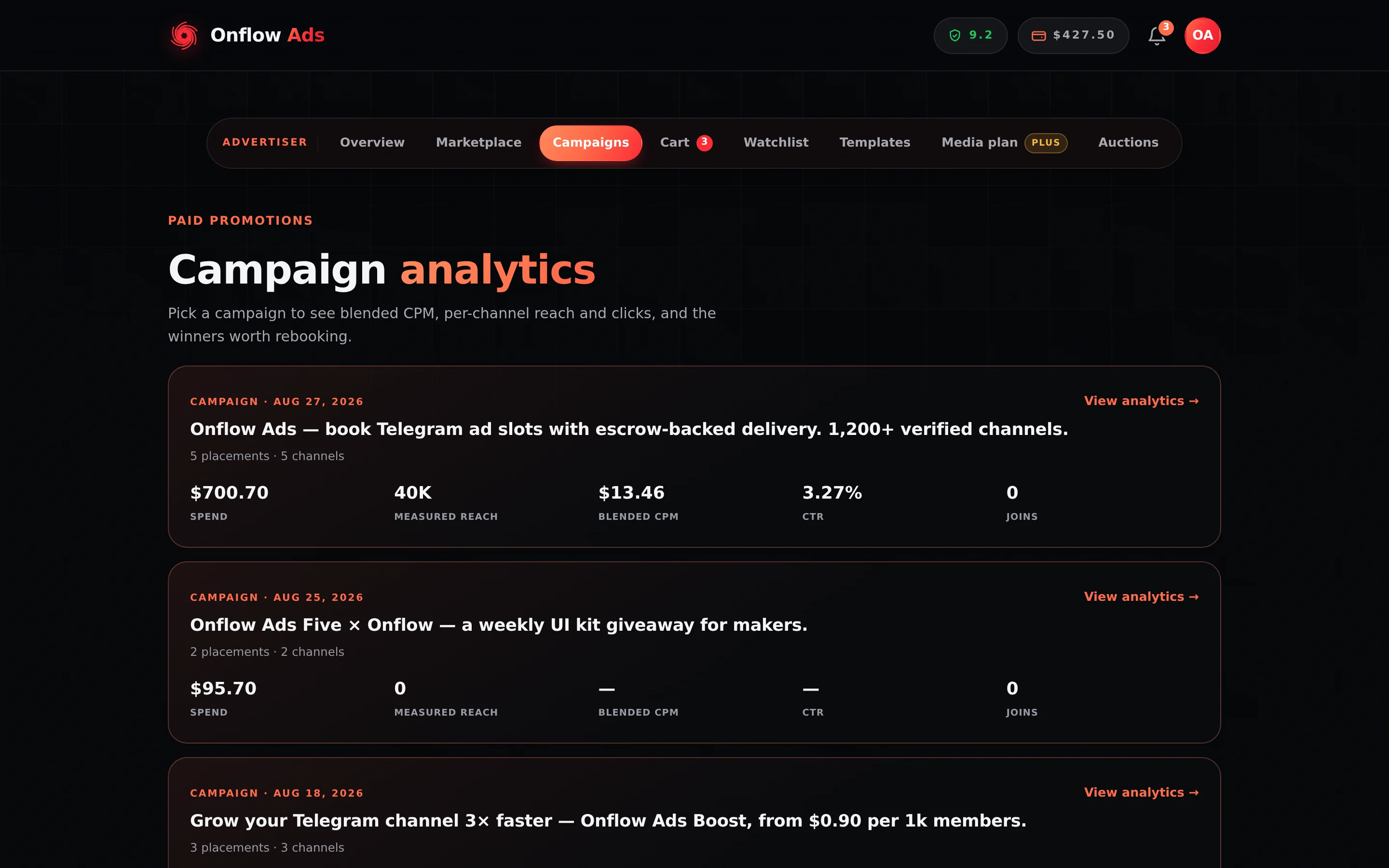
Plus plan · Advertiser. Where a paid campaign's joins and landings end up. CTR is unique taps divided by measured reach; a row with no measured reach shows a dash rather than a fabricated zero.
What a delivered post contains
A post the platform publishes carries the creative and almost nothing else.
| Part | What it is |
|---|---|
| Media and caption | Exactly what the advertiser built and the reviewer approved |
| Buttons | The advertiser's own labels, in their own order, up to the number their plan allows. Each is published as its own onflowads.com/rr/… short link; the platform settles where that sends the reader — a campaign invite link, a Telegram address as written, or a web page — never what the button says |
| The attribution line | One clickable line reading "advertisement via onflowads.com", one blank row below the creative. It is on every placement unless the host channel's owner is on Plus or above |
| Link previews | Off. A link in an ad would otherwise make Telegram attach a preview card the advertiser never designed |
| A pin — only if it was bought | A Paid Promotions ad is pinned only where the advertiser paid for the pin. No other format pins anything |
There is no platform branding, no "sponsored by" header, no channel-owner byline and no upsell. A Subscriber Exchange placement in particular carries no advertiser identity and never reveals that the host channel is in the exchange.
Buttons, and how many you get
Inline buttons are a plan feature. An advertiser on the Free plan gets none at all — a creative built with buttons on Free is refused at the point it is saved, not quietly published without them.
| Plan | Buttons per post |
|---|---|
| Free | 0 |
| Referral Premium | 0 — the earned status tracks Free here |
| Lite | 1 |
| Plus | 2 |
| Elite | 3 |
| Master | 4 |
| Ultimate | 4 |
Four is the ceiling; nothing above Master raises it.
| Rule | Detail |
|---|---|
| Colours unlock on Plus | A button can be blue, green or red, or carry no colour and render as Telegram's normal button. Below Plus a colour is dropped rather than refused — the creative still saves, it simply publishes uncoloured |
| Old Telegram apps are fine | A client that predates button colours ignores the colour and draws a plain, working button. Nothing is version-gated |
| Label length | 1 to 48 characters, no line breaks |
| Private Telegram links are not available on this account | An invite link — t.me/+…, t.me/joinchat/…, a private channel link — needs Lite or above. Public Telegram links work on every plan, Free included |
| Links off Telegram need the add-on | A non-Telegram destination needs the $1 External Links add-on. It is bought separately and is not part of the plan ladder |
| One button per row | Buttons are published as a vertical stack, in the order they were built |
| An album cannot carry buttons | Telegram does not allow buttons on a multi-photo post. Paid Promotions refuses that combination at checkout — "Buttons need a single photo, a video, or a text-only post" — rather than dropping them silently at delivery |
The attribution line
The one line the platform ever signs a post with is the same in every engine:
advertisement via onflowads.com
It is one rule, one direction: the plan of the channel that carries the ad decides, never the plan of the advertiser who wrote or paid for it. The line marks somebody's feed, so the person who earns its removal is the person whose feed it sits in.
| The host channel's owner is on… | What their channel carries |
|---|---|
| Free, Referral Premium or Lite | The line, on every placement — Paid Promotions, Cross-Promotion and Subscriber Exchange alike |
| Plus, Elite, Master or Ultimate | Nothing. Onflow Ads adds no line of its own to that channel's placements |
That is the whole rule. There is no per-engine variation to look up, and no setting an advertiser can buy that removes the line from somebody else's channel.
The line is appended by Onflow Ads at the moment it sends the post. That covers cross-promotion posts, exchange placements, and Paid Promotions bookings delivered by auto-post.
A Paid Promotions owner may instead deliver manually — they publish the ad in their own channel and paste the link back. On that path the platform never touches the message, so it cannot add the line and cannot check that it is there. An owner delivering manually should copy the post from 📄 Get the post here in the booking DM, or from the bookings desk, which is where the correctly composed version — attribution line included — actually exists.
The Subscriber Exchange used to read the advertiser's plan, frozen onto the ad when it was submitted. Cross-Promotion used to read Master or above on the receiving side. Both are gone. If you remember either of them, the number and the direction have both changed.
The attribution is generic. It does not name the advertiser, the host channel, or which engine placed the post — so it cannot leak that a channel takes exchange placements, or who paid for a promotion.
It reserves 33 characters, and it yields rather than breaks a post
The line costs 33 visible characters — the blank row plus the text itself. Every composer holds that many back from your caption budget while you write, so a caption that validates can always carry the line. The Subscriber Exchange reserves them even for advertisers whose ad may well land in a channel that removes the line, because the host is not chosen until after review.
If a caption somehow arrives at delivery with no room left, the line is dropped and the post goes out unchanged. It never fails the send. Losing somebody's paid placement to make room for our own label would be the wrong trade, so the label is what gives way.
Pinned placements
Pinning is something the advertiser buys, not something a format implies.
| Where a pin comes from | What happens |
|---|---|
| The "Pinned for the whole campaign" extra | The channel owner offers it on their rate card; the advertiser adds it at checkout at the platform's price. The ad is pinned from the moment it goes live until the campaign ends, then unpinned automatically |
| The "7 days in feed · pinned throughout" format | Sells the same promise as the format itself — pinned for the whole run |
| Every other format | Never pinned. "1 hour at the top" and its siblings sell being the newest post in the channel, which is a different thing |
Things worth knowing about the extra:
- The platform prices it, the same on every listing: the buyer pays $6.00 per pinned placement and the channel owner receives $4.00 of it. The owner decides whether to offer it, not what it costs.
- It is charged per placement. Two slots in the same channel, both pinned, is two pins and two charges.
- A listing that does not offer it cannot be talked into it. Asking for the extra where it is not on offer refuses the booking rather than quietly delivering an unpinned ad.
- Owners need the right. You cannot offer the extra unless the bot holds Edit Messages of Others in that channel — the switch that grants pinning in a channel. Switching it on runs a live check and refuses the save with "Our bot can't pin in @… yet, so this extra can't be sold there" if the right is missing. See What the Bot Checks.
- A pin the platform failed to apply is the platform's fault. If the pin call is rejected, the failure is recorded on the order as ours, and the delivery checks will not turn it into a penalty against the owner.
Placements booked before the top-of-feed formats were separated from pinning were sold as "pinned for N hours", and they are still delivered and policed that way, deliberately. Nothing was rewritten underneath an owner who agreed to the older wording. Everything booked since follows the table above.
One rule for every tap
There used to be three answers to "what happens when somebody taps my ad", one per engine. There is one now. Before a post goes out — a paid booking at checkout, a cross-promotion post or an exchange placement at the moment the bot publishes it — the website turns every link a reader can tap into its own short link, onflowads.com/rr/NNNN-NNNN (for example onflowads.com/rr/4821-7305): every text link, every address or @handle typed into the text, and every button. Every tap is counted at that hop — uniques one per reader per link per day, raw taps capped at 20 per reader per link per day, link previews, crawlers and automated bursts served but never counted — and where the short link sends the reader depends on where the link points:
| The link points at | Where its short link sends the reader | What else is counted, and by whom |
|---|---|---|
| A channel or group the advertiser has connected to Onflow Ads — the bot is an administrator there | A campaign invite link into that channel, minted for that post. The reader lands in the channel | Joins. Telegram attributes each join to the link it came through and reports it to the admin bot — this bot — which records it against the campaign. A member who leaves is recorded as gone; one who returns is not counted twice. The channel's own subscriber count is checked beside the join count |
| Any other Telegram address — someone else's channel, an invite hash, a bot, a bot's start link, a post link | That address, exactly as written: never tagged, and a bot's start payload arrives byte for byte. Telegram's in-app browser opens it straight back in Telegram, so the reader lands where the link points | Nothing beyond the tap |
| A website | The page, with the campaign tags | The Onflow tag on the far page counts landings and conversions on top |
Each occurrence gets its own code, so the same destination written twice gets two short links, each counted on its own, and the report names where each one sat — Text link, Address in the text, @handle in the text or Button. A text link keeps its words, an @handle keeps its words and becomes a text link, and a typed address is replaced by its short link — or linked in place, when replacing it would take the post past Telegram's length limit. Left exactly as written: something that is not a web address (an email address, say), a malformed or spoofed address, a link that is already an onflowads.com short link, and anything in code formatting. The full rule is on Links and results.
The bot's part in this is small and exact. It asks the website what the links become and publishes the answer; if the website cannot be reached the creative goes out with its plain links, uncounted — an uncounted ad that works beats a broken link in somebody else's channel. And it is the administrator Telegram tells about a join, so it writes that fact into the campaign. It creates no link, decides nothing about what counts, and never replies to the person who joined — they joined a channel, not a conversation.
Cross-Promotion
Each side's creative runs in the other side's channel, so each side's links are planned for that side. Ad opens on the results page are the taps on every link of that side's post; Joined your channel is the join count through your invite links. Both are attributed per side, and on a Blitz per partner slot. Click analytics for your ad breaks your own side's taps down further.
Paid Promotions
The links are settled at checkout, before the owner reviews the ad, so what the owner approves is what publishes. The bookings desk spells out where every short link leads — including which channel a campaign invite link opens.
Subscriber Exchange
A placement's buttons and links are planned when the placement is published. Taps on the campaign row are the taps on every link of the ad; Joins are joins into the advertiser's own connected channel. A placement carries no advertiser identity and never reveals that the host is in the exchange; an invite link into the advertiser's channel reveals nothing a plain link to it did not.
Posts published before every link became a short link keep the links they went out with — onflowads.com/go/… hops and direct t.me/+… invite links — and older ones still: cross-promotions carry onflowads.com/c/… redirects, paid bookings onflowads.com/r/…, and exchange placements a one-tap hop through the bot chat ("🔗 Here you go —"). All of those keep working and keep counting what they always counted until the post comes down. Nothing new is published on them.
How an open differs from a view
An open — a tap — means somebody tapped a link or button on your promoted post. It is not a view of the post and not a purchase. A join into your own connected channel is counted separately, through the campaign invite link, on every engine.
Reach is reported separately. What happens after a reader lands on your page belongs to your own analytics — which is what the Onflow tag exists to connect.
You see counts, never identities. Telegram does not give a bot the identity of a channel's subscribers, and Onflow Ads does not attempt to work around that.
Previews and reviews
While a cross-promotion post is being reviewed — a Partner Post Review in the chat, or the preview on the website — its buttons point at the advertiser's real destinations, exactly as written.
That is deliberate. A reviewer's whole job is to see where the ad actually goes, and the links are only settled at the moment of publishing, so nothing you tap while reviewing can move anybody's figures.
The Paid Promotions bookings desk on the website shows you the ad as it will publish — every link an onflowads.com/rr/… short link — with where each one leads spelled out beneath it, including which channel a campaign invite link opens, because a short link alone answers none of the question when you are deciding whether to let something into your channel.
The 📄 Get the post here button on a Paid Promotions booking DM sends you the placement exactly as it will publish. Its links are the real ones: each is the campaign's own onflowads.com/rr/… short link, so a tap on one is counted like any reader's. A web link then opens the advertiser's page (and, if that page carries the Onflow tag, counts you as a landing); a link into the advertiser's own channel opens the campaign's invite link — tapping Join there would make you a counted member of the advertiser's channel.
Read the post; do not tap through it. If you need to know where a link actually points, open the booking on the website, where the destination is spelled out for you.
Your own tap on a live post counts exactly like anyone else's, and only once. Testing it is harmless, and slightly pointless.
Rules and edge cases
You do not have to set anything up. Add the bot as an administrator to your channel when you enroll it on the website. Posting, wiring the buttons, counting and cleanup are handled from there.
Buttons are the advertiser's, unchanged. The platform publishes the labels and order the advertiser configured. It adds the measurement layer around them; it does not rewrite what they say.
Cleanup is automatic. At the end of the agreed window the post is removed. If a post disappears early instead, the checks catch it: the bot records the breach, the website prices it against the account that removed it, and where that account had declared cross-promotion insurance cover the website pays the declared amount to the other side. See What the Bot Checks.
Forwarded posts keep working. A forwarded copy of a live post still routes through the same links, and its opens still count while the campaign is running. After the run, a forward still takes the reader to the destination — it is simply no longer counted.
If something goes wrong
| What you see | What it means | What to do |
|---|---|---|
| Fewer opens than you expected | Opens are counted once per person, and crawlers are excluded | Compare against reach rather than against raw impressions. Two channels with similar audiences also produce fewer opens, because more readers have already seen you |
| Caption links reporting nothing | Nothing in the caption is a link Telegram makes tappable, or what it carries is left as written — an email address, a link that is already an onflowads.com short link, text in code formatting. On a post published before every link became a short link, bare typed addresses and Telegram channels that were not connected went uncounted | Add a link a reader can tap, and keep it out of code formatting |
An older ad's channel link reads t.me/+… | It is the campaign invite link into the advertiser's own channel, published directly before every link became a short link — readers land in the same place and Telegram counts the joins | Nothing to do |
Every link in an ad reads onflowads.com/rr/… | Each link's own short link, which counts the tap and sends the reader straight on — a Telegram link included (older ads may read onflowads.com/go/theirsite.com/…; both keep working) | Nothing to do |
| A reader saw "That link has expired." | They tapped an exchange placement that has finished | Normal. Placements come down after their window |
| A reader landed on the Onflow Ads home page instead of the destination | A link's short code could not be resolved (a retired campaign), so the reader was sent somewhere safe rather than shown an error | Check the destination on the campaign; if the campaign is live and this repeats, open a support ticket with the campaign ID |
| Your partner's opens are much higher than yours | Different channels, different audiences, different post quality | Start from the campaign page's split of your opens against theirs — and on a Blitz, its per-partner breakdown |
| Your ad published with fewer buttons than you built, or none | Buttons are a plan limit, and Free has none | Check the table above. A creative saved on Free with buttons is refused outright rather than published stripped |
| Your button colours did not appear | Colours unlock on Plus, and below that rung they are dropped rather than refused | Nothing is broken; the buttons still work. The colour returns if the plan does |
| A placement carries the attribution line and you are on a paid plan | The line follows the host channel's plan, not the advertiser's | If it is your own channel and you are on Plus or above, the line should not be there — open a ticket with the order ID |
| An ad published with no attribution line in a Free host's channel | Either the caption had no room left for it, or the owner delivered the post by hand | Nothing you can fix from the advertiser's side |