The Telegram Bot
The Onflow Ads bot is how the platform reaches you and acts for you inside Telegram. It is not a second place to work, and there is nothing in it to learn.
Everything you manage — your account, channels, campaigns, listings, wallet, orders and support — lives on the website at onflowads.com. The bot has three jobs and no others: it is the platform's notification head, its executor, and its tracking lead.
| The bot's job | What that looks like |
|---|---|
| It notifies you | Order updates, payment alerts, campaign news and rewards arrive as Telegram direct messages as they happen. Every one carries a button to the page it is about, and on Plus and above the messages arrive with the premium look — animated icons and coloured buttons. A booking request carries 📄 Get the post here, which sends you the ad exactly as it will publish. |
| It carries out what the website already decided | It publishes the posts you agreed to into your channels, with every link already planned by the website, leaves them up for the agreed window, removes them at the end, and delivers Subscriber Exchange placements. |
| It tracks and records what actually happened | It confirms a channel is real and that you administer it, measures its reach, watches that an agreed post stays up for its full term, hears every join through a campaign invite link and records it, and reports a breach it observed. It records facts; the website prices them. |
| What the bot never does | Who does instead |
|---|---|
| Decide money — a payout, a refund, an insurance claim, a credit | The website, from the fact the bot recorded |
| Decide your plan or tier | The website; the bot reads it |
| Move your reliability score | The website prices what the bot recorded, from its own published table |
| Decide a Subscriber Exchange strike, cooldown, suspension or grace pass | The website, from the breach the bot recorded |
| Spend an Auto-Boost pool, place an auto order, renew or pause a rule, refund a short delivery | The website, from the new post the bot detected |
| Run a Paid Promotions engine of its own | Nothing — Paid Promotions runs entirely on the website; the bot only shows you the post and counts joins |
| Decide moderation | A reviewer's tap in Telegram is relayed to the website, which decides |
The bot holds no account of its own, takes and returns no money, and runs no support conversations. You cannot create or change an order, a campaign or a placement inside it. Every decision that costs money or changes what you bought is made on the website.
Anyone contacting you through Telegram offering to sell you something, take a payment or settle a complaint is not us.
What the chat is like
The bot has no menus, no wizards, no chat commands and no menu button. Every link it gives you is an ordinary Telegram button inside a message, and it opens the website as a web page — in Telegram's in-app browser, or in your own browser. The website itself can still be opened inside Telegram as a Mini App for the deep links it mints (a Connect Telegram link, for instance), but nothing in the bot's chat depends on that: there is no in-bot app to learn, and every button lands on an ordinary page.
Send the bot anything at all — a word, a sticker, /help — and it answers with one card. Tap faster than a person would — more than 20 updates in 10 seconds — and a button answers "Slow down a little and try again in a moment." instead, while a message is simply dropped. That is a flood guard, not a fault, and it refills within seconds.
The card:
- Onflow Ads — official assistant
- "This bot is the Telegram side of Onflow Ads: it publishes and verifies the campaigns you book, and brings your order updates, payment alerts and reports to this chat."
- "Your account, channels, campaigns, wallet and support all live on the website. Own a channel? Add this bot as its admin from the website and it handles the rest."
- One button: Open Onflow Ads
That card is not an error. It is the bot telling you where the controls actually are. Bot vs Website: Who Does What explains the split in full.
Your dashboard is where the buttons land
Nearly every button the bot sends opens a page on the website. The most common destination is your Telegram dashboard, which is the same page in a chat and in a browser — it simply narrows to fit a phone:
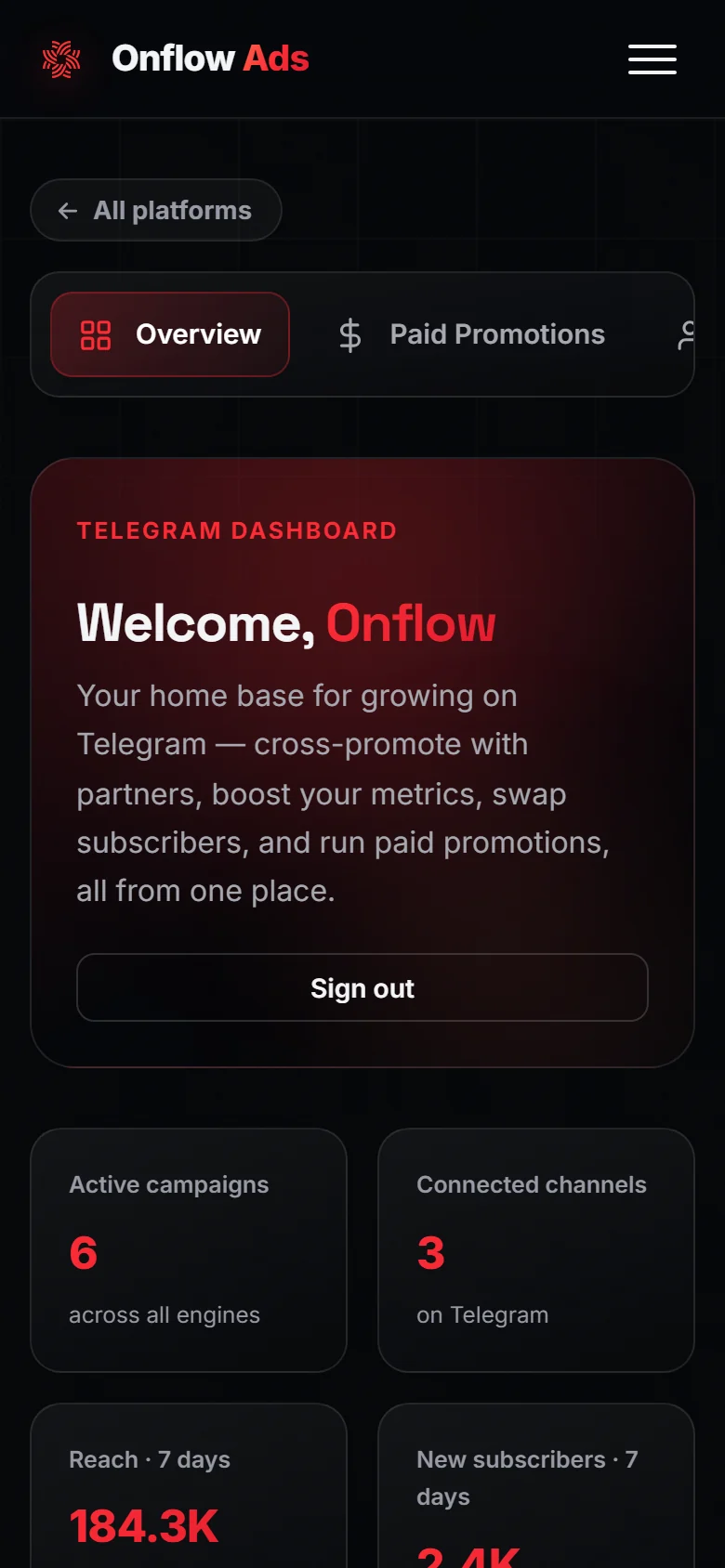
Plus plan · Advertiser. The Telegram dashboard at phone width. Look first at the tiles — they are the figures the bot's messages refer to.
Who it matters to
- Channel owners — the bot publishes the posts you agreed to into your channels, DMs you booking requests and results, and is the thing that can confirm you hosted a placement for its full term.
- Advertisers — the bot tells you as your orders progress, and its checks on the other side are what make a delivery verifiable rather than a promise.
- Anyone who prefers Telegram — you can be reached, signed in and kept honest from the chat, and every button lands you on the page that does the work.
Where to start
If you are new, read these in order and you will be fully set up:
- Why You Must Connect — the one-time requirement every new account meets.
- Starting the Bot — the single tap that lets the bot message you.
- Signing In with Telegram or Connecting Your Telegram — whichever matches how you created your account.
- Notifications from the Bot — what arrives, and how to choose what you receive.
In this section
The pages below run in reading order: the connection requirement and how to satisfy it, then the messages the bot sends, then the work it does in your channels and the checks it runs on them.
Starting the Bot
Open the Onflow Ads bot in Telegram, press Start once, and understand exactly what that first tap switches on — and what it deliberately does not.
Signing In with Telegram
Sign in to onflowads.com without a password using Telegram's official login — one tap, a signed identity Telegram sends the site, no code to type.
Connecting Your Telegram
Link your Telegram account to your existing Onflow Ads account so the bot can message you — including the difference between linked and reachable, and what happens to a Telegram starter account.
Why You Must Connect
Onflow Ads asks every new account to be reachable on both Telegram and email before it opens a marketplace flow — what the requirement is, which half applies to you, and what stays open while you finish it.
Notifications from the Bot
Every kind of update Onflow Ads sends as a Telegram DM, when it sends them, how to choose what you receive, and what muting a category actually does on each plan.
Watching a Live Campaign
The DMs Onflow Ads sends as a cross-promotion runs, and where the live numbers behind them actually live.
Ad Posts & Click Tracking
What a delivered Onflow Ads post looks like in a channel, what gets appended to it, and the one rule that decides how a tap on it is counted on every engine.
What the Bot Checks
How Onflow Ads verifies a channel, measures its reach, and watches that an agreed post stays up — the exact rights it needs, how cautious the monitor is, and how a submission is reviewed.
Bot vs Website — Who Does What
The executor contract in plain language — the website decides everything and the bot carries it out, what the two actually share, and why nothing ever needs syncing.
FAQ & Troubleshooting
Short answers and fixes for the questions the Telegram side gets most — the bot, connecting, signing in, notifications, campaign tracking and the checks.