The contact form
The contact page at https://onflowads.com/contact is the classic write-to-us route: a short form, an email reply, no account required. It suits longer enquiries, partnerships and press, and it is the reliable fallback whenever the help widget is not available.
Everything sent here reaches the same team as the widget, and every reply comes by email.
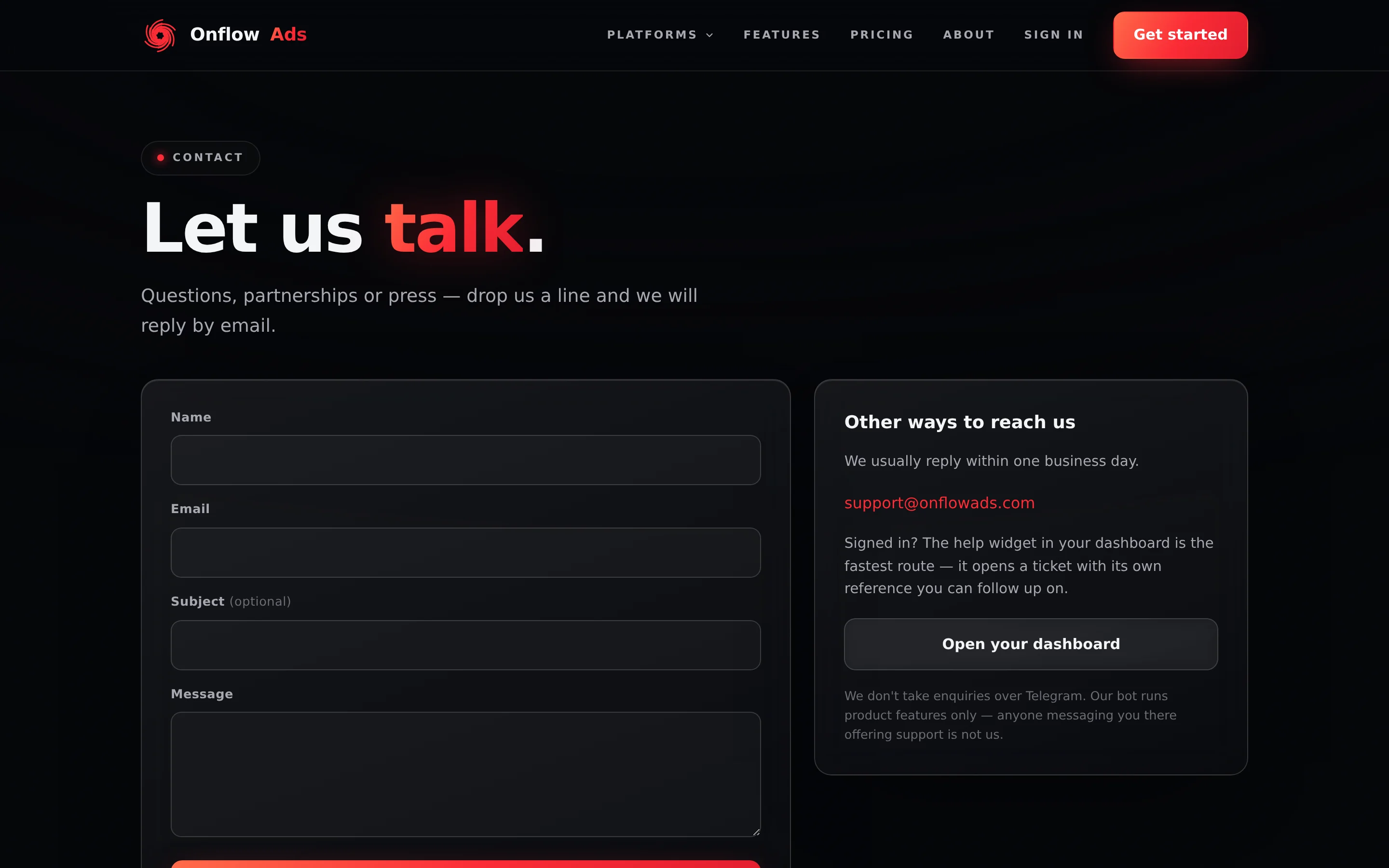
Signed out. The whole page. Nothing is pre-filled here even when you are signed in — the address you type is the address the reply goes to.
Before you start
- No sign-in, and nothing is pre-filled. Type the address you actually want the reply on.
- Have your references to hand: an invoice, an order, a channel username, the exact error text.
- If your problem is one Boost order, use Report a problem on the order instead, so its details are attached for you.
- If the site is in maintenance, this form is unavailable too. Email [email protected] — that address is printed on the maintenance page.
Step by step
- Go to
https://onflowads.com/contact. - Fill in the form on the left: Name, Email, Subject (optional) and Message.
- Complete the verification challenge if one is shown. It is an invisible anti-spam check that only appears when the site has it switched on.
- Press Send message. The button is disabled and the status line reads "Sending..." while it goes.
- On success the status line is replaced by a green Message sent card. It carries the confirmation sentence, a labelled Your reference block with your
OFM-###-####id, and a Copy button. The form clears itself. - Note the reference, or leave it — it is repeated in the acknowledgement email that lands in your inbox.
What each field means
| Field | Required? | Notes and limits |
|---|---|---|
| Name | Required | Up to 200 characters. |
| Required | The only address the reply is sent to. Check it carefully. | |
| Subject (optional) | Optional | Up to 120 characters. A clear subject speeds up routing. |
| Message | Required | Up to 5,000 characters — noticeably more room than the widget's 4,000. |
Say who you are, what you were trying to do, what happened instead, and paste any reference you have — an invoice number, an order reference, a channel username, the exact error text. One complete message beats four short ones.
Your reference, and the email
Every contact enquiry gets its own Onflow Ads reference: an OFM-###-#### id minted the moment it is stored. It appears in two places.
On the page. The Message sent card shows it under the label Your reference, as a chip you can click to copy, with a Copy button beside it and the note "Quote this if you follow up with us — it lets our team find your message straight away."
In your inbox. An acknowledgement email arrives shortly, subject "We've got your message — Onflow Ads" followed by the reference. It restates the reference and tells you to reply to that email to add anything.
Unlike a widget ticket's OFS- reference, an OFM- reference does not open a conversation view — deliberately, which is why the acknowledgement email carries no "view your conversation" button. The email thread is the conversation. Reply to it to add anything.
Other ways to reach us, on the same page
The panel to the right of the form holds:
- The heading Other ways to reach us, and the published expectation: "We usually reply within one business day."
- The address [email protected].
- A note that signed-in members are faster served by the dashboard help widget, because it opens a ticket with a reference you can follow up on.
- An Open your dashboard button to
https://onflowads.com/telegram/dashboard. - The closing line: "We don't take enquiries over Telegram. Our bot runs product features only — anyone messaging you there offering support is not us."
The bot runs the product features documented in the Telegram bot section. It has no support command, and the team never opens a support conversation with you there. Treat anyone who does as an impersonator.
If something goes wrong
| What you see | What it means | What to do |
|---|---|---|
| "Please fill in your name, email and message." | One of the three required fields is empty. Only the subject is optional | Complete the missing field |
| "Please enter your name." | The server rejected the name — blank or over 200 characters | Shorten it |
| "Please enter a valid email address." | The address is malformed | Fix the typo; the reply cannot reach you otherwise |
| "Please include a short message so we know how to help." | The message was empty or over 5,000 characters | Trim it, or send the rest as a second message |
| "Please complete the verification challenge and try again." | The anti-spam check did not pass | Reload the page, complete the challenge and resubmit. On a restricted network, email [email protected] instead |
| "Too many attempts. Please wait a minute and try again." | More than five submissions from this connection in ten minutes | Wait a short while. Nothing already sent is lost |
| "This feature is temporarily unavailable. Please try again shortly." | A temporary service problem | Check the status page, then retry or email the support address |
| "Something went wrong. Please try again." / "Network error — please try again." | The request did not complete | Press Send message again |
What this route does and does not give you
| Contact form | |
|---|---|
| Sign-in | Not needed, and nothing pre-fills |
| Reference code | Yes — an OFM-###-#### |
| Acknowledgement email | Yes, quoting the reference |
| A conversation page in the widget | No |
| Instant AI first reply | No |
| Attachments | No — paste text |
| Message length | 5,000 characters |
| Rate limit | 5 submissions per 10 minutes per connection |
FAQ
Is the contact form slower than the widget? Not inherently. The widget is faster when the desk is online, and it gives you a conversation view and a live status chip. The contact form is plain email, which is fine for anything that is not urgent.
Can I use it to apply for the Ultimate plan? Yes — that is the documented route. See Applying for Ultimate.
I need to add something to a message I already sent.
Reply to the acknowledgement email, quoting the OFM- reference. That keeps everything in one thread.
I never got a reply. Check spam or junk and mark the message as "not spam". Then check the address you typed — a typo there is the most common cause. Resend from the correct address, or write directly to [email protected].
Is my message private? It goes to the Onflow Ads support team only. Handling of personal data is covered by the Privacy Policy.
Related
- Choosing the right support channel — the contact form set against every other route.
- Opening a support ticket — the widget route, which gives you a conversation view.
- Maintenance windows — what to do when this page is unavailable.