Getting started
This page takes you from a new Onflow Ads account to a Telegram channel enrolled and hosting — the point at which the advertising side of the exchange opens. Every error the setup can throw at you is listed here with its fix.
The exchange page walks you through three steps with a Get set up checklist that ticks itself off as you go:
- Connect your Telegram — "Pair your account so the exchange can post for you."
- Enrol a channel — "Agree to host ads — that's what unlocks running your own."
- Run your first ad — "Send an ad across the pool, or set up a 1:1 swap."
This page covers steps 1 and 2 in full. Step 3 is Running ads. The checklist disappears once all three are done.
Before you start
- An Onflow Ads account, signed in at https://onflowads.com. Opening the exchange page while signed out sends you to the sign-in page.
- A public Telegram channel — one with a @username or a t.me link. Private channels cannot join.
- Administrator rights in that channel, held by the Telegram account you are about to link.
- Your reliability score at or above the exchange's floor. The floor ships at 4.0 out of 10 and new accounts start at 8.00, so this only bites an account that has already broken a placement.
Each Onflow Ads account pairs with exactly one Telegram account, and a channel can be enrolled by exactly one account. The pairing is verified against Telegram at every enrolment, so you cannot enrol a channel you do not administer.
Step by step
1. Connect your Telegram
Until your Telegram account is paired, the exchange page shows one card — First, connect your Telegram — reading "The exchange runs inside Telegram, so your Onflow account has to be paired with your Telegram account before you can host or run ads. One Onflow account pairs with exactly one Telegram account."
- Open https://onflowads.com/telegram/dashboard/subscriber-exchange.
- Press Connect Telegram. The page says "In Telegram, tap Start, then “Yes, connect it”. This page will continue automatically…" and opens our bot in a new tab.
- Tap Start in the bot chat, then Yes, connect it on the card the bot answers with — it names the account first, and links nothing until you confirm. The note under the button says it plainly: "Tapping this opens our bot and starts it. Come back here once it confirms — this page checks automatically."
- Return to the exchange tab. It checks every second at first, and checks instantly the moment you switch back to it, then continues to the hub. There is nothing to refresh and no button to press.
If the pairing never lands, the page gives up after about four minutes with "Still not connected. Reopen the link and tap Start." Press Connect Telegram again and make sure you tap Start inside the bot chat rather than only opening it.
2. Open the add-a-channel wizard
From the hub, press the My channels tile (or the My channels pill in the flow bar), then Add a channel. If the page is showing the Host first gate instead, press Add my first channel — it opens the same wizard.
The wizard has three steps, named in the strip across the top: 1 Your channel · 2 Add the bot · 3 Content level.
3. Name the channel
Under Which channel?, type your channel's public link or @username into the Channel link or username field — the placeholder shows the two accepted shapes, @yourchannel or https://t.me/yourchannel — and press Continue. Leaving it empty answers "Enter your channel first."
4. Add the bot as an administrator
The page names the exact bot and the rights it needs: "Open your channel → Administrators → Add Admin → search @OnflowAdsBot, then grant these rights". Press Open the bot to jump straight to it.
| Right | Needed | Why the page gives |
|---|---|---|
| Post Messages | Required | "to publish the placement" |
| Delete Messages | Required | "to take the placement down after 24 hours" |
| Edit Messages | Recommended | "to correct a placement without reposting it" |
Once the bot is an admin, come back and press I've added the bot — verify. Anything missing turns red with a cross in the checklist, so you can fix the exact toggle rather than starting over.
The exchange promises every placement comes down after 24 hours. Without delete rights the bot cannot keep that promise — for you, or for anyone hosting your ad — so the channel cannot be enrolled without it. The page says so: "Without it we can't keep that promise, so we can't enrol the channel."
The wizard carries an expandable panel, Is it safe to give the bot Delete rights?, which scopes the grant honestly. With these rights the bot can only:
- post an exchange ad, then remove that same ad when its 24 hours are up,
- count the views and clicks on the ads it placed.
And it will never:
- delete or edit your own posts, or anyone else's — only the ads it placed itself,
- post anything above the content level you choose,
- see who your subscribers are — Telegram never gives a bot that.
5. Choose what you will host
Verification confirms the channel — "Verified Your Channel (@yourchannel) · 12,400 subscribers." — and asks What will you host?
Pick the highest content level you are willing to accept. Each level includes everything below it.
| Level | Label | Accepts |
|---|---|---|
| 1 | General & Education | Courses, study material, tech, news, apps, general brands. |
| 2 | Business & Commerce | Everything in level 1, plus e-commerce, services, jobs and paid tools. |
| 3 | Finance, Trading & Crypto | Everything above, plus trading signals, investing, crypto and earning offers. |
Level 3 carries a Sensitive pill and needs your explicit opt-in. Skipping the choice answers "Choose the highest level you'll host."
:::note Levels 4 (Betting & Gambling) and 5 (Adult) are retired Onflow Ads does not carry gambling, betting or adult content on any rail, so the levels that existed for them are gone: level 5 on 22 September 2026, level 4 on 25 September 2026. Channels that were on either now sit at level 3, gambling ads that were running were stopped, and nothing can be submitted at level 4 or 5 any more. This is a platform rule, not something a channel owner can opt in to. See Prohibited content. :::
6. Join
Press Join the exchange. The confirmation names the channel and its new reference: "@yourchannel joined the exchange (OFSC-…)." On a database that has not been given an ID yet, the reference is omitted rather than faked.
What happens the moment you enrol
- Your channel appears under My channels with a Hosting badge and its
OFSC-reference chip. - The advertising side opens immediately — you can build an ad straight away.
- Your channel enters the pool and can be matched from that point on.
- Your subscriber count and average views are read once at enrolment through our channel-stats gateway, so the matcher has real numbers to score you against from day one.
If something goes wrong
Verification names the exact problem and highlights the missing right in red. Fix that one item and press verify again.
| What you see | What it means | What to do |
|---|---|---|
| "We couldn't reach that channel. Add @OnflowAdsBot as an administrator first, then try again." | The bot is not an admin yet, or the username is wrong | Check the @username, then add the bot as an administrator |
| "Only public Telegram channels can join the exchange." | The channel is private | Make it public, or enrol a different channel |
| "@OnflowAdsBot is an admin but still needs: Post Messages, Delete Messages." | A required right is off | Turn on exactly the rights named, in the channel's administrator settings |
| "You must be an administrator of this channel to enrol it." | The Telegram account linked to Onflow Ads is not an admin of the channel | Ask the owner to make you an admin, or link the Telegram account that already is |
| "That channel is already enrolled in the exchange by another account." | Another account holds this channel | A channel lives in the exchange under exactly one account |
| "Your plan covers 5 enrolled channels. Lite raises that to 10." | You are at your plan's channel cap | Withdraw a channel, or upgrade — the message names the next plan and its cap |
| "The Subscriber Exchange needs channels with at least N subscribers. This channel has M." | The channel is below the enrolment floor — 1,000 subscribers unless an operator has changed it | Grow the channel, or enrol a larger one. You are told when you press verify, before you set anything else up |
| "We couldn't read this channel's subscriber count — please try again in a moment." | The stats read failed, and an unreadable count is never waved through | Wait a moment and press verify again |
| "Telegram isn't configured yet — please try again later." | A platform-side outage | Try again shortly |
| "Connect your Telegram account to use the exchange." | The pairing was lost or never completed | Go back to step 1 |
| "The Subscriber Exchange needs a reliability score of at least 4/10 — yours is 3.2/10. Honour your placements to earn it back." | Your reliability is below the exchange's floor | Nothing in the exchange will work until it recovers — see Rules and fair play |
You can call verify 20 times and enrol 10 times per 10 minutes. Hammering the button after a failed attempt earns a "too many requests" answer instead of a useful message — fix the rights in Telegram first, then verify once.
A tour of the hub
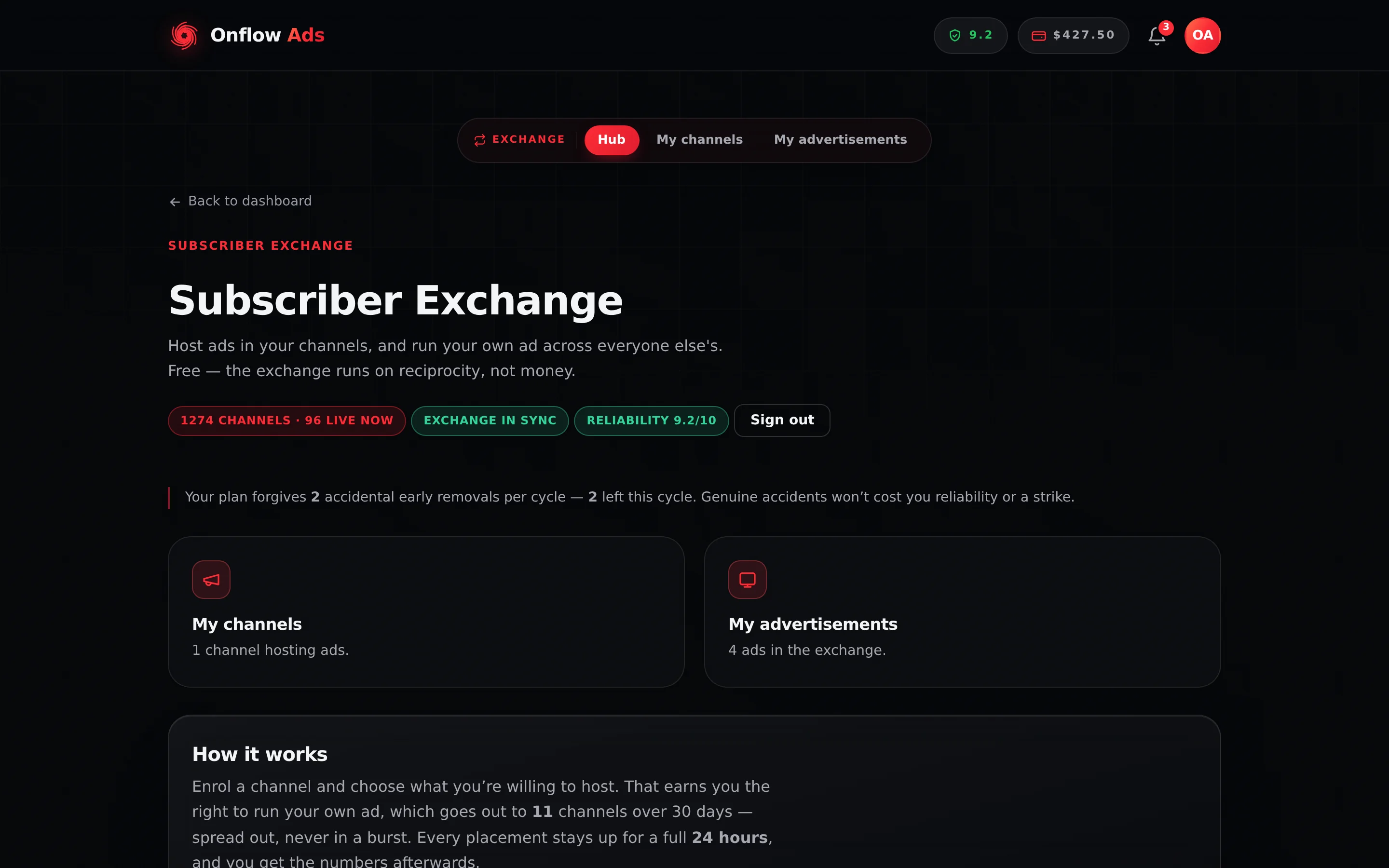
Plus plan · Advertiser. The finished set-up: the Get set up checklist is gone because all three steps are done, and both tiles carry live summaries instead of their empty states.
Once you are set up, the hub carries:
| Element | What it shows |
|---|---|
| The flow bar | Hub, My channels and My advertisements. The advertisements pill routes you to the Host first gate if you have no active channel |
| Pool pill | "1274 channels · 96 live now" — aggregate activity, never identities |
| Sync pill | "Exchange in sync" is normal. "Sync pending" appears briefly after a platform update and clears when the bot restarts. "Sync degraded" means the bot took the current configuration but could not apply every value |
| Reliability pill | Your score out of 10. Press it for the full breakdown at https://onflowads.com/telegram/dashboard/reliability |
| Grace note | Paid plans only: how many accidental early removals your plan forgives this cycle, and how many are left |
| My channels / My advertisements tiles | "N channels hosting ads." and "N ads in the exchange.", or their empty-state prompts |
| How it works | Filled with your own numbers — how many channels your ad reaches over 30 days, and the 24-hour hold |
| Reciprocity note | What your channels offer to host per cycle against what your ads consume. Insight, not a cap |
Two cards appear only when they apply: Ads waiting for your review (when a channel has review switched on and something is held) and Your exchange is paused (when a placement was removed early).
Frequently asked
Do I have to host to advertise?
Yes. The exchange is reciprocal, and this is the rule it is built on. Attempting to open the ad side with no active channel shows the Host first gate: "The exchange is reciprocal: ads run in members' channels, so you need to be hosting before you can run one." If you would rather pay for reach without hosting, use Paid Promotions instead.
Why was my ad refused for "not enough channels", and can I still enrol?
Ads run only when the pool can carry them: your plan schedules an ad into a set number of different channels a cycle, and if fewer eligible channels than that accept your ad the submit is refused — nothing charged, no ad created — and you are put on a list. You are told on Telegram, by email and on the site the moment the exchange can carry it. Enrolling channels is never restricted by this — but note that an ad is never placed in its own advertiser's channels, so adding one of your own raises other members' reach rather than your own. What you can change is the ad: a wider audience or a lower content level reaches more of the pool. An ad that is already approved is paused if the pool later falls below its quota, and resumes on its own when it recovers. See Running ads.
How many channels can I enrol?
5 on Free, 10 on Lite, 25 on Plus, 50 on Elite, 100 on Master and 250 on Ultimate. The My channels header shows "N of M channels used".
Can I enrol a group instead of a channel?
No. The exchange works with public Telegram channels only.
Will my channel start carrying ads immediately?
It becomes eligible immediately, but the first placement arrives when the matcher finds an ad that fits your level and is close enough to your channel in audience size. There is no fixed waiting time.
Can I change the level later?
Yes. Re-run Add a channel for the same channel and pick a new level. Re-enrolling refreshes the level, title and subscriber count and keeps everything else the channel already had.
What if I change my mind about the bot's rights?
Removing the bot's admin rights while a placement is live is treated as breaking the 24-hour promise and is penalised. Withdraw the channel with Leave first, wait for anything live to finish its term, then remove the bot.
Related
- Hosting ads — what actually happens in your channel now that it is in the pool.
- Running ads — the four-step ad builder, now that the advertising side is open.
- Targeting — the filters your first campaign can narrow the pool with.
- Rules and fair play — the 24-hour promise and what breaking it costs.