Reporting a campaign
Every campaign you are a party to carries a Report button. It opens a case a person reads, against the platform's own record of what happened, and it can stop a campaign, hold a payout, refund what was not delivered and put a penalty on the other side's reliability.
It is not the same thing as a dispute, a decline or a cancel — and the form now says so before you write a word, in the language of the side you are actually on.
Where the button is
| You are | The page | The button |
|---|---|---|
| Advertiser (Paid Promotions) | Campaigns → Orders, on the order's own row | 🚩 Report channel — from the moment an owner holds the booking |
| Channel owner (Paid Promotions) | Campaigns → Bookings, on the booking's own row | 🚩 Report advertiser — from the moment you accept, and for as long after delivery as the row exists |
| Cross-promotion partner | The campaign page | Report |
A Boost order's Report a problem opens an ordinary support ticket rather than an OFRP- case — there is no counterparty to report, only us. In the Subscriber Exchange, a host who objects to an ad they are carrying presses Refuse on the hosting list, which takes the ad down for them; that is the faster remedy, and it is the one the page offers.
Two things changed here, and both were real complaints:
- On the owner's side it is a button. It used to be a borderless link at 0.74rem, and on a delivered booking it was a word inside the grey hint sentence — the same grey the rest of the sentence was in. It is now shaped like every other control beside it.
- It names who is being reported. Both sides used to see Report campaign, which told neither of them which party the case would be opened against.
While a booking is still pending, Cancel is on the same row, refunds in full, charges no fee and moves nobody's reliability. There is nothing to report yet, so the report button is not drawn.
The two sides get different reasons
The reason list is role-specific, and the server enforces it: a reason from the other side's list is refused, not quietly accepted.
If you are the advertiser — reporting the channel side
| Reason | Use it when |
|---|---|
| The ad was never published | The window passed and nothing went up |
| The post was removed or hidden early | It went up and came down before its term |
| The post was edited or is not what was agreed | The creative that ran is not the creative you booked |
| It was not pinned, or was unpinned early | You paid for the pin extra and did not get it |
| Wrong channel, audience or timing | It ran somewhere, or to someone, other than the listing described |
| Fake or bought engagement on the channel | The audience is not real |
If you are the channel owner — reporting the advertiser
| Reason | Use it when |
|---|---|
| The creative is not the one I approved | What arrived to post is not what you accepted |
| A link or button leads somewhere it should not | The destination is harmful, deceptive, or simply not what the ad claims |
| The ad breaks my channel's rules or the platform's | Prohibited goods, a topic you banned, anything against the Terms |
| The ad makes false or misleading claims | Guarantees, invented figures, fake endorsements |
| The advertiser is pressuring me to break a rule | Being pushed to post something you declined, or to deal off-platform |
| The ad impersonates a brand, person or Onflow Ads | Including anything pretending to be us |
Both sides also get these
Scam, fraud or a broken promise · Abusive or threatening behaviour · Illegal or prohibited content · A payment, refund or payout problem · Something else.
The rules panel, above the form
Before the reason list, the form prints what a report is and is not for your side. There is a version of this for each side because the two doors have genuinely different consequences, and a reporter who picks the wrong one waits for an answer that was never going to come from there.
Reporting the channel side — what the advertiser sees
Use this for
- The post never appeared, went up late, came down early, or was edited.
- The channel is not the audience the listing described, or its engagement is bought.
- The owner is abusive, or is asking you for money outside the platform.
Not this — there is a faster way
- A refund you are owed automatically. An unpublished or lapsed booking refunds itself, with nothing to file.
- A delivery dispute over money on this booking. Use Open a dispute on the order instead: it runs on a published clock and ends in a money verdict. A report does not.
What we do: a person reads every report, replies by email, and can stop the campaign, hold the payout, and record a penalty against the owner.
Reporting the advertiser — what the channel owner sees
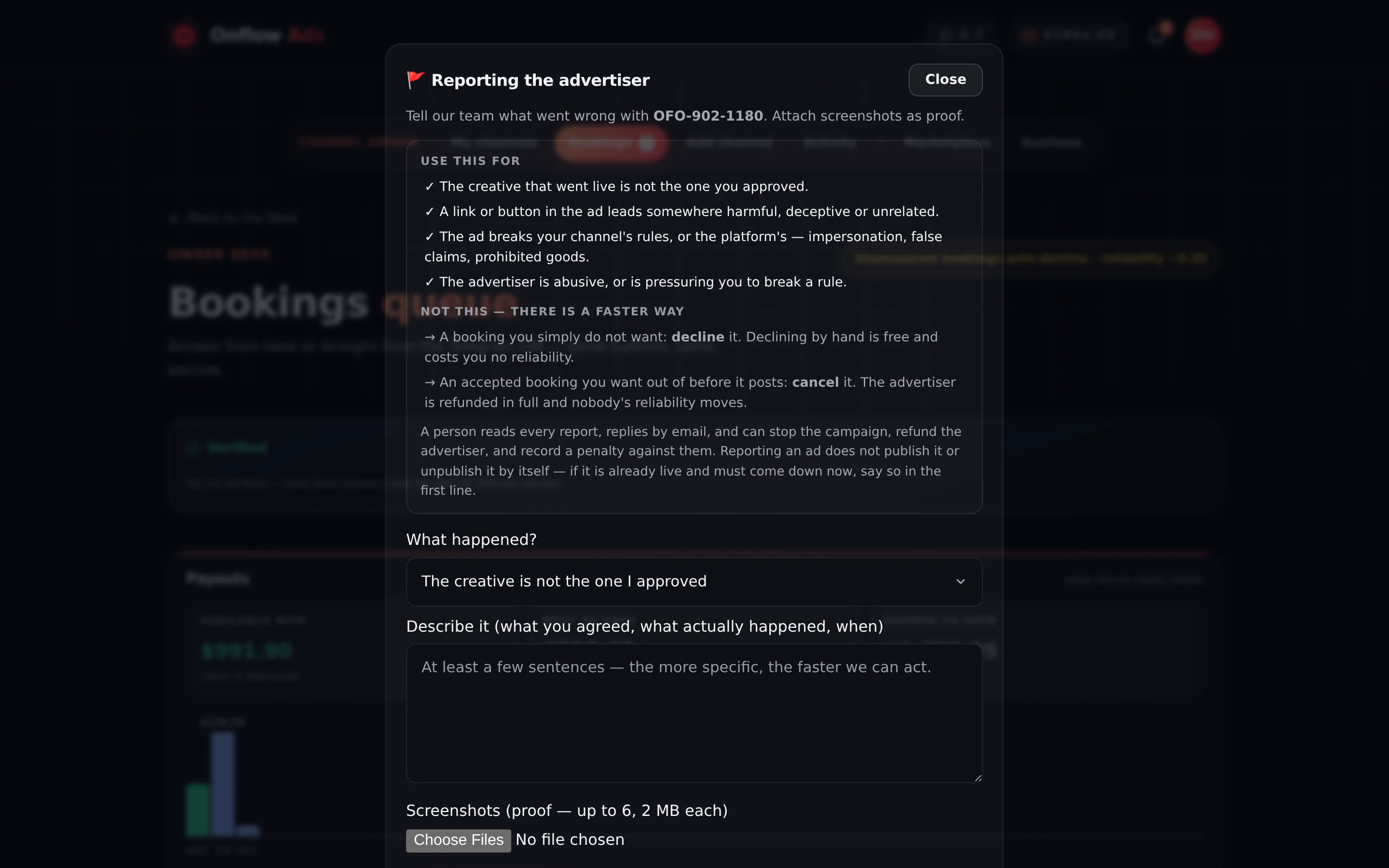
Elite plan · Channel owner — reporting an advertiser. The advertiser's side of this dialog is headed Reporting the channel side and carries the other list entirely.
Use this for
- The creative that went live is not the one you approved.
- A link or button in the ad leads somewhere harmful, deceptive or unrelated.
- The ad breaks your channel's rules, or the platform's — impersonation, false claims, prohibited goods.
- The advertiser is abusive, or is pressuring you to break a rule.
Not this — there is a faster way
- A booking you simply do not want: decline it. Declining by hand is free and costs you no reliability.
- An accepted booking you want out of before it posts: cancel it. The advertiser is refunded in full and nobody's reliability moves.
What we do: a person reads every report, replies by email, and can stop the campaign, refund the advertiser, and record a penalty against them. Reporting an ad does not publish or unpublish it by itself — if it is already live and must come down now, say so in the first line.
Filing one
- Press the button. If you already have an open report on this campaign, you get the thread instead of a fresh form — one case per campaign per reporter.
- Pick a reason from your side's list.
- Describe what happened in your own words — at least 20 characters, up to 6,000.
- Attach up to 6 screenshots, 2 MB each (PNG, JPEG, WebP or GIF). This is the one place on the platform that takes uploads as evidence, and each one raises the ordinary upload notice with a real progress bar.
- Send. You get a case id of the form
OFRP-###-####and an emailed acknowledgement.
What filing does, and does not do
| Does | Does not |
|---|---|
| Open a case a human reads, against our own delivery record | Change the campaign by itself — nothing is stopped, refunded or penalised by the act of filing |
| Let a reviewer stop the campaign, hold a payout, refund, and record a reliability penalty | Show your evidence to the party you reported. They never see it |
| Reply by email to whichever parties the reviewer decides to address | Replace a dispute's clock, or an automatic refund you are already owed |
| Stay reopenable — add detail or more screenshots to the thread at any time while it is open | Guarantee an outcome. A person decides |
On a Paid Promotions order, a dispute is the money mechanism: a published clock, evidence from both sides, and a verdict that moves funds. A report is the safety mechanism: a human case that can also move money, but on no fixed clock. If your complaint is "I paid and did not get what I paid for", open the dispute. If it is "this shouldn't be allowed", file the report. Filing both is fine.
Related
- Trust and safety — where a report sits among the other routes.
- Disputes (advertiser) · Disputes (owner) — the money clock.
- Handling bookings — decline and cancel, the two faster doors.
- Appealing a penalty — if a report went against you.