Account standing
Account standing is the answer to one question: right now, what is my account allowed to do?
It is not the same thing as your reliability score. The score is a number that moves gradually. Standing is a set of distinct states — some driven by your score, some by an open investigation, some by a decision the Onflow Ads team made about your account, and one that is not about your account at all. Each one blocks different things, and each one has its own way out.
This page walks through every state you can be in, what you will see on screen, and what you have to do about it.
Why this page exists
If something on Onflow Ads suddenly stops working — a booking button refuses, a withdrawal is declined, a sign-in fails, the help widget shows a dead end, the whole site answers "Forbidden." — the cause is almost always one of the states below. Knowing which one you are in tells you whether to wait, to appeal, to earn your score back, or to write in from somewhere else. Guessing wastes days.
Where to check your standing
| What you want to see | Where |
|---|---|
| Your score, tier or Under Review label, and which product floors you currently clear | onflowads.com/telegram/dashboard/reliability |
| Every event that moved your score, with dates | The Your ledger section at the bottom of the same page |
| Whether your wallet is on hold | onflowads.com/telegram/dashboard/wallet — try the action; a hold explains itself in the response |
| Whether a specific placement is paused | onflowads.com/telegram/dashboard/paid-promotion/orders (as a buyer) or Bookings (as an owner) |
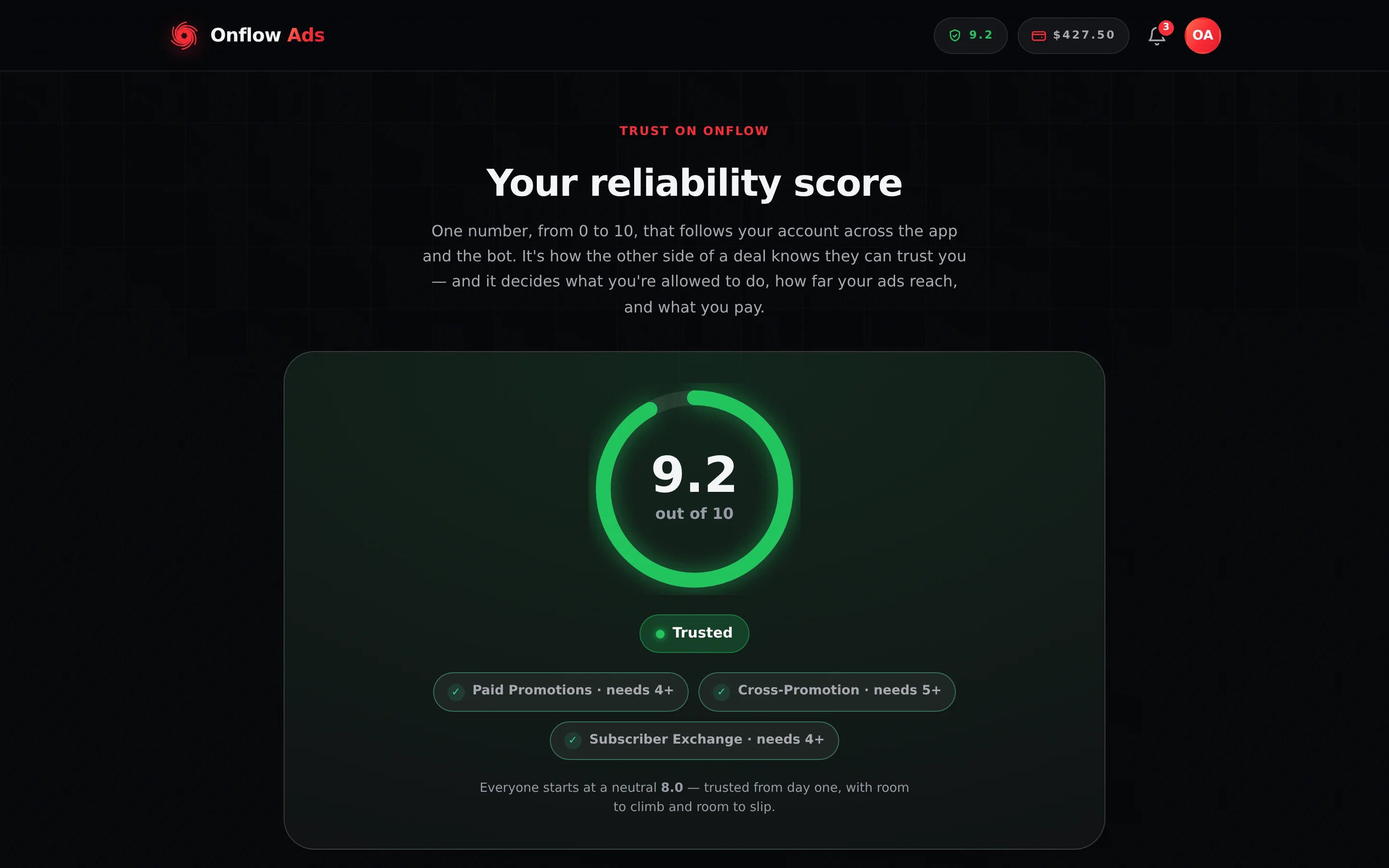
Plus plan · Advertiser. The fastest read of your standing anywhere on the platform. Look at the badge under the gauge first — if it says Under Review instead of a tier, that is your answer — then at the three gate chips, which show a tick where you clear that marketplace's floor and a cross where you do not.
The floors quoted throughout this page are the ones currently shipped. They can be retuned by the Onflow Ads team, and Terms §15.6 says the live figure governs: the numbers shown on your reliability page and inside any block message are always the ones actually being enforced. Raising a floor can lock a surface you could use yesterday without anything on your record having changed.
The states at a glance
| State | Triggered by | What it blocks | How it ends |
|---|---|---|---|
| Good standing | The default | Nothing | Not applicable |
| Under Review | An open fraud concern against you, or a hold on your wallet | Starting any new deal, withdrawals, payout claims, AI generation | Automatically, the moment the concern is resolved |
| Below a reliability floor | Your score falling under a product's minimum | New deals on that one product only | You raise your score back over the floor |
| Support access restricted | A decision to bar an account or an email address from the support surfaces | Every route into support. Nothing else | A person lifts it |
| Suspended | An account-level decision for a serious breach | Signing in at all | Automatically, on the date shown |
| Banned | A permanent account-level decision | Signing in at all | It does not — write in |
| Connection refused | A block on the network address you are browsing from | Essentially the whole site, before sign-in | A person lifts it — and you have to ask from a different connection |
Separately from all of them, a sign-in lockout can temporarily stop you signing in after repeated failed attempts. That is a security measure, not a standing state, and it is covered at the end of this page.
Good standing
The default for every account, from the moment you sign up.
- Your reliability page shows your tier — Trusted, Reliable, Fair, Building or Low — rather than a review label.
- Every marketplace whose floor you clear is open to you.
- Withdrawals, payout claims and AI generation all work normally, within your plan's own limits.
Nothing is required to stay here except delivering what you promise. Every clean deal you finish also nudges your score up, which widens the gap between you and the floors.
Under Review
Under Review is a temporary, account-wide pause applied while something involving you is being investigated. It is deliberately neutral: it stops new commitments without treating you as guilty. Terms §15.3 puts it in one sentence — being Under Review is not a finding against you.
What puts you in it
Either of these is enough:
- An open fraud concern names you. An advertiser raised a concern about one of your placements and the Onflow Ads team has not yet resolved it.
- Your wallet is on hold. Raising a concern against you places a hold on your wallet for the full 14-day concern window, so money cannot leave the platform mid-investigation. A reviewer can also place a hold by hand — between 1 hour and 30 days, 72 hours by default — and that one is written to your ledger as Score frozen for review, with Review hold lifted when it is cleared early.
The block is deliberately sticky: it holds for as long as the concern is open, even if the timed wallet hold happens to lapse first. That prevents an investigation from quietly expiring before anyone decides it.
What you will see
- Your reliability page and header pill show Under Review in place of your usual tier, so the label cannot be quoted against you before anything is proven. The gauge still shows your number; the gate chips still use it.
- Your reliability page's own explanation reads: "While a fraud concern about you is being investigated, your score is frozen to Under Review so it can't be used against you unfairly, and it won't heal in the meantime — though a separately confirmed penalty still applies. It unfreezes the moment the concern is resolved: upheld, rejected, or dismissed as inconclusive."
- Trying to start a new deal anywhere — booking, accepting, bidding, creating or joining a cross-promotion, applying through discovery — returns: "Your account is under review while an open fraud concern is resolved. You can finish anything already in progress, but can't start a new deal until it's cleared — see your reliability page."
- Trying to withdraw returns: "Your wallet is temporarily on hold while a concern is reviewed. Withdrawals resume once it's cleared."
- Trying to claim a payout returns: "Your wallet is temporarily on hold while a concern is reviewed. Payouts resume once it's cleared."
- Trying to generate with the AI tools returns: "AI is paused on your account while a review is open."
What is blocked and what still works
| Blocked | Still works |
|---|---|
| Starting any new deal | Finishing every deal already in flight — the bot still publishes, delivers and completes what you agreed to before the review opened |
| Withdrawals from your wallet | Spending your wallet balance on the platform is unaffected by the review itself |
| Claiming a payout on a booking | Receiving buyer confirmations and running placements |
| AI text and image generation | Every read-only surface: analytics, proof pages, your ledger |
| Automatic clean-streak healing of your score | Your score staying exactly where it is — the open concern moves it only if it is upheld |
| Support | Nothing about a review touches support. The help widget and the contact form work normally |
The rule is deliberate. Freezing work already in progress would punish the people on the other side of your existing deals, who did nothing wrong. Blocking new commitments is what stops an unresolved problem from spreading. Terms §15.2 extends "in flight" further than you might expect: continuing an existing partnership counts, and so does a recurring arrangement you already agreed with that same partner, and the rounds that cadence sets up. What locks is opening something new by hand.
A penalty that falls due while you are Under Review still applies — the freeze hides your tier, it does not suspend the rules. And automatic recovery is paused for as long as the review lasts, so a quiet stretch spent Under Review does not count toward clean-streak healing (Terms §15.3).
How it ends
It clears automatically the moment the concern is resolved. All three outcomes lift the hold in the same step:
| Outcome | What happens to you |
|---|---|
| Concern rejected | The claim was unfounded. The hold lifts, your stake comes back, your payout releases normally, and your standing returns to exactly what it was. The person who raised a concern that did not stand takes a −0.50 reliability penalty themselves. |
| Concern dismissed | Inconclusive — fault could not be established either way. The hold lifts, your stake comes back, your payout releases, and nobody's score moves. A zero-value Concern dismissed — inconclusive line appears on your ledger so the outcome is visible. |
| Concern upheld | The hold lifts, the advertiser is made whole under the Refund Policy, your stake is forfeited, and a −2.00 reliability penalty lands on your record — the heaviest single mark on the platform. |
If a penalty lands and you believe it is wrong, you can still contest it — see Appeals and fraud concerns. If the review finds you were not at fault, the score is restored exactly.
Edge cases
- You can be Under Review with a perfect score. The label replaces your tier regardless of what your number is; it says an investigation is open, not that you did anything.
- Only one review is needed to pause you. Several open concerns do not compound the block; resolving all of them is what lifts it.
- Being Under Review does not hide your listings. Buyers can still browse them; they just cannot start a new deal with you until you are clear.
- A recurring arrangement may be paused. Where standing has fallen far enough, or while a concern naming you is open, the platform may pause or end a recurring partnership — and both sides are told, rather than your partner discovering it (Terms §15.2).
One placement paused (not an account state)
This one is easy to mistake for a standing problem, so it is worth separating out.
If the automated delivery monitor finds a problem with a single placement, that one order is paused — not your account:
- You receive a notification titled "A placement was flagged automatically", naming the channel and the reason.
- The buyer receives one titled "A problem with one of your placements".
- Claiming the payout on that order returns: "We've flagged a problem with this placement — the payout is paused until it's resolved. Re-post the ad or contact support."
Everything else on your account keeps working — you can book, accept and withdraw as normal, subject to your usual standing. A flag pauses money on one order; it never reverses it. The full behaviour is on Fraud and bot protection.
Likewise, if a buyer's booking has an open concern on it, the payout on that specific booking is held: "A fraud concern on this booking is under review — the payout is on hold until our team resolves it."
Below a reliability floor
This is not a punishment state and it is not account-wide. It is a single product declining to let you start something new until your score recovers.
The floors
| Product | Minimum score to start something new |
|---|---|
| Paid Promotions — booking as an advertiser and accepting as an owner | 4.0 |
| Cross-Promotion — creating, accepting or joining | 5.0 |
| Subscriber Exchange — hosting | 4.0 |
Cross-Promotion sets the higher bar on purpose: no money sits in escrow on a free swap, so trust has to carry the whole deal.
What you will see
The block message always names the floor, your actual score, and how to recover:
- Paid Promotions: "Paid Promotions needs a reliability score of at least 4/10 — yours is 3.6/10. Complete clean deals to raise it — and a clean streak also recovers it over time on its own. See how it works on your reliability page."
- Cross-Promotion: "Cross-Promotion needs a reliability score of at least 5/10 — yours is 4.4/10. Complete clean deals to raise it — and a clean streak also recovers it over time on its own. See how it works on your reliability page."
- Subscriber Exchange: "The Subscriber Exchange needs a reliability score of at least 4/10 — yours is 3.7/10. Honour your placements to earn it back."
The rules that come with it
- Only the product you are below locks. At 4.4 you are under the Cross-Promotion floor but comfortably over the Paid Promotions one — paid work stays fully open.
- Anything already in flight always finishes. Falling under a floor never cancels a live campaign, a scheduled post or a pending payout.
- Both sides of a paid deal are gated. The Paid Promotions floor applies to buying and to accepting, so an owner under 4.0 cannot accept new bookings either.
- The score is one number everywhere. Every engine reads the same figure at the moment you act, so there is no corner of the platform where a floor does not apply.
- Under Review is checked first. If you are both under review and below a floor, you get the review message — telling a frozen user their score is too low would be the wrong answer.
- A penalty costs you money before a floor blocks you. Every unforgiven penalty restarts your veteran streak — the 100 clean campaigns (or 100 clean placements) behind the veteran rate on the marketplace fee — so you pay the standard rate until it is rebuilt, and plan allowances tighten as the score falls. Refunds §24 is explicit that a fee charged at the standard rate is not a fee levied in error and is not refundable, even if the mark behind it is later overturned.
How it ends
By recovering your score. Three routes, described in full on Your reliability score:
- Complete clean deals — the fastest route, and the only one that works above 8.0.
- Stay clean and let time heal it — a below-baseline score recovers automatically after a quiet streak, at most once a day, up to a ceiling of 8.0.
- Appeal a penalty you think is wrong — an overturned penalty returns the exact points.
The moment your score crosses back over the floor, the product unlocks. Nothing has to be re-applied for.
Support access restricted
This one is genuinely unlike every other state on the page: it closes the support surfaces and leaves the product completely untouched. You can still book, sell, top up, withdraw and run campaigns exactly as before. What you cannot do is open a conversation about it.
What you will see
One calm dead end, identical on every route you try — a muted icon, the heading Support access restricted, and the sentence:
"Support access for this account has been restricted. If you believe this is a mistake, email [email protected]."
A Back to help link sits above it. The server answers every barred request the same way, with HTTP 403.
What it closes
- Opening a new support ticket.
- Posting a follow-up on an existing conversation.
- Every turn of the Onflow AI chat, including the instant-answer search behind it.
- The moment a guest types their email address during an escalation.
- Report a problem on a Boost order.
How it is targeted
A restriction can name an account id, an email address, or both. That matters in two directions: someone who has never signed in can be barred by email alone, and signing out or using a different browser does not get around one aimed at your account.
There is no automatic trigger for this state and no score that causes it. A member of the Onflow Ads team applies it from a ticket in the support desk, and a member of the team removes it. Each restriction carries its own OFSB- reference in the platform's ID registry, so there is a record of when it was applied and by whom.
How it ends
Email [email protected] from the address on the account, saying what happened and why you think the restriction is wrong. That address is read by people, and a restriction that was applied in error is lifted.
Suspended
A time-boxed, account-level block applied for serious breaches of the Terms and Conditions.
- You cannot sign in at all while it lasts. Every existing session is signed out immediately when the suspension is applied, on every device.
- The sign-in page tells you when it ends, in the form: "Your account is suspended until Mar 04, 2026."
- It expires automatically. Once the date passes, your next sign-in reactivates the account with no request needed and no action from support.
- Your data, channels, wallet balance, listings and reliability record are all still there when you come back.
- A suspension does not forfeit your wallet balance, but orders in flight may be cancelled and refunded to the counterparty (Refunds §24).
If you believe a suspension was applied in error, email [email protected] with your account email and any context you have.
Banned
A permanent account-level block.
- Sign-in is refused with: "Your account has been suspended."
- Unlike a suspension, it carries no end date and does not expire.
- Password-reset codes are not sent to a banned account either — the reset flow returns the same generic response it gives any unknown address, so nothing is leaked.
If you believe this is a mistake, contact [email protected]. Bans are applied by people and can be reviewed by people.
For deliberate fraud, scams, chargeback abuse or coordinated manipulation, Onflow Ads reserves the right — at its sole discretion — to freeze payouts and the account permanently with every balance held, to delete the account and all of its data with no payout and no refund, and in extreme cases to pursue legal action. None of this ever touches an account that deals in good faith.
Connection refused (a block on the network, not the account)
This is the state that explains the strangest symptom on the platform: the whole site answers "Forbidden." and there is nothing wrong with your account at all.
Not every abuser has an account. A scanner never signs in, and a banned account can simply register again — so alongside everything above, Onflow Ads may refuse traffic from a network address it associates with abuse. Terms §16.5 publishes this rather than leaving you to discover it.
What you will see
A bare page of plain text reading only:
Forbidden.
No reason. No expiry. No branding. That is deliberate, and §16.5 explains why: an explanation is a probe, and anyone who can read back the reason and the timing can work out what triggered the block and how to come back around it.
What is unusual about it
- It runs before sign-in. The check happens in front of everything else, so it applies whether you are signed in or not, to pages and to API calls alike.
- It does not expire unless an expiry was set. A block is permanent by default; it can also be applied with a set number of days on it.
- It can catch people it was not aimed at. Internet addresses are shared — a mobile carrier, an office, a campus or a coffee shop can put hundreds or thousands of people behind one address. A block aimed at one of them reaches all of them. That is how networks are built. It is not a finding against anyone else on that connection, and it does not touch their accounts, balances or reliability.
- You cannot reach Onflow Ads from a blocked connection. The block covers essentially the whole site — the contact form, the support desk, and the Terms page that describes it. Contesting one is off-site by design.
- A few machine paths still answer. Health checks,
robots.txt,sitemap.xml, the site manifest, brand assets and payment-provider webhook paths are exempt, so a favicon or a manifest may still load. That is not a sign the block has lifted.
Because the block sits in front of the whole site, there is no form to fill in and no chat to open. Email [email protected] from a different connection — a phone on mobile data usually works when an office network does not — with the rough date and time you were refused and the public IP address you were using. These blocks are applied by people and lifted by people, and one applied in error is lifted.
Nothing about a connection block appears on your reliability page, in your ledger or in your standing. Your account is untouched, your balances are untouched, and the moment the block is lifted everything is exactly where you left it. Lifting one takes effect on your very next request rather than after any waiting period.
Sign-in protection lockouts
Not a standing state at all, and unrelated to your conduct on the platform.
After repeated failed sign-in attempts, failed verification codes or failed password resets, that path is temporarily locked to protect your account from guessing attacks. You will see one of:
- "Too many attempts. Please try again in a few hours."
- "Too many attempts. For your security this is locked for a few hours."
- "Too many attempts. Please wait a minute and try again." — the short, general-purpose limit that also guards ordinary actions like filing a concern or leaving a review.
What to do: wait it out. The lock releases on its own — a minute for the general limit, a few hours for the sign-in ones. You can also use the password-reset flow at onflowads.com/reset-password if you have simply forgotten your password. Nothing about a lockout touches your reliability score, your standing or your balances. Full detail: Limits and lockouts and Security and rate limits.
Rules that apply to standing everywhere
- One account, one standing. However you signed in, you land in the same account with the same state. There is no second identity in Telegram to fall back on.
- Standing is enforced at the moment you act. A change made while you are signed in takes effect on your next action, not at your next sign-in.
- Nothing is applied silently. Every score movement is written to your ledger, and every block message names the reason — with the single, deliberate exception of a connection block.
- Every check fails open. A ban lookup, a rate limiter and a reliability gate all return the permissive answer when the database or cache is unreachable, because a backend fault locking legitimate users out is a far worse outage than a restriction being briefly unenforced.
- Deleting your account is not a reset. If an account leaves with a below-baseline record, re-registering with the same identity resumes at that record's floor rather than a fresh 8.0 — for 45 days, or 90 after an unforgiven upheld fraud — and the carried-over amount appears on the new ledger as its own entry, with its reason. A good-standing account leaves nothing behind at all (Terms §15.5).
- A debt is checked before your score is. If your wallet is below zero, every gate refuses with the amount and the deadline rather than a standing message — see Owing money.
No standing state on Onflow Ads is designed to be a dead end. A floor lifts when you earn your way back; a review clears when it resolves; a suspension expires on its own; a support restriction and a connection block are both lifted by the people who applied them. Only deliberate abuse leads anywhere permanent.
If something goes wrong
| What you see | What it means | What to do |
|---|---|---|
| A booking or accept button refuses with a review message | Under Review — an open concern or a wallet hold | Finish what is in flight; it clears automatically when the concern resolves |
| A block message naming a score and a floor | Below a reliability floor on that one product | Complete clean deals, or appeal the penalty that took you under |
| Support access restricted on every help route | A support ban on your account, your email, or both | Email [email protected] from the account's address |
| "Your account is suspended until…" on the sign-in page | A time-boxed suspension | Wait for the date, then sign in normally |
| "Your account has been suspended." with no date | A permanent ban | Write to [email protected] |
| A blank page reading only Forbidden. | A block on the connection you are browsing from | Email [email protected] from another network with the time and your public IP |
| "Too many attempts…" | A rate limit or a sign-in lockout, not a standing state | Wait a minute, or a few hours on the sign-in paths |
Frequently asked questions
My score is fine but I still can't start a deal. Why?
You are almost certainly Under Review — an open fraud concern or a wallet hold blocks new deals regardless of your score. Check the label at the top of your reliability page.
How long does Under Review last?
As long as the investigation does. It clears automatically the moment the concern is resolved, on either outcome — there is nothing to request or re-apply for. If you have a plan with a published dispute-resolution target, that target is shown on the order itself.
Does being Under Review lower my score?
No. Your score is frozen for the duration and neither drops nor heals. It moves only if the concern is actually upheld — although a separate penalty that falls due during the review still applies.
I'm below a floor. Can I still get paid for work I already did?
Yes. Payouts, confirmations and completions on deals already in flight are untouched by a floor. A floor only refuses new starts.
My support is barred but everything else works. Is that a mistake?
No — that is exactly what a support restriction does. It closes the support surfaces and leaves the product completely alone. Email [email protected] from the account's address to ask for it to be reviewed.
The whole site says "Forbidden." on my office Wi-Fi but works on my phone.
That is a connection block, not an account problem — and the shared-address case is exactly why it looks like this. Email [email protected] from the connection that works, with the time you were refused and the public IP address you were on.
What is the difference between suspended and banned?
A suspension has an end date shown on the sign-in page and lifts automatically. A ban has no end date. Both block sign-in completely.
I was signed out of everything without warning.
That is what a suspension, a ban, an account deletion or a password reset all do — every live session is destroyed at once. Try signing in; the response will tell you which one it was.
Can I see my standing history?
Yes, for the score side of it. The Your ledger section of your reliability page lists your 50 most recent score events with the amount, a plain-language label, the date and your score after each one.
Who do I contact?
Email [email protected] or use the contact form. For anything about a specific order, include the order reference. For privacy matters, write to [email protected].
Related
- Your reliability score — the number behind the floors, and the three ways to recover a drop
- Appeals and fraud concerns — contesting a penalty, and reporting a deal that went wrong
- Fraud and bot protection — the automated checks, refusals and rate limits you can actually hit
- Limits and lockouts — the sign-in protections that are not standing at all
Next: if a penalty or a state looks wrong to you, Appeals and fraud concerns is the page that pushes back — contesting a mark on your record, and reporting a deal that went wrong.