Comparing the tiers
This page does two things. First it walks you through the pricing page, where the whole ladder is shown side by side and every button tells you exactly what it would do. Then it gives you the full comparison, area by area, so you can decide with numbers rather than adjectives.
If you would rather read one rung at a time, every tier has its own page: Free, Lite, Plus, Elite, Master, Ultimate.
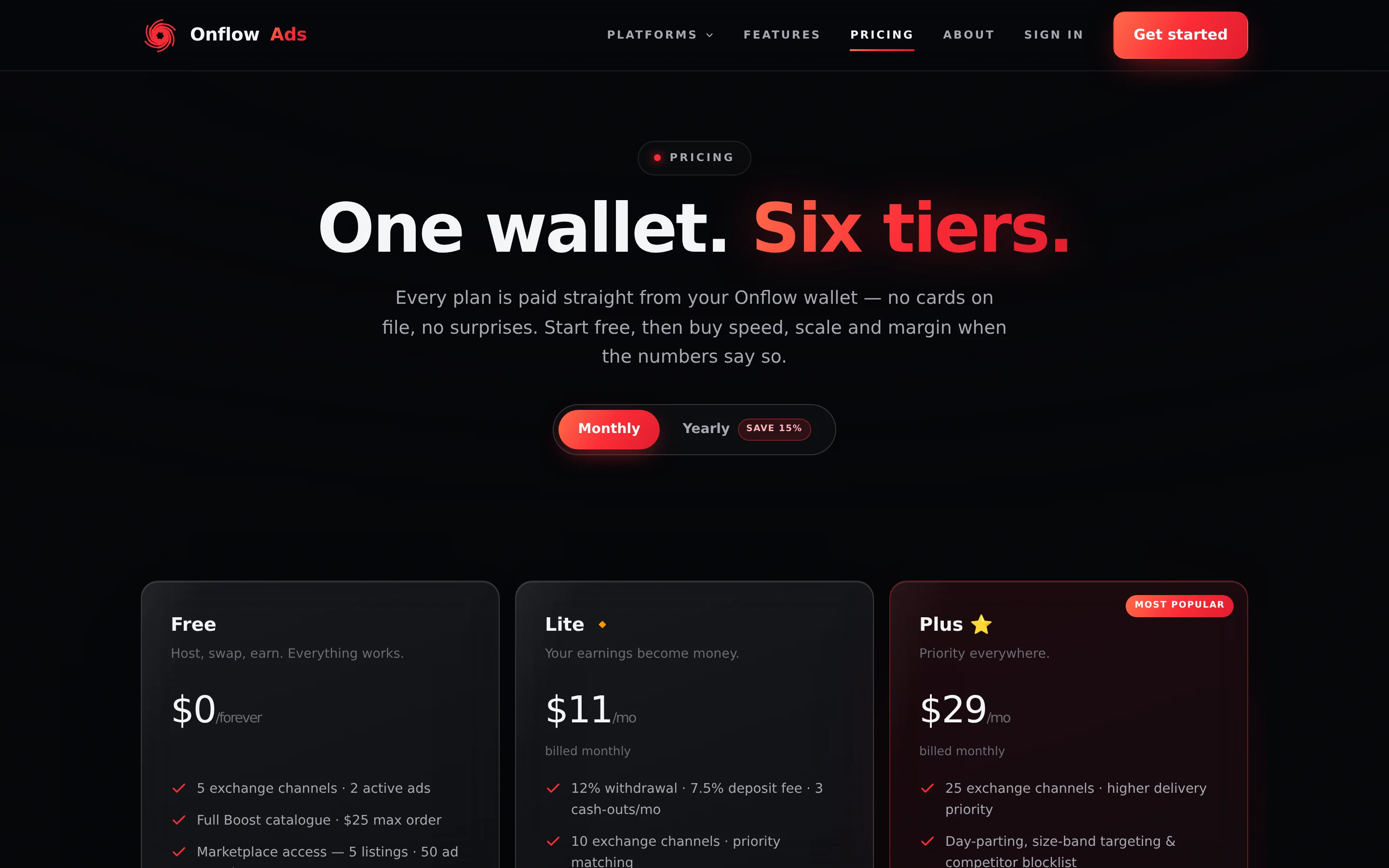
Signed out. The published ladder. Everything on this page works without an account; only the card buttons change once you sign in. On a narrow screen the table scrolls sideways with the feature column pinned.
Where to compare plans
| Page | URL | Best for |
|---|---|---|
| Pricing | onflowads.com/pricing | The published ladder and the full side-by-side table — works signed out. Signed in, the same page shows your own standing, your wallet balance and the in-page checkout. |
| This guide | You are here | The same numbers, with the rules, the caveats and the edge cases spelled out. |
The pricing page and the total shown in your checkout are the authoritative published figures. If a number here ever differs from the product, the product is right — it reads your account's live entitlements.
Step by step on the pricing page
-
Open onflowads.com/pricing. You do not need an account to look. The page opens on the hero "One wallet. Six tiers." with all six cards in one grid — Free, Lite, Plus, Elite, Master and Ultimate. Ultimate wears a corner badge reading "Application only · 50 seats".
-
Pick a billing period. The pill switch under the hero has two options: Monthly and Yearly, the second tagged Save 15%. Every card re-prices instantly.
- On Monthly each paid card shows the monthly price above the line "billed monthly".
- On Yearly each paid card shows the effective per-month price above the line "billed $X/yr — Save 15%".
- The Free card always reads "$0" and "/forever", with no billing line.
-
Read the cards. Each carries the tier name and badge, a one-line positioning statement, the price, and its headline benefits.
-
Scroll to the comparison table. Below the cards, the section headed "The full ladder, no fine print." puts every tier in one table grouped by product area: Plans, Subscriber Exchange, Boost, Paid Promotions, Cross-Promotion, AI, Analytics, Wallet & Fees and Support.
-
Read the billing FAQ. Under "The fine print, in plain English." there are seven answers: how you pay, whether your plan changes what it costs to add money, what happens when you renew, whether you can upgrade mid-term, whether you can downgrade, how yearly billing works, and how to get Ultimate.
-
Sign in when you want to buy. The buttons change to your real situation — see the next section.
What the buttons do
Signed out, every button is a link:
| Card | Button | Where it goes |
|---|---|---|
| Free | Start free | The sign-up page |
| Lite / Plus / Elite / Master | Get Lite / Get Plus / Get Elite / Get Master | The sign-up page |
| Ultimate | Apply | The contact page |
Signed in, the buttons switch to the same decision table the server enforces, so a card never offers a purchase the checkout would refuse:
| Your situation | The button reads | What happens |
|---|---|---|
| The tier you hold, with an expiry date | Renew, with the note "Extends your term — no days lost." | Opens the checkout in place |
| The tier you hold, as a lifetime membership | Current plan (disabled) | Nothing — there is nothing to extend |
| A tier above the one you hold | Upgrade | Opens the checkout with the forfeit warning and its confirmation checkbox |
| A tier below the one you hold | Get Lite / Get Plus / … (disabled), with the note "Available after your current plan expires — no mid-term downgrades." | Nothing until your membership expires |
| Any paid tier, while you hold none | Get Lite / Get Plus / … | Opens the checkout |
| The Free card, while you are on Free | Current plan (disabled) | Nothing |
| The Free card, while you hold a paid tier | Included with every plan (disabled) | Nothing — Free is the floor, not a purchase |
| Ultimate | Apply, or Current plan (disabled) if you hold it | The contact page |
/pricing?tier=plus&billing=yearly selects that billing period, scrolls to that card and — when you are signed in and the tier is one you could buy, renew or upgrade to — opens the checkout on arrival. It is skipped for free and ultimate.
How to read the comparison
- A dash (—) means the feature is not included at that tier.
- "Unlimited" stays subject to the platform's fair-use and anti-abuse rules.
- Every number is a live entitlement: what your account gets the moment a tier activates, on the website and in the Telegram bot at the same time.
- Nothing on the ladder gets worse as you move up. Every dimension improves or stays the same.
Price and terms
| Free | Lite | Plus | Elite | Master | Ultimate | |
|---|---|---|---|---|---|---|
| Monthly | $0 | $11 | $29 | $99 | $349 | $1,200 |
| Yearly (Save 15%) | $0 | $112.20 | $295.80 | $1,009.80 | $3,559.80 | $12,240 |
| Effective per month, billed yearly | $0 | $9.35 | $24.65 | $84.15 | $296.65 | $1,020 |
| Term length | — | 30 days monthly / 365 days yearly | Same | Same | Same | Same |
| How you get it | Sign up | Buy | Buy | Buy | Buy | Application only, 50 seats |
| Badge | — | 🔹 | 🔸 | 💠 | 👑 | ⭐ |
Fees, cell by cell
This is the money table. It is written one plan per row because those three columns are checked against the code automatically before this guide ships — if a rate moved and this table did not, the build fails.
| Plan | Deposit fee | Withdrawal fee | Withdrawal requests per calendar month |
|---|---|---|---|
| Free | 9% | 15% | 1 |
| Lite | 7.5% | 12% | 3 |
| Plus | 6% | 10% | 6 |
| Elite | 5% | 8% | 12 |
| Master | 4% | 6% | 30 |
| Ultimate | 4% | 5% | Unlimited |
The deposit fee is the platform's commission on a wallet top-up, and it is added to the amount you choose rather than taken out of it — ask to add $100 and you are credited $100, whatever your rung. The exact figure is shown in the breakdown at checkout every time you top up, and that breakdown is what you are charged. Master and Ultimate share the 4% floor.
No rung moves the Paid Promotions fee, which is why it is not on this table: the standard rate is 9% on both sides of a booking — added to what an advertiser pays and deducted from what a channel owner receives — and the veteran rate is 7%, earned rather than bought. An owner earns it once one of their channels has completed 100 clean campaigns; an advertiser earns it after 100 clean placements. On an auction the bidder pays exactly the bid and the auction fee is 11% on the owner's side. Every one of these figures is an operator setting, so the checkout is the number that binds.
Subscriber Exchange
The exchange is the swap network where channels host each other's ads for credits. Topic (niche) and language matching are open on every tier, Free included — a badly matched placement wastes the host's audience as much as the advertiser's. What the ladder adds is the finer targeting on top, more reach and a bigger credit multiplier.
| Free | Lite | Plus | Elite | Master | Ultimate | |
|---|---|---|---|---|---|---|
| Enrolled channels | 5 | 10 | 25 | 50 | 100 | 250 |
| Active ads at once | 2 | 4 | 8 | 12 | 18 | 25 |
| Base placements per 30-day cycle | 7 | 9 | 11 | 13 | 15 | 18 |
| Maximum placements per cycle, with credit-bought extras | 7 | 12 | 15 | 18 | 21 | 24 |
| Credit-earning multiplier per hosted placement | 1.0x | 1.1x | 1.2x | 1.5x | 1.7x | 2.0x |
| Matching priority | 0 | +5 | +10 | +15 | +20 | +25 |
| Matching focus (lower = tighter shortlist) | Whole pool | 0.75 | 0.50 | 0.35 | 0.25 | 0.20 |
| Distinct channels one ad reaches per week | 2 | 2 | 3 | 3 | 4 | 4 |
| Topic (niche) and language targeting | ✓ | ✓ | ✓ | ✓ | ✓ | ✓ |
| Country targeting and scheduled starts | — | ✓ | ✓ | ✓ | ✓ | ✓ |
| Day-parting and size-band targeting | — | — | ✓ | ✓ | ✓ | ✓ |
| Competitor blocklist size (entries) | — | — | 50 | 100 | 200 | 500 |
| Lookalike host targeting | — | — | — | — | ✓ | ✓ |
| Penalty-free grace deletes per cycle | 0 | 1 | 2 | 3 | 4 | 5 |
| Custom matcher weights | — | — | — | — | — | ✓ |
| Delivery floor (shortfall credited) | — | — | — | — | — | ✓ |
The absolute ceiling on placements is 24 per cycle, which is why Ultimate's maximum stops there.
A paid rung never buys its way past the reciprocity rule, a host's declared level ceiling or topic blocklist, quiet hours, a weekly cap, or the reliability floor. Those are the host's guarantees, and a guarantee money can void is not a guarantee. Two more things are open to everybody at no charge: refusing a specific ad on one of your own channels carries no penalty at any tier, and appealing a moderation decision is open to every tier. Every plan's ads go through the same review queue; a plan never buys a review outcome.
Separately from the ladder, any account — Free included — can buy one-off per-campaign delivery upgrades (extra placements, higher priority) when submitting an exchange ad. The price is shown at submission and refunded in full if the ad is declined.
Boost
Boost is the growth storefront: followers, views, reactions and more, bought per order from your wallet. Every tier, Free included, can browse and buy; services flagged premium-only unlock at Lite. The ladder buys rate, automation and scale.
| Free | Lite | Plus | Elite | Master | Ultimate | |
|---|---|---|---|---|---|---|
| Standing discount on every order | 0% | 5% | 8% | 10% | 12% | 15% |
| Maximum order size | $25 | $200 | $500 | $1,500 | $5,000 | $100,000 |
| Live orders at once | 5 | 25 | 50 | 100 | 250 | 1,000 |
| Auto-Boost subscriptions | 1 | 3 | 5 | 8 | 15 | 50 |
| Mass-order rows | — | 25 | 50 | 150 | 500 | 2,000 |
| Dripfeed and scheduled orders | — | ✓ | ✓ | ✓ | ✓ | ✓ |
| Auto-refill | — | ✓ | ✓ | ✓ | ✓ | ✓ |
| Premium catalogue access | — | ✓ | ✓ | ✓ | ✓ | ✓ |
| CSV order exports | — | ✓ | ✓ | ✓ | ✓ | ✓ |
| Eligible for the multi-item bundle discount | — | ✓ | ✓ | ✓ | ✓ | ✓ |
| Priority delivery add-on | — | — | ✓ | ✓ | ✓ | ✓ |
| Status-refresh cooldown | 60 s | 10 s | 5 s | 5 s | 3 s | 3 s |
| Developer API keys | — | — | — | 3 | 10 | 25 |
| API rate limit (requests/min per key) | — | — | — | 60 | 120 | 300 |
| Delivery guarantee included free on every order | — | — | — | 30 days | 60 days | 90 days |
| Order-event webhooks | — | — | — | — | ✓ | ✓ |
| Wholesale Desk markup floor | — | — | — | — | 18% | 10% |
The multi-item bundle discount is 10% off a cart holding two or more items, and eligibility starts at Lite. It stacks on your standing discount rather than replacing it.
The Wholesale Desk is the negotiated route for committed, prepaid volume. The percentage above is the markup floor the desk may not price below at that rung — 18% at Master, 10% at Ultimate — so a lower number is a better deal.
Paid Promotions (the marketplace)
Paid Promotions is the escrow-protected marketplace where advertisers book placements on listed channels. The marketplace fee is not a plan number — it is the same at every rung, see Fees, cell by cell — so this table is about allowances, speed and tooling.
| Free | Lite | Plus | Elite | Master | Ultimate | |
|---|---|---|---|---|---|---|
| Channel listings | 5 | 10 | 15 | 30 | 60 | Unlimited |
| Placements per month | 30 | 60 | 150 | 400 | 800 | Unlimited |
| Saved ad templates | 2 | 4 | 8 | 12 | 16 | 20 |
| Photos per creative | 2 | 3 | 4 | 5 | 6 | 8 |
| Video creatives | — | — | — | ✓ | ✓ | ✓ |
| Instant listing auto-verify (skip the queue) | — | ✓ | ✓ | ✓ | ✓ | ✓ |
| Listing re-verify cooldown | 15 days | 10 days | 7 days | 5 days | 3 days | None |
| Featured days included per month | 0 | 1 | 2 | 4 | 7 | 14 |
| Catalog rank boost | 0 | +1 | +2 | +3 | +4 | +5 |
| Spotlight deals: cooldown / concurrent | 5 days / 1 | 4 days / 1 | 3 days / 2 | 2 days / 2 | 1 day / 3 | None / 5 |
| Owner payout speed | After the full run | Within 7 days | Within 72 hours | On confirm, or 48 h | On confirm, or 48 h | Within 24 hours |
| Placement monitoring cadence | 60 min | 60 min | 30 min | 15 min | 10 min | 5 min |
| Synced cart and saved channels | — | ✓ | ✓ | ✓ | ✓ | ✓ |
| Wishlist price-drop alerts | — | ✓ | ✓ | ✓ | ✓ | ✓ |
| AI Channel Picker and Channel finder searches | — | — | ✓ | ✓ | ✓ | ✓ |
| Channel bundles (channels per plan) | — | — | 3 | 5 | 10 | 10 |
| Weekly recurring rebook | — | — | ✓ | ✓ | ✓ | ✓ |
| Run auctions on your own listings | — | — | ✓ | ✓ | ✓ | ✓ |
| Proxy (maximum) bids on auctions | — | — | — | ✓ | ✓ | ✓ |
| Dispute resolution target | — | — | — | 48 h | 24 h | 24 h |
| Placement Proof Certificates per month | — | — | — | 10 | 25 | Unlimited |
| Verified Delivery Insurance | — | — | — | ✓ | ✓ | ✓ |
| Retention-Escrow bookings | — | — | — | ✓ | ✓ | ✓ |
| Performance Passport | — | — | — | ✓ | ✓ | ✓ |
| Reach Dedup Advisor | — | — | — | — | ✓ | ✓ |
| First-look inventory (48 h early) | — | — | — | — | — | ✓ |
Payout speed is how fast a booking's escrow releases to the owner's wallet balance. Getting that money out of the wallet is a separate step: withdrawals pass the same manual review at every tier, in no tier order, and clawback still runs against the balance — so releasing early does not remove any check.
The dispute target is the published turnaround on a paid-promotion concern, and it starts at Elite. Below Elite there is no published target and concerns are worked in queue order.
Placement monitoring is the advertiser's entitlement, not the owner's: the buyer is the one exposed when a post comes down early, so the cadence follows the tier of the account that paid.
Cross-Promotion
Cross-Promotion pairs channels for mutual shout-outs.
| Free | Lite | Plus | Elite | Master | Ultimate | |
|---|---|---|---|---|---|---|
| Campaign initiations per calendar month | 5 | 15 | 30 | 60 | 120 | Unlimited |
| Add-on discount (rush, insurance, featured) | — | 10% | 25% | 50% | 75% | 100% |
| Boost-credit reward per clean completion (first 30 a month) | — | $0.10 | $0.25 | $0.50 | $0.75 | $1.00 |
| Campaign insurance included | — | — | — | ✓ | ✓ | ✓ |
| Blitz multi-channel campaigns | — | — | — | — | To 5 extra channels | To 10 extra channels |
The monthly number counts campaigns you start. Nothing limits how many run at the same time, at any rung, and joining somebody else's campaign is never capped by tier. A campaign that never actually ran — unjoined and expired, cancelled, or refunded by the anti-ghost check — does not spend a monthly slot.
Monthly initiations have no one-off purchase: the next rung is the only way past them. See Buying past a limit without upgrading for what can be bought one-off.
AI
The AI writer and the image generator are buttons inside each post composer. What the ladder sets is how many actions you get — and, for images, whether you get them at all.
| Free | Lite | Plus | Elite | Master | Ultimate | |
|---|---|---|---|---|---|---|
| AI texts per UTC day | 1 | 2 | 3 | 4 | 5 | 5 |
| AI texts per calendar month | 3 | 8 | 12 | 16 | 20 | 20 |
| AI images per UTC day | — | — | — | — | 2 | 2 |
| AI images per calendar month | — | — | — | — | 10 | 10 |
An AI action is blocked when either window is exhausted. On Plus you get 3 texts a day but only 12 in the month, so four heavy days use the month up. The text day window resets at 00:00 UTC; the month window resets on the calendar month.
The numbers above are the plan allowance. Your reliability score then modulates what is actually granted: an account under review gets no AI at all; a score below 4.0 is clamped to the Free text allowance with images off; 4.0–4.9 halves the text allowance with images off; 9.0 and above adds roughly 20% text headroom. Every cell is also retunable by an operator without a release. That is why the counter inside the AI panel — not this table — is the authority on what you have left. Full detail in AI quotas and limits.
Image generation is a hard top-two-rung feature: Master and Ultimate only, and no reliability bonus lifts it earlier.
Post composer
Every ad you compose — in the Subscriber Exchange, in Paid Promotions and in Cross-Promotion — goes through the same editor. Three of its capabilities are on the ladder, a fourth is sold as a $1 add-on, and the last row below is not about your own ads at all.
| Free | Lite | Plus | Elite | Master | Ultimate | |
|---|---|---|---|---|---|---|
| Inline buttons per post | — | 1 | 2 | 3 | 4 | 4 |
| Coloured inline buttons (Blue / Green / Red) | — | — | ✓ | ✓ | ✓ | ✓ |
Private Telegram links (t.me/+invite, joinchat, t.me/c/) | — | ✓ | ✓ | ✓ | ✓ | ✓ |
| Public Telegram links | ✓ | ✓ | ✓ | ✓ | ✓ | ✓ |
| Non-Telegram links | $1 add-on | $1 add-on | $1 add-on | $1 add-on | $1 add-on | $1 add-on |
| Ads in your channels run without the attribution line | — | — | ✓ | ✓ | ✓ | ✓ |
Non-Telegram URLs are deliberately not a rung: they are unlocked by the $1 External Links add-on, which any tier can buy — but it is recorded against the tier you bought it on, so changing rung means buying it again. The whole thing is explained in Post buttons and links.
Button colours are a Plus unlock and stop there: one colour per button, chosen from Blue, Green, Red or the app's ordinary button, and every button you are allowed may carry its own. Below Plus a colour is silently dropped rather than refused, and the swatch row is not drawn at all — so it is the one composer limit with no message and no locked control.
Every ad the platform delivers into a channel — in all three products — carries the line advertisement via onflowads.com one blank line under the copy. The plan that removes it is the channel owner's, not the advertiser's: from Plus up, ads carried by your channels run clean; on Free and Lite they carry the line. Your own rung has no effect on the ads you place in other people's channels, so a Free advertiser's ad in a Plus owner's channel goes out clean and an Ultimate advertiser's ad in a Free owner's channel does not. There is no toggle at any tier, and it is not sold separately. Full detail: The attribution line.
Analytics, support and interface
Analytics unlocks in steps: everybody gets the campaign rollup, and the ways of taking the numbers out arrive rung by rung. Support is not a ladder — the desk answers everyone by email and works the queue in order of recency, at every tier.
| Free | Lite | Plus | Elite | Master | Ultimate | |
|---|---|---|---|---|---|---|
| Campaign analytics rollup | ✓ | ✓ | ✓ | ✓ | ✓ | ✓ |
| Analytics CSV export | — | — | ✓ | ✓ | ✓ | ✓ |
| Branded PDF report | — | — | — | ✓ | ✓ | ✓ |
| Raw per-sample data | — | — | — | — | ✓ | ✓ |
| Email support | ✓ | ✓ | ✓ | ✓ | ✓ | ✓ |
| Onflow AI support chat | 30 messages/cycle | Unlimited | Unlimited | Unlimited | Unlimited | Unlimited |
| Answers about your own account in the chat | ✓ | ✓ | ✓ | ✓ | ✓ | ✓ |
| Assisted actions and account flows in the chat | — | — | ✓ | ✓ | ✓ | ✓ |
| Dedicated account manager | — | — | — | — | — | ✓ |
| Premium styling on Telegram bot messages | — | — | ✓ | ✓ | ✓ | ✓ |
| Tier badge | — | 🔹 | 🔸 | 💠 | 👑 | ⭐ |
Your message counts one and the agent's reply counts one, so 30 is about fifteen questions and answers. The cycle is a rolling 30 days anchored to your own first message, not the calendar month. Every paid rung is unlimited. The email path to a human is never metered — the meter gates the AI, never support itself. A visitor who is not signed in gets a separate, smaller courtesy allowance, which is not a tier.
Premium styling — animated premium emoji and coloured inline buttons on the messages the bot sends you (booking cards, notices, reminders) — is drawn by the Telegram bot and only there. The bot has no screens or menus of its own to restyle, and the website looks the same at every rung.
Do not confuse it with the coloured inline buttons on an ad, which are a separate Plus unlock listed under Post composer: you pick those in the website composer and they ship inside the ad post itself, in whoever's channel it lands in.
Any account-level export you buy separately still works: a $5 per-campaign analytics pass unlocks CSV, the branded PDF and the raw samples for one campaign at any tier. See Buying past a limit without upgrading.
Choosing between two tiers
A few shortcuts that usually settle it:
- You cash out earnings. Every tier can withdraw; the fee is the whole question — 15% at Free, 12% at Lite, 10% at Plus, down to 5% at Ultimate. Compare the fee saved on what you actually withdraw each month against the plan price. Check the monthly request allowance too, since Free gets one.
- You sell placements. The marketplace fee is the same at every rung, so for an owner the ladder is about three other things: payout speed (after the full run on Free, within 24 hours at the top), the listings allowance, and the withdrawal fee and monthly request allowance on what you cash out.
- You buy Boost regularly. The standing discount applies to every order, so a rung pays for itself once monthly Boost spend × the extra discount exceeds the plan price.
- You top up regularly. The deposit fee is a straight percentage of everything you fund. Funding $2,000 a month costs $180 in fees on Free and $120 on Plus — the $60 saved is twice the price of that rung.
- You keep hitting one wall. If a single limit is what stops you — enrolled channels, active exchange ads, listings, monthly placements, order size — jump to the rung that clears it, then read Where tier limits appear so you know where the next wall is.
- You need one named feature. Video creatives, the Boost developer API, Proof Certificates, webhooks and Blitz each unlock at a named rung, and the locked control in the product always names it.
If something looks wrong
| What you see | What it means | What to do |
|---|---|---|
| A number in the product is lower than this table | Your membership expired, or reliability is clamping an AI allowance | Check the status pill on the pricing page for your tier and renewal date; an expired paid tier reads as Free everywhere |
| The prices on the cards look stale | The page was open a long time and the catalogue fetch failed | Refresh. The page ships its prices as static text so it always renders, then refreshes them from the live catalogue |
| No status pill under the billing switch | You are signed out, or the catalogue fetch failed | Sign in and refresh. The pill is hidden rather than replaced by an error, and the static prices stay correct either way |
| A benefit you bought is missing in the Telegram bot | Almost always an expired term, since both surfaces read the same account row | Check your renewal date on the pricing page, then renew |
| The comparison table disagrees with this guide | The pricing page is the published authority | Trust the pricing page and your checkout total, and tell us through the contact page |
Related
- Buying a plan — the checkout, step by step, once you have picked your rung.
- How billing works — terms, discounts, the legacy price lock and expiry.
- Where tier limits appear — where the ladder becomes visible while you work.
- Post buttons and links — the composer ladder and the $1 External Links add-on.