Buying a plan
Buying a plan takes you from Free onto a rung of the ladder. It happens entirely on onflowads.com/pricing, it is paid from your Onflow Ads wallet, and it takes well under a minute once the wallet has funds.
This page covers a first purchase — you hold no paid tier today. If you already hold one, the same page handles it, but the buttons and the rules differ: read Renewing your membership, Upgrading your tier or Downgrading and letting a plan lapse.
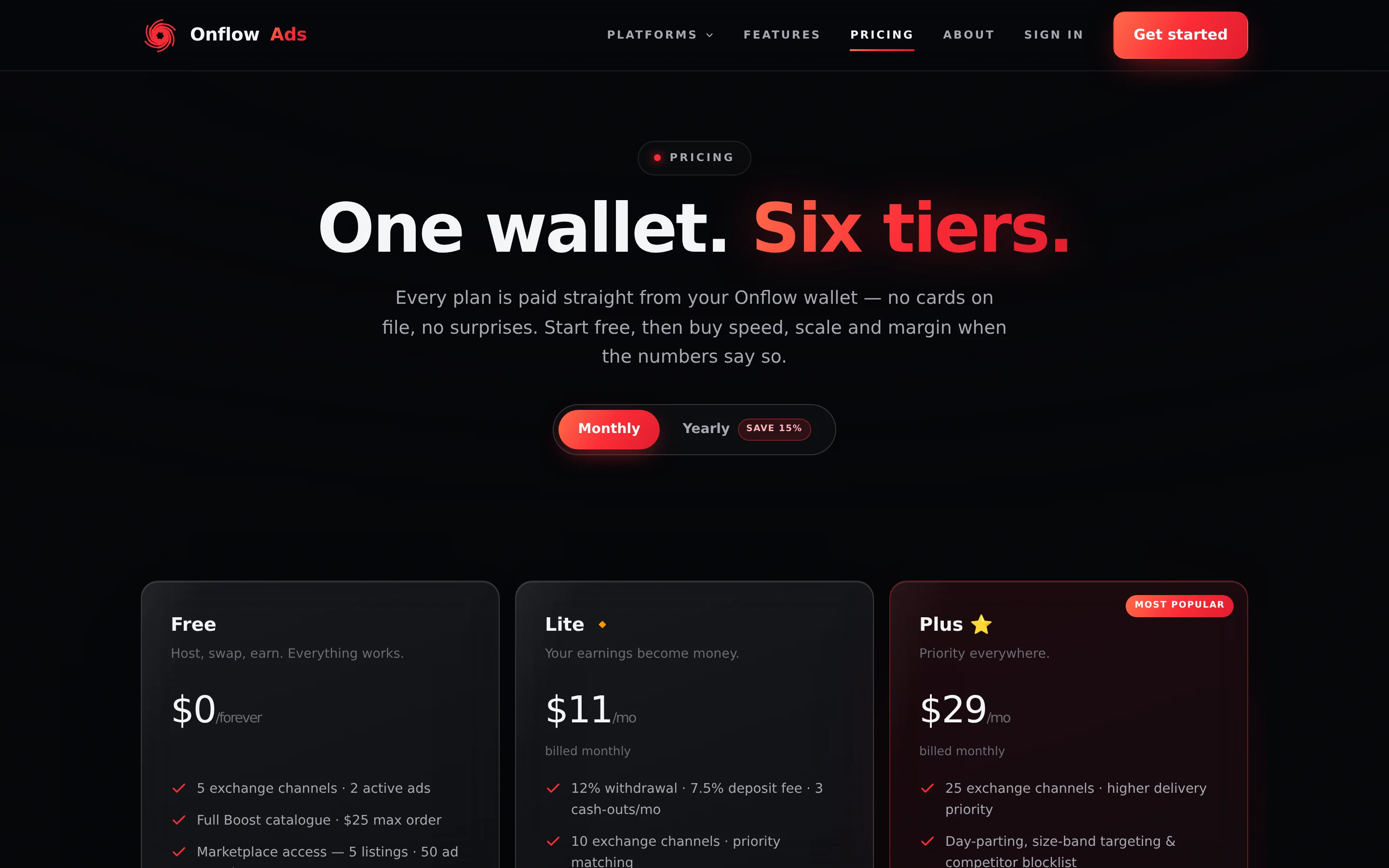
Signed out. This is the one plans page. Signed out, the paid cards' buttons send you to sign-up. Signed in, a one-line status pill appears directly below the billing switch and the buttons become the real actions your account can take.
Before you start
- An Onflow Ads account. Create one at onflowads.com/signup. Signed out, Get Lite / Get Plus / Get Elite / Get Master all route you there rather than opening a checkout.
- Wallet balance that covers the price. Plans are charged from your Onflow Ads wallet. Top up on the wallet page — the checkout links you straight there if you are short.
- A decision about which rung. Read Comparing the tiers, or the individual tier pages.
Onflow Ads never stores a card for memberships and never charges one. A plan is a single wallet debit, made only when you press the pay button.
Step by step
-
Open onflowads.com/pricing. The page is public, so it renders whether or not you are signed in. Every upgrade prompt in the product, and every plan button in the Telegram bot, ends up here.
-
Check the status pill. Signed in, a single line appears under the Monthly / Yearly switch — for example "You're on Free · Wallet $12.40 · Top up". It is your live standing and your live balance. There is no membership card and no days-remaining count; see What the status pill says below for every form it takes.
-
Pick a billing period. Use the Monthly / Yearly switch, the second option tagged Save 15%. Card prices update instantly. On Monthly a card shows the monthly price above "billed monthly"; on Yearly it shows the effective per-month price above "billed $295.80/yr — Save 15%". A monthly term is 30 days, a yearly term is 365.
-
Pick a tier. Six cards sit in one grid: Free, Lite, Plus, Elite, Master and Ultimate. Press the card's button — Get Lite, Get Plus, Get Elite or Get Master. The Free card is always disabled, reading Current plan if you are on Free and Included with every plan if you hold a paid tier. Ultimate's button reads Apply and goes to the contact page; it has no checkout anywhere.
-
Read the checkout. A panel opens titled with the action itself — Get Plus for a plain purchase. There is no descriptive sentence on a normal purchase; the summary rows carry everything. They are listed in What each checkout row means.
-
Press the pay button. It prints the exact charge: Pay $29. Whole-dollar amounts print without cents, so a discounted purchase reads Pay $26.10 instead. The full term leaves your wallet in one debit and the tier activates immediately.
-
Read the success panel. It is titled "Welcome to Plus!" and reads "Your membership is active until Sep 29, 2026." Choose Stay here or Go to dashboard. Behind the panel, the status pill and the card buttons refresh on their own.
-
Check your notification. A Premium activated notification arrives in-app, as a Telegram message if your Telegram account is linked, and by email. Its body names the plan, the billing period, the date it runs through and the amount charged to your wallet.
What each checkout row means
| Row | What it tells you |
|---|---|
| Membership | The tier you picked |
| Billing | "Monthly · 30 days" or "Yearly · 365 days" |
| Legacy price lock — Applied | Shown only on Plus, and only if you hold the legacy $11 Premium price lock |
| List price | Shown only when a discount applies — the price before it |
| First-purchase discount −10% | Shown only when your account qualifies for the automatic first-purchase discount |
| Total | The exact amount that leaves your wallet |
| Wallet after | Your balance once the charge goes through. It turns red and shows a negative figure when the balance does not cover the price |
The checkout charges the period that was selected at the moment you opened it. Flipping the Monthly / Yearly switch behind an open panel cannot change what you are billed. Close it and reopen if you changed your mind.
What the status pill says
The pill is a single line under the billing switch. It is hidden entirely when you are signed out, and these are its forms:
| You are | The pill reads |
|---|---|
| On Free | "You're on Free · Wallet $0.00 · Top up" |
| On a dated paid tier | "You're on Plus 🔸 · Active until Aug 30, 2026 · Wallet $12.40 · Top up" |
| On a lifetime membership | "You're on Plus 🔸 · Lifetime · Wallet $12.40 · Top up" |
| A legacy $11 Premium holder | The same, with "· legacy $11 price lock" appended |
Top up is a link to your wallet page. There is no days-remaining number anywhere on the page, and no explanatory sentence about Free — the pill is the whole status display.
A link that takes you straight there
/pricing?tier=plus&billing=yearly selects that billing period, scrolls to that card, and — when you are signed in and the tier is one you could buy, renew or upgrade to — opens the checkout on arrival. The auto-open is skipped for free and ultimate, and skipped entirely when you are signed out (you are sent to sign-up by the button instead).
Support answers and internal handovers get shorter when the link does the picking. onflowads.com/pricing?tier=elite&billing=monthly puts the reader in the right checkout rather than describing where to click.
What happens after you pay
- Your tier is live instantly, on the website and in the Telegram bot. There is nothing to activate, refresh or claim — both surfaces read the same account record.
- Your term is a fixed window. A monthly purchase buys 30 days from now; a yearly purchase buys 365 days from now. It is not a billing anchor and it does not recur.
- Nothing auto-renews. When the term ends your account reads as Free again unless you renew. See Renewing your membership.
- Every product picks up the new numbers at once — exchange caps and priority, the Boost discount and order ceiling, marketplace listings, placements and payout speed, cross-promotion allowances, AI quota, the deposit and withdrawal fees, analytics depth, your AI support-chat allowance and your dispute-resolution target. See Where tier limits appear.
- A wallet transaction is recorded for the debit, naming the tier and the billing period, and visible in your wallet history.
Buying from the Telegram bot
You cannot. Memberships are sold here, on the website: every plan button the Telegram bot shows opens the pricing page rather than a checkout of its own.
What the bot does do is mirror the price catalogue. It reads the website's published plan list, caches it briefly, and falls back to an identical offline copy if the fetch fails, so any price it quotes is always the website's price. Buying still happens here.
If something goes wrong
| What you see | What it means | What to do |
|---|---|---|
| The checkout is titled Top up to continue and reads "You need $8.40 more in your wallet to buy Plus. Top up, then come back to finish — your plan is charged straight from your Onflow wallet." | Your balance does not cover the price. There is no pay button, only Cancel and Top up wallet | Nothing was charged. Top up on the wallet page and pick the tier again |
| Top up to continue appears after you pressed pay, reading "The full monthly amount is charged in one go from your wallet." | Your balance changed between opening the panel and paying, so the server refused it. Its own wording is "Insufficient funds in wallet." | Nothing was charged. Top up and retry |
| Top up to continue adds "$X of your balance is frozen while a top-up refund request is reviewed, and what is left does not cover this plan." | An open top-up refund request freezes the amount it asks for, and a plan cannot be paid from frozen money | Nothing was charged. Wait for the request to be decided, or top up the difference the panel names |
| A lower tier's button is disabled with the note "Available after your current plan expires — no mid-term downgrades." | You hold a higher tier | Wait for expiry. See Downgrading and letting a plan lapse |
| A panel titled Can't downgrade mid-term reading "You already have Plus active. Lower tiers can be purchased after it expires." | The same refusal, from the server, if a downgrade request reaches it anyway | Nothing was charged. Buy the lower tier after your current membership ends |
| The button reads Upgrade and the checkout adds a red warning and a checkbox | You hold a lower paid tier, so this is an upgrade, not a purchase | Read Upgrading your tier before you tick the box — the days you have left are forfeited |
| A panel titled Ultimate is application only reading "Ultimate is application only — 50 seats. Apply through the contact page and we'll be in touch." | Ultimate is never sold from a checkout | Press Apply, or read Applying for Ultimate |
| "Pricing has been updated — refresh the page." | Your browser was holding an old copy of the page carrying out-of-date prices | Nothing was charged. Refresh and the current prices load |
| "Your Plus membership is already lifetime — there is nothing to extend." | You tried to renew a membership with no expiry date | Nothing was charged. A lifetime membership can still be upgraded |
| "Invalid tier selected." or "Invalid billing period selected." | The request named something that is not a purchasable tier or a valid period — almost always a stale page | Refresh the pricing page and pick again |
| "Sign in to continue." | The session expired between loading the page and paying | Sign in at onflowads.com/signin and retry |
| "Cross-origin request blocked." | The purchase request did not come from the Onflow Ads site | Open onflowads.com/pricing directly and buy there |
| A panel titled Connection error reading "We couldn't reach the server. Check your connection and try again." | The request never completed | Before pressing Retry, check the status pill and your wallet history to see whether the charge landed |
| A panel titled Something went wrong reading "Something went wrong processing your purchase. Please try again." | The purchase did not commit | Check the status pill and wallet history, then try again. If it repeats, use the contact page |
| No status pill at all, but the prices still render | The account fetch failed. The page hides the pill rather than showing an error, and keeps its static prices | Refresh. If it persists you can still read the ladder; buying needs the fetch to succeed |
A purchase is one atomic step — the wallet debit and the tier write commit together or neither happens, and two purchases racing each other are judged one after the other rather than both applying. So a retry after a genuine failure is safe. What is worth thirty seconds first is confirming the failure was genuine: look at the status pill and your wallet history before pressing the button again.
Frequently asked
Which payment methods can I use?
Your wallet balance only. How you fund the wallet — crypto, UPI, the deposit fee your tier pays — is covered in the Wallet & Payments section.
Can promotional credit pay for a plan?
Yes. Non-withdrawable promotional balance sitting in your wallet counts toward the price and is drawn down by the charge. Boost credit is a separate pot and cannot pay for a membership.
Do I get an invoice?
The purchase appears in your wallet history as a debit naming the tier and billing period, and you receive an activation email.
Can I buy a plan for someone else?
No. A membership always applies to the account that pays for it.
What if I picked the wrong tier?
Purchases are final. If you bought below the rung you wanted you can upgrade at any time, but an upgrade forfeits the days remaining on what you just bought. If you bought above it, you keep it until it expires and lower tiers unlock after that.
How do I check my plan later?
The status pill at the top of onflowads.com/pricing always shows your current tier, whether it is Active or Lifetime, and its renewal date.
Related
- Managing your membership — what every button means once you hold a paid tier.
- How billing works — terms, the first-purchase discount and the legacy price lock.
- Comparing the tiers — the full ladder, side by side.
- Plans FAQ and troubleshooting — every plan message, explained.