Plans & Premium Tiers
Onflow Ads runs on a single plan ladder: six tiers, one account, one wallet. Your tier applies everywhere at once — on the website and in the Telegram bot, across the Subscriber Exchange, Boost, Paid Promotions, Cross-Promotion, AI, analytics, wallet fees and support. Buy once, and every product reads the same membership.
There is exactly one page for plans: onflowads.com/pricing. It is public, so anyone can read the whole ladder. Sign in and the same page buys, renews and upgrades in place. Every plan is charged straight from your Onflow Ads wallet balance — no cards on file, no external subscription, and nothing auto-renews.
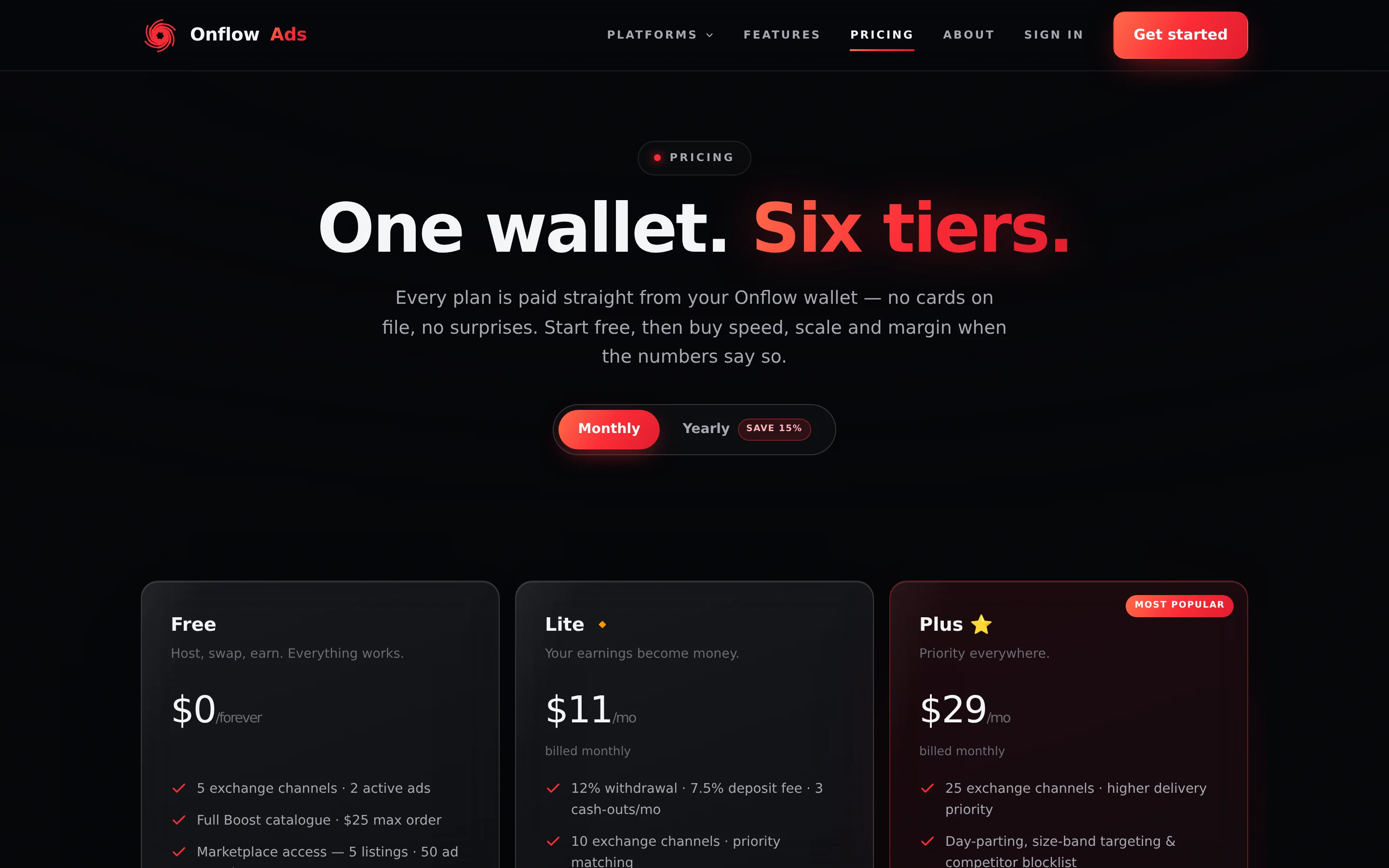
Signed out. The public pricing page. The Monthly / Yearly switch re-prices every card instantly, and all six tiers sit in one grid — Ultimate is the sixth card, not a separate banner. Signed in, a one-line status pill appears directly under the billing switch.
Who this section is for
- Anyone on Onflow Ads. Free is a complete working account, so the ladder is a question of how far and how fast you want to go, not whether the product works.
- Channel owners who want faster escrow payouts on what they earn, more listings, and a lower fee when they cash out.
- Advertisers and agencies who need bigger limits, higher priority and pro tooling across the marketplace, Boost and the exchange.
The six tiers
| Tier | Monthly | Yearly (Save 15%) | In one line | Its own page |
|---|---|---|---|---|
| Free | $0 | $0 | Host, swap, earn. Everything works. | Free |
| Lite 🔹 | $11 | $112.20 | Your earnings become money. | Lite |
| Plus 🔸 | $29 | $295.80 | Priority everywhere. | Plus |
| Elite 💠 | $99 | $1,009.80 | Proof, guarantees, API. | Elite |
| Master 👑 | $349 | $3,559.80 | The agency plan. | Master |
| Ultimate ⭐ | $1,200 | $12,240 | Not a plan — a partnership. Application only, 50 seats. | Ultimate |
Prices are in USD and are always shown in the checkout before anything is charged. A monthly term runs 30 days; a yearly term runs 365 days at a flat 15% discount off twelve monthly payments. You do not need dollars to pay: from India you can top up your wallet in rupees by UPI, card or netbanking. The exchange rate and the exact total are shown before you pay, and the wallet is credited in US dollars. See Top up with UPI or card.
The Plus card is visually featured on the pricing page — it sits on a brighter panel — but it carries no "Most Popular" text. The published plan catalogue does flag Plus as the most popular rung, and the separate Telegram-platform pricing page prints that label, so you may see it in the Telegram bot's plan cards.
Ultimate is application-only, limited to 50 seats globally. Its card button reads Apply and goes to the contact page. If a purchase request for Ultimate ever reaches the server it is refused with "Ultimate is application only — 50 seats. Apply through the contact page and we'll be in touch." See Applying for Ultimate.
What the ladder actually buys
Free is a real account. On Free you can enrol channels in the Subscriber Exchange, buy from the whole Boost catalogue, list channels and book placements in the escrow-protected marketplace, run cross-promotions, write ad copy with AI, deposit funds and withdraw earnings. A paid tier does not switch the platform on — it buys speed, scale and margin:
- Lower fees. The withdrawal fee falls from 15% on Free to 5% on Ultimate. The deposit fee on wallet top-ups falls from 9% to 4%. The marketplace fee is the same on every plan.
- Higher limits. More enrolled exchange channels, more active ads, bigger Boost orders, more listings, more monthly placements, more cross-promotions you can start each month.
- Priority. Higher matching priority in the exchange, the priority Boost delivery add-on from Plus up, and faster marketplace payouts — Free releases an owner's escrow after the full run, Ultimate within 24 hours.
- Pro tooling. Finer targeting, CSV exports, the Boost developer API, included delivery guarantees, Placement Proof Certificates, delivery insurance, order webhooks and more, each unlocking at a named rung.
Each paid tier carries a badge you will see across the platform: 🔹 Lite, 🔸 Plus, 💠 Elite, 👑 Master, ⭐ Ultimate.
For the full side-by-side breakdown, read Comparing the tiers. For one rung explained area by area, open its own page from the table above.
How paying works, in short
- Charged from your wallet. The full term leaves your Onflow Ads wallet balance the moment you confirm. If the balance does not cover it, the checkout turns into a Top up to continue panel and nothing is charged.
- Nothing auto-renews. A membership expires at the end of its term unless you renew it. Renewing early never wastes a day — the new term is added on top of your remaining time.
- Upgrades are instant, and they replace. A higher tier starts a fresh full term today and forfeits the days left on the tier you held, with no refund. The checkout says so and makes you tick a box.
- No mid-term downgrades. A lower tier's button stays disabled until your current membership expires.
The details — the automatic first-purchase discount, the legacy $11 price lock, and where a lifetime membership comes from — are in How billing works.
The Referral Programme sits beside the ladder
Referring people pays in boost credit, not in tier: one OFRF-###-#### code per account, a permanent binding at signup, and a share of every top-up the person you referred pays, credited to you as non-withdrawable boost credit. It lives at onflowads.com/account/referrals — the full walkthrough is in Referral Programme.
Where a tier is written down
Your tier is a value on your account row in the shared database, together with its expiry date. The website is the only place it is ever written — a purchase, or an operator's manual grant. The Telegram bot reads that same row and mirrors the benefit table locally, which is why one membership behaves identically on both surfaces and why there is nothing to sync after you buy. The bot cannot sell a membership at all; every plan button in the bot opens this website. See How billing works.
In this section
Comparing the Tiers
The full side-by-side comparison of all six tiers — every limit, fee and feature, area by area — plus how to read the ladder and the buttons on the pricing page.
Buying a Plan
A complete walkthrough of buying an Onflow Ads tier on the pricing page — the checkout rows, the pay button, the success panel, and every message the flow can show you.
Managing Your Membership
What every button on the pricing page means once you hold a paid tier, and which of the three flows — renew, upgrade, or wait for expiry — you actually want.
Renewing Your Membership
How to extend the tier you already hold, why the new term stacks on top of your remaining days, and why renewing early is the way not to lapse.
Upgrading Your Tier
How an Onflow Ads upgrade works — the immediate switch, the forfeit warning and its checkbox, what it really costs, and when waiting is cheaper.
Downgrading & Letting a Plan Lapse
Why Onflow Ads blocks mid-term downgrades, how to move to a lower tier, exactly what changes the moment a membership expires, and what stays untouched.
How Billing Works
The rulebook behind every Onflow Ads membership — how you are charged, how long a term runs, the two discounts, the legacy price lock, lifetime grants, and why nothing auto-renews.
Where Tier Limits Appear
A tour of every place the product shows or enforces your plan — status strips, quota counters, locked controls and limit messages — plus the one-off purchases that get you past a cap without upgrading.
Post Buttons & Links
The composer ladder — how many inline buttons each tier gets, what colour they may be, which Telegram links are allowed at which rung, how the $1 External Links add-on works, and the attribution line the platform appends.
Marketplace Entry Gates
The subscriber and reliability floors that decide whether a channel or an account may enter Paid Promotions, the Subscriber Exchange or Cross-Promotion — 1,000 subscribers to list or enrol a channel — and why no tier exempts you from them.
Free
Everything the Onflow Ads Free tier includes, product area by product area — and exactly where its limits sit.
Lite
Everything the Onflow Ads Lite tier unlocks at $11 a month — area by area, what changes from Free, and where its limits sit.
Plus
Everything the Onflow Ads Plus tier unlocks at $29 a month — area by area, what changes from Lite, and the legacy $11 price lock that applies to it.
Elite
Everything the Onflow Ads Elite tier unlocks at $99 a month — proof, guarantees, insurance and Boost API access, area by area.
Master
Everything the Onflow Ads Master tier unlocks at $349 a month — the agency plan and the highest limits you can buy directly, area by area.
Ultimate
Everything the application-only Onflow Ads Ultimate tier includes — the platform ceiling on every dimension, area by area, and the few places it matches Master rather than beating it.
Applying for Ultimate
How the application-only Ultimate tier is granted, how to apply for one of its 50 seats, what the card actually promises, and what happens after you send an application.
Testing Accounts
What the operator-set Testing flag does to an account — why it shows top-tier limits on a Free row, exactly which gates it lifts, and the two it deliberately does not.
Plans FAQ & Troubleshooting
Quick answers on choosing, buying and keeping an Onflow Ads plan — plus every billing and limit message the product can show you, explained against the live wording.
Next: Comparing the tiers — the side-by-side breakdown that tells you which rung you actually need.