Escrow and Getting Paid
Every booking is escrow-backed: the advertiser pays at checkout and Onflow Ads holds the money until delivery is verified. Your payout — the booking price minus the marketplace fee, exactly the amount printed on the booking card — releases to your wallet on a schedule, and from the wallet you can withdraw.
This page is the whole money path, from the moment a booking is accepted to the moment cash leaves the platform.
Each stage has its own reference: the booking is an OFO-, the payout landing in your wallet is an OFT- on your Activity ledger, the withdrawal that takes it off the platform is an OFW-. Quoting the right one tells support exactly which stage you mean.
The Payouts panel
The top of your bookings queue shows Payouts — "what you're owed, dated".
| Element | What it shows |
|---|---|
| Available now | Delivered placements whose hold has cleared. With money in it the tile reads "claim in Delivered"; without, "nothing cleared" |
| Next 30 days | Everything scheduled to release within a month, retention holds included |
| Earned to date | Your lifetime completed payouts |
| The column chart | Every dated release. Green columns clear to your wallet; blue columns are retention holds. The key beneath names both |
| Scheduled releases | A dated list under the chart, each row showing the date, the number of placements and the amount; retention rows are tagged "retention hold" |
| Forecast | Accepted but not yet delivered bookings, with the note "Estimated release once each post goes live — not a committed date." |
With nothing held yet: "No held payouts yet — delivered placements will show their release dates here."
What you are actually paid
Your payout is fixed when the booking is priced and printed on every card as "you receive $X" with "after N% fee".
- The marketplace fee is one rate, the same on every plan. The standard rate is 9%, charged to both sides: the advertiser pays your price plus 9%, you receive your price minus 9%, and the platform keeps both slices. List a slot at $100 and the advertiser pays $109, you receive $91, and $18 stays with Onflow Ads. No plan changes it.
- The veteran rate is earned, never bought. Once one of your channels has completed 100 clean campaigns, the veteran rate is 7% on every payout to your account. The count is per channel — campaigns on several channels are never added together; one channel has to reach 100 on its own — and only campaigns completed after your most recent reliability penalty count: a penalty restarts the count from zero, a penalty overturned on appeal is marked forgiven and restores it by itself, and wash trades never count. Your progress ("37 of 100") is shown on your Paid Promotions pages.
- An auction settles at its own rate. The winner pays exactly what they bid and you receive the winning bid minus the auction fee: the auction fee is 11%, deducted automatically at settlement, and the veteran rate does not apply to it. See Running auctions.
- The numbers are the platform's, published live, and fixed onto each booking. Every rate is published live on the Paid Promotions pages, so a change reaches every page at once — and a booking keeps the rate it was priced at, whatever changes afterwards. Whatever rate applies is printed on the card.
When escrow releases
After a booking is marked delivered, three clocks matter.
1. The advertiser's review window — the ad's promised duration, capped at 48 hours. Inside it they can confirm the post (which releases your payout on the spot) or raise a concern (which holds it). Letting it lapse counts as delivered.
2. Your plan's payout schedule. The release date is computed at the moment you deliver, from your plan at that moment, and written onto the booking.
| Plan | Escrow release |
|---|---|
| Free | After the full run — the format's whole promised duration |
| Lite | Within 7 days |
| Plus | Within 72 hours |
| Elite | On the advertiser's confirmation, or 48 hours |
| Master | On the advertiser's confirmation, or 48 hours |
| Ultimate | Within 24 hours |
The "on confirmation, or N hours" rungs never pay before the buyer's own review window has passed — a seller's subscription cannot shorten a buyer's protection. On every rung the cap can only bring a payout forward, never push it back.
3. The advertiser confirming early — at any point they can confirm the post went live, which releases your payout immediately whatever your plan.
On the Free plan the hold tracks the format exactly: a 1h top · 24h feed placement holds for 24 hours, a native placement for a week, a monthly placement for 30 days. If long formats are tying your money up, either move up a plan or lean on instant payout — and remember that a plan change only affects placements delivered after it.
Claiming
When the date arrives — or the advertiser confirms — the card in Delivered reads "Delivery verified — the hold has cleared." with a Claim $X payout button.
- Press it once. It arms and changes to "Tap again — claim $X".
- Press it again. The money is credited to your wallet immediately, the booking moves to Completed, and you get a "Payout released" notice.
You never have to remember: releases also happen automatically on the scheduled date, so an unclaimed payout is never lost. Claiming takes it the moment it is available.
Before the date the card explains itself: "Funds release automatically on [date] UTC, once the verification window has passed. The advertiser can release it sooner by confirming the post."
Instant payout
On a delivered booking whose release date has not arrived, you can release early for a flat fee — 5% of the payout, open to every plan, once the advertiser's review window has passed.
- The card shows Get it now · $NET with the fee beside it: "$FEE early-release fee (5%)". The button shows the net.
- It takes a second confirming tap: "Confirm · $NET now ($FEE fee)".
- The fee is retained by the platform for the acceleration and appears as its own note on the wallet line. It never changes the payout you earned.
- Funds go to your wallet only. Withdrawal still goes through the normal queue, so paying yourself early is not a shortcut out of the platform.
Before the review window has passed the card shows the date instead: "Instant payout opens [date]." If the payout has already cleared, it refuses with "This payout is already available — claim it free from the booking."
The same guards apply as a normal claim: no open dispute, no monitor flag, no frozen wallet, no unmet verification threshold.
The good-faith deposit comes back separately
If accepting the booking staked a refundable good-faith deposit, it is returned as its own wallet line at the same moment your payout is credited — never netted against it, so your statement shows both movements. It comes back as withdrawable funds, because that is how it was taken.
It is returned on clean delivery, returned if the advertiser cancels, and returned when a missed window was caused by a platform failure. It is forfeited to the advertiser only when the failure was yours.
Retention escrow
Some bookings carry a retention hold: an option an Elite-and-above advertiser can add at checkout, which keeps part of your payout in escrow past delivery.
| Rule | Value |
|---|---|
| Slice held back | 20% of the payout |
| Held for | 14 days from delivery, or until the rest of the payout releases — whichever is later |
| Shown as | A blue entry tagged "retention hold" in your Payouts panel, with its own date |
The "whichever is later" matters on long formats. A month-long placement on the "after the full run" rung pays at day 30, and a slice that came back to you on day 14 would not be a retention hold at all — it would be the first part of your payout rather than the last. So on those bookings the hold runs to the payout date instead of the fourteenth day. On every faster rung the fourteen days are the longer clock and nothing changes.
At the end of the window the slice is released to you when both of these are true:
- the placement was never flagged by the monitor, and was not refunded or disputed; and
- your channel's live subscriber count is not below the count snapshotted when you accepted the booking.
If the live count cannot be read at that moment, that half of the test is skipped rather than failed — an unreadable count is never treated as a fall. On a clean release you get "Held-back payout released to you"; where the terms were not met, the slice goes back to the advertiser, and the refund is capped at whatever has not already been refunded, so an insured-and-flagged booking can never be refunded twice.
The test is that your channel has not shrunk against its size on the day you accepted. Flat is a pass. A channel that lost subscribers for reasons unrelated to the ad still fails it, which is the honest reading of the term the buyer paid for — but nothing in the test touches your reliability score.
What blocks a release
A payout is held — never lost — while any of these is true. Each names itself on the booking.
| Block | What you see | How it clears |
|---|---|---|
| Open dispute | "A fraud concern on this booking is under review — the payout is on hold until our team resolves it." | The review is decided, either way. See Disputes |
| Monitor flag | "We've flagged a problem with this placement — the payout is paused until it's resolved. Re-post the ad or contact support." | The problem is resolved. See Delivery monitoring |
| Frozen wallet | "Your wallet is temporarily on hold while a concern is reviewed. Payouts resume once it's cleared." | The concern is decided, in either direction |
| Verification threshold | "This payout crosses a verification threshold … your funds are held safely until then." | You clear the matching level. See Identity verification |
More than one can apply at once, which is why a booking sometimes stays held after you clear the reason you knew about.
Withdrawing your earnings
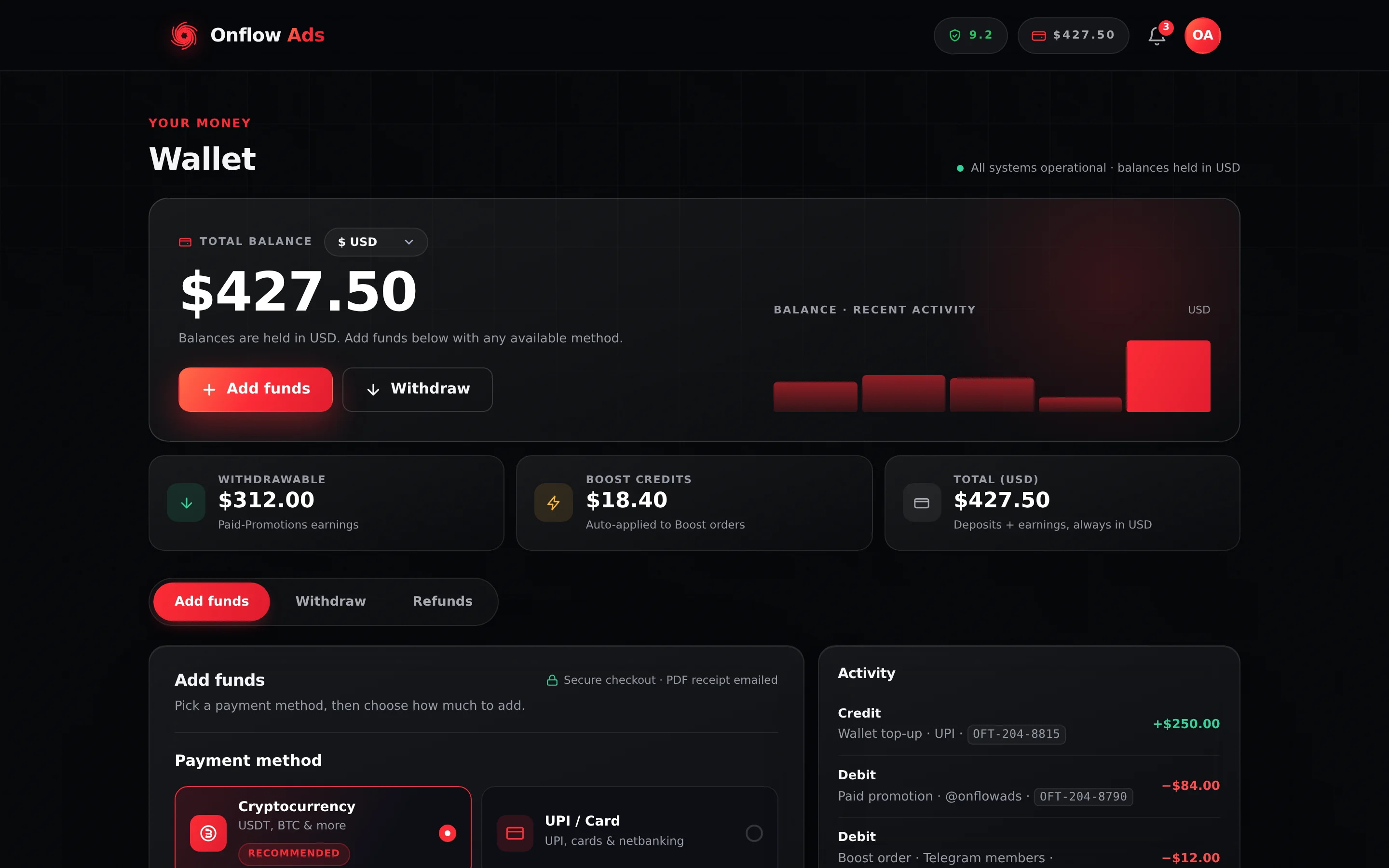
Plus plan · Advertiser. The wallet is shared by every Onflow Ads product, so it looks the same on both sides of the marketplace. The Withdrawable tile is the only figure a withdrawal can draw on.
- Open https://onflowads.com/telegram/dashboard/wallet and pick the Withdraw tab.
- Choose a Withdrawal method — Telegram Stars, UPI or USDT on BEP-20.
- Enter the Destination for that method.
- Enter the Amount (USD). The panel shows your withdrawable balance, the minimum of $5.00, and "You receive $X after fees" as you type.
- Press Request Withdrawal. The gross amount is held from your balance immediately and the request enters the review queue as pending, visible in My withdrawals.
Every withdrawal is reviewed before it is sent, and a rejected request refunds the held amount in full.
| Plan | Withdrawal requests per calendar month |
|---|---|
| Free | 1 |
| Lite | 3 |
| Plus | 6 |
| Elite | 12 |
| Master | 30 |
| Ultimate | Unlimited |
Placement payouts and returned good-faith deposits are withdrawable. Late-cancellation compensation, refund credit and promotional credit are spendable on Onflow Ads but cannot be cashed out, and boost credit is a separate balance entirely. The wallet page shows the withdrawable figure on its own tile — check that one before planning a withdrawal.
Full detail on methods, fees and timing is in Withdrawing earnings.
If something goes wrong
| What you see | What it means | What to do |
|---|---|---|
| "There's nothing to pay out on this booking yet." | The booking is not a delivered, still-active placement | Check the tab — it may already be completed |
| "Funds release automatically on [date] UTC…" | You claimed before the release date | Wait, ask the advertiser to confirm, or use instant payout once their review window has passed |
| "Instant payout opens after the advertiser's review window on [date]." | The buyer still has time to look at the post | Wait for the date on the card |
| "This payout is already available — claim it free from the booking." | You pressed instant payout on a cleared payout | Use Claim instead and pay no fee |
| "This payout crosses a verification threshold…" | Your lifetime payouts have reached a KYC band | Complete the card at the top of your bookings queue. See Identity verification |
| A release date longer than your current plan's hold | Release dates are pinned at delivery from the plan you had then | Deliberate — the date you earned by delivering must not slide because a subscription changed weeks later |
| Balance you cannot withdraw | Some of it is not withdrawable, you are under the $5.00 minimum, your wallet is frozen, or you have used the month's requests | Check the Withdrawable tile first, then the other three |
Ask how much did I earn this month or my payouts and the assistant answers from your live owner figures and payout history. What the assistant can do for you has the full list and the confirmation rule.
Related
- Identity verification (KYC) — the one thing that holds a payout once earnings add up.
- Delivery monitoring and your reliability — the flag that pauses a payout.
- Disputes — the seller's side — the freeze, and how long it lasts.
- Withdrawing earnings — methods, fees and timing in full.