Earning as a Channel Owner
The Paid Promotion marketplace lets you sell ad placements in your public Telegram channel. Advertisers browse the marketplace, pick your channel, and book a slot from your rate card. Their money is held in escrow by Onflow Ads, the ad is published, our monitor verifies it actually ran, and the payout lands in your wallet.
This section covers the selling side, one page per task: choosing the channel-owner side, listing a channel, pricing it, controlling when it can be booked, answering booking requests, posting the ad, proving delivery, getting paid, and keeping your standing healthy.
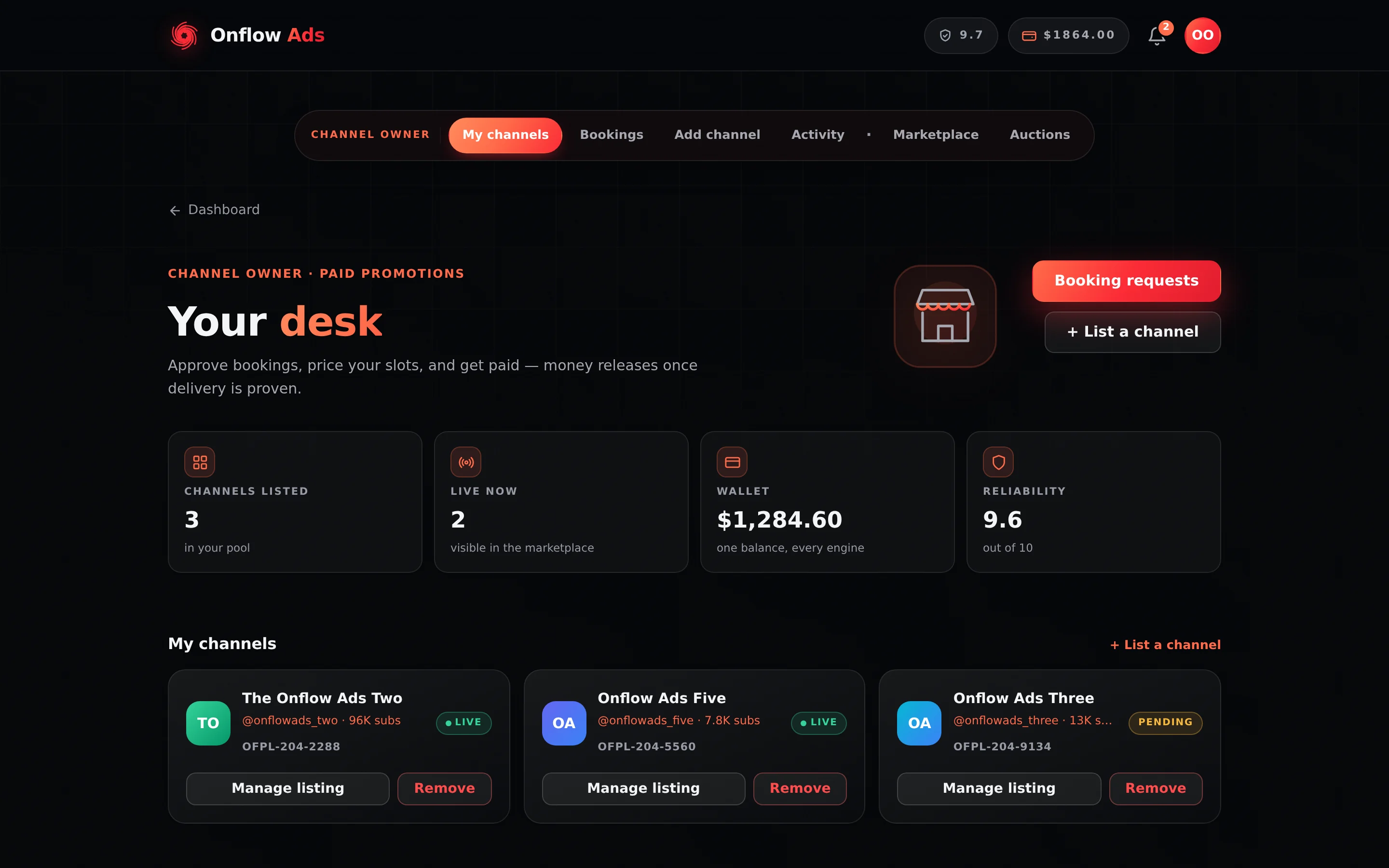
Elite plan · Channel owner. This is what
/telegram/dashboard/paid-promotionbecomes once your account is on the selling side. Look at the subnav first: everything after the separator dot is browse-only.
Who it is for
You can sell placements if:
- You own or manage a public Telegram channel. Private channels, groups and invite-only links cannot be listed.
- The channel has at least 1,000 subscribers. The floor is set by Onflow Ads and can be changed; if your channel falls short, the current minimum and your channel's real count are both named when you try to add it.
- You can add @OnflowAdsBot as an administrator of the channel with the Post Messages and Delete Messages rights, so Onflow Ads can verify its reach, publish every booked ad, monitor it, and remove it when its run ends. Edit Messages of Others is optional and needed for exactly one thing: offering the pin. Without it everything else works normally.
- Your account is on the channel-owner side of the marketplace. That side is chosen once and can never be changed — see Choosing the channel-owner side.
Where everything lives
Once your account is on the owner side, a subnav bar appears at the top of every Paid Promotions page. It carries the role label Channel owner and six pills, in this order:
| Pill | Address | What you do there |
|---|---|---|
| My channels | /telegram/dashboard/paid-promotion | Your desk: listed channels, how many are live, your wallet balance and your reliability at a glance |
| Bookings | /telegram/dashboard/paid-promotion/bookings | Accept or decline requests (the pill in the bar counts the ones waiting); cancel an accepted booking before it posts; mark ads posted; claim payouts; verify your identity |
| Add channel | /telegram/dashboard/paid-promotion/new | The four-step wizard that creates or edits a listing |
| Activity | /telegram/dashboard/paid-promotion/activity | Booking requests, payouts, feedback and disputes as they happen |
| Marketplace | /telegram/dashboard/paid-promotion/catalog | Browse-only. See what comparable channels charge before you price your own |
| Auctions | /telegram/dashboard/paid-promotion/auctions | Host an auction on one of your own slots, and watch it run |
The separator dot before Marketplace is the line between selling and looking. An owner account cannot book a placement: the cart, the booking composer, campaigns, the watchlist, the Channel finderner and the buyer analytics pages all send an owner back to the desk, and every buy-side API refuses an owner outright. Marketplace is there so you can price against your peers; Auctions is there because owners host auctions.
Four more surfaces you will use that are not in the subnav:
| Surface | Address | What it holds |
|---|---|---|
| Listing manager | /telegram/dashboard/paid-promotion/listing/ plus the listing's OFPL- id | Booking lead time, blackout dates, auto-accept, dynamic pricing, spotlights, category sponsorship, priority review, analytics, reviews, and the public link to share |
| Wallet | /telegram/dashboard/wallet | Your balance, transaction history and withdrawals |
| The channel's own dashboard | /telegram/dashboard/channels/ plus the channel's OFCH- id, then /overview | One read-only page per channel: measured subscribers, views, reactions and shares per post, posting cadence, what the channel has run in each of the four engines, and what it has earned. Covered in A channel's own dashboard |
| Your public channel page | /pc/ plus your channel's short share code | The sign-in-free page you hand a prospective advertiser — see Your public channel page |
Nine controls live only on the listing manager, and nothing in the web interface links to it. The Manage listing button on your desk opens the pricing wizard instead, and the subnav has no pill for it. The one route in is the 📊 Manage channel button on the Telegram message Onflow Ads sends when a listing passes verification — so link your Telegram, and bookmark the page the first time you reach it. Full detail, including what to do if you never got that message: The listing manager.
The life of a booking
- An advertiser books a slot. Their payment is debited immediately and held in escrow. The request appears in your bookings queue, and — if your Telegram is linked — as a bot message.
- You answer before the deadline on the card — 24 hours, or the ad's go-live when that comes first. Accept it at your listed rate, or decline it with a reason. On a channel whose lead time is under 24 hours a request can reach you with as little as two hours to answer, and the card says so; see Managing availability. A request nobody answers auto-declines, refunds the advertiser in full, and costs you 0.30 reliability points. Declining by hand costs nothing.
- The ad is published — and later removed — by the platform. The bot posts the booked creative the moment the window opens and takes it down when the booked duration ends. You publish nothing and delete nothing. Nothing is pinned unless the buyer paid for the pin extra, in which case the platform pins it for the whole run.
- Delivery is proven at publication. The live link, the message id and the agreed creative are recorded the instant the ad goes up. The monitor then checks repeatedly that the post still exists and samples its real view counts, and a separate one-off sweep checks that nothing else went up in your channel during the format's opening window.
- The money releases. The advertiser gets a review window. After that, escrow releases on your plan's payout schedule — or immediately if the advertiser confirms the post. The payout, minus the marketplace fee, lands in your wallet.
- You withdraw. Placement earnings are withdrawable from the wallet page.
What Onflow Ads takes
Onflow Ads charges one marketplace fee on each booking, and it is the same on every plan: the standard rate is 9%, charged to both sides. The advertiser pays your price plus 9% and you receive your price minus 9%; the platform keeps both slices. List a slot at $100 and the advertiser pays $109, you receive $91, and $18 stays with Onflow Ads.
The veteran rate is 7%, and it is earned, never bought: once one of your channels has completed 100 clean campaigns, every payout to your account is charged 7% instead of 9%. Campaigns on several channels are never added together — a single channel has to reach 100 on its own — and only campaigns completed after your most recent reliability penalty count. Your progress towards it is shown on your Paid Promotions pages.
An auction is priced differently: the winner pays exactly what they bid, and you receive the winning bid minus the auction fee. The auction fee is 11%, deducted automatically at settlement, and the veteran rate does not apply to it. See Running auctions.
Every booking card prints the result as "you receive $X" with "after N% fee" underneath, and that payout is fixed when the booking is priced — there is no counter-offer, so it never moves afterwards. The four numbers are the platform's, published live on the Paid Promotions pages, and a booking keeps the rate it was priced at even if they change later.
A reliability penalty restarts the count of clean campaigns behind the veteran rate, so a booking priced after one is back at the standard rate until a channel of yours reaches 100 again; a penalty overturned on appeal restores the streak by itself. The rate actually applied is printed on the booking card, so a different fee is never silent. See Delivery monitoring and your reliability.
The IDs you will be quoted
Selling touches several references. They are part of the platform-wide Onflow Ads IDs scheme.
| ID | What it names | Where you will see it |
|---|---|---|
OFCH-… | One of your channels | On the channel, and in every email about it as Channel ID |
OFPL-… | A listing — that channel's shop window, with its rate card | On the desk card, on the listing manager, and in listing emails |
OFO-… | One booking — a single placement you were asked to run | On the request in your bookings queue, on the Telegram booking message, and on the Reference line of emails |
OFP-… | The advertiser's campaign the booking belongs to | Quoted by the advertiser; you deal in the OFO- |
OFPD-… | A dispute raised on one of your placements | On the dispute thread — see Disputes |
OFPA-… | An auction you are hosting | On the auction — see Running auctions |
OFPS-… | A spotlight deal you launched | On the running deal in the listing manager |
OFPV-… | A review left on your listing | On the review card |
OFPZ-… | A proof certificate for a delivered placement | Issued by the advertiser from their side; you would only meet one if it is quoted to you |
OFT-… | A wallet movement — each payout credit and each fee | On its row in your wallet's Activity |
OFW-… | A withdrawal request | In My withdrawals — see Escrow and getting paid |
OFRE-… | One reliability event — a single change to your score | On its row in Your ledger on the reliability page |
A channel and its listing are not the same thing: OFCH- names the Telegram channel, OFPL- names the offer you built on top of it. You can have a channel with no listing; you cannot have a listing without a channel.
OFO-Whenever you contact support about a specific booking — the brief is unclear, the schedule slipped, a payout has not landed — lead with that booking's OFO-. It resolves in one step, on both sides of the deal, and there is nothing to explain.
In this section
The pages below run in reading order: pick your side and list a channel, then price it and control when it can be booked, then handle bookings, post, prove and get paid, then the trust and growth tools around it.
Choosing the Channel-Owner Side
The permanent, one-time choice that puts an account on the selling side of the marketplace — how to make it, what it locks in, and how to connect Telegram afterwards.
Listing Your Channel
The four-step listing wizard — adding a channel, pricing the slots, the rules step and its one trap, verification, and the re-checks that run afterwards.
The Listing Manager
The per-channel control room — how to reach a page nothing in the product links to, what each of its panels does, and which controls exist nowhere else.
Prices and Offers
Build and tune your rate card — the placement formats and what they really promise, the one paid extra and what it pays you, dynamic pricing, buyer perks, spotlight deals, and exactly how a buyer's price is assembled.
Managing Your Availability
Control when your channel can be booked — booking lead time, blackout dates and auto-accept — plus exactly which of your rules the platform enforces at checkout.
Receiving, Accepting, and Declining Bookings
Work your bookings queue — the answer clock (24 hours or go-live), the good-faith deposit and its exact numbers, declining, cancelling before posting, bulk actions, and what the Telegram message really carries.
Posting the Ad
The bot publishes every accepted booking and removes it when the run ends — what happens at the window, the rights it needs from you, the quiet hours you owe the buyer, and what happens if publishing fails.
Proof of Delivery
Delivery is proven the instant the bot publishes — the record it writes, the five clocks that start, the signed proof archive both parties read, and what to do when something looks wrong.
Escrow and Getting Paid
The whole money path for sellers — the payouts ledger, when escrow releases on each plan, instant payout, retention holds, what blocks a release, and how to withdraw.
Identity Verification (KYC)
Verification scales with your lifetime payouts — the three thresholds, what each level asks for, how the gate behaves, and how to clear it before a payout is ever held.
Delivery Monitoring and Your Reliability
What the monitor checks on a delivered ad, the exclusivity sweep that watches the opening window, the safeguards that stop a false flag, what each penalty costs, and how a damaged reliability score heals.
The View Guarantee
What guaranteed-views placements mean for a channel owner — you are always paid in full, the make-good is funded by Onflow Ads, and nothing extra is asked of you.
Disputes — the Seller's Side
What happens when an advertiser raises a fraud concern on your placement — the holds and how long they last, the evidence used, both outcomes, and how to protect yourself.
Promoting Your Listing
Get seen by more buyers — the free public link, category sponsorship, priority review, the Standing score that drives ranking, the Performance Passport, and the analytics panels that tell you what to fix.
Your Public Channel Page
The sign-in-free page an advertiser can open at your link — where to find the link, why it only exists while your listing is live, what a visitor reads, and what they can actually do on it.
Running Auctions on Your Slots
Auction one rate from your rate card instead of selling it at a fixed price — pick the slot, set when the ad goes live and when bidding closes, optional reserve and instant-buy cap, escrow-backed bids, anti-sniping, and how a winning bid becomes a normal booking.
FAQ and Troubleshooting
The channel-owner section indexed by symptom — the error message or the surprise you hit, the one-paragraph answer, and a link to the full page.
Next: Choosing the channel-owner side — the one permanent decision on this account.