Watchlist and Price Alerts
The watchlist is your saved-channels list with built-in price tracking. Save a channel you are not ready to book and the platform snapshots its price daily, so when it gets cheaper you can see it — and prove it is cheaper than when you saved it.
It lives at https://onflowads.com/telegram/dashboard/paid-promotion/watchlist (the Watchlist pill).
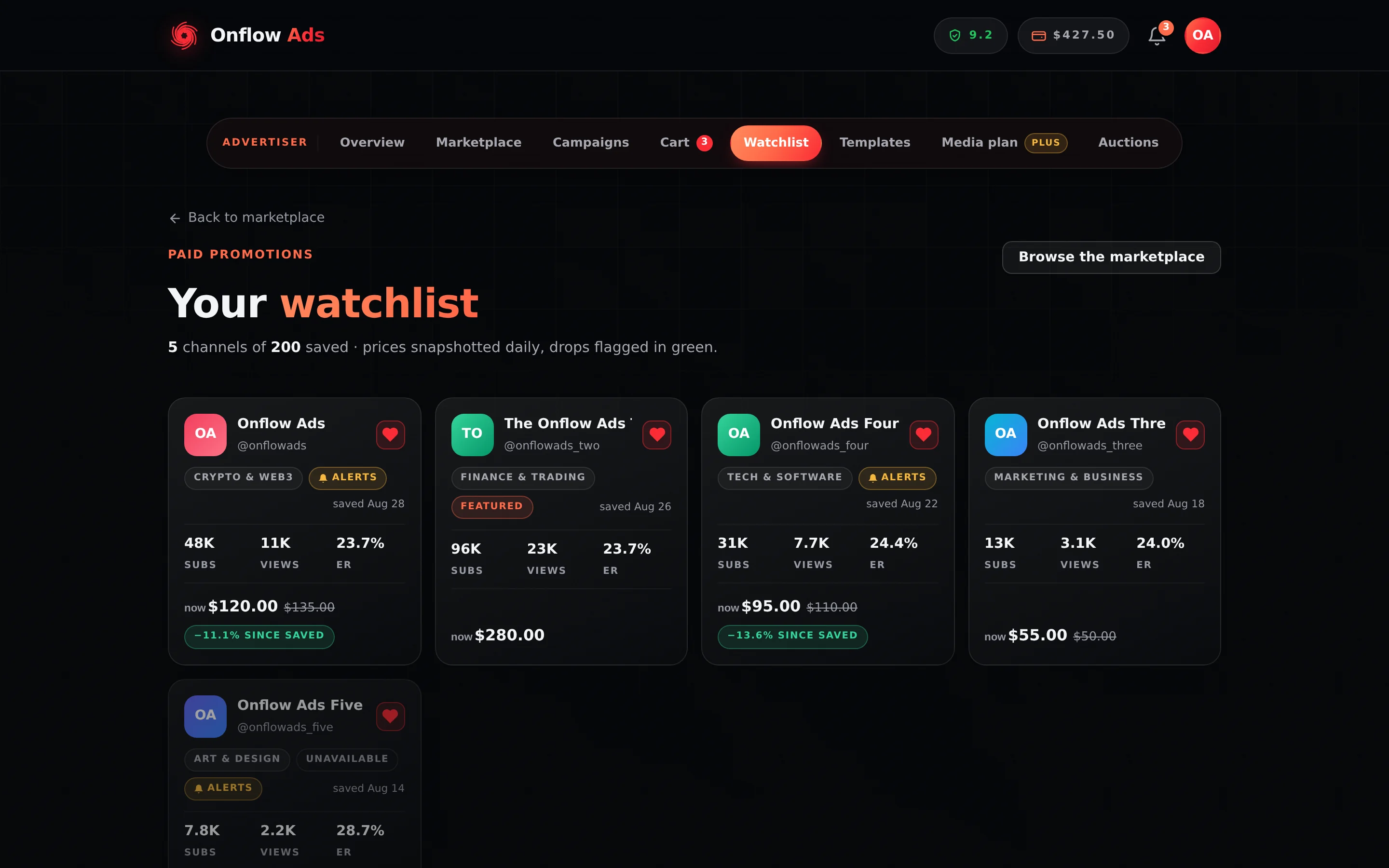
Plus plan · Advertiser. A watchlist with five channels saved. The subtitle counts what you have saved against your plan's ceiling; the green chip is a price drop since the day you saved it.
Before you start
- Advertiser role required. The page redirects a channel-owner account to the Paid Promotions hub.
- Every plan can keep a watchlist, including Free. What a paid plan buys is being told when something changes — see Alerts below.
- The channel must be live to be saved. A paused or removed listing cannot be added.
Step by step
- Open the marketplace catalog or any channel page.
- Press the heart on a channel card. The catalog confirms with "Saved to your watchlist."
- Open the Watchlist pill. Every saved channel is a card, newest first.
- Press the filled heart on a card to remove it. The card dims while the removal confirms and comes back, with the reason, if it fails.
You can also narrow the whole marketplace to your saved channels with the heart-labelled Watchlist toggle next to the catalog's search box.
The heart swaps instantly and reconciles in the background; the request always reports what the state is, not what changed. A double-tap on a slow connection can never leave the icon disagreeing with what is actually saved. If the save genuinely fails the heart reverts and tells you why.
What each card shows
| Element | What it is |
|---|---|
| now $X | The channel's current entry price |
| A struck-through price beside it | What it cost when you saved it, shown only when the two differ |
| −N% since saved (green) | The drop, to one decimal place. This is the point of the page |
| saved Mar 4 | The date you added it |
| subs / views / ER | The channel's live statistics |
| A gold bell alerts badge | Price-drop notifications are armed for this channel |
| A grey Unavailable badge, card dimmed | The listing has since been paused or removed. It stays on your list so you notice if it returns |
| A Featured badge | The channel currently holds a paid featured slot |
Pressing a card opens the channel page.
The price on a watchlist card, the 90-day price-history chart and the body of a price-drop notification all quote your all-in price — the owner's rate plus the marketplace fee at your rate (the standard 9%, the same on every plan, or the veteran rate once you have earned it) — exactly as the catalog card, the channel page's rate rows and the cart do. A channel listed at $100 reads $109 everywhere you see it. The drop percentage is the same either way.
What the numbers mean
| Rule | The figure |
|---|---|
| Watchlist capacity | 200 channels per account |
| Price snapshots | Written by a sweep that runs every 6 hours, keeping one value per listing per UTC day — so the stored figure is that day's last reading |
| Price-history window | 90 days |
| Alert threshold | A drop of 5% or more. Smaller moves never notify |
| Alert re-arm | Only after the price recovers to or above the price you saved at |
| Auction pings | One per auction per watcher, ever |
| Which price is tracked | The channel's entry price — the compulsory 1 hour at the top · 24 hours in feed format, or its cheapest priced format if that one is missing |
The tracked number is the same "from" price the catalog card shows. An alert about a format you never see on the card would not be a drop you asked to hear about.
Price-drop alerts
Keeping a watchlist is open to everyone. Being notified is a plan benefit, included from Lite upward; Free and Referral Premium accounts get the list, the daily snapshots and the green −N% since saved badges, but no notification.
When an armed channel's entry price falls at least 5% below what it cost when you saved it, you get a notification titled "ChannelName dropped 12% in price", quoting the new starting price against the saved price and linking straight to the channel page.
Three guards keep the alerts worth reading:
- A drop under 5% never fires. A 2% move is noise, and notifying about it teaches people to mute us.
- One alert per drop, not one per sweep. The alert re-arms only when the price recovers to or above your saved price, so a channel that simply stays cheap does not ping you every six hours.
- Only armed watches fire. Alerts are armed automatically when you save a channel on an eligible plan; the gold bell badge on the card confirms it.
Auction alerts
On the same plans, the watchlist pings you once when a channel you watch opens a prime-slot auction — with the current top bid, or the opening price if nobody has bid yet, linking to the Auctions page. You are never pinged twice about the same auction.
If something goes wrong
| What you see | What it means | What to do |
|---|---|---|
| "That channel isn't open for bookings right now." | You tried to save a paused, draft or removed listing | A watch on an unbookable channel could never fire an alert, so it is refused. Try again if the owner relists |
| "Your watchlist is full (200 channels). Remove one to add another." | You are at the cap | Remove a channel with its heart, then add the new one |
| "Couldn't update your watchlist." | The server refused the change | The heart reverts. Reload and check the listing's current state |
| "Network error — your watchlist didn't change." | The request never arrived | Retry. Nothing was saved or removed |
| A card is dimmed and badged Unavailable | The owner paused or removed the listing after you saved it | Nothing to fix. It stays on your list so you see it if it comes back; remove it with the heart if you have moved on |
| The price dropped but you were not notified | One of three things | The drop was under 5%; or you were already notified for this drop and the price has not recovered since; or your plan does not include alerts (Free and Referral Premium) |
| The watchlist price disagrees with the catalog price | The owner changed the price since the last snapshot, or a sale or spotlight is running | The watchlist shows the regular all-in price of the entry format; a live sale is shown on the catalog card and the channel page |
Related
- Browsing the marketplace — where the heart lives, and the Watchlist toggle over the whole grid.
- Reading a channel page — the 90-day price chart the snapshots feed.
- What each plan includes — which plans get alerts.
- Discounts and deals — the other way a price falls: spotlights, sales and perks.