Orders and Campaigns
Everything you have booked lives at https://onflowads.com/telegram/dashboard/paid-promotion/orders — the Campaigns pill. The page's own lede states the rule it runs on: "One checkout = one campaign. Every number below is measured by our monitor — never self-reported by owners."
This page covers the life of an order from payment to payout. The evidence a delivered order carries is on Tracked links and delivery proof; the escalation path is on Raising a dispute.
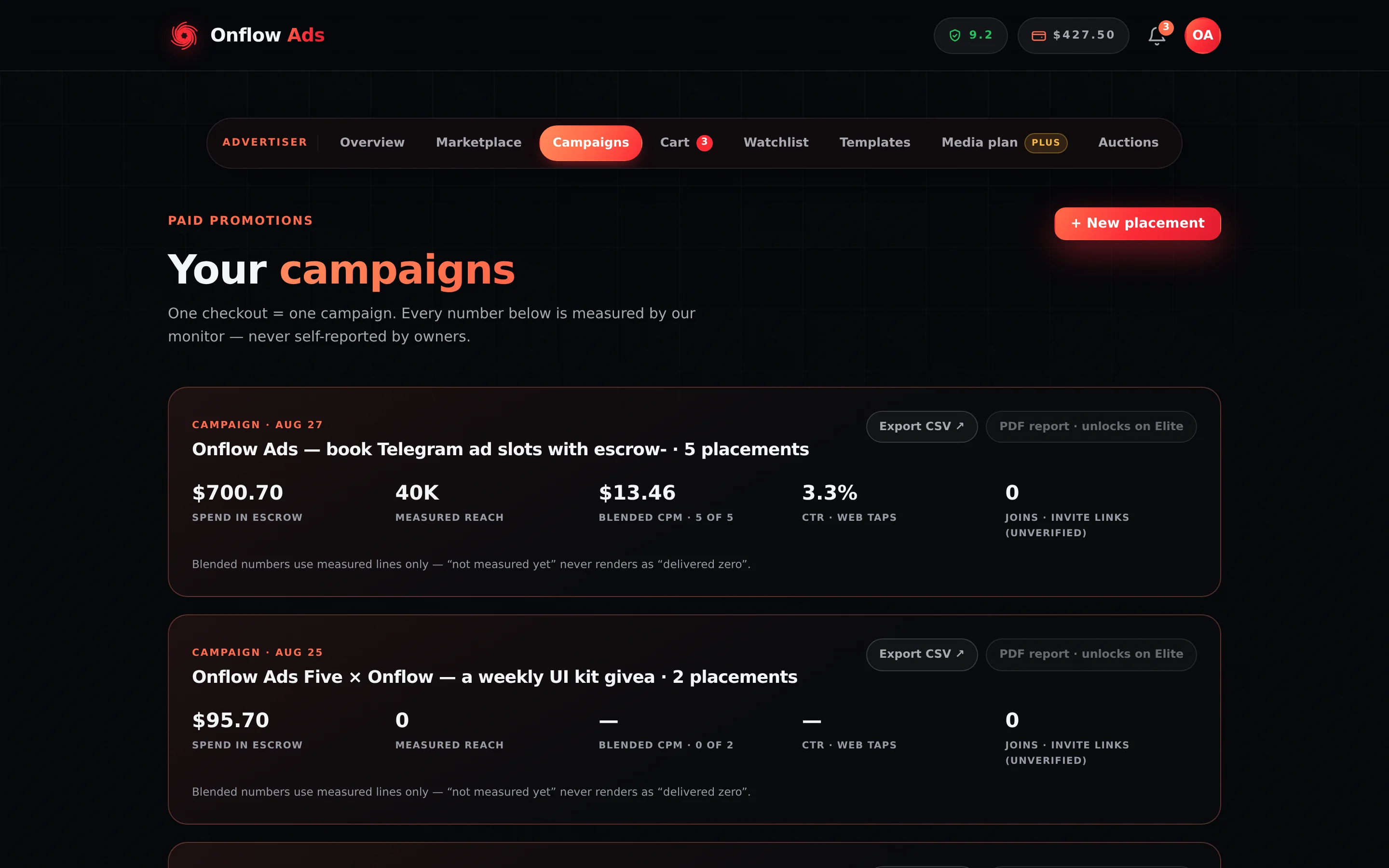
Plus plan · Advertiser. The Campaigns page with two campaigns on it. Each checkout becomes one card, with its own placements listed underneath it and blended figures measured across only the lines that have been measured.
Before you start
- Advertiser role required. A channel-owner account is redirected to the Paid Promotions hub; owners manage their side on the Bookings page.
- Every campaign carries an
OFP-reference and every placement inside it anOFO-. Quote theOFO-whenever you mean one specific post.
How the page is laid out
Top to bottom:
- One campaign card per checkout, with that campaign's order rows underneath it.
- A Placements section for any orders that do not belong to a listed campaign.
A + New placement button sits in the header.
Campaign cards
Each card summarises one checkout:
| Cell | What it is |
|---|---|
| Total spend | What you paid for this campaign — held in escrow until each placement is released, then paid out |
| Measured reach | Total monitor-measured views across its placements |
| Blended CPM · N of M | Computed from measured lines only, labelled with how many of the campaign's orders are measured |
| CTR · taps | Unique taps on your ad's links against measured views — every link is counted, a Telegram one included; see links and results |
| Joins · invite links | Members who joined your connected channel through this campaign's invite link, as Telegram attributes them |
Below those: a Measured views per channel bar chart once at least two placements are measured, a Links & results block listing that campaign's counted links — taps for every link, joins too for a link into your own channel, landings for a web page that carries the Onflow tag — with a Click analytics button for the whole campaign and Details on each link, both opening the click analytics panel, and the export chips.
The export chips are either live links or greyed labels: Export CSV ↗ or Export CSV · locked, and PDF report ↗ or PDF report · unlocks on Elite. See Analytics and reporting.
Blended CPM is divided by measured views only — mixing an unmeasured line's spend into the numerator while its views are absent from the denominator would overstate the number. A blank metric or a Measuring… badge means not measured yet, never delivered nothing.
Order status badges
Every order row carries one badge. These are the exact strings and exactly what each means:
| Badge | What it means |
|---|---|
AWAITING ACCEPT · <countdown> | Paid and in escrow. The countdown runs to the owner's real deadline: 24 hours after you booked, or the ad's go-live when you booked a slot that starts sooner than that |
SCHEDULED · <date> | The owner accepted; the post is waiting for its slot |
LIVE · verifying <countdown> | The post is published and your verification window is still open |
| LIVE | The post is published and the verification window has closed |
| LIVE · pinned | The same, on an order that bought the pin — the pin extra or the 7 days in feed · pinned throughout format. See below |
| RELEASED ✓ | The placement ran clean and the funds went to the owner. Complete |
| DECLINED | The booking failed on the owner's side. Refunded in full, automatically |
| CANCELLED | You cancelled it |
| REFUNDED | The money came back — delivery insurance or an upheld dispute |
| NEW PRICE (blue, alongside) | Legacy only: a counter-offer sent before counter-offers were retired — see Counter-offers |
The badge is derived from whether the order carries a decline reason, not from who acted. All four of these render as DECLINED, and all four refund you in full and automatically:
- the owner actively declined your booking;
- the owner never answered inside the accept window ("The channel owner did not respond in time.");
- the owner accepted and then did not post within the agreed window ("The owner did not post within the agreed window.");
- the owner could not accept at all — they are under review or below the marketplace's reliability floor — so the platform declined it for them at once rather than leaving your money waiting on a deal that could not proceed ("The channel owner is temporarily unable to accept bookings."). Nobody's reliability changes.
The reason line inside the order's timeline is what tells them apart. CANCELLED — with no reason line — means you cancelled it.
The word pinned appears on the Campaigns page only for an order that bought the pin: the pin extra, or the 7 days in feed · pinned throughout format. On such an order the badge reads LIVE · pinned and the timeline step reads Posted & pinned; on every other booking they read LIVE and Posted, because nothing was pinned — the hours at the top are top-of-feed exclusivity, not a pin.
The expanded order
Press Details on any row. Live orders expand to a five-step timeline:
- Booked & held in escrow — with the time you booked.
- Accepted by owner — with the time, or "waiting ·
<time left>". - Posted — with the publish time, or the scheduled slot. On an order that bought the pin it reads Posted & pinned.
- Delivery measured — with the measured views and real CPM once final, or "our monitor watches the post".
- Funds released to owner — with the time, or "after the promised duration runs".
A declined, cancelled or refunded order shows a two-step history instead: Booked, then the outcome with its reason.
Under the timeline, an action chip row. Which chips appear depends on the order's state:
| Chip | When it appears |
|---|---|
| 🔗 View live post ↗ | Once the post is published — opens the actual Telegram post |
Delivery proof · <date> | Once a proof archive exists. Expands the frozen, signed evidence trail |
Open a dispute · <48h SLA or queue-ordered> | While a dispute may still be raised |
Cancel booking · N% fee | While the order is AWAITING ACCEPT or SCHEDULED |
Dispute · open · resolves <countdown> | While one of your disputes is under review |
| 🚩 Report channel | From the moment the owner holds the booking — every stage after AWAITING ACCEPT. Before that the faster remedy is Cancel, which is on the same row |
Orders with delivery data also show a meter: measured views against promised views.
Four actions: open the live post, open the delivery-proof archive (optionally asking AI what it proves), raise a dispute, and 🚩 Report channel. Everything else is the monitor's job — you never have to confirm anything for a delivery to count, and the Cancel booking chip is gone by then because the slot has already been spent.
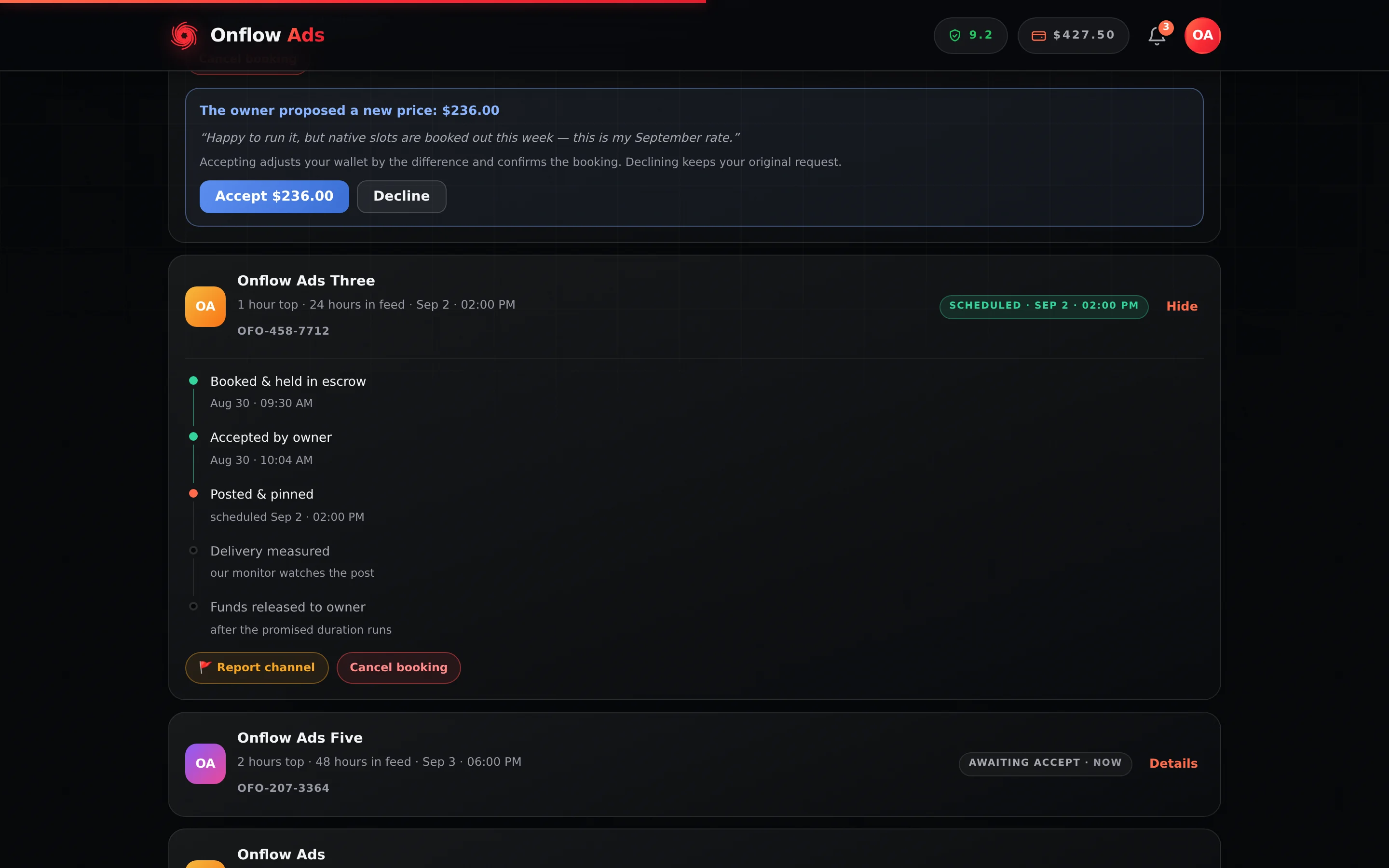
Plus plan · Advertiser — an order expanded to its action chips. 🚩 Report channel sits with the rest of them, and it names the side being reported rather than saying Report campaign to both parties.
A dispute is the money mechanism: a published clock, both sides' evidence, a verdict that moves funds. 🚩 Report channel is the safety mechanism: a human case about delivery, the audience, or the owner's behaviour, which can also move money but runs on no fixed clock. "I paid and did not get what I paid for" → dispute. "This shouldn't be allowed" → report. Both is fine. The reasons you can pick, and what the form promises, are on Reporting a campaign.
While the post is live
The delivery monitor re-checks that your post is still there for its promised in-feed duration — and, on an order that bought a pin, that it is still pinned — and samples views, forwards and reactions across the run. The check cadence is your plan's, and it is frozen onto the order at purchase — a plan change later cannot downgrade a protection mid-placement.
The "N hours at the top" half of your format is top-of-feed exclusivity, not a pin, and it is checked by a different mechanism — one retrospective read of the channel's history after the window closes. See below.
| Plan | Monitor re-check, no more often than |
|---|---|
| Free | 60 min |
| Lite | 60 min |
| Plus | 30 min |
| Elite | 15 min |
| Master | 10 min |
| Ultimate | 5 min |
A monitor flag pauses the release to the owner. See Escrow and buyer protection.
If the owner posts over your ad
Five minutes after your exclusive window closes, the platform reads the channel's history once and checks whether anything newer than your ad went up inside it. Your own album's other photos and Telegram's service messages do not count; another post does.
On a confirmed breach you are notified, under the title "Your ad did not get its full time at the top". The item names the channel, says how many posts went up and how far into the window the first one landed, and adds: "We have recorded it against the channel. Your ad is still running for its full booked duration."
| What happens | What does not |
|---|---|
| The owner loses 0.40 reliability, once | Nothing is refunded, and no discount is applied |
| Both parties are notified | The payout is not held |
| The verdict is recorded against the order | Your placement keeps running for its full in-feed duration |
No page renders the verdict — not the order row, not the timeline, not the proof archive, not the campaign rollup. Once you dismiss the notification there is nowhere on the dashboard to read it back, so keep it or quote the OFO- to support.
None of the four dispute reasons covers "the owner posted over my ad", and reaching for the nearest one is expensive: a concern the review finds unfounded costs −0.5 reliability. The breach is handled without you, and it carries no money remedy because your ad still ran. See What you are actually buying.
The verification window
After your post goes live you get a window to inspect it and raise a concern. It runs from publication for the ad's own promised in-feed duration, capped at 48 hours — so a 24-hour format gives you 24 hours and a 7-day format still gives you 48.
While it is open the badge reads LIVE · verifying with the countdown. Doing nothing is a clean delivery: the placement is judged delivered when the window closes and you never have to click anything. You can still dispute for up to 14 days after delivery.
Cancelling a booking
Cancel from the expanded order. What it costs depends on the stage.
| Stage | What happens |
|---|---|
| AWAITING ACCEPT — the owner has not accepted | Withdrawn and refunded in full. No fee, no reliability cost |
| SCHEDULED — accepted, not yet posted | Cancelled and refunded in full. The owner's good-faith deposit is returned, and nobody's reliability changes. The owner can cancel on the same terms from their side; you are told, and the refund lands in your wallet at once |
| LIVE or later | Refused: "This ad is already live — it can no longer be cancelled." |
The chip arms into a confirm that states the exact amount — "Confirm · full refund $X" — and nothing happens until you press it a second time.
There is no fee and no "abandoned booking" penalty at either stage: whether the owner has accepted or not, a cancellation before the post is published is a full refund and nobody's reliability changes — the owner's good-faith deposit simply goes back to them. The only thing you cannot do is cancel a placement that has already run.
Cancelled and refunded bookings do not count against your plan's monthly placement allowance.
Counter-offers
Counter-offers are retired: a channel's rate card is the price, and an owner answers a booking by accepting or declining it at that price. The rest of this section only applies to a counter that was sent before the retirement and is still waiting on your answer.
An owner used to be able to answer a pending booking with a different price. The order gains a blue NEW PRICE badge, stays expanded so you cannot miss it, and shows a panel: "The owner proposed a new price: $X", with their note in quotes if they left one, and the line "Accepting adjusts your wallet by the difference and confirms the booking. Declining keeps your original request."
- Accept $X — the difference is settled against your wallet. A higher price is debited; a lower one is refunded. The order re-prices and flows straight through the owner's normal accept path, which usually confirms it immediately. If your wallet cannot cover a higher price you are told the shortfall and nothing changes.
- Decline — the counter is rejected and your original booking stands. The owner can still accept or decline it as you booked it.
The accept countdown keeps running throughout: an unanswered booking still auto-refunds when the window lapses.
Repeating placements
A campaign that worked can book itself again on a schedule. Included from Plus.
The offer is made once, on the receipt you get straight after a checkout, because that is the only moment that holds all three things a rule needs: the exact channels you booked, the ad post they ran, and a real figure to seed the cap. It reads 🔁 Book this again, automatically, with a repeat interval (Every week, Every 2 weeks, Every month), a Cap per run already filled in with the total you just paid rounded up, and Start repeating.
There is no AI in this. It does not pick channels, suggest times or re-write anything — it repeats exactly what you booked.
How a run works
Each run goes through the same checkout, the same escrow and the same owner accept as anything you book by hand. It schedules itself at your channel's lead time, prices at whatever the rate cards say that day, and debits your wallet as a normal booking. Every run books under its own key, so a sweep that retries after a crash replays the original booking instead of charging twice.
The cap is a reversal, not a trim
The price of a run is not knowable until the run is priced, so the cap is checked after. If the run came out above it, the whole booking is reversed — not trimmed to fit, not partly placed:
- every line is cancelled before any owner sees it,
- the full amount goes back to your balance as non-withdrawable credit, exactly like every other Paid Promotions refund (spendable anywhere on the platform, not cashable out),
- you get a notice naming the price, your cap and the amount returned,
- the rule stays on and tries again next period, unless it has now failed too often.
Nothing runs and nothing is charged. Raise the cap if you want that run to go ahead next time.
Watching, pausing and removing
Rules appear under Repeating placements at the bottom of this page, each showing its channels, interval, cap, how many runs it has made, and when the next one is due. Each carries two buttons:
| Control | What it does |
|---|---|
| Pause / Resume | Stops or restarts future runs. Anything already booked is untouched. Resuming also clears the failure count |
| Remove | Arms in place to Confirm · remove this rule. It stops every future run and cannot be undone, so it takes the same two-step as a cancel chip |
A rule that could not book says why on its own row — "Last run didn't book: This run priced at $161.00, over your $150.00 cap." — and carries a gold Retrying pill instead of Active. That line matters more than it looks: a rule between runs and a rule that died look identical from the outside, and the first you would otherwise hear of it is your channels going quiet.
After repeated failures the rule pauses itself and tells you, rather than generating a notice every period for something you cannot fix by waiting. It also stops itself outright if the saved ad post was deleted, or if repeating placements are no longer included on your plan.
If something goes wrong
| What you see | What it means | What to do |
|---|---|---|
| The accept countdown ran out and nothing happened | Auto-decline and auto-refund run on a background sweep | The refund lands moments after the window lapses and the badge flips to DECLINED. Your notification centre records it |
| The badge says LIVE but you cannot find the post | Busy channels scroll fast, and once the exclusive window has closed the ad sits in ordinary feed order — it is not held at the top, and on most bookings it is not pinned either | Use 🔗 View live post ↗ rather than scrolling. If its target is genuinely gone, that is what the monitor watches for — and what a dispute is for if it slips through |
| Measuring… on a placement | The monitor is still sampling | Nothing to do. Views are sampled across the promised duration; blank means not measured yet |
| A campaign card shows a blank CPM | No line in it is measured yet | Wait for the run. The card labels how many of M orders are measured |
| Export CSV · locked / PDF report · unlocks on Elite | Your plan does not include that export | Upgrade, or buy that one campaign's exports — see Analytics and reporting |
| "This booking can't be cancelled — it may already be resolved." | The order already left a cancellable state | Refresh. If it is live, the dispute path is what remains |
| "This ad is already live — it can no longer be cancelled." | The post is published | A placement that has run cannot be un-spent |
| "We couldn't reach your campaigns just now" with Retry | A display problem, not a marketplace one | Your bookings and escrow are untouched. Retry |
| "A repeating run was reversed — it priced over your cap" | A repeating placement came out above its ceiling and was undone whole | Nothing was charged and the refund has already landed. Raise the cap on the rule if you want that run to go ahead next period |
| "Your repeating placement has stopped" | The rule failed too many times, lost its ad post, or is no longer included on your plan | The notice names the last reason. Fix it and press Resume, or Remove the rule |
FAQ
Can I change the schedule or the creative after paying?
No. Both are frozen into the booking — that is exactly what the delivery-proof archive later verifies against. Cancel under the rules above and rebook. The owner sees your slot in their own local time automatically, so there is nothing to coordinate.
One channel declined and the others did not. What happens to my campaign?
Each owner accepts or declines independently. The declined line refunds on its own while the rest of the campaign proceeds, and the campaign card's numbers cover the lines that ran.
Where do my Paid Promotions notifications appear?
In the site-wide notification centre — accepts, declines, refunds, price counters and dispute outcomes all land there.
Ask the assistant to confirm delivery of my order OFO-… once the post is up and it proposes the confirmation that pays the owner; cancel my order cancels one that has not been published; dispute my booking because … raises a concern with your reason. Each waits for CONFIRM. What the assistant can do for you has the full list and the confirmation rule.
Related
- What you are actually buying — the hours at the top versus a pin, and which bookings are pinned.
- Tracked links and delivery proof — the evidence trail behind a delivered order.
- Raising a dispute — the escalation path, and what a rejected concern costs.
- Escrow and buyer protection — what fires automatically without you acting.
- Analytics and reporting — the full rollup behind each campaign card.
- Reporting a campaign — the advertiser's reason list and what filing does.