Reading a Channel Page
Press any card in the marketplace catalog to open that channel's page (its URL ends …/paid-promotion/channel/OFPL-…). This is where you decide whether a channel deserves your budget, so every number on it says where it came from — checked by the platform, or claimed by the owner.
This page walks the listing top to bottom.
Every active listing also has a signed-out, shareable page at https://onflowads.com/channel/OFPL-… — same listing id, no dashboard, no sign-in. It carries the same stats, rate card, extras, rules and reviews, is crawlable by search engines, and ends in "Sign in to book a slot" for a visitor who has no account. It is the link to send someone who wants to see a channel before joining Onflow Ads.
Two differences matter. Its prices carry the marketplace fee at the standard rate and are labelled "from" — the fine print says so — so an advertiser who has earned the veteran rate sees a lower number on the dashboard page than on the public one. And a paused or removed listing's public page is a plain 404, so a shared link stops working the moment the owner withdraws.
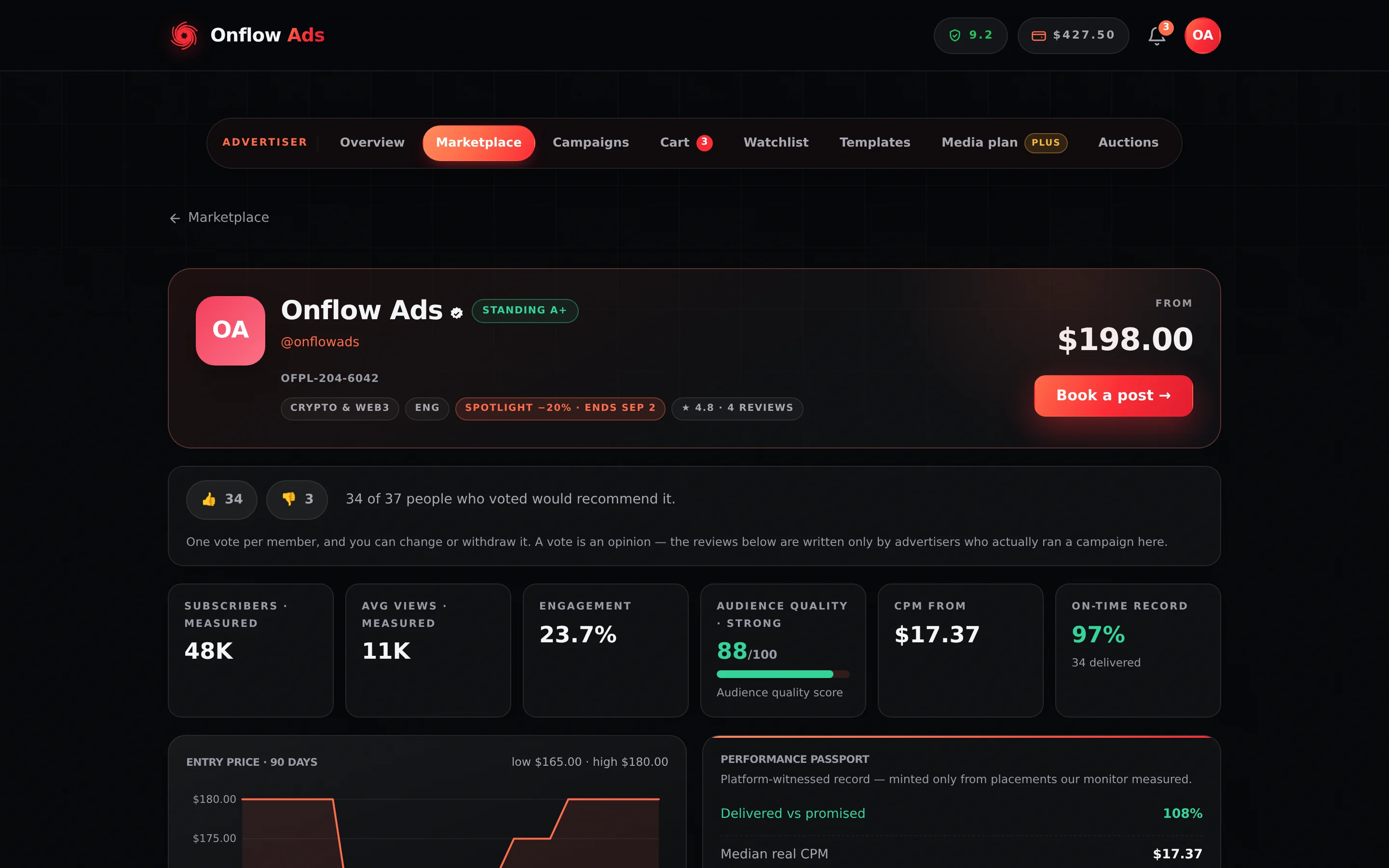
Plus plan · Advertiser. One listing's page. The “· measured” and “· self-reported” suffixes under the stat tiles are the first thing to read — they tell you which headline numbers the platform checked and which the owner supplied.
Before you start
- Any plan and any role can open a channel page. A channel-owner account sees the price but not the booking button.
- The prices on this page are yours. Every figure is the owner's list price plus the marketplace fee at your own rate — the standard rate is 9%, and the veteran rate is 7% once you have earned it — so a veteran and a newcomer genuinely see different numbers on the same listing. See Escrow and buyer protection.
The header
The header carries the channel's name with a green tick if it passed platform verification, its @handle, the OFPL- channel reference, and badges for category and language. When the owner is running a flash deal, a "Spotlight −N% · ends <date>" badge joins them.
On the right: the "from" price — the channel's cheapest live format — and "Book a post →", which opens the booking composer.
An owner sees the line "Your account sells slots, so booking is not available on it." where the button would be. The price stays visible on purpose: seeing what other channels charge is exactly why an owner browses.
The Standing grade
When the owner's plan publishes a Performance passport, a Standing chip sits next to the channel name. It is a letter summary of the owner's platform-witnessed reliability score:
| Grade | Owner reliability (out of 10) |
|---|---|
| A+ | 9.0 and above |
| A | 8.0 to 8.9 |
| B+ | 7.0 to 7.9 |
| B | 6.0 to 6.9 |
| C | 4.0 to 5.9 |
Below 4.0 the raw score is printed instead of a letter — there is no grade that hides a score that low. Everyone starts at 8.00, so A is the neutral state, not a distinction.
Likes and dislikes
Directly under the header sits a strip with a thumbs-up and a thumbs-down, their running totals, and a line reading, for example, "34 of 37 people who voted would recommend it."
Any signed-in member can vote. One vote per channel: pressing the other button switches it, pressing the same one again withdraws it. An owner cannot vote on their own channel, and the refusal says so.
A vote costs an account and nothing else — the person voting need never have bought a placement. A review can only be written by an advertiser whose placement was paid for and completed, and it carries a rating, a body and the owner's reply. Weigh them accordingly; the strip says as much in its own fine print.
Votes feed exactly one thing: the Most liked order in the marketplace. They do not touch the channel's reliability score, its prices, or any other collection.
An owner's reply to a review is signed with the channel — its avatar, its title, its @handle and a Channel owner tag — never with the person's name or email address. You are weighing a channel, and that is whose voice a reply is.
The stat tiles
| Tile | What it is |
|---|---|
| Subscribers · measured or · self-reported | The subscriber count, and whether the platform checked it or the owner supplied it |
| Avg views · measured or · self-reported | Average views per post, with the same basis label |
| Engagement | The engagement rate — average views ÷ subscribers × 100, to one decimal, capped at 100%. Forwards and public shares can push the raw arithmetic past 100; the published figure never goes there, because "160% of the audience" is a true number nobody can act on. A channel we could not measure has no tile, rather than a 0% |
| Audience quality | A 0–100 score with a band word and a meter. Measured listings only |
| CPM from | Cost per 1,000 views at the entry price, in your own money |
| On-time record | The share of this owner's deliveries that ran clean, with the number of monitored placements underneath |
Audience quality, and its two warnings
The quality tile is computed from the view-to-subscriber ratio and engagement. Two flags can appear as a note under the tiles, and the note always prints the ratio it was computed from so you can check it:
- "Views are a small fraction of the subscriber count — reach may be limited." — a large list, few of whom see a post.
- "Views run unusually close to the subscriber count." — a pattern that rarely occurs naturally.
A channel showing · self-reported has not been independently measured yet. That is not proof of anything — but it does mean the headline reach on the card is the owner's own claim, and it is why measured listings also get an audience-quality score and unmeasured ones do not. Weigh a self-reported listing on its Performance passport and its On-time record instead.
Entry price · 90 days
A price-history panel for the channel's cheapest live format, with the low and the high over the window. Its own fine print reads: "Daily snapshots of the cheapest live format. Watchers get a drop alert when it falls."
With fewer than two priced points, the panel says "No price history yet — snapshots begin once this channel has been listed a few days." rather than drawing a single dot as a trend.
The 90-day chart, like the stat tiles, the rate card rows and the cart, shows your all-in price — the owner's entry rate plus the marketplace fee at your rate — so its low and high are figures you could actually have paid. The same applies to your watchlist.
The history exists so an owner cannot quietly raise the rate the day you commit. What the channel charged is on the chart, and a watcher gets told when it falls.
Who this channel reaches
Under the price panel, a channel whose owner filled it in shows two columns of bars — Interests and Where they are — each row a label, a bar and its percentage. The panel carries one badge: Declared by the owner.
Read that badge literally. Telegram publishes no channel's member list to anyone, so nobody can measure these splits — not the owner, not Onflow Ads. They are the owner's own claim, and the panel says so under the bars: "These splits are the owner's own figures … The subscriber, view and engagement numbers above are the ones we measured."
Absent panel means the owner declared nothing. That is not a black mark; it is the honest default, and plenty of good channels leave it empty.
Treat it as a hypothesis, not a fact, and make your first placement the test. Your money sits in escrow until the post is proven live, the monitor measures what the run actually delivered, and Analytics and reporting shows you real CPM per channel. A channel whose declared audience does not match what it delivers is something you can raise as a dispute — and, either way, something you simply do not rebook.
Performance passport
For owners whose plan publishes one, the passport is a platform-witnessed record minted only from placements the delivery monitor actually measured. The panel says so: "Platform-witnessed record — minted only from placements our monitor measured."
| Row | Meaning |
|---|---|
| Delivered vs promised | Measured views as a percentage of what the owner promised, across monitored placements |
| Median real CPM | What buyers actually paid per 1,000 measured views |
| Median CTR | Unique landings on advertisers' tagged pages against measured views |
| Monitored placements | How many placements the record is built from |
Badges below note how many monitor checks stand behind the record and, where known, the owner's average turnaround in hours.
When the owner's plan does not publish a passport, or the sample is too small, the panel says so and adds: "Every placement on Onflow Ads is still monitored end-to-end — funds hold in escrow until the promised post runs its full duration."
Formats and rates
The owner's rate card. Each row is one format at one price; pressing a row opens the booking composer with that format already selected.
| Format | What the owner is selling |
|---|---|
| 1 hour at the top · 24 hours in feed | Your ad is the newest post for a full hour — the owner publishes nothing else in that window — then it stays in the feed for a day |
| 2 hours at the top · 48 hours in feed | Two hours as the newest post in the channel, then two days live in the feed |
| 3 hours at the top · 72 hours in feed | Three hours with nothing posted after it, then three days in the feed — maximum dwell time |
| Native · 7 days in feed · 1 hour at the top | A softer, longer-lived placement: an hour as the newest post, then a week quietly living in the feed |
| 30 days in feed · 3 hours at the top | A full month of presence, opening with three hours as the newest post in the channel |
| Forward / repost | The ad is forwarded from the advertiser's channel, keeping the original source visible |
| 7 days in feed · pinned throughout | The post is pinned to the top from go-live until the run ends seven days later, then comes down with it — the one format that really is a pin |
Every listing must price 1 hour at the top · 24 hours in feed; the rest are optional, so not every channel shows every row. A listing with no published rates shows "This channel hasn't published its rate card yet."
On every row except 7 days in feed · pinned throughout, the hours at the top buy top-of-feed exclusivity: for that window the ad is the newest post in the channel and the owner publishes nothing after it, so anyone opening the channel sees it first. The ad is not held above the feed, and when the window closes it sits in ordinary feed position for the rest of its run.
A pin is a different, more valuable promise, and it is sold separately — as the 7 days in feed · pinned throughout format, or as the whole-campaign pin extra below the rate card. Neither is permanent: both end when the booked run does. The platform cannot prevent a breach of an exclusivity window (a bot cannot stop a channel's own admins posting), so it checks afterwards and prices it against the owner. The whole mechanic, including what happens when an owner breaks it, is on What you are actually buying.
Both halves of the promise, as exact numbers. The in-feed duration is the one with teeth: it sets the escrow release clock, it is what the monitor watches, and it is the window a delivery failure is measured against.
| Format | Minutes at the top | In feed, in hours |
|---|---|---|
| 1 hour at the top · 24 hours in feed | 60 | 24 |
| 2 hours at the top · 48 hours in feed | 120 | 48 |
| 3 hours at the top · 72 hours in feed | 180 | 72 |
| Native · 7 days in feed · 1 hour at the top | 60 | 168 |
| 30 days in feed · 3 hours at the top | 180 | 720 |
| Forward / repost | none | 24 |
| 7 days in feed · pinned throughout | none — the pin is the placement | 168 |
Above the rows sit the channel's terms as chips:
- a green owner perk chip with its percentage — a standing discount the owner offers you, applied automatically in the composer and the cart (see Discounts and deals);
- "Links OK" — the owner accepts a creative carrying a link;
- "Marks the post as an ad" — the owner labels sponsored posts.
The panel closes with: "Pick a format to start composing — your money sits in escrow until the post is proven live."
"Marks the post as an ad" is the owner's own promise about how they present a sponsored post. Separately, the platform appends its own line — advertisement via onflowads.com — under every ad it delivers, unless the channel owner's plan is Plus or above. The two are independent: a channel without the chip can still carry the platform's line, and a channel with the chip may carry nothing else.
The public page states which of the two applies to a given channel, in a Labelling row: either "Onflow Ads adds one line under the ad: “advertisement via onflowads.com”." or "Onflow Ads adds no line of its own to this channel's placements." The dashboard page does not print it, so the public page is where to check before you write. See What you are actually buying.
Optional extras
Under the rate card, a channel that sells one shows an Optional extras panel, with the note "Add these to a placement when you book it — the price is per placement, on top of the slot." There is exactly one extra in the product today:
Pinned for the whole campaign · +$X — "The ad is pinned in the channel from the moment it goes live until the campaign ends — so it stays at the top even after the owner posts again. Unpinned automatically when the run finishes."
The price is the platform's, identical on every channel that offers it: you pay $6.00 a placement — $5 for the pin and a $1 platform charge on your side — and $4.00 reaches the owner. No percentage lever ever touches it. You tick it in the composer's Price panel and again on the line in your cart.
No panel means this owner does not sell the pin. That is not an oversight in the page: an extra is a promise one owner is willing to make, and a channel that will not make it shows no row rather than a dead one. Pinning also needs the platform's bot to hold Edit Messages of Others rights in the channel (a channel has no "Pin Messages" switch — that one is groups-only), which listing a channel does not require — so an owner who never granted them cannot offer it at all.
Availability
A day-by-day strip covering the next few weeks. Each day is in exactly one of four states:
| Day state | What it means |
|---|---|
| open | Bookable. The owner has set no per-day cap |
| N left | Bookable, with N of the owner's daily slots still free |
| full | The owner's daily cap is already taken for that date |
| closed | An owner blackout date — not taking bookings that day at all |
When the owner caps daily ads, an "N/day max" chip sits in the panel header and the note reads "Grey days are fully booked. Green shows the slots still open that day." With no cap, it reads "This owner hasn't set a per-day cap — every day is open to book."
The composer does not know the owner's blackout calendar. Booking into a closed day is refused at checkout, after the composer and after the cart, with "One of these channels isn't taking bookings on that date. Please pick another day." Only the start day is checked. Read this strip before you compose, especially on a multi-channel basket where one closed date blocks the whole checkout.
A blackout never unlists the channel and never affects its rank or its Standing — the listing stays in the catalog, that date is simply shut.
Live auction strip
If the owner is running a prime-slot auction on this channel, a gold strip appears with the format being auctioned, the bid count, the current bid, a live countdown and a "Bid $X" button. The strip only renders while the auction is genuinely open with time left on the clock. See Auctions and bidding.
Reviews
Verified buyer reviews with star ratings. Each shows the reviewer under a stable pseudonym, a "✓ Verified" badge when the review was left on a completed paid placement, the format booked, the review text, and the owner's reply if they wrote one. Once a channel has reviews, a "★ 4.8 · 12 reviews" chip joins the header badges.
A review is published under a stable pseudonym, not an account name — the marketplace has no business compiling who advertises where. What carries the weight is the ✓ Verified badge: it means the review sits on a completed, paid placement, not on an opinion.
Similar channels
A rail of other channels in the same category with their subscribers and "from" price — quick comparison shopping without going back to the catalog. For a real side-by-side table, use the catalog's compare tool.
If something goes wrong
| What you see | What it means | What to do |
|---|---|---|
| "This channel isn't available in the marketplace." | The listing was paused or removed by its owner | The rest of the marketplace is unaffected. If it was on your watchlist it stays there, badged Unavailable, so you notice if it returns |
| "We couldn't reach this channel just now." with Retry | A connection problem, not a marketplace one | Retry. Nothing was charged or changed |
| "No price history yet…" | The listing is too new to chart | Not a red flag. Snapshots begin once it has been listed a few days |
| The passport panel shows the fallback text | The owner's plan does not publish a passport, or too few monitored placements | Your protection does not depend on it. Escrow, monitoring and refunds apply to every booking equally |
| "This channel hasn't published its rate card yet." | The owner has a verified listing but no live prices | Nothing to book yet. Save it to your watchlist and check back |
Related
- What you are actually buying — what "at the top" really means, the pin extra, and the line under your ad.
- Booking a promo slot — write the ad, pick the slot, add it to your cart.
- Watchlist and price alerts — save the channel and be told when the price drops.
- Discounts and deals — what a spotlight, a perk and a bulk discount are each worth.
- Auctions and bidding — how the gold strip on this page works.