Cart and Checkout
The cart is the last stop before your money moves: it collects every placement you composed, prices them once, and pays the total into escrow. It lives at https://onflowads.com/telegram/dashboard/paid-promotion/cart (the Cart pill, which shows a live line count).
The chip in its header — "One price path — the button is the invoice" — is literal. The amount on the pay button is produced by the same server code that charges you.
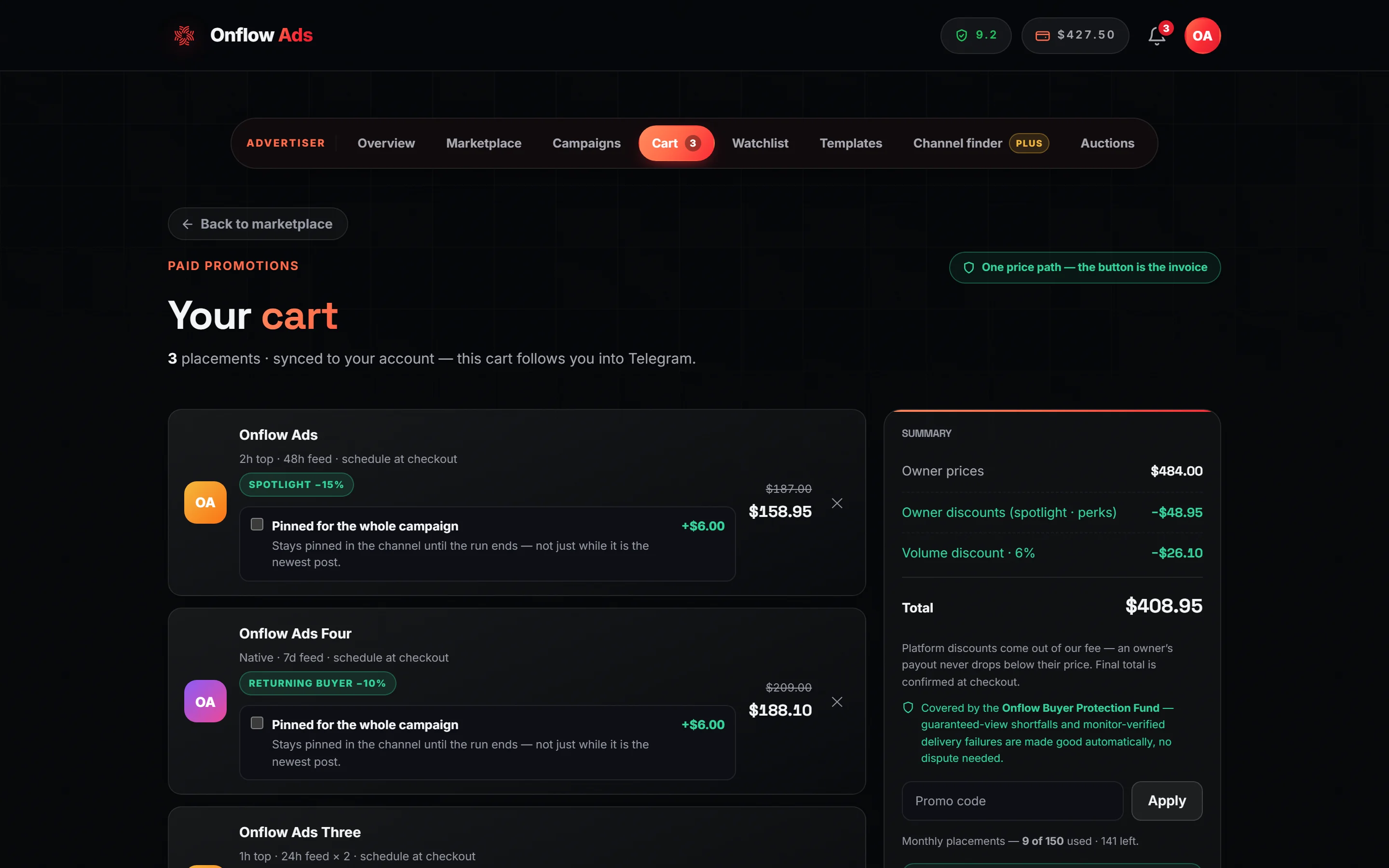
Plus plan · Advertiser. A cart with three placements in it. The left column lists one line per channel and format, then What happens after you pay (the four steps, with the owner's acceptance window quoted from the live escrow clock), the Compliance check and the fee explainer; the right column is the sticky Summary ledger with the promo field and the pay button, which stays with you as you scroll.
Before you start
Four things must be true before the pay button can succeed. The cart pre-checks all of them, so you see the reason before the charge attempt rather than after.
- Advertiser role. The page and the endpoint both refuse a channel-owner account.
- Reliability at or above the floor, currently 4.0 / 10. Below it the cart says so: "Your reliability is X/10 — Paid Promotions needs at least 4/10 to book. Raise it with clean, on-time deliveries, then check out." See Your reliability as a buyer.
- Monthly placement allowance left. The cart prints "Monthly placements — X of N used · R left." and blocks with an exact count if this order would exceed it.
- A composed ad post and a schedule. With lines but no creative, the pay attempt answers "Add your ad post first — compose it now." and links you back to the composer.
An account under an active fraud review cannot start a new booking at all.
Step by step
- Open the Cart pill. Each line shows the channel, the format, your scheduled slot, the price, and — where one applies — an owner-discount chip with the pre-discount price struck through.
- Remove anything you have changed your mind about with the ✕ on its line.
- With two or more channels, press "Check overlap" to see whether you are about to pay twice for the same audience.
- Enter a promo code if you have one and press Apply. The summary reprices.
- Read the Summary ledger top to bottom. Every discount is named as its own row.
- Press "Pay $X into escrow" — or, when the offer appears, "Book as a bundle — $X into escrow".
- The whole page is replaced by the receipt.
Cart lines
- Prices are quoted live: "Prices are quoted live — a line re-prices only if the owner changes their rate before you pay."
- One line per channel and format, one placement per line. Re-adding the same pair in the composer replaces the line; a repeated pair sent to checkout is merged, never doubled. To run twice in the same channel, book the second placement in its own checkout.
- If a listing is paused, removed, or its format withdrawn between adding and paying, the line reads "This channel is no longer available.", is pruned automatically, and you are told: "A channel in your cart is no longer available — it was removed."
The compliance check, in the cart
Every channel in the cart has to have been screened against its own rules, for the post as it currently reads. A cart assembled the ordinary way — one channel at a time through the booking composer — arrives already screened, and you will never see this panel.
It appears for the two ways a line reaches the cart without passing through that composer: the Channel finder and rebook the winners on the analytics page. Both put channels straight into the cart, so the check has not run for them.
The panel is headed Compliance check and opens by saying what the screen actually does:
One pass, two things checked: Telegram's own limits (4,096 characters on a post, 1,024 once a photo is attached) and this channel's rules — what it accepts and what it bans. It runs before the owner ever sees the booking, and an edit retires the result.
Under it are exactly the channels that still need one, each marked ○ not screened yet or ⚠️ with what was found. One button, Run the compliance check, screens them in turn — the label counts through them — and the panel disappears when nothing is left.
- It costs nothing. The screen is a system pre-screen and is not metered against your AI allowance.
- A flagged channel cannot be cleared from here: open that channel's booking page, edit the post, and run the check again.
- Pressing Pay with anything outstanding does not charge you. It names what is missing and shows the panel.
Full detail on what the screen actually looks for is on Booking a promotion.
The pin, on a cart line
Where the channel's owner offers it, the line carries its own checkbox:
Pinned for the whole campaign — "Stays pinned in the channel until the run ends — not just while it is the newest post." +$6.00
This is the only way to buy a pinned ad on a timed format, and it is per line: ticking it on one channel does not tick it on another. The rate is the platform's — $6.00 a placement, identical on every channel — multiplied by the line's quantity.
The Summary ledger has no row for it. It is added last — after the owner discounts and after the volume or promo discount — straight into the Total, because it is a fixed amount and no percentage lever is allowed to touch it. If your Total is higher than the ledger rows add up to, the difference is the pins you ticked.
If the owner withdraws the pin between adding the line and paying, the tick is cleared rather than quoted at a price the server will refuse — and a checkout that still asks for it is refused outright, never quietly downgraded to an unpinned booking.
Full detail on What you are actually buying.
The basket always lives in your browser, so it works inside Telegram's in-app browser on every plan. From Lite up, the lines also sync to your account and follow you between devices. The creative and the schedule always stay local — the server cart stores bookable lines only. A Free account is simply told the cart is not synced; it is never shown an error for its normal state. If two devices save at once, one is refused with "Your cart was changed on another device. We've loaded the latest one." and refreshed with the server's copy.
The Summary ledger
The rows appear in this order, and only when they apply:
| Row | What it is |
|---|---|
| Owner prices | The sum of each channel's published rate, with the marketplace fee at your rate inside it |
| Owner discounts (spotlight · perks) | Discounts the owner is offering. These reduce both your charge and their payout, because the owner chose to sell cheaper |
| Volume discount · N% | Your standing discount, earned from lifetime wallet funding |
| Volume + promo (CODE) | The combined saving when a promo code is applied — it replaces the volume row rather than sitting beside it |
| Total | What the pay button will charge |
One thing in the Total has no row of its own: the pin, which is ticked per line and added after everything above.
Under the rows: "Platform discounts come out of our fee — an owner's payout never drops below their price. Final total is confirmed at checkout." And a green shield line naming the Onflow Buyer Protection Fund, which makes good a monitor-verified delivery failure automatically, with no dispute needed.
The volume discount
Your standing discount rises with the money you have ever put into your wallet. The cart prints the rate you have earned and the amount it saves on this order; the ladder itself is not drawn on the page, so here it is:
| Lifetime wallet funding | Volume discount |
|---|---|
| $50 or more | 3% |
| $200 or more | 6% |
| $500 or more | 10% |
It is keyed to lifetime deposits, a number that only ever increases — so once you reach a rung you keep it. The highest rung you have passed applies.
Promo codes
Type a code into the Promo code field and press Apply (the button reads Change once one is applied). A valid code shows "Code XXXX applied." and reprices the summary from a server quote, so the preview matches the charge exactly. An invalid one explains itself, or falls back to "That code isn't live." Codes can carry expiry dates, usage caps, minimum order values, first-order-only and once-per-user rules.
Removing a line clears any applied code — the quote covered lines that no longer exist.
The marketplace fee
The marketplace earns the same fee on every plan, on both sides of a booking: you pay the channel's list price plus the fee, the owner receives their list price minus it, and the platform keeps both slices. The standard rate is 9% — an owner who lists at $100 costs you $109 and receives $91 — and the veteran rate is 7%, earned once you have completed 100 clean placements on paid promotion channels. The count is of placements completed after your most recent reliability penalty (a penalty restarts it from zero; one overturned on appeal restores it), and your progress is shown on your Paid Promotions pages.
Your rate is fixed onto each order at checkout and never repriced afterwards. Every price on the catalog, the channel pages, the composer, the Channel finder and the cart already includes it, which is why the ledger carries no fee row of its own.
What your fee covers
A panel below the Summary, opening "What the platform fee funds — the protection you don't get buying a channel direct:", names the services the marketplace fee pays for, resolved from your own entitlements: escrow on every dollar, the delivery monitor at the cadence your plan includes, dispute arbitration with the resolution target your plan includes, verified metrics measured while the ad runs, delivery insurance where your plan includes it, and the buyer-protection fund. The fee is the same on every plan; the list is generated from your entitlements, so it cannot drift from what you actually get.
The bundle offer
With two or more distinct channels in the cart, a green box may appear:
🤝 Book all N channels as one campaign and save $X (10% off). Our treat — every owner is still paid in full.
with a "Book as a bundle — $X into escrow" button beside the ordinary pay button.
| Rule | Detail |
|---|---|
| The rate | A server-fixed 10%. The page never names a rate of its own |
| The requirement | At least 2 distinct channels — two formats on one channel do not qualify |
| How it stacks | On the same platform lever as the volume discount and any promo code, capped together at 90% |
| Who funds it | Onflow Ads, out of its own fee. Every owner is still paid their published price |
Every platform discount is floored at the owner's payout: once the charge would fall below what the owner is owed, the discount stops there. On a basket already deep in owner-authored discounts there can be no fee margin left to give away, so the quoted saving is zero and the box does not render. That is the floor working, not a missing feature.
This is your own basket at a discount — different from the pre-packaged curated bundles, where Onflow Ads picks the channels.
The audience overlap check
With two or more channels in the cart, a panel offers "Check overlap" under the line "Booking similar channels can reach the same people twice. Check before you pay."
The clusters are deterministic, not a model. Channels that share the same category and the same language are grouped as "Likely same audience"; channels that share category and geography are "Some overlap". Each cluster names the channels and its reason. Only the diversification sentence underneath is AI-written, and it draws on your AI text allowance — refunded if the model returns nothing. When there is no overlap at all the check short-circuits with a deterministic all-clear ("✓ Little overlap.") and spends nothing.
The check compares the channels' declared category, language and geography. It says nothing about who you have reached before. Open to every plan.
The limits that refuse a checkout
| Limit | The figure | What you see if you cross it |
|---|---|---|
| Lines per cart | 50 | "That's too many channels for one order." |
| Value of one checkout | $100,000 | "That order is over the per-checkout limit. Please split it up." |
| Checkout attempts | 20 per hour, per account and per IP | The request is refused as too frequent |
| Monthly placements | Free 30 · Lite 60 · Plus 150 · Elite 400 · Master 800 · Ultimate unlimited | "Monthly ad placement limit reached. Your <plan> plan covers up to N placements per month — upgrade for more." |
| Reliability | 4.0 / 10 | The cart's reliability note, before you press pay |
Each line in the cart spends one placement from that allowance. Cancelled and refunded bookings never count against it.
What happens when you press pay
In order, inside one transaction:
- Your role is re-checked at the till, and so are the reliability floor and the fraud-review block.
- The cart is parsed and de-duplicated — one line per channel and format.
- The monthly allowance is checked.
- Any promo code is resolved against the at-list total, so a code with a minimum-order rule is judged on a real number.
- The cart is re-priced from live listings. A listing that vanished returns a 409 and your cart is refreshed instead of being charged at a stale price.
- The strictest lead time across the cart is enforced on your schedule.
- Owner blackout dates are checked on the start day.
- Your chosen ad post is snapshotted onto the campaign, so a later edit or deletion cannot change a live booking.
- Inline buttons are re-validated against your entitlements right now — too many buttons is a refusal, but a button colour your plan no longer includes is silently dropped rather than blocking the sale — and each link is settled for publishing — every link in the post becomes its own
onflowads.com/rr/…short link that counts every tap: a link to one of your connected channels opens a campaign invite link, any other Telegram address opens exactly as written, and a web link opens your page carrying your campaign tags; see links and results. - Any pin you ticked is re-checked against the owner's live offer. A pin the owner has since withdrawn fails the checkout rather than booking you an unpinned placement.
- Every channel in the cart must have passed the compliance check for the post as it reads now. A channel that has not is named, and the cart offers to run it — see The compliance check, in the cart.
- One order row per line is written, with its monitoring cadence, its insurance status, its fee percentages and its promised views frozen onto it.
- Your wallet is debited once.
Every checkout carries an idempotency key. A double-click, a dropped connection or a retried request lands on the original booking and answers "This order was already placed — you weren't charged again."
The receipt
On success the page becomes:
N placements booked $X moved into escrow — owners have up to 24h to accept, or until go-live on a slot that starts sooner. Declined or expired bookings refund to your wallet automatically.
with "Track my campaign →" and "Keep browsing".
That checkout is now one campaign with an OFP- reference, and each line inside it is its own placement with an OFO- order ID — so a five-channel cart gives you one campaign ID and five order IDs, each tracked, delivered, disputed and refunded on its own. The wallet debit carries an OFT- reference in your balance history.
If something goes wrong
| What you see | What it means | What to do |
|---|---|---|
| "Balance is short by $X — top up from your wallet." | Your wallet cannot cover the total | Nothing was charged. The link opens the wallet; the cart is untouched |
| "Some channels are no longer available — your cart was refreshed." | A listing went inactive between quoting and paying | The stale lines are dropped. Review the new total and pay again |
| "One of these channels isn't taking bookings on that date. Please pick another day." | Your start day is a blackout date on one of the channels | Check each channel's Availability strip and re-compose with a different day |
| "Bookings must start at least N hours from now." | One channel in the cart has a stricter lead time than the slot you picked | The strictest channel wins. Move the slot out, or remove that channel |
| "That's too many channels for one order." | Over 50 lines | Split the campaign into two checkouts |
| "That order is over the per-checkout limit. Please split it up." | Over $100,000 | Split it |
| "Monthly ad placement limit reached…" | This order would exceed your plan's monthly allowance | Remove lines, or upgrade. Cancelled and refunded placements never count |
| "A limited-quantity discount on this order was just claimed by another buyer." | An owner perk with a monthly quota ran out during your checkout | Nothing was charged. Reload the cart to see the honest price and pay again |
| "This order was already placed — you weren't charged again." | A retry landed on the original booking | Open Campaigns — the booking is there |
| "Add your ad post first — compose it now." | You have lines but no creative or schedule | Follow the link back to the composer |
| "Your reliability is X/10 — Paid Promotions needs at least 4/10 to book." | You are under the floor | See Your reliability as a buyer |
| "That code isn't live." | The promo code is invalid, expired, used up, or not for this order | Check the code, or remove it and pay at the un-coded total |
| "Your cart was changed on another device. We've loaded the latest one." | Two devices saved at once | The newer cart wins and is now on screen. Review it before paying |
After checkout
One checkout becomes one campaign. Every channel in it gets its own order, all visible on the Campaigns page. Each owner independently accepts or declines within their 24-hour window; a declined or expired line refunds automatically while the rest of the campaign proceeds.
Related
- What you are actually buying — the pin, and why it sits outside every discount.
- Discounts and deals — where every discount row in the Summary comes from, and which ones stack.
- Orders and campaigns — follow your placements from payment to payout.
- Escrow and buyer protection — what the escrow actually guarantees, and where refunds land.
- What each plan includes — monthly placements and cart sync by plan.