Auctions and Bidding
Channel owners can auction prime slots — premium placements sold to the highest bidder instead of at a fixed price. Auctions live at https://onflowads.com/telegram/dashboard/paid-promotion/auctions (the Auctions pill), and a channel with a live auction also carries a gold strip on its own page.
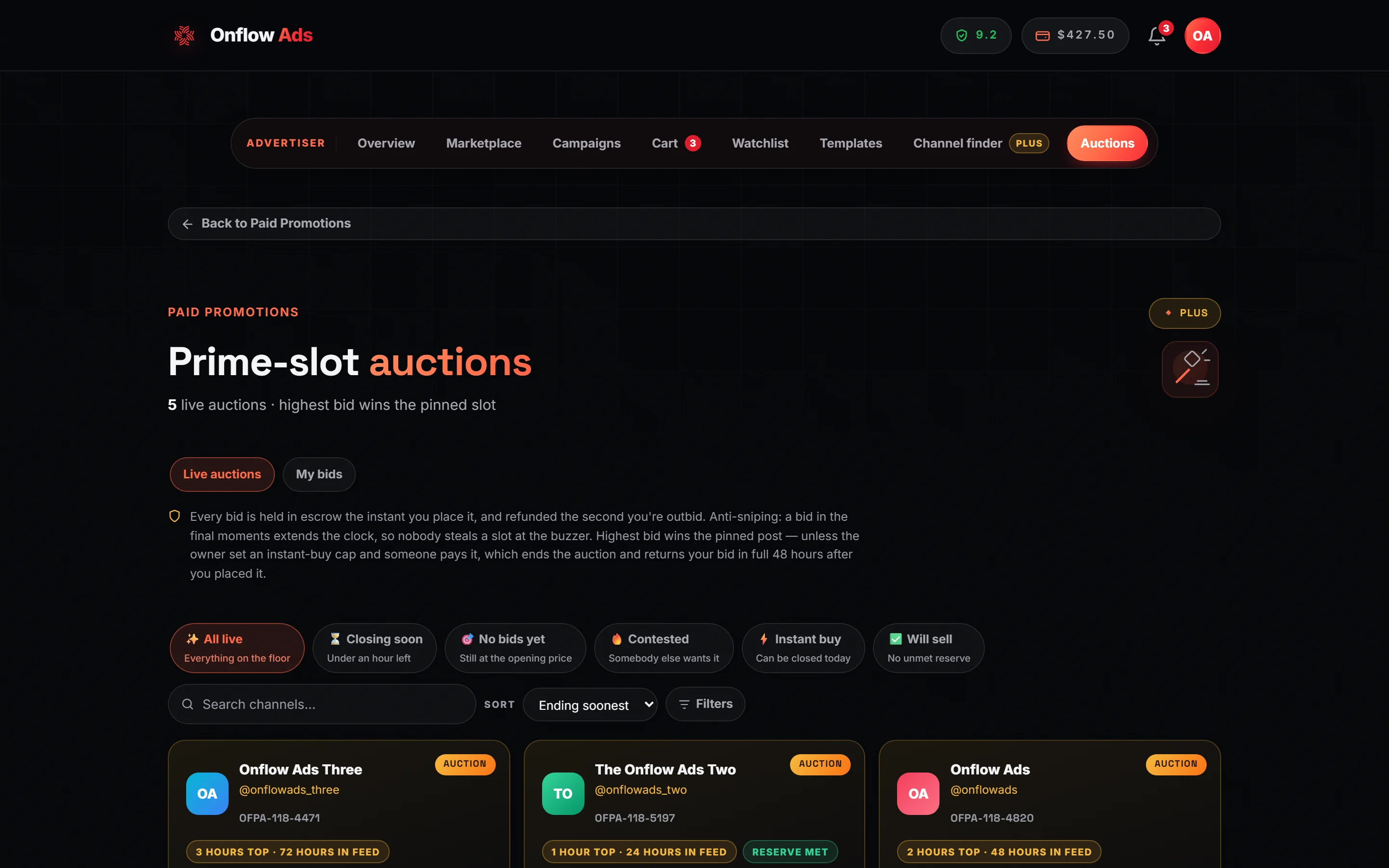
Plus plan · Advertiser. The auction floor. The rules sit in the line above the grid so you read them before you bid, and the collection chips stay clickable whatever the floor holds — an empty collection answers with its own empty state rather than a greyed chip.
Before you start
- Advertiser role required. A channel-owner account can browse and host on this page but can never bid.
- Bidding is open to every plan, including Free. Proxy (automatic) bidding is not — see below.
- Your reliability must be at least 4.0 / 10, you must not be under an active fraud review, your wallet must cover the bid, and you must have at least one placement left in your monthly allowance.
A winning bid settles into a real booking. A bidder already at their monthly cap would otherwise bid, hold funds, win — and then be refunded with "the slot became unavailable", having cost the owner the sale and learned nothing. The check asks "can you book anything today", judged on the current month; it is not a reservation.
The rules, up front
The page states them above the grid:
- Every bid is held in escrow the instant you place it. You can only bid money you actually have, and the hold is your bid.
- You are refunded the second you are outbid — no waiting for the auction to end.
- Anti-sniping: a bid in the final moments extends the clock, so nobody steals a slot at the buzzer.
- Highest bid wins the slot — unless the owner set an instant-buy cap and someone pays it.
An auction sells one format on one channel, and it settles through the ordinary checkout: you win exactly what that format sells, which on every format except 7 days in feed · pinned throughout is top-of-feed exclusivity, not a pin.
There is also no way to add the whole-campaign pin to a bid — the bid form has no tick for it, and an auction-won order is booked without it. If you need the ad pinned, either bid on an auction whose format is 7 days in feed · pinned throughout, or book that channel normally and tick the pin in the composer.
Every price you see is your price
An auction has no buyer markup: you pay exactly what you bid, and every dollar figure on an auction card is that amount — what the bid button commits and what actually leaves your wallet. Nothing is added at settlement, and no plan changes it.
The platform is paid on the owner's side instead: the owner receives the winning bid minus the auction fee, and the auction fee is 11%, deducted automatically at settlement. Bids are ranked on the bid amount, so the highest bid is both the best offer for the owner and the price you pay.
Finding an auction
Tabs
An advertiser account sees two: Live auctions (the whole floor) and My bids (only auctions this account has bid on, live or finished). The search, sort and filter controls appear on Live auctions only — your own bid list is short enough that a search box over it could only hide things.
The six collections
One visible row of chips, none of them counted or disabled. Like the marketplace's, a collection is a group, not a requirement.
| Chip | What it shows | Its own order |
|---|---|---|
| All live | Everything on the floor | Ending soonest |
| Closing soon | Under an hour left | Ending soonest |
| No bids yet | Still at the opening price | Cheapest now |
| Contested | Somebody else wants it | Most bids |
| Instant buy | Can be closed today | Ending soonest |
| Will sell | No unmet reserve — either there is no reserve, or it is already met | Ending soonest |
A collection that is empty right now stays live and says so when you open it.
Sort
A select next to the search box: Ending soonest · Ending last · Cheapest now · Priciest now · Most bids · Biggest reach · Newest. An explicit choice overrides the collection's own order.
The Filters panel
The Filters button carries a badge counting the requirements you have set, and opens a panel with three sections:
| Section | Controls |
|---|---|
| Placement | One chip per format, with a count. A format that would return nothing is drawn disabled |
| Price right now (you pay) | Min $ and Max $ |
| Audience | Min subscribers |
The price fields are in the same money as the cards — what you would pay, which on an auction is the bid itself — so "under $500" can never hide a card that says $499 to you.
Everything you have applied appears as removable pills under the controls, labelled Filtering, with a Clear all button.
Reading an auction card
Each card shows the channel (press through to its listing), the slot format being auctioned, a per-second "Ends in" countdown that turns urgent under five minutes, the current bid — or the starting bid if nobody has bid — the bid count, when the winning ad goes live, and the channel's subscribers and average views.
| Badge or chip | What it means |
|---|---|
| Reserve met | The current bid clears the owner's hidden minimum. The auction will sell |
| Reserve not met | It does not. At this price the slot goes unsold. The amount itself is never published |
| Cap $X | The owner set an instant-buy price. Bidding can never exceed it, and paying it ends the auction |
| You're winning · $X (green) | Your bid is currently the top one |
| Outbid · your $X | You have been passed. Your hold was already released |
| Bought outright · held until date · your $X | Someone paid the cap while your bid stood. Your $X is still held and comes back in full at that date |
| Auto-bidding up to $Y | Your proxy maximum, on the plans that have one |
Placing a bid
- Press "Bid $X" on a live card. The amount shown is the next valid bid, in your own money.
- An inline form opens:
- "Your bid (min $X)" — pre-filled with the minimum, and editable.
- "Ad post you'd run if you win" — a required select of your saved ad posts, each labelled with its
OFPT-reference. With none saved, the form links you to the composer instead: "Write an ad post first — a bid without a creative can't be settled if you win." - "Auto-bid up to (optional)" — on plans with proxy bidding. On plans without it, an upsell line appears in its place explaining what it does and where it unlocks.
- Press Place bid. The amount is held from your wallet into escrow immediately.
The ad post has to have passed the compliance check for that channel — the same check a normal booking runs — because a winning bid is booked exactly like one. If it has not, the bid is refused before anything is held, with "Run the compliance check for … before bidding" and a Run the check link to the booking page for that channel and format. Run it there, then come back and bid.
The form's own note: "This amount is held in escrow the moment you bid, and released the instant someone outbids you." Where the auction has a cap, it adds what happens if someone pays it.
The bid field is editable for a reason. Bidding exactly the minimum every time is how an auction turns into a long ratchet nobody enjoys and the mechanism never discovers a clearing price. Put in what the slot is worth to you.
Bid again on the same auction and your existing hold is topped up, never doubled. One live hold per bidder per auction, always.
Proxy (automatic) bidding
On Elite and above, set a maximum and the system bids on your behalf: it answers each rival with the smallest amount that keeps your lead, up to your ceiling, including through anti-snipe extensions. A maximum is what you are willing to pay, never what you are charged.
Two rules worth knowing:
- Your maximum must be at least your current bid — "Your maximum has to be at least your bid."
- Where the owner set an instant-buy cap, your maximum is clamped to one cent below it. A cap is a genuine ceiling, and a proxy is a bid.
- On a tie, the maximum set first wins. If a rival already holds a $120 maximum and you set $120 too, they keep the lead at $120 — go above it to take the slot.
Rival maximums are sealed. Nothing on this page, and nothing the platform will tell you, reveals what somebody else set.
Buying a slot outright
Where the owner set a cap, the card carries "Buy now $X". Paying it closes the deal on the spot: the auction ends, the slot is yours, and nobody can outbid you afterwards. You pick which ad post runs, and the button asks for a second press before it spends anything.
Once the next valid bid would reach the cap, the card stops offering Bid at all and shows only Buy now. Bidding at or above the cap is refused and points you at that button: "That's at or above the instant-buy price — take the slot outright instead of bidding." The cap is a ceiling, not a suggestion.
What the numbers mean
| Rule | The figure |
|---|---|
| An auction runs for | 6 hours to 14 days |
| Minimum bid increment | $0.50, unless the host set a higher one |
| Anti-snipe extension | A bid inside the last 5 minutes pushes the close out |
| The extension's hard ceiling | A fence set when the auction was created: the winner's go-live, minus 30 minutes, minus the wider of the channel's own lead time and the global 48-hour floor. The clock can never move past it |
| A host may cancel an auction with bids | Only while more than 12 hours remain |
| A deferred hold returns | 48 hours after the bid was placed — see below |
The auction is selling a slot that has to be booked, produced and delivered. The fence exists so an endless run of last-minute bids can never push the close past the point where the winner's ad could still go live on time.
If someone buys the cap over your head
This is the one refund in the marketplace that is not instant.
When another bidder ends the auction by paying the instant-buy cap while your bid is standing, your escrow returns automatically, in full, 48 hours after you placed the bid — immediately if that has already elapsed. You are told the exact date it will land, and told again when it does. Nothing is deducted and there is nothing to claim.
Ordinary outbidding — someone simply bidding higher while the auction runs — always releases your hold immediately.
If you are bidding on several slots close together and one of them ends this way, that money is genuinely unavailable to you until the 48 hours are up. It is the only case where losing does not free your balance the same second.
Winning
When the clock runs out the highest bid wins, provided any reserve was met:
- Your held bid becomes the payment — you are charged your winning bid, never more — and the slot books automatically as a normal order, using the ad post you attached, going live at the time the owner published on the auction.
- The escrow converts into the booking inside a single transaction, so the money is never spendable in between.
- The won placement appears on your Campaigns page with the same escrow protection, delivery monitoring, tracked links, proof archive and dispute rights as anything else.
- The card shows "You won this slot 🎉".
If an auction ends with no bids, or without meeting its reserve, or the slot has somehow become unbookable, it closes unsold and every hold is released in full.
Self-dealing is refused — including through a second account linked to yours. An account that bids on a listing it is connected to is not building a market price; it is manufacturing one, and it is treated as fraud.
If something goes wrong
| What you see | What it means | What to do |
|---|---|---|
| "The next bid is $X or more." | Somebody bid while your form was open | The card refreshes with the new floor. Bid at or above it |
| "That's at or above the instant-buy price — take the slot outright instead of bidding." | Your amount reached the owner's cap | Use Buy now — it ends the auction in your favour immediately |
| You were outbid the instant you bid | A rival's automatic maximum answered you | Your funds were released the same moment. The message names the new price to beat. On Elite and above you can set your own maximum |
| "That auction has closed." | The clock ran out while your form was open | Nothing was held. Check My bids for the outcome |
| "You can't bid on your own auction." | The listing is yours | Owners host; advertisers bid. The two roles are separate accounts |
| "That saved ad post couldn't be found." | The creative you selected was deleted | Pick another, or write one in the composer |
| "Run the compliance check for … before bidding" | The ad post has no compliance check for this channel yet (or was edited since) | Press Run the check, run it on the booking page, then bid again |
| "Automatic (proxy) bidding is a paid feature." | Your plan is below Elite | Bid manually — every other part of the auction is open to you |
| "Your maximum has to be at least your bid." | The proxy ceiling is below the bid itself | Raise the maximum, or clear it |
| Reserve not met while you are the top bid | The owner's hidden minimum is above your bid | Bid higher until the badge flips to Reserve met. If nobody does, the slot goes unsold and every hold is returned |
| "Nothing matches these filters" | The floor is busy but nothing fits your requirements | Press Clear filters. The message is deliberately different from "no live auctions right now" |
| Your bid came back but the auction is over | Someone paid the instant-buy cap | Your escrow returns 48 hours after you placed the bid. The notification names the date |
Related
- Booking a promo slot — where the saved ad post a bid needs comes from.
- What you are actually buying — what a won format delivers, and why it is not a pin.
- Orders and campaigns — a won slot lands there as an ordinary order.
- Escrow and buyer protection — including why an auction hold returns in a different pocket from every other refund.
- What each plan includes — which plan unlocks proxy bidding.