Referral Programme
Onflow Ads pays you for the people you bring in. You get a link; anyone who signs up through it is bound to you permanently; and every time one of them tops up their wallet, a share of that payment is credited to you as boost credit.
Everything about it lives on one page: https://onflowads.com/account/referrals, reachable from your account page — the Referrals tab in the tab strip, or the Referral Programme card at the top of the Profile tab.
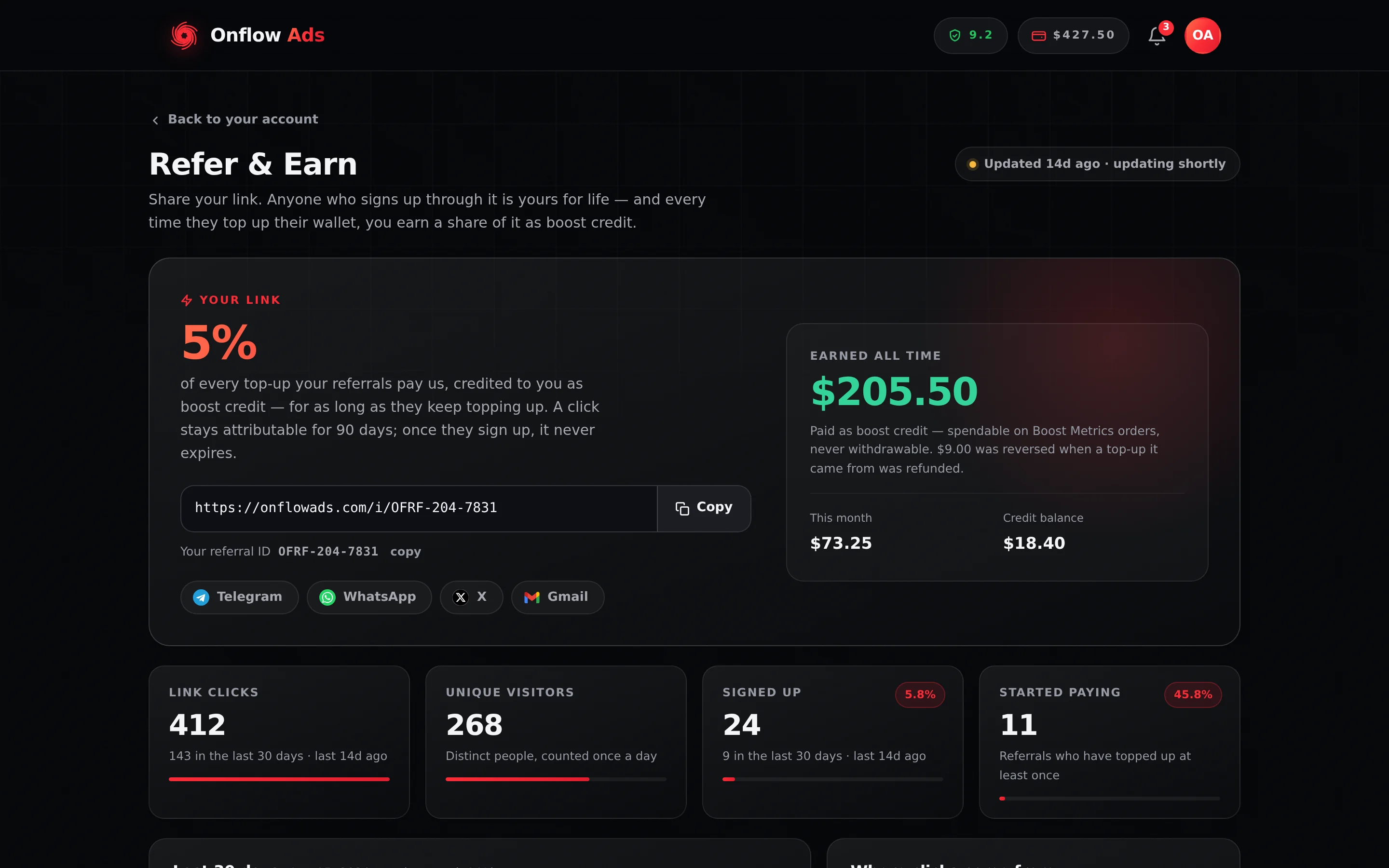
Plus plan · Advertiser. The Referral Programme page. The percentage at the top left is the live commission rate; the full share URL sits under it with Copy, and Your referral ID is the
OFRF-code that link is built from. The four tiles below are the funnel.
Before you start
- You need a signed-in account with a verified email. There is no tier requirement — every plan, including Free, earns the same rate.
- Your code and link exist from the moment your account does. There is nothing to apply for and nothing to switch on.
Your code and your link
| Thing | What it looks like | Where it is |
|---|---|---|
| Your referral code | OFRF- then three digits and four, e.g. OFRF-318-2047 | Your referral ID in the hero, with a small copy beside it |
| Your share link | https://onflowads.com/i/OFRF-318-2047 | The wide field in the hero, with a Copy button |
| The link people paste by habit | https://onflowads.com/?ref=OFRF-318-2047 | Works identically — you do not have to hand this shape out, but it is honoured if someone rewrites your link that way |
The OFRF- code is a second reference on your own account, alongside your OFA ID. It does not replace it: the OFA- names you to support, the OFRF- names your referral link. Both are listed in Your Onflow Ads IDs.
Unlike almost everything else on the platform, your OFRF- code is meant to be published. Put it in a channel description, a pinned post, a video description or a bio. Knowing it lets someone credit you with their signup and nothing else — it grants no access to your account, your balance or your channels.
Five share buttons build the message for you: Telegram, WhatsApp, X, Gmail, and More… (which appears only when your browser offers a native share sheet — typically on a phone). They open a pre-written line: "I use Onflow Ads to grow my Telegram channel — subscribers, views, cross-promos and paid ads in one place. Sign up with my link: …"
How it works
- You share your link. Someone opens it. The link always lands on the Onflow Ads homepage — a mistyped code, a stale code or a backend blip all end at the homepage rather than an error page — and your referral is attached quietly in the background.
- They sign up. Any method counts: email and password, Continue with Google, Continue with Apple, or Log in with Telegram. At that moment they are bound to you.
- They top up. Whenever they pay us by crypto or UPI, their wallet is credited exactly as normal. Nothing about their price, their fee or their balance changes.
- You earn. Your share lands as boost credit the instant their payment settles — every top-up, for as long as they keep topping up.
Your referral is attached silently, from the link the person followed, at the moment their account is created — they never type anything. It cannot be attached afterwards: someone who reaches the site without your link cannot be credited to you later.
Someone who follows your link has about 90 days to get around to signing up (the live number is printed on the page). After that the trail is cold and a fresh click is needed. But once they have signed up, the binding is permanent: they have exactly one referrer for life, and neither of you can change it.
What you earn
The commission is 5% by default, and the big number at the top of the page is always the live value — read it there rather than trusting a figure you wrote down.
| Rule | Detail |
|---|---|
| What it is a percentage of | The money a referral actually pays us — the credited amount of a settled crypto or UPI top-up |
| What earns nothing | Promotional credit, deposit bonuses, adjustments made by our team, refunds, and credit moving between your own pockets. None of those are payments |
| What it is paid in | Boost credit — the separate, non-cash pocket |
| When it arrives | Inside the same moment the top-up is credited. There is no waiting period and no approval step |
| Cap | None. There is no per-order cap and no monthly ceiling |
| Reversal | If a top-up you earned on is later refunded, the commission it paid is taken back with it |
Boost credit is spendable on Boost Metrics orders and nothing else. It cannot be cashed out, transferred, or converted to wallet cash — not at any tier, not by request. If you want money you can withdraw, referral commission is not it. See Boost credit for what the pocket can and cannot do.
The reversal is a debit against your boost credit for the amount you were paid. If you have already spent some of it, we take back what is still there rather than pushing your balance below zero — but the entitlement is gone either way, and the reversed amount is shown on the page and marked reversed on the line it came from.
A second account of your own, or an account you also control, does not earn. It is refused at signup where we can see it, and reviewed where we cannot — a review that weighs several signals together, where no single one decides anything (see How referrals are checked). Confirmed abuse costs you your referral links and carries a reliability penalty.
The same-device rule
A sign-up from a device your own account has been used on never counts. What we mean by device is exact: the browser profile itself, which the platform marks with a random identity of its own — not the make, model or settings of the phone. Two people who own the same phone never share that mark, so they are never affected; and because the mark lives in the browser rather than on the network, a VPN or a shared connection changes nothing either way.
A private window carries no such mark, which is why the rule has a second half. A referral that is later found to share a device with your own account — the moment it is used from your usual browser — is put under review: it stays your referral, but nothing it pays earns you credit until a person has looked at it.
When a sign-up is refused, the page tells you. The Signed up tile says "1 sign-up did not count — see why", and a Sign-ups that did not count list further down names the rule beside the person's OFA ID. They keep their account; only the referral was not recorded. If it was a genuine friend on your device, contact support with their OFA ID — a person reviews the evidence and can count the referral from the day they joined, with commission starting from their next top-up. Nothing is paid retroactively. Partner links run on their own agreed terms.
What the numbers mean
The page is one snapshot, taken at most every 15 minutes, and it tells you how old it is: a chip at the top reads Updated [when] and refreshes on its own while the page is open. Pressing the chip refreshes it now. A new signup on your link drops the snapshot immediately, so you are not told "nobody yet" while watching a friend join.
The funnel
| Tile | What it counts |
|---|---|
| Link clicks | Every counted open of your link |
| Unique visitors | Distinct people, counted once a day |
| Signed up | People who created an account through your link. A sign-up a rule refused is said underneath, not counted |
| Started paying | Referrals who have topped up at least once |
Two conversion percentages sit alongside — click to signup, and signup to paying — and the four bars are scaled to the widest stage, so the shape of the funnel is what you read rather than four numbers you have to divide yourself.
The money panel
| Figure | What it is |
|---|---|
| Earned all time | Your commission net of anything reversed |
| This month | The same, for the current calendar month |
| Credit balance | What is actually left in your boost-credit pocket right now — which also reflects anything you have spent |
The rest of the page
- Last 30 days — clicks and signups plotted day by day, with a legend under it. Hover a day for its numbers.
- Where clicks come from — the site that sent each visitor. We record the host only, never the page, and clicks bouncing around our own site are not counted as a source.
- Your referrals — Member, Joined, Signed up with, Status, Their top-ups, You earned. Status is Joined until their first commission, then Earning — or Under review when the referral has been found to share a device with your own account (it stays yours; nothing it pays earns you credit until a person has looked at it). Empty state: "Nobody yet. Share your link and the first person who signs up through it is bound to you permanently."
- Sign-ups that did not count — shown only when a rule has refused a sign-up through your link: Member, Signed up, Signed up with, and why it did not count, in words. See The same-device rule.
- Commission history — When, From, Paid via, Their top-up, Rate, You earned. One line per top-up that earned you credit; a reversed line is marked reversed. Empty state: "No commission yet. You earn the moment one of your referrals tops up their wallet."
Both tables identify a referred member only by their OFA ID — shown as it is, because it is the platform's public handle for an account, the same string support quotes. You are not shown their name, their email, their address, their device, their channels or what they bought. Earning from someone's deposits does not entitle you to their identity, and the tables are built so it cannot leak.
Were you referred?
If you signed up through someone's link, the page shows who referred you — again by their OFA ID and the date. It costs you nothing: a referral changes no price, no fee and no limit on your side, and there is no way for your referrer to see or touch your account.
Partner links
Members who promote Onflow Ads by arrangement with the team can be given a partner link on top of their own: https://onflowads.com/ref/your-name, with tracking tags, created by the team and attached to your account using your Account ID. Everyone who joins through it is your referral exactly as with your own link — bound at sign-up, earning the same commission in the same boost credit — and it adds three things of its own:
| What it means | |
|---|---|
| Rules | A partner link can ask more of a referral than signing up before it counts — topping up, say, or placing a Paid Promotion order — sometimes within a set number of days of joining |
| Commission mode | Standard pays on every deposit, as your own link does. Qualified only pays on a deposit only once the person meets every rule on the link |
| Its own figures | Once a link is attached, this page shows a Partner link section with the link, its rules and status, and the figures the team has switched on for you — funnel, activity, money and qualification |
Nothing about partner links appears on the page until the team attaches one. The team may pause or end a partnership at any time and emails you when it does; the people who already joined through the link stay your referrals. The team can also email you a referral report. Every email about a link quotes its Partner link ID, an OFRL-… reference — the one to quote to support about a partnership.
Partner links has the whole picture.
If something goes wrong
| What you see | What it means | What to do |
|---|---|---|
| Your link is being prepared — refresh in a moment. | Your code had not been minted when the page loaded | Refresh. If it persists, contact support with your OFA ID |
| A friend signed up but is not listed | Either the snapshot is stale, or the click never attached | Press the freshness chip to refresh. If they are still missing, they most likely reached the site without your link — that cannot be repaired retroactively |
| Signed up is higher than Link clicks | Normal. A click can be uncounted (rate-limited, or a repeat within 10 minutes) while the attribution still worked — attribution is set first and counting second, on purpose | Nothing to do; the earnings are unaffected |
| A referral topped up, but you earned nothing | Their credit came from a bonus, an adjustment or a refund rather than a payment they made — or they joined through a partner link that pays on qualified referrals only | Only settled crypto and UPI top-ups earn. For a partner link, see Partner links |
| Your earned figure went down | A top-up you earned on was refunded | The reversal is shown in the money panel and marked on the line in Commission history |
| A Partner link section has appeared on the page | The team attached a partner link to your account, and emailed you about it | Read Partner links |
| Too many attempts. Please wait a minute and try again. | You refreshed the page more than 60 times in an hour | Wait; the page refreshes itself anyway |
| Someone reports your link opened the homepage with no sign of a referral | That is exactly what it should do | The link deliberately looks like an ordinary homepage visit. The attribution is invisible to the visitor |
My referrals answers with your code, link, clicks, sign-ups and earnings from the live programme. What the assistant can do for you has the full list and the confirmation rule.
Related
- Partner links — the tracked links the team can attach to your account, their rules and their figures.
- Boost credit — the pocket your commission lands in, and what it buys.
- Your Onflow Ads IDs — where
OFRF-andOFRL-sit among the rest. - Account settings and profile — the page the Referral Programme opens from.
- Adding funds — the top-ups your referrals make, from their side.