Connecting Your Account
Every new Onflow Ads account finishes signing up on one screen at https://onflowads.com/telegram/link. It asks for whichever half of your identity is missing: an account created with an email address links the Telegram bot, and an account created through Log in with Telegram adds a real email address.
This is a step of signing up, not an error. Until it is done, the Telegram dashboard and every engine inside it stay closed.
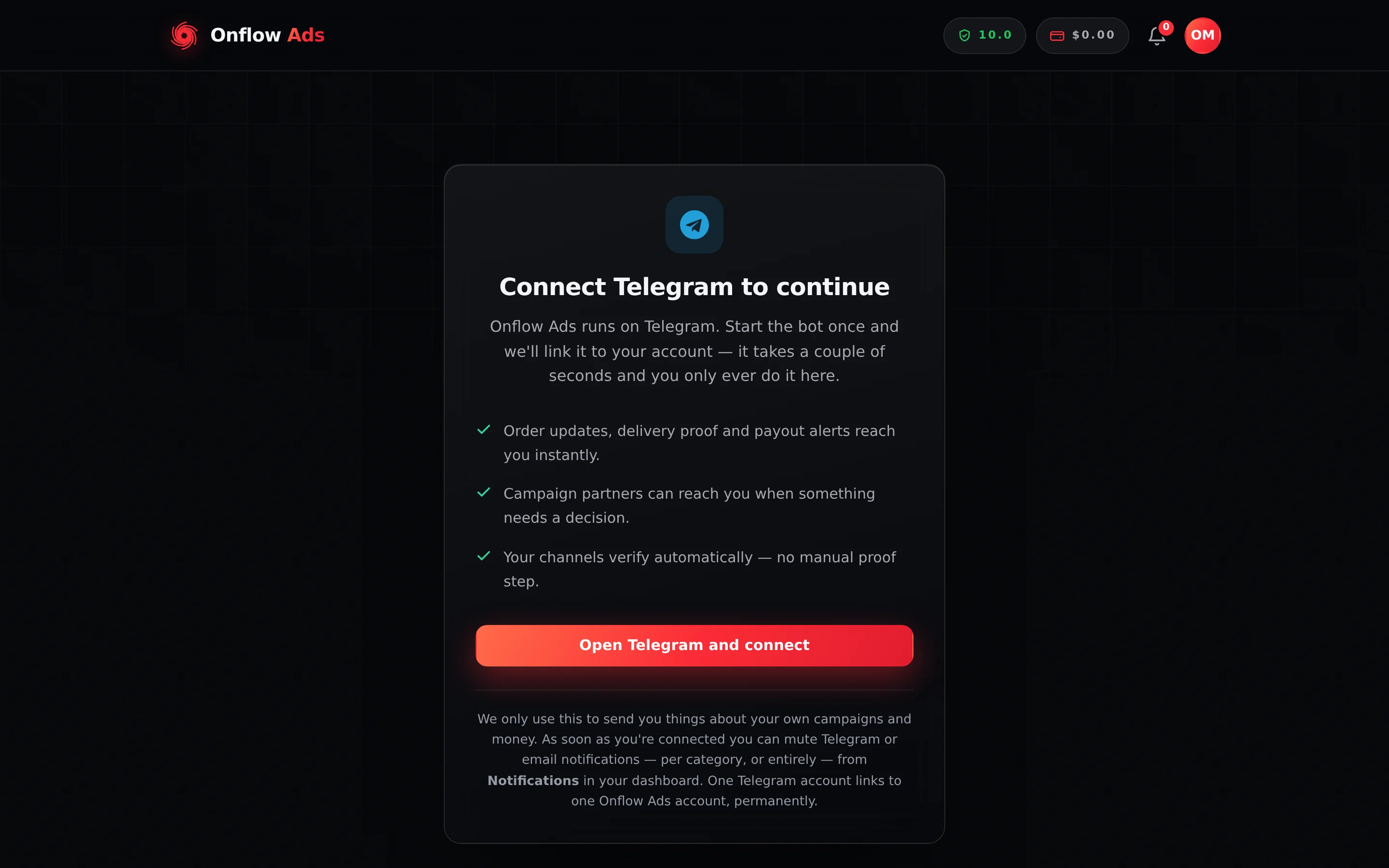
Free plan · a brand-new account meeting the onboarding gate. This is the half shown to an account created with an email address. An account created through Log in with Telegram sees the mirror of it, asking for an email address instead.
Why it exists
Every engine on Onflow Ads sends you things you have to actually receive: a campaign partner accepted, an order needs proof, a placement was declined, a payout cleared, a refund landed. An account we cannot reach silently misses all of it — and in cross-promotion and paid promotions, a member who misses a message strands the partner on the other side of the deal.
So the site establishes a live channel to you before it opens a flow. When you finish, you are reachable on both email and Telegram, which is the point.
The gate asks for a working channel; it does not commit you to being messaged forever. Once you are through, you can mute Telegram messages, email, or both — per category or entirely — from Notification settings at /telegram/dashboard/notifications. Muting silences delivery and never unlinks anything.
Which half applies to you
| How your account was created | What the screen asks for | Heading you will see |
|---|---|---|
| Email and password on the sign-up form | Link the Onflow Ads Telegram bot | Connect Telegram to continue |
| Continue with Google or Continue with Apple | Link the Onflow Ads Telegram bot | Connect Telegram to continue |
| Log in with Telegram | Add a real email address, confirmed by a 6-digit code | Add your email to continue |
You never see both. The page checks your account when it opens — it briefly reads "Checking your account…" — and renders only the half that applies. If your account is already complete, it forwards you straight on to where you were heading.
Before you start
- You are signed in, and your email is verified (email signups only — see Verifying Your Email).
- To link Telegram: the Telegram app, or Telegram Web signed in to your account, on the device you are using.
- To add an email: an inbox you can check within 10 minutes.
- Pop-ups allowed for
onflowads.com— the connect button opens Telegram in a new tab.
Linking the Telegram bot
This is the half an email, Google or Apple signup sees.
- Open https://onflowads.com/telegram/link, or press Open dashboard on the Telegram card of your launchpad — an unconnected account lands here either way.
- Read the three things the connection switches on: order updates, delivery proof and payout alerts reaching you instantly; campaign partners being able to reach you when something needs a decision; and your channels verifying automatically with no manual proof step.
- Press Open Telegram and connect. The site mints a single-use link and opens
t.me/<the Onflow Ads bot>in a new tab. Nothing is typed by hand — opening that link from your signed-in browser is itself the proof that both identities are yours. - In Telegram, press Start. The bot answers Connect this Telegram?, names the account the link belongs to (its email, partly hidden), and waits. Tap Yes, connect it — nothing is linked until you do. If the account it names is not yours, someone sent you their link: ignore it. The bot then replies "Telegram connected" with the line "Your Telegram is now linked to your Onflow Ads account. You will get order updates, payment alerts and rewards right here."
- Come back to the browser tab. The message under the button reads "In Telegram, tap Start, then Yes, connect it…", with a Telegram didn’t open? Open it here link under it while the page checks every three seconds; it also re-checks the moment you switch back to the tab. As soon as the link registers, you are forwarded to the page you originally wanted.
The button relabels itself Reopen Telegram after the first press, so you can open the link again if the tab was blocked or you closed it by accident.
Each Open Telegram and connect press issues one token that expires after 10 minutes and dies the moment it is used. If you leave it too long the bot answers "Link expired" — "This Telegram connection link has expired or was already used. Open the website and tap Connect Telegram again to get a fresh one." Press the button again for a new one. You can start at most 10 links per account per 10 minutes.
Adding a real email address
This is the half a Log in with Telegram account sees. Such an account is created with a placeholder address of the form tg<your Telegram id>@tg.onflowads.com, which has no inbox behind it — so the site cannot email you a receipt, an invoice or a recovery code until you claim a real one.
- Open https://onflowads.com/telegram/link. The heading reads Add your email to continue, above "Your Telegram is already connected. Add an email address so we have a second way to reach you — we'll send a 6-digit code to confirm it."
- Type your address into the field marked
[email protected]and press Send me a code. - The form is replaced by "We sent a 6-digit code to [your address]." and a wide 6-digit box. Open your inbox, find the code, and type it in.
- Press Confirm and continue. On success the address is attached, marked verified, and you are taken to the Telegram dashboard.
Use a different address takes you back to step 2 if you mistyped. You can start this at most 6 times per account in 15 minutes.
A Telegram-created account has no password anyone has ever seen and no inbox of its own. Until you attach a real address, that Telegram account is the only way back into your Onflow Ads account — lose access to it and support cannot email you a recovery code, because there is nowhere to send one. Do this first, not later.
Claiming an address changes your sign-in email and marks it verified. It does not set a password. If you want one, run the ordinary password reset afterwards on your new address — that is what sets your first password. From then on your account behaves like any other — and, like any other, its sign-in email is now permanent, so claim the address you mean to keep.
There is no change-email form on the account page — a sign-in email, once set, cannot be changed by its owner. The screen at /telegram/link exists for exactly one case: a Telegram-created account whose address is still the @tg.onflowads.com placeholder attaching its first real email. It needs no password, and it stops working the moment a real address lands. After that only the Onflow Ads team can move a sign-in email — see If the team changes your sign-in details.
What is blocked, and what stays open
The wall is deliberately narrow. It stops you taking on something new; it never stops you finishing, cancelling or looking at something you are already part of.
| Area | While the gate stands |
|---|---|
Every page under /telegram/dashboard — the hub, Cross-Promotion, Boost Metrics, Subscriber Exchange, Paid Promotions, Channels, Wallet, Reliability, Notifications, Support | Redirects to the connect screen |
The platform launchpad at /dashboard | Open |
Your account page at /account, including its Wallet tab | Open |
Referral Programme at /account/referrals | Open |
The public Telegram pages — /telegram, /telegram/features, /telegram/pricing, /telegram/cross-promotion | Open |
A channel's public page — the /pc/… link an owner shares | Readable. It sits outside /telegram/ on purpose, so a link someone sends you opens whether or not you are signed in. Its Book a slot button is not: booking runs through the paid-promotion API, which is gated, so it answers "Connect your Telegram to continue." |
Pricing, the legal pages, /contact and the floating help widget | Open |
| Reading anything through the API — your existing campaigns, orders and balances | Open |
| Creating a campaign, placing an order, listing a channel, bidding, joining someone's campaign | Blocked |
| Continuing something you are already a party to — approving a partner's post, submitting proof, cancelling | Open |
A blocked action answers with "Connect your Telegram to continue." or "Add your email address to continue."
There are exactly three actions that address an existing thing and are still blocked, because each one takes on a brand-new obligation: joining someone else's cross-promotion campaign with their code, placing a bid in a paid-promotion auction, and checking out a bundle.
The support page sits under /telegram/dashboard, so it redirects like the rest — but the support system itself is never gated. Use the floating help widget on any open page, or https://onflowads.com/contact, and you can ask us anything while the gate is up.
Who never sees this
- Accounts created before 24 August 2026 at 19:00 UTC. The requirement is new, and applying it to members who were already mid-campaign would have walled them out of work they had started. Those accounts are prompted to connect — the Telegram card is still on the account page — but never blocked. This line is a fixed historical fact, not a setting that moves.
- Testing accounts. An account our team has flagged for testing is waved through, and says so: the connection screen reports "This is a testing account, so the connection requirement is waived. Real accounts must still connect Telegram." The flag can only be set by a master administrator; it cannot be granted to yourself.
If you already have two accounts
It happens: you signed up on the website with an email once, and separately your Telegram ended up with an account of its own — one you made with Log in with Telegram, or a starter account the bot created for it.
Connect Telegram never merges accounts. A connect link is a URL anyone can forward, so opening one is not treated as consent to fold one account into another. If the Telegram you are connecting already has an account of its own — a real one or a starter one — the bot says "Already connected elsewhere" and nothing on either account changes. To bring the two together, contact support from the account you want to keep, with both OFA IDs: the team can detach the Telegram from the other account so you can connect it here.
If the website account you are signed into is already linked to a different Telegram, the bot says "Account already linked".
The pairing is enforced by the database, not by a screen: a Telegram account can never be attached to two Onflow Ads accounts, and an Onflow Ads account can never hold two Telegrams. There is no self-service unlink anywhere on the site — changing a pairing is a support request.
If something goes wrong
| What you see | What it means | What to do |
|---|---|---|
| Checking your account… and nothing else | The status call did not come back | Reload the page. If it persists, sign out and in again |
| Nothing happened when you pressed Open Telegram and connect | The new tab was blocked | Allow pop-ups for onflowads.com, then press Reopen Telegram |
| Link expired in the bot | The token was older than 10 minutes, or already used | Return to the site and press the button again for a fresh link |
| Already connected elsewhere in the bot | That Telegram belongs to another Onflow Ads account | Sign in to that account, or contact support to move the connection |
| Account already linked in the bot | The website account you are on already holds a different Telegram | Contact support — it cannot be changed from the site |
| Could not connect in the bot | The bind failed part-way | Press the button again from the website; if it repeats, contact support with your OFA ID |
| Telegram linking isn't configured yet. | Telegram linking is switched off on the site right now | Try again later, or ask support |
| That email is already in use. | Another account already signs in with that address | Use a different address, or sign in to the account that already has it |
| Use the email settings on your account page to change your address. | Your account already has a real email — the claim screen is only for placeholder addresses | Nothing to claim: you are already past this step. A sign-in email cannot be changed from the site; if yours has to move, that is a support request — see If the team changes your sign-in details |
| Too many attempts. Please wait a minute and try again. | You hit a rate limit | Wait, then retry — see Limits and Lockouts |
| You finished, but a page you had open still refuses | That tab is holding a stale answer | Reload it. Finishing releases you immediately — nothing is cached against you |
The "you are connected" answer is remembered for 15 minutes to keep the check off the critical path, but the "not yet" answer is never remembered. The moment you link or confirm your address, every page and every action opens — there is nothing to wait out.
Related
- Creating your account — the step before this one.
- Signing in with Telegram — the route that leads to the email half.
- Account settings and profile — where the Telegram card lives afterwards.
- A tour of the dashboard — where Open dashboard takes you once you are through.