Account Settings and Profile
Everything about your account lives on one page: https://onflowads.com/account. Reach it from the account menu in the top navigation (Account), on every page of the site.
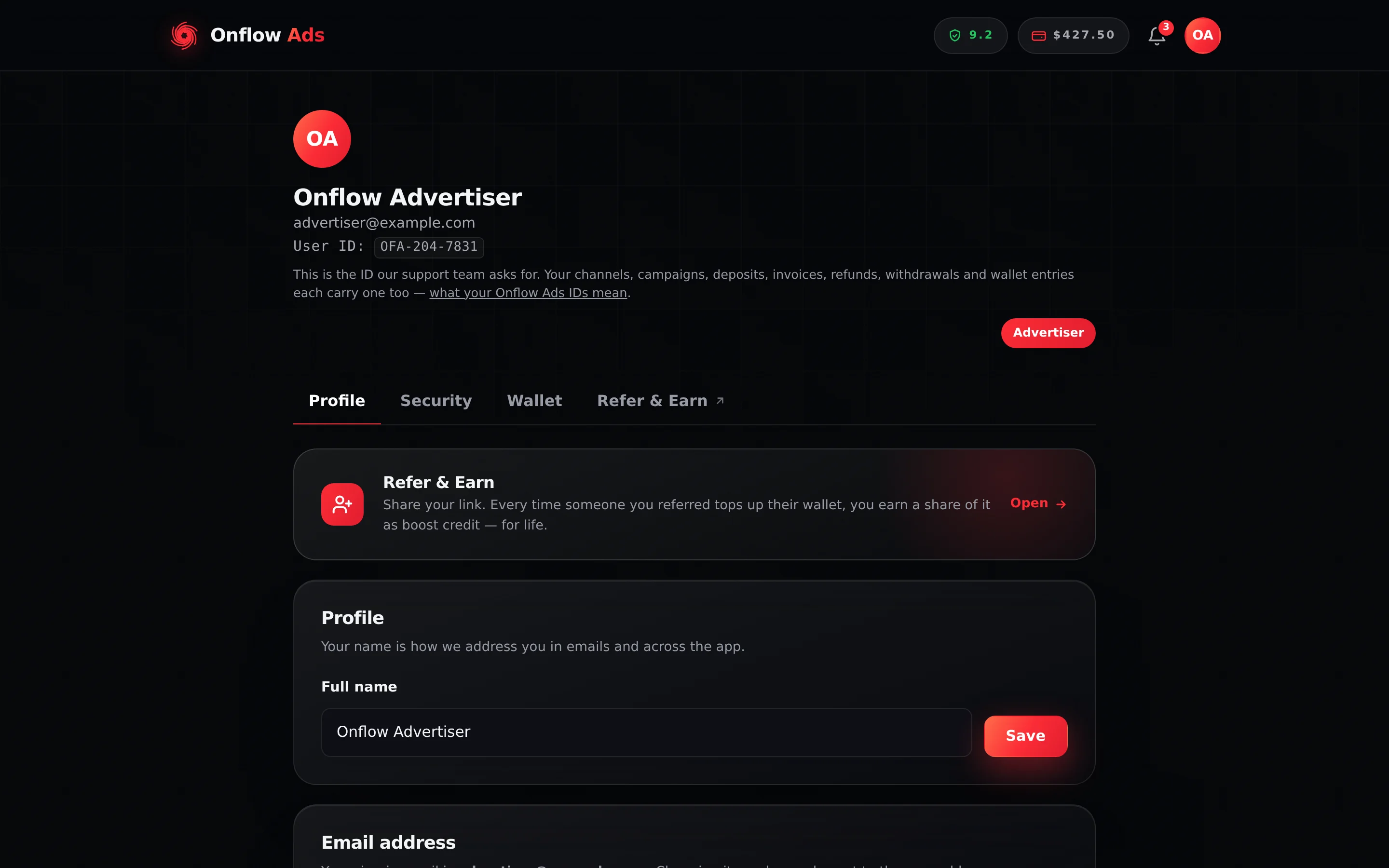
Plus plan · Advertiser. The account page. Your User ID sits under your email; the fourth tab, Referrals, leaves this page for the Referral Programme page, and the role pill on the right appears once you have enlisted in the marketplace.
What is on the page
At the top: your initials avatar, your name, your sign-in email, your User ID — the OFA ID support asks for — and, once you have enlisted in Paid Promotions, a role pill reading Advertiser or Channel Owner.
Below that, four tab controls:
| Tab | What it holds |
|---|---|
| Profile | Referral Programme card, your name, your email address, your Telegram connection |
| Security | Two-factor authentication |
| Wallet | Balances, Add funds, Withdraw, Refunds, activity and withdrawal history |
| Referrals | Not a tab — a link that opens the Referral Programme page at /account/referrals |
If your account has not connected the Telegram bot yet, the Telegram dashboard is closed to you — but this page, its Wallet tab and the Referral Programme page all stay open. That is deliberate: you can still see your money and still ask for help while you finish connecting.
Profile tab
Changing your name
- Edit the Full name field — up to 200 characters.
- Press Save.
Your name is how we address you in emails and across the app. It affects nothing else. You can save it up to 20 times an hour.
Your email address is permanent
The Email address card shows the sign-in email on your account, and that address cannot be changed from this page. It is the anchor of the account — recovery, receipts, security codes and the report password flow all hang off it, and "change the email" is the last step of every account takeover, which is exactly why the door is closed.
- An account made through Log in with Telegram attaches its first real address on the connection screen — see Connecting Your Account. Once that address lands, it is permanent like any other.
- If you are ever about to lose access to your inbox (leaving a company address, closing a mailbox), write to [email protected] from that address while you still can, and the team will help. Moving a sign-in email is something only the team can do — If the team changes your sign-in details explains how it is kept safe.
Telegram connection
The card checks its own state each time the page loads and shows one of three things. The difference between the second and the third matters, so it is worth reading closely.
| State | What the card says | The button |
|---|---|---|
| Connected and reachable | "✓ Your Telegram is connected — one Telegram account, linked permanently." | Gone — a linked account has nothing left to connect |
| Linked, but the bot cannot message you | "Your Telegram is linked, but the bot can't message you yet — open it once and tap Start to switch notifications on." | Open the bot |
| Not linked at all | "Not connected yet." | Connect Telegram |
To connect, or to make an already-linked account reachable:
- Press the button. A Telegram tab opens on the Onflow Ads bot with a single-use link that lives for 10 minutes.
- Press Start in Telegram. The bot replies "Telegram connected".
- The page shows "Tap Start in Telegram to finish, then refresh this page." — refresh it, and the card turns green.
Being linked means we know which Telegram account is yours. Being reachable means Telegram permits our bot to open a conversation with you — and Telegram only permits that after you press Start. The middle state is the normal one for anyone who arrived through Log in with Telegram, because that route never involves the bot at all. It is a prompt, never a wall: nothing on the site is blocked by it, but nothing the bot sends reaches you until you clear it.
One Telegram account pairs with one Onflow Ads account, enforced in the database rather than by a screen. Nothing on this page can undo it. If you need a pairing moved, that is a support request: the team can unlink Telegram for you (see If the team changes your sign-in details), after which you connect the right account.
Security tab
The Security tab has two cards.
- Two-factor authentication: Enable two-factor when it is off, and the Two-factor is on badge with Disable 2FA and Regenerate recovery codes when it is on. Two-Factor Authentication covers it in full. Turning it on signs every other device out.
- Signed-in devices: Sign out other devices ends every session on the account except the one in this browser, which moves to a fresh token and stays signed in. A notice says how many devices were signed out. Sessions and staying signed in has what else ends a session.
Onflow Ads has no change-password form on the account page — not hidden, not elsewhere. To set a new password, run the password reset flow while signed out. Bear in mind that it signs you out of every device.
If the team changes your sign-in details
Nothing on this page lets you move your sign-in email or unlink Telegram, and there is no change-password form. The Onflow Ads team can do those things for you — when you ask support for help, or when your account looks to be at risk. Every one of these changes comes with an email to you that states the reason it was made.
| What the team can do | What happens on your side |
|---|---|
| Send you a password reset link | You are emailed a one-time link that works for 24 hours. Opening it starts the normal password reset — a 6-digit code to your inbox, then a new password. Nothing changes until you finish it |
| Reset your password and sign you out everywhere | For a password that is known to be compromised. Your old password stops working at once, every device is signed out, and the same reset link is emailed so that you can choose a new one |
| Move your sign-in email | The new address is sent a confirmation link, good for 24 hours, and the move happens only when that link is opened. The old address is told straight away, so a change you did not ask for is visible before it lands. When support has already verified who you are, the team can apply the move at once instead — both addresses are emailed and every device is signed out |
| Unlink Telegram | The Telegram account is detached from your Onflow Ads account, and the bot can no longer act for you until you connect Telegram again from the Profile tab |
| Switch off two-factor | For when you are locked out of your authenticator. Every device is signed out, and the account signs in with the password alone until you turn two-factor back on |
| Sign you out of every device | Every live session ends. Sign in again when you are ready — and if you did not expect it, reset your password |
None of these touches your balance, your channels, your campaigns or anything else on the account — only how you sign in.
Write to [email protected] at once — from your sign-in address, if you still have it. Unless support had already verified you, a sign-in email move cannot complete until the new address confirms it, so the notice sent to your old address is your moment to stop one you did not start.
Wallet tab
Three figures across the top:
| Figure | What it is |
|---|---|
| Withdrawable | Paid-Promotions earnings you can take off the platform |
| Boost Credits | The separate non-cash pocket, auto-applied to Boost orders |
| Total (USD) | Deposits plus earnings, always in USD |
Under them, three sub-tabs — Add funds, Withdraw and Refunds — plus your activity and your withdrawal history. Each has its own page in Wallet and Payments; this tab is where you find them.
The Boost Credits figure includes anything you have earned through the Referral Programme. It is spendable on Boost Metrics orders and is never withdrawable, whatever your plan.
What lives elsewhere
| Thing | Where |
|---|---|
| Your channels | The Telegram dashboard — see Managing your channels |
| Your reliability score | /telegram/dashboard/reliability, and the shield pill in the header |
| Notification settings | /telegram/dashboard/notifications — this is where you mute anything the bot or our email sends, and where the optional Product news and offers toggle lives (marketing email is opt-in: off unless you ticked the box at sign-up or checkout, or switch it on here) |
| Your marketplace role | Chosen once in the Paid Promotions hub. It is permanent |
| Deleting your account | Not on the site. It is a support request |
Enlisting as Advertiser or Channel Owner is a one-way decision, enforced by the database. A second attempt returns "You're already enlisted, and your role can't be changed." The pill on this page is where you read back which one you took.
If something goes wrong
| What you see | What it means | What to do |
|---|---|---|
| The User ID line is missing | A display hiccup; the ID itself is unaffected | Refresh the page |
| The Telegram card stays on Checking… | The status call did not return | Refresh; if it persists, sign out and in again |
| The card still says Not connected yet. after you pressed Start | The page has not re-read the status | Refresh the page |
| Could not start linking. Please try again. | The link could not be minted | Try again; you can start 10 links per 10 minutes |
| Too many attempts. Please wait a minute and try again. | 20 name saves from your network in an hour | Wait — see Limits and Lockouts |
Run a security check has the assistant read your two-factor, email verification, Telegram link and recent sign-ins and tell you what to fix; link my Telegram hands you a fresh link button. It never changes a security setting itself. What the assistant can do for you has the full list and the confirmation rule.
Related
- Two-factor authentication — the Security tab in full.
- Referral Programme — the fourth tab's destination.
- Connecting your account — what the Telegram card is part of.
- Your OFA ID — the reference printed under your email.