Portfolio
The Portfolio page is the control room for members who run several channels: "One view of every channel you run — active swaps, completions, reach, and whether each is discoverable. Manage the whole roster from here."
Open it at https://onflowads.com/telegram/dashboard/cross-promotion/portfolio, or via the Portfolio pill in the cross-promotion sub-navigation.
It earns its keep from two channels upward. If you run a single channel, two other views cover you: the campaign lists for the swaps themselves, and that channel's own dashboard for its cross-promotion record alongside everything else it does.
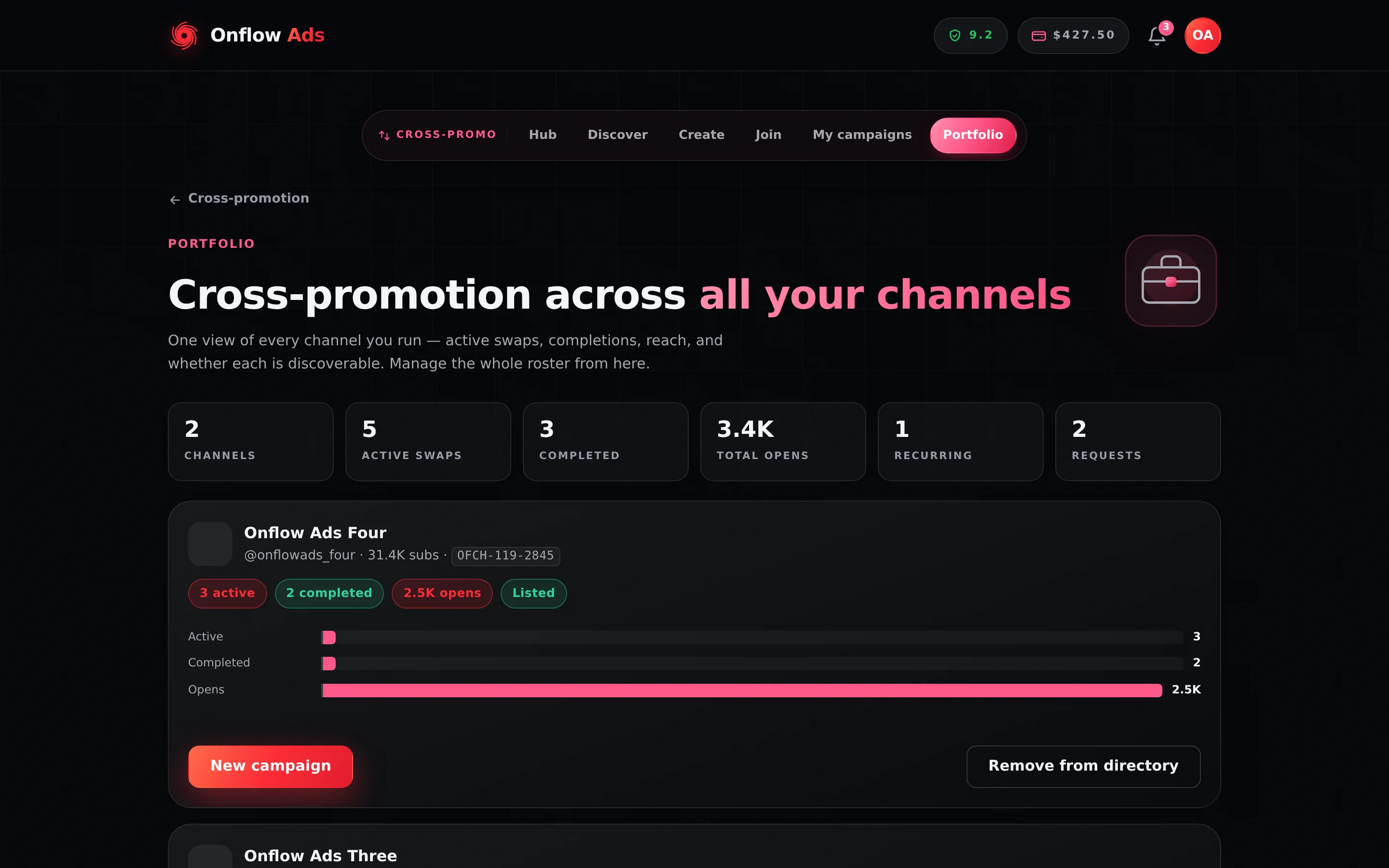
Plus plan · Advertiser. The Portfolio page. The six tiles summarise your whole roster; each channel's own card sits underneath, with its directory state as a Listed pill and its list/unlist button on the right.
What the numbers mean
| Tile | What it counts |
|---|---|
| Channels | Your channels that have cross-promotion history or a directory listing. Idle channels are not counted and not shown |
| Active swaps | Campaigns currently in setup or delivery, across all channels |
| Completed | Finished swaps across all channels |
| Total opens | Ad opens from completed campaigns only |
| Recurring | Every recurring partnership that has not ended — proposed, active or paused |
| Requests | Pending inbound partnership requests waiting for your decision |
Total opens sums completed campaigns only. A campaign that is live right now contributes nothing here — its opens are on its own results panel, updating in real time, and they land in this tile when the run finishes.
Recurring counts every partnership that is not ended, so a proposal your partner has not yet accepted and a series you paused months ago both inflate it. Open the Recurring tab on Find Partners to see the status of each one.
Per-channel cards
Each channel with cross-promotion history or a directory listing gets a card showing:
- the channel's photo, title,
@handle, subscriber count and itsOFCH-channel ID; - pills for its active and completed swap counts, its total opens, and a Listed pill when it is currently in the partner directory;
- a small activity bar chart comparing those three numbers;
- two actions: New campaign, which jumps to the create wizard, and List on directory / Remove from directory.
Channels with no activity at all are hidden. If nothing has activity yet: "No cross-promotion activity yet. Create a campaign or find a partner to get started."
The List on directory button on this page sends only the channel — not its genre and not its pitch line — and the listing is rewritten with what it was sent. Both fields are cleared, permanently. The old text is overwritten, not archived.
If the channel already has a pitch you care about, copy it out first, then re-list from the List my channel tab on Find Partners where you can enter the genre and pitch in the same action. Remove from directory here is safe — it only hides the listing and keeps everything.
What the portfolio is good for
- A weekly health check — which channels are actively swapping, which have gone quiet, and where your opens are coming from.
- Directory hygiene — see at a glance which channels are discoverable, and unlist the ones you do not want approached.
- Spotting the next move — a channel with completions but no active swaps is a candidate for a new campaign or a recurring swap; a Requests count above zero means partners are waiting on you.
The per-channel dashboard
Portfolio answers "how is my roster doing?". The other half of the question — "how is this channel doing?" — is answered by a channel's own dashboard, which you reach by clicking a channel in My channels. It belongs to the channels section rather than to cross-promotion, because it covers all four engines at once, but it is where a single-channel member finds the same kind of view Portfolio gives a multi-channel one.
Its Cross-Promotion panel reports, for that one channel:
| Fact | What it counts |
|---|---|
| Campaigns | Campaigns this channel has been a side of, on either side |
| Completed | How many of them reached Completed |
| Subscribers gained | This channel's own signed change across those runs, e.g. +240 |
| Ad opens | Opens of this channel's ads — the posts written for it, which ran in the partner channels |
Two things to know about how it reads:
- A figure it cannot measure is left out, not shown as zero. If a number is missing from the panel, it is because there is nothing to report — never because the answer is 0 dressed up as a measurement. The same rule governs the whole page, and figures you typed in yourself rather than ones we measured are labelled "As stated by the owner — not measured by us".
- It is read-only, plus one door out. Nothing on it changes a campaign. It does carry a Cross-Promotion card — "Swap a slot with a partner channel" — whose Create a CP code button opens the create wizard. The wizard asks for the channel link on its first step rather than arriving pre-filled, so the page offers that channel's
t.melink to copy.
It does not replace Portfolio: there are no directory list/unlist controls on it, and it shows one channel at a time.
If something goes wrong
| What you see | What it means | What to do |
|---|---|---|
| A channel of yours is missing | Cards appear only for channels with cross-promotion activity or a directory listing. | Run a campaign with it, or list it from the List my channel tab. |
| Total opens looks too low | It counts completed campaigns only. | A live campaign's opens are on its own campaign page until the run ends. |
| Recurring looks too high | It counts pending and paused series as well as active ones. | Check the Recurring tab for each one's real status. |
| A channel's pitch vanished after you listed it from here | Expected — see the danger note above. | Re-enter the genre and pitch on the List my channel tab. |
| "Could not update." after a list or unlist | A transient error; nothing changed. | Try again, or use the List my channel tab. |
Related
- A channel's own dashboard — the single-channel view, across all four engines.
- Discovering partners — the full listing form, with genre and pitch.
- Campaign lifecycle — the campaign-level lists this page aggregates.
- Recurring promos — what the Recurring tile is counting.
- Campaign results — where a live campaign's opens live until it completes.
Next: Rules and fairness — the trust signals, no-show protections, delivery monitoring and plan limits behind every swap.