Joining a Campaign
Got a code from a partner? Enter it, preview their channel and proposed schedule, attach your own channel, then either accept the schedule as-is or propose new timing. Joining is always free and never counts against any monthly allowance, on any plan.
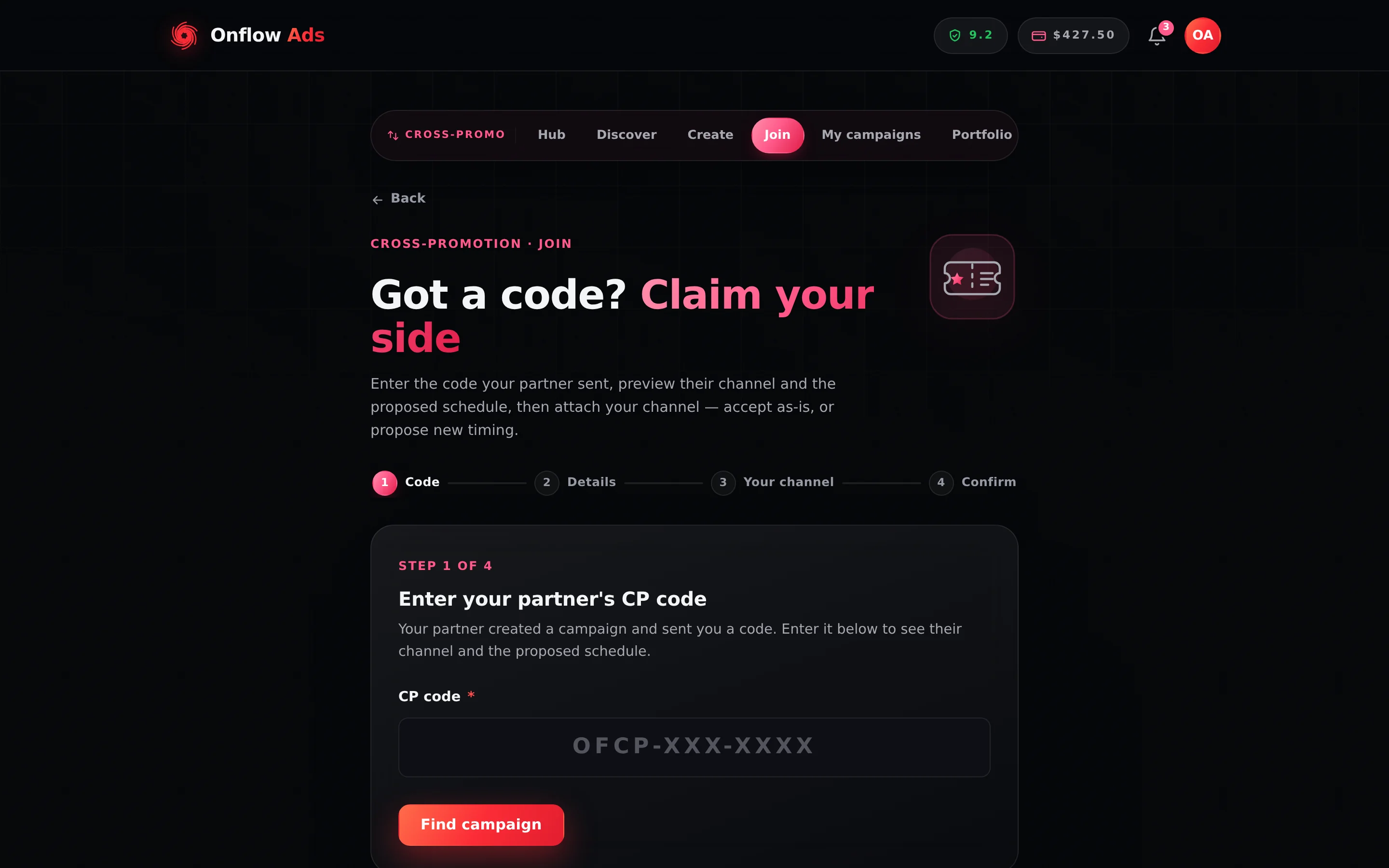
Plus plan · Advertiser. Step 1 of the join flow. Entering a code only looks the campaign up — you see the partner's channel, their track record and the schedule before you decide anything.
Before you start
- A public Telegram channel with an
@username, with the Onflow Ads bot added as an admin. You attach it at step 3. - A reliability score of at least 5.0/10 and no open account review. The gate runs on the lookup, the attach and the accept.
- No active join cooldown. Repeatedly joining campaigns and never confirming pauses joining for 48 hours; creating your own is never blocked. See Anti-ghost protections.
Step by step
Joining runs in four numbered panes — Code, Details, Your channel, Confirm — and nothing is committed until you attach your channel at step 3.
-
Open https://onflowads.com/telegram/dashboard/cross-promotion, choose Have a code?, then Enter a code. (Direct link:
/telegram/dashboard/cross-promotion/join.) -
Code. Type the code your partner sent — the field shows the
OFCP-XXX-XXXXshape, and capitalisation, spaces and dashes do not matter. Press Find campaign. -
Details. You see the creator's channel card — title,
@handle, subscribers, average views — the schedule they set (go-live in their timezone plus UTC, the duration, and when it ends), and a Before you commit panel with the trust signals:- Size verdict — Great match, Good match, Fair match or Uneven sizes, comparing subscribers and average views. It fills in once your own channel is known, so at this point it may still be blank.
- Track record — "12 completed · 1 dropped · 92% reliable" with a meter, or "New partner · no completed swaps yet" for someone with no history.
- Star rating — the average past partners gave them, with the count, as
★ 4.6 (12).
Press Continue, or walk away — nothing is committed yet.
-
Your channel. Paste your own public channel link or
@usernameand press Fetch & continue. As in the create flow you may be asked to add the Onflow Ads bot as an admin, and to pick your channel's genre. Attaching pairs you into the campaign — from this point the creator can see you joined, and the anti-ghost clock starts. -
Confirm. Two choice cards:
- Keep this schedule → Accept & confirm. Accepts the date, time and duration exactly as set, and confirms the swap immediately. You see "It's confirmed! 🤝" and both of you get the full details by email.
- Propose changes → Suggest new timing. Opens the scheduler pre-filled with the creator's timing so you can suggest a different date, time, timezone or duration. You see "Changes sent ✈️", your partner decides, and you are emailed the moment they do. Full flow: Schedule proposals.
If you found the campaign on the open-campaigns board, the Join this campaign → button brings you here with the code already filled in and looked up. You start at the Details pane.
If you attach your channel and then never confirm or propose, the campaign is released after about 48 hours with the note "Partner didn't confirm in time". The creator gets their allowance back and you take a strike and −0.30 on your reliability score; three strikes pauses your joining for 48 hours. The creator's score is untouched. See Anti-ghost protections.
After joining
- Once confirmed, both of you move on to building posts — see Creatives.
- Revisit the campaign any time at
/telegram/dashboard/cross-promotion/campaign/YOUR-CODE, from Your campaigns on the manual page, or by entering the same code again on the join page. - Either side can still cancel before the campaign goes live, and either side can propose new timing right up until it is handed to the delivery queue.
Joining a Blitz campaign
If the code belongs to a Blitz — a one-to-many campaign — the page swaps to a Blitz campaign — Claim a slot pane instead of steps 3 and 4. You see the creator's channel, the schedule, their post under Their post — runs in your channel, and "X of N slots taken". You fetch your channel, then write the post that will run in their channel in two steps (Write, then Review), and the Review step's Claim slot claims it; claiming and writing are one action. Success shows Slot claimed (and a notice), and re-entering the code later shows "You've claimed a slot and built your post. Waiting for the creator to launch."
A Blitz has two hard requirements a 1:1 join does not: your Onflow Ads account must have Telegram linked, and your channel must have a public @username.
Messages you might see when entering a code
| What you see | What it means | What to do |
|---|---|---|
| "That doesn't look like a valid code. Codes look like OFCP-000-0000." | The string cannot be a code at all. | Re-read it from your partner. Spacing and case do not matter; the digits do. |
| "No campaign found for that code. Double-check it with your partner." | Nothing carries that code — almost always a typo. | Ask them to read it back, or to create a fresh one. |
| "This code has expired — ask your partner to create a new campaign." | Nobody joined within 24 hours of creation. | The creator makes a new one; it costs them nothing. |
| "This campaign has already been joined by someone else." | Codes are one-time and another channel got there first. | Ask for a fresh code, or find a partner on the board. |
| "That's your own code — share it with a partner instead." | You entered a code you created. | Manage your side from its campaign page; send the code to your partner. |
| "Joining is paused for now — a campaign you recently joined went unconfirmed." | You are in the 48-hour join cooldown. | The message names the exact reopening time. You can still create your own campaigns. |
| "Cross-Promotion needs a reliability score of at least 5/10 — yours is X." | Your score is below the floor. | Finish deals in flight; a clean streak also heals it. See Rules and fairness. |
| "This blitz campaign is already full." | Every slot is claimed. | Ask the creator whether they will run another. |
| "This blitz campaign has already been launched or closed." | The creator launched it before you claimed. | Nothing to do — the run is locked. |
| "Link your Telegram account before joining a Blitz campaign." | Blitz needs a linked Telegram on both sides. | Link your account, then claim the slot. |
| "Your channel needs a public @username to join a Blitz." | The channel has no public handle. | Set one on the channel in Telegram, then re-fetch. |
| "This is a Blitz campaign — join it through its claim page instead." | You tried a 1:1 attach against a Blitz code. | Re-enter the code on the join page; it detects the Blitz and shows the claim pane. |
| "That proposed go-live time has already passed." on accept | The schedule elapsed while the code sat unclaimed. | Use Propose changes instead. See When a time has already passed. |
| "Pick a different channel — that one is already in this campaign." | You tried to attach the creator's own channel. | Use a different channel of yours. |
Related
- Schedule proposals — negotiating a different go-live instead of accepting the one on offer.
- Creatives: posts and delivery — the next step once the schedule is agreed.
- The open-campaign page — reading the case for a campaign before you take its slot.
- Rules and fairness — what happens if you join and then go quiet.
Next: Schedule proposals — how to negotiate a different go-live time instead of accepting the one on offer.