Discovering Partners
You don't need to already know a partner to cross-promote. The Find Partners page at https://onflowads.com/telegram/dashboard/cross-promotion/discover — reachable from the hub's Find a partner card, or the Discover pill in the sub-navigation — has five tabs.
| Tab | What it does |
|---|---|
| Find partners | Browse the opt-in partner directory, ranked by how well each channel matches yours |
| Open campaigns | Campaigns whose creators listed them publicly — take a slot directly, no code to swap |
| Requests | Your inbound and outbound swap requests — see Partnership requests |
| Recurring | Partnerships set to repeat — see Recurring promos |
| List my channel | Put your own channel in the directory (see Listing your channel below) |
This page covers the discovery flows: browsing the directory, the open-campaigns board, and opting your own channel in and out.
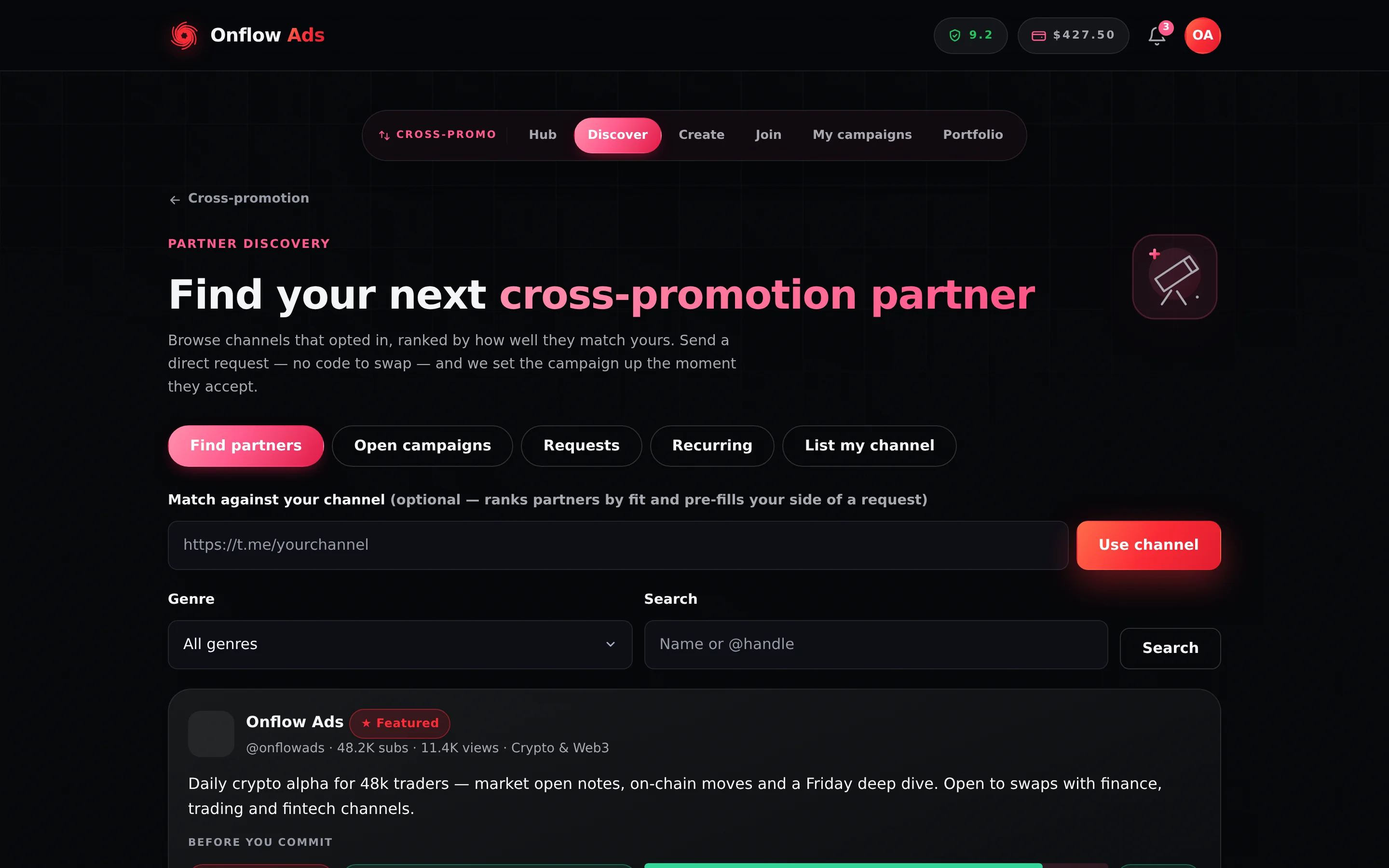
Plus plan · Advertiser. The Find Partners page. Set your own channel in the field at the top before anything else — that is what ranks the results by fit, paints a size verdict on every card, and pre-fills your side of any request you send.
Before you start
- You need a public Telegram channel with the Onflow Ads bot added as an admin. Browsing works without one; sending a request or listing your channel does not.
- Sending a request runs the same reliability floor of 5.0/10 and the same monthly initiation allowance as creating a campaign. Browsing and viewing are never gated.
Browsing the directory
- On the Find partners tab, paste your channel link under Match against your channel and press Use channel. This is optional but changes almost everything the page can tell you: it ranks partners by fit, shows a size verdict on every card, and pre-fills your side of any request. Until you set a channel, results are in recency order with no verdicts.
- Filter by Genre, or type a name or
@handleinto Search and press Search. - Read each partner card. It carries the channel's photo, title,
@handle, subscriber count, average views and genre, an optional pitch line the owner wrote, and the standard trust signals:- the size verdict — Great match, Good match, Fair match or Uneven sizes, shown once you have set your channel;
- their track record — completed and dropped swap counts with a reliability percentage and meter, or "New partner · no completed swaps yet";
- their average star rating from past swaps, as
★ 4.6 (12).
- Press Request swap on the card of the partner you want. The card is replaced by the request form — the full flow is on Partnership requests.
A card marked ★ Featured paid for placement at the top of the results. Featuring buys position only — match verdicts, track records and ratings are never for sale. See Rules and fairness, and Featured placement below for buying it on your own listing.
Some cards also show 💼 Book a paid promotion ↗. That partner sells placements through Paid Promotions as well, so you can buy guaranteed reach from them on top of a free swap.
The browse scan scores up to 200 candidate channels and returns the best 40, so a very broad filter still paints one page rather than an endless list. Narrow with Genre or Search rather than scrolling for more.
Once you have set your channel, a bar appears above the results: Not sure who fits? with a Find my best matches button. It weighs the visible partners against your channel and returns a shortlist of two to four, each with a one-line reason. It spends one action from your shared AI text allowance — the same budget the post writer and the pitch drafter use. If it is exhausted, the page says so and nothing is charged.
If nothing matches your filters, the page reads: "No partners listed yet… Be the first — list your channel from the 'List my channel' tab." A directory with nobody in it is a young directory, not a broken page.
The open-campaigns board
The Open campaigns tab lists campaigns whose creators chose to publish them — via the List this on the open-codes board checkbox at creation, or the board toggle on the campaign page. Anyone can take one of these slots; no code changes hands.
The board is deliberately two steps.
- The list is scannable. Each row shows the creator's channel identity, the size pill, the track-record pill, and one line: "Goes live
<date>(<timezone>) · runs<duration>". A chevron on the right shows the whole row is a link. - The row itself is a link to that campaign's own page at
/telegram/dashboard/cross-promotion/board/CODE, where the full case is made — six stat tiles, the track record explained in prose, the proposed run down to the minute, an "About the channel" panel and a numbered list of exactly what joining commits you to. The Join this campaign → button lives there, not on the card. See The open-campaign page.
Set your channel on the Find partners tab first: the board then ranks listings by closeness to it and paints the size verdict on every row and on the detail page.
The board only shows campaigns created in the last 24 hours, matching the code's own expiry clock. A Blitz code never expires — but a listed Blitz still drops off the board after a day, while remaining joinable by anyone holding its code. If you listed a Blitz and want it visible again, cancel it and create a fresh one.
Empty board: "No open campaigns on the board right now. Create one and list it, or check back soon." Your own listed codes are never shown to you — the board is other people's campaigns.
Listing your channel in the directory
The directory is strictly opt-in — your channel never appears unless you list it.
- Open the List my channel tab.
- Paste your channel link under Your channel and press Fetch. The usual checks apply: the channel must be public, and you will be walked through adding the Onflow Ads bot as an admin if it is not already there.
- Pick your Genre and write a Pitch — up to 240 characters, shown on your directory card. The placeholder sets the tone: "e.g. Daily crypto alpha, 12k engaged traders — open to weekly swaps."
- Press List my channel. The page confirms "Your channel is now discoverable."
Managing your listings
Your listings sit under Your listings on the same tab, each with a Listed or Hidden pill.
| Button | What it does |
|---|---|
| Remove from directory | Hides the listing immediately. Partners can no longer find you or send you requests from the directory. Campaigns already running are unaffected. |
| List again | Re-activates a hidden listing. |
| ★ Feature — $X / 7 days | Buys top-of-browse placement for 7 days — see Featured placement below. |
List again re-sends your genre but not your pitch, so the pitch line is cleared. The List on directory button on the Portfolio page sends neither, so it clears both the genre and the pitch. Neither is recoverable — the old text is overwritten, not archived.
After you re-list a channel from either place, come back to this tab and re-enter the genre and pitch before partners see the card. If you want to keep the text, copy it out of the card first.
Featured placement
★ Feature — $X / 7 days pins that listing to the top of partner browsing for 7 days and paints a ★ Featured badge on the card. It buys position in the list and nothing else — match verdicts, track records and ratings are never for sale.
- Press ★ Feature — $X / 7 days on the listing. The button arms, changing to Confirm — charge my wallet.
- Press it again. Your wallet is charged and the page confirms "Your listing is featured for the next 7 days."
The card then carries the ★ Featured badge and a Featured until <date> line, and the button disappears until the window runs out. The price shown is your plan's price — it falls with each rung and is free on Ultimate — see Add-ons and extras.
The button is offered only on a listing that is active and not already featured, and the server checks the same two things again when you confirm. If the listing was hidden in the meantime the purchase is refused with "List this channel in the directory first, then feature it."; if it is already inside a window, with "This listing is already featured." Neither charges you, so a double tap can never buy the same week twice.
The "Your directory listing is quiet" banner
If your oldest active listing has been up for more than 7 days with zero inbound partner requests in that window, a dismissible banner appears above the directory results. It names the channel, says how long it has been quiet, and offers two levers: Feature for $X and Redraft my blurb with AI.
Feature for $X is the same purchase as the button on your listing, armed the same way and at the same plan price.
Redraft my blurb with AI drafts a one-sentence pitch from your channel's own profile, shows it to you in quotes inside the banner, and saves it only when you press Use this pitch. It spends one action from your shared AI text allowance.
If your reliability percentage is under 50%, the banner adds one more line, and it is the honest one: partners see that number before accepting, and completing the swaps you start raises it at no cost. No amount of placement fixes a weak record — see Rules and fairness.
The banner never appears on a listing that is already featured, is newer than 7 days, or has had a request in the window.
If something goes wrong
| What you see | What it means | What to do |
|---|---|---|
| "Not enough wallet balance — top up to feature your listing." after Confirm — charge my wallet | The Featured debit would overdraw your wallet. Nothing was charged and nothing was featured. | Top up, then press the button again. |
| "This listing is already featured." | The listing is inside a Featured window already. | Read the Featured until line on the card; the button returns when the window ends. |
| "List this channel in the directory first, then feature it." | The listing is hidden, so there is nothing to pin to the top. | Press List again, re-enter the genre and pitch, then feature it. |
| "That channel isn't public, or it doesn't exist." | The link points at a private channel, or the handle is wrong. | Only public channels with an @username can be listed. Check the handle. |
| An add-bot panel after Fetch | The Onflow Ads bot is not an admin of that channel yet. | Follow the panel's steps, then press retry on the same panel. |
| "Cross-Promotion channels need at least N subscribers. This channel has M." | An operator has switched on the optional subscriber floor. | Nothing to fix on your side — the channel is below the current floor. |
| "You've used today's AI actions." | The matchmaker or the blurb drafter has no allowance left. | The daily counter resets at 00:00 UTC and the monthly one on the 1st. Nothing was spent on the failed attempt. |
| Your listing shows Hidden | You removed it earlier. | Press List again, then re-enter the pitch (see the danger note above). |
Related
- The open-campaign page — what a board row opens into, and everything you should read before taking a slot.
- Partnership requests — approaching a partner you spotted in the directory.
- Rules and fairness — how the size verdict and track record are computed.
- Portfolio — listing state for every channel you own, in one view.
Next: The open-campaign page — the full case for an unclaimed campaign, and the numbered list of what taking its slot commits you to.