Campaign Lifecycle
Every cross-promotion moves through a defined set of statuses, shown as a coloured pill on the campaign page and in every campaign list. This page explains each status, what you can do in it, and how campaigns end.
Setup states (agreeing the deal)
The campaign page is fully interactive here.
| Status shown | What it means | What you can do |
|---|---|---|
| Awaiting partner | The code is minted; nobody has joined | Creator: copy and share the code, list or unlist it on the board, or cancel. Unused codes expire after 24 hours |
| Awaiting confirmation (In progress in campaign lists) | A partner attached their channel and is reviewing the schedule | Joiner: Accept & confirm or Propose changes. Either side can cancel. Both sides can already build posts |
| New time proposed (Changes proposed in lists) | One side proposed new timing; the other side decides | The decider sees both schedules side by side and presses Accept changes or Decline — see Schedule proposals |
| Confirmed | Both sides locked in the schedule | Build and review posts (Creatives); either side can still Propose new time or Cancel campaign |
Delivery states
Once the schedule is confirmed, both posts are built and both reviews are approved, the campaign is handed to our delivery bot and becomes read-only.
| Status shown | What it means |
|---|---|
| Scheduled | Everything approved; the bot will publish at go-live automatically. You can still cancel |
| Going live | The bot is publishing the posts right now |
| Live now | Both posts are up; results update live |
| Wrapping up | The run ended; the bot is removing the posts |
| Completed | Done — final results and ratings available |
| Didn't run | The run was called off before it started — see below |
What "Didn't run" actually means
If the delivery engine cannot publish both ads, it publishes neither. Any ad that did go out is taken down again, the campaign is marked failed, and nobody is penalised. A half-run — one channel carrying its partner's ad for free while its own never appeared — is a deal neither side agreed to, so it is deliberately not allowed to stand.
The results panel on such a campaign shows a Did not run pill and an explanatory banner instead of zeroed statistics, with a Run a fresh campaign button. The usual cause is the bot losing admin posting rights on a channel, or an ad image that could not be fetched. Full copy on Campaign results.
A campaign can be built, approved and stuck. It stays at Confirmed and grows a warning banner instead — "This campaign missed its go-live window", "Delivery is blocked — a channel has no @username", or "Delivery is blocked — no go-live time". Nothing was posted, nobody is penalised, and the campaign is still yours to reschedule. Details and fixes: If your campaign was never queued.
Closed states
| Status shown | What it means |
|---|---|
| Expired | No partner joined within 24 hours — you were emailed. Or a joiner attached but never confirmed, and the campaign was released with the note "Partner didn't confirm in time" (see anti-ghost protections) |
| Cancelled | One side cancelled before go-live; the other side was notified by DM and email |
Cancelling
Cancel campaign is a two-tap button — it arms to Confirm cancel first.
- Awaiting partner: only the creator can cancel (there is no partner yet). The campaign never counts against your allowance.
- Awaiting confirmation / New time proposed / Confirmed / Scheduled: either participant can cancel. You do not need the other side's agreement, and you do not need to be the creator.
- Once the campaign starts going live, it can no longer be cancelled: "This campaign can't be cancelled — it may already be live or finished."
The other participant is always told by Telegram DM and email when a swap is called off. On a Blitz, where the participants are the slot holders rather than a single partner, every slot holder is notified individually.
Scheduled means the hand-off already happened and the bot is holding the campaign until go-live. Cancelling then is still clean — nothing has been posted and nobody is penalised. Once the status moves to Going live, the ads are being published and the only way out is to leave the post up for the full run. Taking it down early costs 1.50 reliability points, and leaving your partner's channel early costs 1.00; see The delivery monitor.
Expiry, at both ends
Two clocks protect you from a partner who never shows up:
- Unjoined codes expire 24 hours after creation. You are emailed, the campaign shows Expired, and it costs nothing from your allowance. Blitz codes are exempt — they stay open until launched or cancelled.
- Unconfirmed joins are released after 48 hours: if a joiner attaches a channel but never confirms or proposes, the campaign is closed out, the creator is freed with no allowance spent, and the joiner takes a strike and −0.30 reliability. Details in Rules and fairness.
Both clocks are swept every 10 minutes, so an expiry lands promptly rather than at some daily boundary.
Your campaign lists
My Cross-Promotions
The My Cross-Promotions page at /telegram/dashboard/cross-promotion/campaigns (the My campaigns pill) is the one place that holds your complete history — every status, cancelled campaigns included.
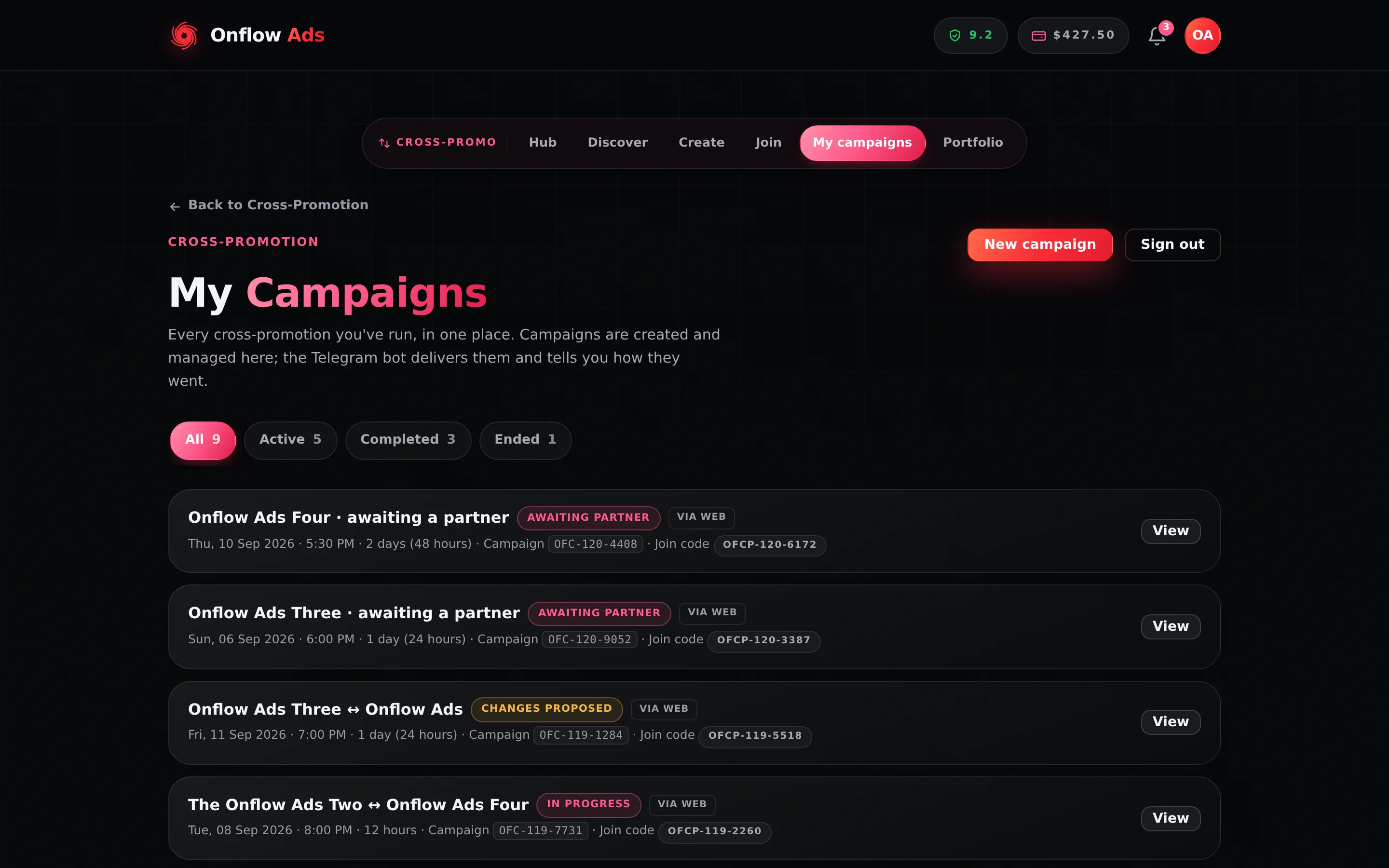
Plus plan · Advertiser. My Cross-Promotions. The four filter tabs carry live counts, and every row opens with View — the pairing, the status chip and both IDs are on the row itself, so you can find a swap without opening it.
Each row shows the channel pairing ("A ↔ B", or "Your channel · awaiting a partner"), a status chip, a via Web tag, the schedule or creation date, the campaign's OFC- ID, the join code, and a View button.
Empty state: "No cross-promotions yet", with Start a campaign.
Your campaigns (manual page)
The manual page lists your campaigns under Your campaigns, with a + New campaign shortcut. It is the working list while you are actively creating and joining with codes — but it hides cancelled campaigns. For everything, use My Cross-Promotions.
Portfolio
If you run several channels, the Portfolio page aggregates activity per channel — active swaps, completions, opens and directory state.
If something goes wrong
| What you see | What it means | What to do |
|---|---|---|
| "You don't have access to this campaign." | You are not a participant. Campaign pages are participant-only. | If you meant to join it, use the join page with its code. A Blitz slot holder counts as a participant. |
| "This campaign can't be cancelled — it may already be live or finished." | The bot started publishing between your first and second tap. | Let it run. Taking your partner's post down early carries a penalty. |
| A campaign is missing from Your campaigns | It was cancelled — that list hides cancelled campaigns. | Open My Cross-Promotions and use the Ended tab. |
| Status stuck at Confirmed past the go-live | The campaign was never queued. | Read the banner on the page — it names the cause. See If your campaign was never queued. |
| Didn't run | The engine could not publish both ads, so it published neither. | Confirm the Onflow Ads bot is still an admin of both channels, then start a fresh campaign. |
Confirm the cross-promo with @partner confirms a campaign your partner joined; cancel my cross-promo pulls one back before it goes live. Both are proposed first and run only after CONFIRM. What the assistant can do for you has the full list and the confirmation rule.
Related
- Campaign results — the numbers a campaign reports from go-live onward.
- Creatives: posts and delivery — the three delivery-blocked banners.
- Rules and fairness — the clocks that free a stranded creator.
- Schedule proposals — rescuing a campaign that missed its window.
Next: Campaign results — the numbers and proof links a campaign reports once it goes live.