Links and results
Every advertiser eventually asks the same question: did the ad work? Views tell you how many people saw it; taps, joins and landings tell you how many acted. Onflow Ads counts those by one rule on every engine — Paid Promotions, Cross-Promotion and the Subscriber Exchange alike — and the rule depends only on where a link points.
You never create a measured link by hand. What each link in your ad becomes is decided as the ad is booked or published, and the figures show up on the campaign that produced them.
What each link becomes
Every link a reader can tap in your ad is published as its own short link of the form onflowads.com/rr/NNNN-NNNN — an eight-digit code, for example onflowads.com/rr/4821-7305. That covers text links (words carrying a link), addresses typed into the text with or without https:// (example.com/sale, t.me/somechannel), @handles in the text, and every inline button. Every tap is counted at onflowads.com before the reader is sent on — deduplicated per reader per day, link previews and crawlers excluded — and where the short link sends them depends only on where the link points:
| The link points at | Where its short link sends the reader | What is counted |
|---|---|---|
| A channel or group you have connected to Onflow Ads (the bot is an admin there) | A campaign invite link into that channel. The reader lands in your channel | Every tap, plus joins, attributed by Telegram itself, and leaves — with the channel's own subscriber growth beside them |
| Any other Telegram address — a channel that is not yours, an invite hash, a bot, a bot's start link, a post | That address, exactly as written — a bot's start payload arrives byte for byte. Telegram's in-app browser opens it straight back in Telegram, so the reader lands where the link points | Every tap |
| A website | The page, carrying the campaign tags — see UTM tags, added for you | Every tap. The one-line Onflow tag on the page counts landings and conversions on top |
The rule is the same for a link written into the caption and for an inline button. Each occurrence gets its own code: the same destination written twice gets two short links, so each is counted separately, and the report names where in the ad each link sat — Text link, Address in the text, @handle in the text or Button. An ad's text carries up to 50 counted links — the team can raise or lower that number — and buttons are outside that budget. How many buttons you may attach depends on your plan — see below.
What a reader sees changes as little as possible. A text link keeps its words; only the destination behind them changes. An @handle keeps its words and becomes a text link. An address typed into the text is replaced by its short link, which Telegram links by itself — unless that would take the post past Telegram's length limit, in which case the longest typed addresses keep their visible text and are linked in place instead. Either way, every one is counted.
- Something that is not a web address, such as an email address — Telegram does not link those as web links.
- A malformed or spoofed address, such as
https://[email protected]. - A link that is already an
onflowads.comshort link. - Anything inside code formatting — Telegram does not link it either.
If the website cannot be reached at the moment the bot publishes a Cross-Promotion or exchange post, the creative goes out as written and is not counted.
Posts published before every link became a short link keep the links they went out with: onflowads.com/go/… hops and direct t.me/+… invite links into your channel, and before those, onflowads.com/r/… redirects on paid bookings, onflowads.com/c/… ones on cross-promotions and a one-tap hop through the bot on exchange placements. All of those keep working and keep counting what they always counted; their rows are marked accordingly. Nothing new is published on them.
How many buttons your plan allows
Inline buttons are a plan benefit, not a universal one, and the cap is a hard number the composer enforces on every engine — Paid Promotions, Cross-Promotion and the Subscriber Exchange alike.
| Plan | Buttons per post |
|---|---|
| Free | 0 |
| Lite | 1 |
| Plus | 2 |
| Elite | 3 |
| Master | 4 |
| Ultimate | 4 |
Referral Premium — the status earned from referrals rather than bought — tracks Free here: 0 buttons. Earned status never satisfies a paid gate.
The two refusals you can meet are exact: "Inline buttons are not available on this account." when your cap is zero, and "Your plan allows up to N button(s) per post." when you attach more than the cap. Button text is 1–48 characters with no line breaks, and a button's address must be an absolute http or https URL of 512 characters or less.
A post sent as an album — several photos in one message group — carries no buttons at all, because Telegram's album send has nowhere to put them. Paid Promotions refuses the pairing up front rather than dropping them silently: "Buttons need a single photo, a video, or a text-only post."
UTM tags, added for you
A web destination gets standard UTM parameters appended so arrivals land correctly attributed in your own analytics: utm_source=onflowads, utm_medium=telegram, a utm_campaign naming the campaign, and utm_content naming the exact link, so two buttons in one post can be told apart.
Any parameter you already set is kept untouched. If your link already carries utm_source or utm_campaign of your own, those values are left exactly as you wrote them and only the missing ones are filled in. A Telegram address is never tagged at all.
What happens when someone taps
- Every tap opens the link's short address on onflowads.com, which looks the link up (from memory for a busy link), sends the redirect, and hands the tap to a queue that is written a moment later — nobody waits on our database to reach the destination, and a burst of readers is never slowed or turned away by the counting. It is a temporary redirect, never a permanent one, so every tap reaches us.
- Into your own connected channel, the redirect opens the campaign invite link. Telegram records the join against it and tells the bot, which writes it to the campaign; a later leave is written too, and a return through the same link is not a second join.
- To any other Telegram address, the redirect sends the reader to it exactly as written, and Telegram's in-app browser opens it straight back in Telegram.
- To a website, the reader arrives on the page carrying the campaign tags. On your page the Onflow tag, if present, reports the arrival as a landing.
Where the figures are shown
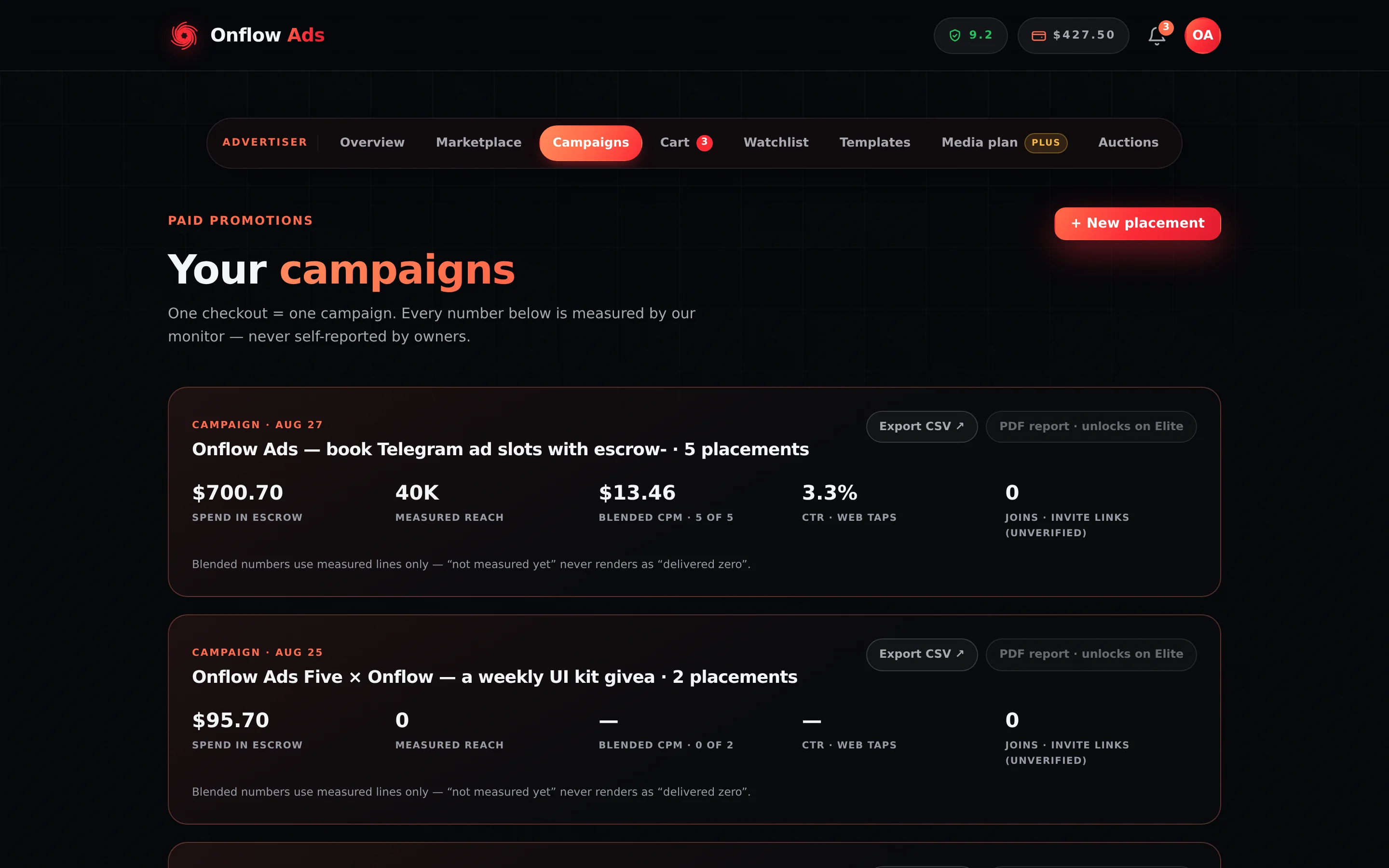
Plus plan · Advertiser. Look at the fourth figure on each card: CTR · tracked links. The second campaign shows an em dash because nothing has been measured on it yet — not because nobody clicked.
On a campaign card
At https://onflowads.com/telegram/dashboard/paid-promotion/orders, every campaign card carries a CTR · taps figure and a Joins · invite links figure, and underneath the card's figures — below the per-channel delivery chart, where the campaign has one — a block headed Links & results listing one row per counted link:
- its label, or its destination when it has no label,
- its kind — taps counted, taps and joins counted for a link into your own channel, or joins counted / redirect / tagged for an older booking,
- where in the ad it sat — Text link, Address in the text, @handle in the text or Button,
- how many taps it took and how many were unique (an older booking's bare invite link or tagged link counted joins or landings instead),
- for a link into your channel, how many joined, how many have left since, and the channel's own growth,
- for a web link, with the Onflow tag on the page, how many landings,
- a Details button that opens the click analytics panel for that link alone.
The block's own Click analytics button opens the same panel for every link of the campaign at once. A campaign with no counted link renders no block at all — an absent Links & results section means nothing in the ad could be counted, not that counting failed.
On the analytics rollup
At https://onflowads.com/telegram/dashboard/paid-promotion/analytics the same data is aggregated: a Blended CTR · unique taps figure for the campaign, Unique taps and Joins via invite links in the Signals row, and a CTR per channel so you can tell which placement actually drove the traffic.
On the other engines
| Engine | Where clicks appear | What it is called |
|---|---|---|
| Cross-Promotion | The campaign results page, the channel's own dashboard, and the story popup for a channel that has no dashboard | Ad opens (taps), Joined your channel |
| Subscriber Exchange | The campaign row, the channel's own dashboard, and the story popup for a channel that has no dashboard | Taps, Joins |
| Paid Promotions | The campaign card and the analytics rollup, and the channel's own dashboard for the owner's side | Taps, Joins, Landings, CTR · taps |
A channel's own dashboard shows these as a running total for that one channel — every cross-promotion's opens added together, every hosted exchange ad's clicks added together — while a campaign card is one campaign. The two answer different questions and will not match. The dashboard also reads only a bounded slice of history, so treat its totals as a floor; it says so on the page when it hits that limit.
Cross-promotion "ad opens" and exchange "taps" are the same tap count described above, from the same ledger, since the bot began asking the website what each link becomes before it publishes. On all three engines the click analytics panel breaks a campaign's taps down further.
What the numbers mean
| Figure | Exactly what it counts |
|---|---|
| Joins | Members who joined your channel through this campaign's invite link, as attributed by Telegram. One person counts once, even if they leave and come back |
| Left since | How many of those joins have since left the channel |
| Taps | Every tap on a link in the ad, including repeats from the same reader — link previews, crawlers, uptime monitors, prefetches and bursts that look automated are served but never counted, and one reader is capped at 20 taps per link per day |
| Unique | One reader, one link, one day, counted once. The same reader tapping tomorrow adds another unique |
| Landings | Arrivals on a page that carries the Onflow tag, deduplicated the same way |
| CTR | Unique taps measured against the views the placement actually delivered |
The click analytics panel
The figures above are totals. The click analytics panel shows what those taps were — when they came and from where — for one link, or for every link of a campaign at once.
| Engine | Where to open it | What it covers |
|---|---|---|
| Paid Promotions | Campaigns → a campaign's Links & results block: Click analytics in its header, or Details on one link | The whole campaign, or that one link |
| Cross-Promotion | The campaign's page → Results → Click analytics for your ad | Your own side only. On a Blitz the creator sees their ad across every partner channel, and a partner sees their own slot |
| Subscriber Exchange | My advertisements → Click analytics on a running or finished ad | That ad, across every placement it has had |
What the panel shows:
- A period switch — 7 days, 30 days or 90 days. Days and hours are in your own time zone, and the panel names it.
- Headline figures — Taps; Readers, each counted once over the period however often they tapped; Joins, where a link goes into your channel, with how many have left since; Busiest hour; Top country; and Not counted — what was served but never counted, split into previews and crawlers, automated bursts, and taps past a reader's daily limit.
- Taps over time — By day, or the Last 48 hours — with unique readers in the hover, and joins as well when it is shown by day.
- When readers tap — the hour of the day — and Day of the week.
- Breakdowns by Countries, Devices, Opened in (the app a tap was opened inside), Operating systems, Browsers, Languages and Came from (the referring site).
- For a campaign, every link with its own taps, readers counted once a day (Unique a day) and joins, each with a Details button that opens that link alone. All links takes you back.
Each chart — Taps over time, When readers tap and Day of the week — has a Show as table button that shows the same numbers as a table. The tap record behind the panel is kept in full for 90 days, which is why the longest period is 90 days. A period with no counted taps says so rather than drawing empty charts.
For each tap the panel knows when it happened, the country (never a city), the device type, the operating system and the browser, the app it was opened inside — Telegram's in-app browser, Instagram and so on — the reader's language, and the referring site, as a host name only. It never shows who tapped. Link previews and crawlers are served but never counted, automated bursts are not counted, one reader adds at most a fixed number of taps to a link each day, and "unique" means one per reader per day.
Privacy, by design
- The IP address and browser string are stored for 90 days, then deleted automatically. Recognising a repeat visitor needs a fingerprint rather than an identity, so a salted, truncated, non-reversible hash of the address and browser is stored alongside them — and that hash, with the country, device, operating system and browser it produced, is what remains after the 90 days are up. The hash cannot be turned back into an address and is meaningless outside this deployment. The raw values are kept only while a placement can still be queried or disputed; see the Privacy Policy §5.6.
- No Telegram user is ever named. A join is recorded against a salted one-way hash of the member — enough to notice the same person leaving, never enough to identify them.
- Referrers are stored as a host name only — the site a reader came from, never the page they were on.
- Country comes from the network edge when the hosting layer supplies one, and is left blank when it does not. It is never guessed from an IP address.
- The uniqueness rule is enforced by the database itself, so two simultaneous arrivals from the same reader cannot both be counted as unique, and a join Telegram delivers twice is still one join.
- The bot only reports. It asks the website what each link becomes before it publishes, and it passes on the joins Telegram tells it about. It creates no link, counts nothing itself and decides nothing about what a figure is worth — a join through a link the website does not recognise is simply not one of ours (the link is looked up in the ledger by the link itself, never by its name). If the bot cannot reach the website, the post goes out with its links as written and uncounted rather than not at all.
- Joins are an indicator, not an audited count. Telegram announces a join or a leave once, to the bot, and there is no way to ask for that history again afterwards. A join that arrives while the bot is restarting is therefore missing from the total rather than recovered later, which is why the figure is labelled unverified and should be read as a floor. Nothing you are charged, refunded or guaranteed depends on it: delivery is settled on views, and host credits on a placement serving its term.
- The conversion pixel, being public, is bounded too: 20 conversions per reader per link per day, 500 per link per hour, and a value no higher than ten times the placement's charge. See Security and rate limits.
Two boundaries worth knowing
- Only advertisers see the campaign figures. Both the campaigns page and the analytics rollup are advertiser-side pages. A channel owner sees the delivery numbers for their own placements instead.
- Multi-channel campaigns share one caption. When one caption runs across several channels, a join or a landing cannot honestly be assigned to one of them, so the campaign total is reported and no per-channel split is invented.
If something goes wrong
| What you see | What it means | What to do |
|---|---|---|
| No Links & results block on a campaign | Nothing in the ad could be counted — no link at all, or only ones left as written: an email address, a link that is already an onflowads.com short link, or text in code formatting. A campaign booked before every link became a short link may also have none, if its only links were bare addresses or Telegram addresses that are not your connected channels | Add a text link or a button, and keep links out of code formatting |
A link to your channel in an older ad reads t.me/+… | That is the campaign invite link into your channel, published directly before every link became a short link — the reader lands in the same place, and Telegram counts the joins | Nothing to do |
| A link to your channel shows taps but no joins | The channel is not connected, or the bot may not create invite links there, so the short link sends readers to the channel's address as written — taps are counted, joins cannot be | Connect the channel and give the bot the invite right. Before you book, the pre-flight names the channels whose joins it will count |
| A web link shows taps but no landings | The page does not carry the Onflow tag | Add the one-line tag to the page the ad opens; taps are counted regardless |
| "Inline buttons are not available on this account." | You are on Free or Referral Premium, where the button cap is zero | Upgrade, or link words in the caption instead — a text link is measured the same way |
| "Your plan allows up to N button(s) per post." | You attached more buttons than your plan's cap | Remove the extras, or upgrade — the cap runs 0 · 1 · 2 · 3 · 4 · 4 from Free to Ultimate |
| CTR · taps shows an em dash | Nothing has been measured on that campaign yet | Wait for the monitor to measure it; a dash is not a zero |
| Taps and uniques differ a lot | Expected. Taps count every tap; uniques count one reader per link per day | Judge interest by uniques and CTR |
| Links past the 50th in a long text are not counted | An ad's text carries up to 50 counted links; the rest are published as written | Move the extras onto buttons, which do not use that budget — as far as your plan's button cap allows |
Every link in the post reads onflowads.com/rr/… | Each link's own short link, which counts the tap and sends the reader straight on — a Telegram link included (older posts may read onflowads.com/go/yoursite.com/…; both keep working) | Nothing to do |
| A typed address kept its own words in the post | Replacing it with its short link would have taken the post past Telegram's length limit, so it was linked in place instead | Nothing to do — it is counted like every other link |
| The same address shows up as two rows | It is written twice in the ad. Each occurrence gets its own short link and is counted on its own | Nothing to do — each row says where in the ad it sat |
Related
- Your campaigns — where the per-campaign figures live
- Analytics and reporting — the blended and per-channel view
- Tracked links and delivery proof — how joins and landings sit alongside delivery evidence
- The channel story popup — where cross-promotion Ad opens and exchange Clicks appear
- Post buttons and links — the per-plan button cap and what else it gates
Next: Notifications — how Onflow Ads tells you what happened on your account.