A channel's own dashboard
Click a registered channel in My channels and you land on that channel's own page: what it measures, what it has run in each engine, what it has earned, and what has happened to it recently.
It is one screen per channel, and it is the deepest view of a channel the product has.
Where: https://onflowads.com/telegram/dashboard/channels/ + the channel's OFCH- reference + /overview. You never have to type it — a row in My channels links straight to it.
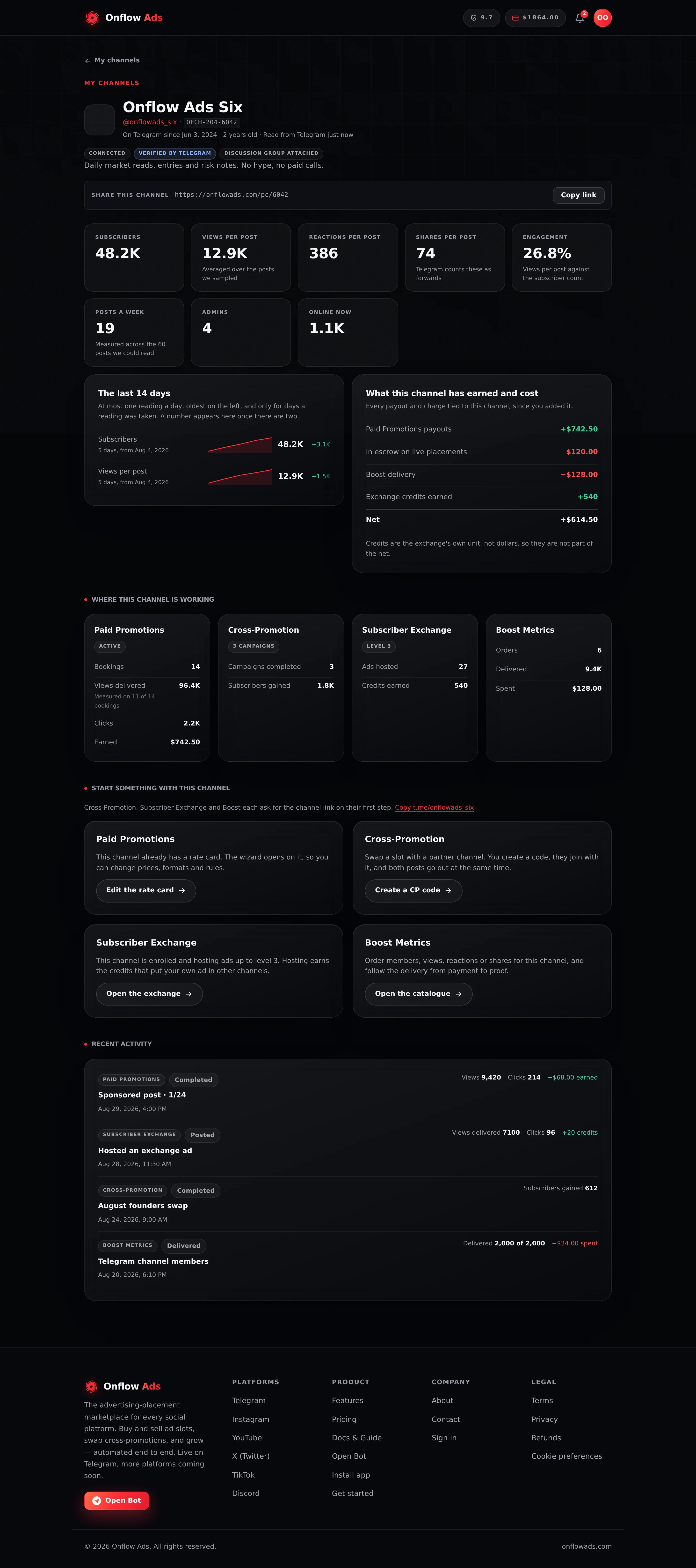
Elite plan · Channel owner. A channel that is listed on the marketplace, enrolled in the exchange and has been boosted, so every panel has something in it.
Before you start
- A signed-in account past the onboarding gate.
- A channel with a registry record — one you added or submitted through the setup wizard. A channel known only from a Boost order or an exchange enrolment has no page; its row opens the story popup instead.
- The page is yours alone. It is authorised on the channel's reference and your account, so another member's
OFCH-is a 404 rather than a leak.
Draft, in review, approved, not approved — the page opens at all of them. There is no status gate. The header simply prints the status you are on.
What you see at the top
| Part | Where it comes from |
|---|---|
| Avatar and title | The stored registry record, refreshed by the live pull below when Telegram answers |
@username | The stored handle. A channel with no public handle shows No public username |
The OFCH- chip | The channel's Onflow Ads id. Click it to copy |
| Status | Draft, In review, Approved or Not approved |
| Verified by Telegram, Flagged as scam, Flagged as fake, Restricted by Telegram | Telegram's own trust signals, read live. They are Telegram's judgement, not ours |
| Discussion group attached | The channel has a linked discussion group |
| Slow mode n s | Slow mode is on, with its interval |
| "On Telegram since …· n years old" | The creation date Telegram reports for the channel, and its age in whole years |
| "Read from Telegram just now" / "Last measured …" | Whether the figures below are this minute's or the stored ones |
The older wizard preview told you Telegram does not expose a channel's creation date. That is no longer the whole story: the scraper that backs this page does report one, so this is the one screen that can tell you how old a channel is.
Sharing this channel
Under the header sits Share this channel with a link and a Copy link button:
https://onflowads.com/pc/6042
That is your channel's public page — the numbers, the rate card, your rules and your reviews, readable by anyone with the link, with a Book a slot button on it. Signed-in visitors can also give the channel a thumbs-up or thumbs-down there, and your replies to reviews appear on it signed with the channel rather than with you.
This is the whole rule, and it has no exceptions:
- Active listing → the link and the Copy link button appear.
- Listing paused, in draft, rejected, or removed → no button at all. In its place is one line telling you why.
- No listing ever created → no button at all, and a line pointing you at listing the channel.
The public page renders an active listing and nothing else, so a link offered at any other moment would be a link to a "not found". You will never see a copy control here that cannot copy something.
The four digits are your channel's own — they are taken from the tail of its OFCH- reference when those digits are still free, and drawn fresh when they are not. You do not choose them and you cannot change them, and they never move to another channel.
The same link, with the same rule, is on the listing's own page under Paid Promotions → your listing.
What we measure
A strip of tiles, each one a single reading. A figure we cannot measure has no tile at all — printing a zero for it would read as a measurement.
| Tile | What it is, exactly |
|---|---|
| Subscribers | The channel's member count |
| Views per post | The mean view count across the posts we sampled — not all posts ever, just the recent window Telegram let us read |
| Reactions per post | The mean reaction count across that same window |
| Shares per post | The mean forward count across that window. Telegram counts a share as a forward |
| Engagement | Views per post as a percentage of the subscriber count — views per post ÷ subscribers × 100, rounded to one decimal and capped at 100%. Roughly: what share of your audience sees a post |
| Posts a week | A rate, not a count — see below |
| Posts published | The channel's total post count, as Telegram reports it |
| Admins | How many administrators the channel has |
| Online now | How many members Telegram reports as online at the moment of the read |
Why a percentage never reads above 100%
Views can genuinely outrun subscribers. A post that gets forwarded, or one shared into a public group, is seen by people who are not members — so the raw arithmetic can hand back 160%.
That is a true number and a useless one: nobody can act on "160% of my audience saw this", and it reads as a bug. Every percentage the platform publishes is clamped to the 0–100 range and rounded to one decimal — on this page, in the marketplace card, on your Boost orders and in the tracking data. When you see exactly 100%, read it as "everyone, and then some", not as a coincidence.
The clamp is applied where the number is made, so the same figure is capped identically wherever it is shown. A reading we could not take at all stays absent rather than becoming 0% — see the honesty rule below.
How "Posts a week" is worked out
Not "posts in the last seven days". It is the gaps between the posts we can see, scaled to a week:
- Take the dated posts in the sampled window and sort them oldest to newest.
- Measure the span in days from the oldest to the newest.
(number of posts − 1) ÷ span in days × 7, rounded to one decimal.
The caption under the tile tells you the basis it used — for example "41 posts over the last 15 days" — so you can see what the rate was computed from.
The tile is absent when it would be a guess:
- fewer than two dated posts in the window, or
- every post falls inside half a day. A burst of nine posts in one afternoon says nothing about a week, and multiplying it up would invent a number.
Measured by us, or stated by you
This is the page's central honesty rule, and it changes what a tile means.
When the live read from Telegram succeeds, a tile is a measurement we just took. When it does not, some tiles fall back to a stored column — and several of those columns are ones you typed into the listing wizard. A number you supplied, printed under a heading that says "what we measure", would be worse than no tile at all.
So a tile that came from you carries the note:
As stated by the owner — not measured by us
That applies to Subscribers, Views per post, Reactions per post and Shares per post whenever the live read failed. Posts published goes further: nothing in the product ever writes that column from a measurement, so it is shown only when the live read produced it, and is simply absent otherwise.
Look at the line under the channel name. "Read from Telegram just now" means every tile is a fresh measurement. "Last measured …" means Telegram could not be reached, and any tile without a note is a stored reading.
How this channel is trending
Under the tiles, a sparkline per metric for Subscribers, Views per post, Reactions per post and Shares per post, with the change from the first reading to the last.
How the history is built, and its limits:
- Readings come from daily snapshots — at most one a day per metric, over the last 13 days.
- Nothing snapshots these on a schedule. A reading is stored opportunistically, when something in the product reads the channel. So gaps are days nobody looked, not days Telegram was silent.
- A metric with fewer than two readings has no row. One dot is a reading, not a trend.
- Each row carries its own window ("9 days, from 12 Aug") because each metric started being snapshotted on its own day.
- The number on the right is last reading − first reading across that row's window. It is not a rate and not a projection.
Where this channel is working
One card per engine, showing whether the channel is in it and what it has done there.
| Engine | Counted as "in it" when | The facts it shows |
|---|---|---|
| Paid Promotions | You have a marketplace listing for it, or any booking has been taken on it with you as the channel owner | Bookings, views delivered, clicks (taps on the ad's links — joins through invite links and landings are reported on the advertiser's campaign, not here), earned |
| Cross-Promotion | It has been used on your side of a campaign | Campaigns completed, subscribers gained |
| Subscriber Exchange | It is enrolled and not removed | Ads hosted, credits earned, and the level it hosts up to |
| Boost Metrics | A Boost order points at its t.me link, or an Auto-Boost subscription runs on it | Orders, delivered, spent |
Two details worth knowing:
- "Views delivered" says what it was measured on. Not every booking gets a final view count, so the note reads "Measured on 11 of 14 bookings" rather than implying all fourteen were counted.
- Campaigns completed comes from our own status column, not from the executor's record of when it finished. A campaign that completed without the bot writing its timestamp still counts.
What this channel has earned and cost
Money that moved because of this channel, over its whole life on your account.
| Line | Exactly what it totals |
|---|---|
| Paid Promotions payouts | Bookings that reached completed, each one net of anything refunded on it |
| In escrow on live placements | Bookings that are live and published but not yet complete |
| Boost delivery | What you spent boosting this channel, net of refunds and of any credit refunded |
| Exchange credits earned | Credits this channel earned by hosting |
| Net | Payouts minus Boost spend. Cash only |
The rules behind those, because each one is a place a total could flatter you:
- Earnings are completed bookings only. A booking's payout figure is written at checkout, so a pending, declined or refunded booking carries one too. Summing every row would count money you have not earned, on a card headed "what this channel has earned" — wrong in your favour, which is exactly why it would be believed.
- Escrow is named separately, never folded in. It is real money owed on live placements, but it is not earned until the run completes, and a total that mixes the two is the number you would plan against.
- Auto-Boost is not counted twice. Auto-Boost's per-post charges are Boost orders in their own right and are already in the Boost total. Rebuilding them from posts × price and adding that on top charged every auto-boosted post to the channel twice, and the orders are the ledger.
- Credits are not netted against cash. Exchange credits are the exchange's own unit. Subtracting them from a dollar payout would invent an exchange rate that does not exist.
- "Treat these as a floor." If the channel has run more campaigns than the page reads (see the caps below), the note above the totals says so instead of presenting a partial history as a complete one.
Recent activity
The twelve most recent things that happened to this channel, newest first, mixed across all four engines. Each row carries the engine, what happened, its stage, the date, any metrics attached to it, and any money it moved.
Only the eight most recent items per engine are eligible for that mix, even though every one of them counts towards the totals above.
Start something with this channel
Four cards, one per engine, each with a line about what the engine would do for this channel and a link into it.
Its wizard reads the listing from the address and opens straight onto this channel. Cross-Promotion, the Subscriber Exchange and Boost all ask for the channel link on their own first step, so rather than a query parameter nothing reads, the page offers you the channel's t.me link to copy and you paste it into the first step.
A channel with no public username cannot be pointed at by link at all, and the page says so.
The caps, stated plainly
The page reads a bounded slice of history so it stays fast. Reaching a cap does not hide anything — the Boost, Paid Promotions and exchange pages still hold every record — it only means the totals here are a floor, and the page says so when that happens.
| Source | How far back it reads |
|---|---|
| Paid Promotions bookings | 200 most recent |
| Cross-promotion campaigns | 200 most recent |
| Exchange deliveries | 200 most recent |
| Boost orders | 500 most recent on your account, then matched to this channel by its t.me link |
| Auto-Boost subscriptions | 50 most recent |
| Metric snapshots | Last 13 days |
| Activity feed | 12 rows, from at most 8 per engine |
If something goes wrong
| What you see | What it means | What to do |
|---|---|---|
| "We have no readings for this channel yet." | Telegram has not answered for it, and nothing is stored | Wait for the next read; check the channel is public and our bot is still an administrator |
| Tiles with As stated by the owner on them | The live read failed and these came from what you typed | Refresh later. If it persists, see Verifying your channel |
| No Posts a week tile | Fewer than two dated posts, or all of them inside half a day | Nothing to fix — post over a longer span and the rate appears |
| No trend rows | Fewer than two snapshot readings for every metric | They accrue as the product reads your channel; the trend fills in on its own |
| No public page where the share link should be | The channel has no ACTIVE Paid Promotions listing | List it, or put the paused listing back on sale |
| "Channel not found." | The reference is not one of your channels | Check the OFCH- in the address, or open it from My channels |
| A 503 | A backend is unwell | Nothing has happened to your channel. Try again shortly |
Related
- My channels — the list this page opens from
- The channel story popup — what an unregistered channel's row opens instead
- Your public channel page — what a visitor sees at the link you share
- Your reliability score — the account-level score, not per channel
Next: The channel story popup — the lighter view, for channels with no registry record.