The Boost API
The Boost API lets you place and track boosts from your own code. It is Perfect-Panel compatible — the de-facto standard of the panel market — so existing reseller tooling works against it with a URL and key change. It uses the same catalogue, the same prices, the same wallet and the same order path as the dashboard.
The always-current reference lives in your account at https://onflowads.com/telegram/dashboard/boost/api. This page is the guide version: the same endpoint, with the reasoning and the sharp edges written out.
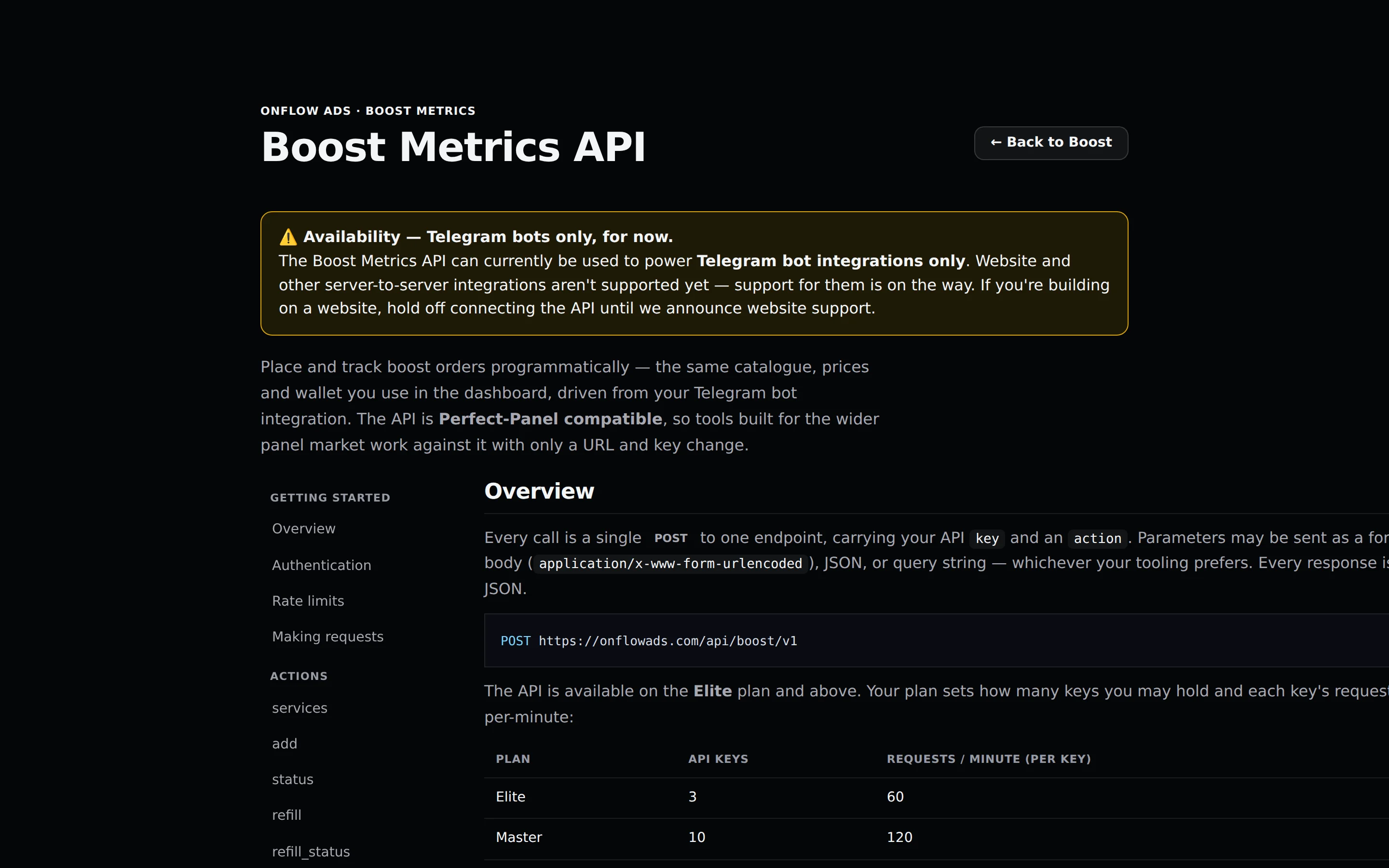
Plus plan · Advertiser. The in-product API reference. The left rail jumps between getting started and each of the seven actions; the endpoint and the per-plan key and rate table are at the top.
The Boost API can currently be used to power Telegram bot integrations only. Website and other server-to-server integrations are not supported yet. If you are building on a website, hold off connecting the API until website support is announced.
Before you start
- Elite plan or above. Free, Lite and Plus cannot mint a key.
- Sign in to create keys — key management is session-authed, not API-authed.
- Fund the account. API orders spend the same wallet and boost credit as the dashboard.
- Have somewhere safe to put the key. It is shown once and never again.
Overview
Every call is a single POST to one endpoint, carrying your API key and an action:
POST https://onflowads.com/api/boost/v1
Parameters may be sent as a form body (application/x-www-form-urlencoded), as JSON, or in the query string. Every response is JSON.
The seven valid actions are services, add, status, refill, refill_status, cancel and balance. Anything else returns:
Unknown action. Use services / add / status / refill / refill_status / cancel / balance.
One correction to carry with you: the Developer page's copy-paste curl snippet sends "action":"order", which is not one of the seven and returns the unknown-action error. Use add instead, as this page does throughout.
Your plan's keys and rate
| Plan | Active API keys | Requests per minute, per key |
|---|---|---|
| Elite | 3 | 60 |
| Master | 10 | 120 |
| Ultimate | 25 | 300 |
Entitlement is re-read on every single call, not stamped on the key when it was minted. Drop below Elite — by downgrading or by letting a plan expire — and every existing key immediately returns HTTP 403 with Your plan no longer includes the developer API. The rate limit follows the live plan too: an upgrade speeds existing keys up at once, and a downgrade slows them down.
Your reliability score bands that rate
The table above is what your plan sells. What a key actually gets is that figure banded by your reliability score, worked out fresh on every call from your live plan and your live score — the same thresholds that already band your AI allowance, applied to requests per minute.
| Your reliability | What happens to the rate | Elite | Master | Ultimate |
|---|---|---|---|---|
| Under review — the score is frozen while a fraud concern is open | Every call is refused | — | — | — |
| Low — below 4.0 | Clamped to the lowest rate any plan sells the API at | 60 | 60 | 60 |
| Building — 4.0 to 4.9 | Halved, rounded up | 30 | 60 | 150 |
| Fair — 5.0 to 7.4 | Exactly what your plan sells | 60 | 120 | 300 |
| Reliable — 7.5 to 8.9 | Exactly what your plan sells | 60 | 120 | 300 |
| Trusted — 9.0 and above | A fifth more, and never less than one extra call | 72 | 144 | 360 |
Because it is read live, a score that recovers speeds your integration back up on its own — there is nothing to reissue and no key to replace.
Separately from the bands, developer-API access has a minimum score an operator can set. It ships at 0, which means off: no key is refused today for the score behind it. If it is ever raised, a key below it is refused with 403 and a message naming both the floor and your score. The bands above apply either way — they narrow a rate rather than close a door.
Creating and managing keys
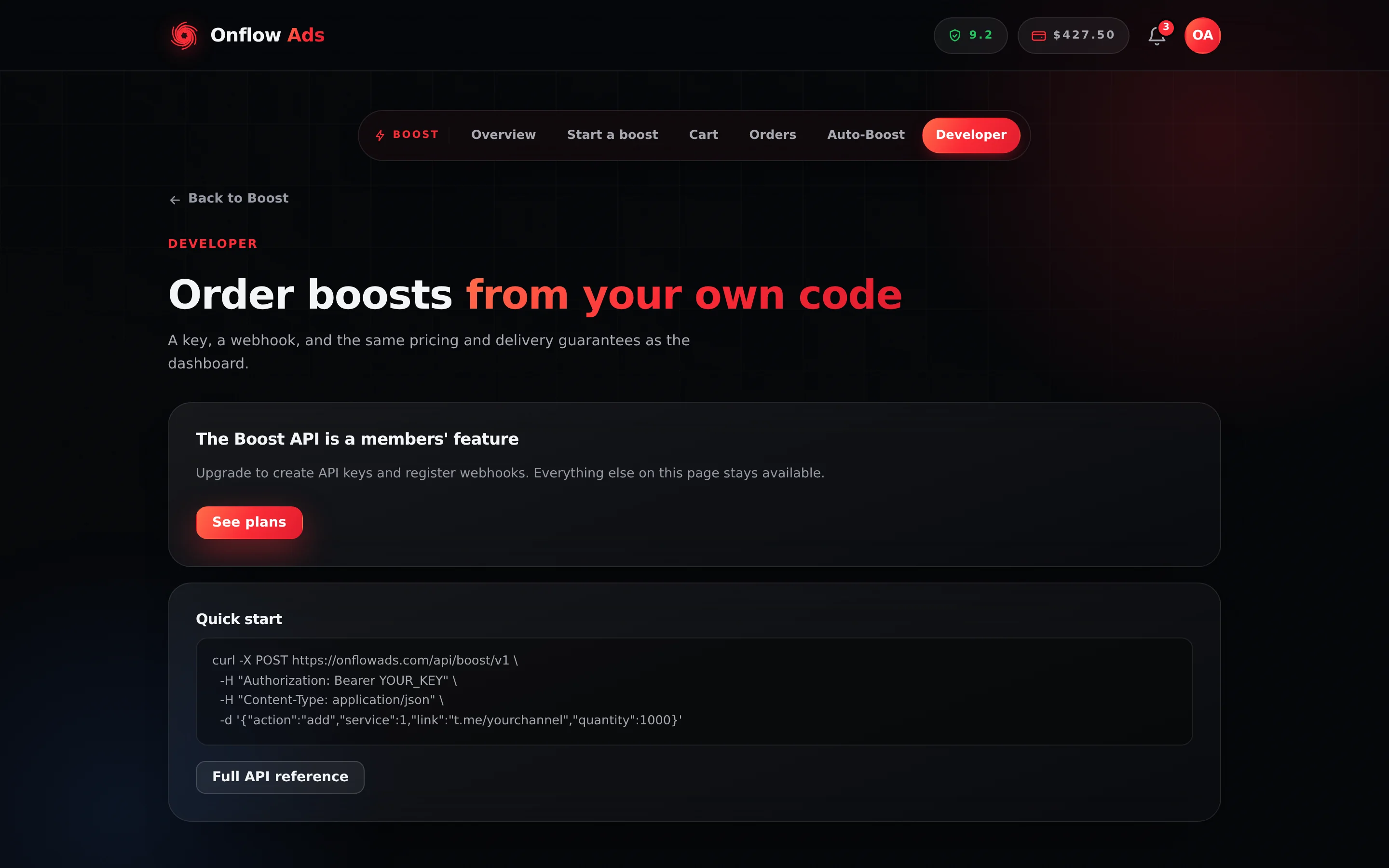
Plus plan · Advertiser. The Developer page below Elite. The API keys and Webhooks cards are hidden entirely and replaced by this locked card; the Quick start card and the Full API reference link stay available at every plan.
- Open Developer at https://onflowads.com/telegram/dashboard/boost/developer.
- Press Create a key. A dialog opens headed Your new API key, with the line This is the only time it is shown. Copy it now.
- Copy the full secret — it starts with
bk_— with the Copy key button. - Note the Key ID line beneath it: Key ID OFBK-… — quote this to support. That reference is permanent and safe to store or share; the secret is not.
- Press Done.
Each key row afterwards shows its label, its prefix, when it was created, when it was last used, how many calls it has made, and its OFBK- reference — with a single Revoke button (confirmation: Revoke this key? Anything using it stops working immediately.).
There is no Rotate action: to rotate a key, revoke the old one and create a new one. The creation dialog also never asks for a name, so every key is labelled API key — tell them apart by their prefix and their OFBK- reference.
A key is tied to your account and spends from your wallet. Anyone holding it can place orders billed to you, and the platform keeps only a hash — a lost key cannot be recovered, only revoked and replaced. Revoke a leaked key immediately.
Key minting is limited to 10 per hour. At your plan's ceiling: You're at your <Plan> limit of N active API keys. Revoke one to mint another.
Authentication
Send the key with every request, in any one of:
- the
keyparameter, in the form body, JSON or query string; - an
Authorization: Bearer YOUR_API_KEYheader; - an
X-Api-Key: YOUR_API_KEYheader.
Making requests
# form-encoded
curl https://onflowads.com/api/boost/v1 \
  -d key=YOUR_API_KEY \
  -d action=balance

# JSON
curl https://onflowads.com/api/boost/v1 \
  -H "Content-Type: application/json" \
  -d '{"key":"YOUR_API_KEY","action":"balance"}'

# header auth
curl https://onflowads.com/api/boost/v1 \
  -H "Authorization: Bearer YOUR_API_KEY" \
  -d action=services
The actions
services — what you can order
Every offering your account may order, priced for your plan: the per-1,000 rate already carries your standing discount and your volume rate-break. Services your plan cannot buy are omitted entirely rather than returned as locked.
[
  {
    "service": 1,
    "name": "Telegram Channel Members",
    "type": "Default",
    "category": "Telegram",
    "rate": "2.4000",
    "min": 10,
    "max": 1000000,
    "refill": true,
    "cancel": false,
    "dripfeed": true
  }
]
The refill, cancel and dripfeed flags tell you which later actions that service supports. Check them before you build a workflow around one.
add — place an order
Charged exactly as in the dashboard: the same price, the same boost-credit-then-cash split, the same idempotency fence and the same automatic refund if no provider accepts it.
| Parameter | Required | Description |
|---|---|---|
service | yes | The service id from services |
link | yes | The target link or @username |
quantity | yes | Units to deliver, inside the service's own minimum and maximum |
runs | no | Drip-feed batches, 2 to 100. Send together with interval |
interval | no | Minutes between batches, 1 to 1,440. Send together with runs |
coupon | no | A discount code |
request_id | no | Your idempotency key. Resend the same one to retry safely |
curl https://onflowads.com/api/boost/v1 \
  -d key=YOUR_API_KEY \
  -d action=add \
  -d service=1 \
  -d link=https://t.me/yourchannel \
  -d quantity=1000
Response:
{ "order": "OFB-482-1907" }
OFB-482-1907 is the order's Onflow Ads ID, minted by the database when the order is created. It is the string you pass back to status, refill and cancel, the one on the order in your dashboard, in the CSV export and in its proof page address, and the one to quote to support. Store it against your own record and you never need a mapping table.
Pass a unique request_id per intended order. If a network error leaves you unsure whether an order was placed, resend the identical request with the same request_id — you get the original order back instead of a second charge. Without one, every call is a distinct order.
add returns HTTP 200, not 402Order-level failures — insufficient balance, a bad link, a quantity outside the service's range, a plan cap, a locked service — come back as {"error": "…"} with an HTTP status of 200. Client code that branches on the HTTP status alone will treat a failed order as a success. Always check for an error key in the body, on every add.
You can opt out of that. Send http_errors=1 with the request and the endpoint answers with real HTTP statuses instead — 400 for a malformed request, 402 for insufficient balance (with shortfall_cents in the body so you know how far short you are). The 200-with-error default exists only for Perfect-Panel compatibility; if you are writing the client yourself, opting in is the better contract.
One 402 you get either way: if the account's wallet is overdrawn, every action is refused with 402 before it reaches the order path, whatever http_errors says.
A failed add never leaves you charged: if no provider accepts the order, it is refunded in full to the pocket it was paid from before the response is returned.
status — check an order
Pass order (one id) or orders (up to 100 ids, comma-separated). Duplicates in the list are collapsed.
{
  "order": "OFB-482-1907",
  "charge": "2.4000",
  "start_count": 1240,
  "status": "In progress",
  "remains": 320,
  "currency": "USD"
}
Every packet carries its own order id, so a result is self-describing even for a single-order call. With orders, you get an object keyed by order id, with an error entry in the place of any id we do not recognise:
{
  "OFB-482-1907": { "order": "OFB-482-1907", "status": "In progress", "remains": 320 },
  "OFB-903-5514": { "error": "Incorrect order ID" }
}
Single and batched status are not equally fresh. A single-order status on a live order forces a fresh provider poll before answering. A batched orders call is served from the last delivery sweep, which runs every 90 seconds — 100 live provider calls in one request would time out. Poll one order when you need the freshest number, and in batches when you need many.
refill — request a refill
Only for services where refill is true, on an order that has settled as completed or partial and is still inside its window. Pass order, or orders for up to 100.
{ "order": "OFB-482-1907", "refill": "91245" }
With orders you get an array, one entry per id, in the order you asked:
[
  { "order": "OFB-482-1907", "refill": "91245" },
  { "order": "OFB-903-5514", "refill": { "error": "This order can't be refilled." } }
]
On the single-order form a failure comes back as { "order": "OFB-903-5514", "error": "…" }. A closed window is named exactly: The 30-day refill window has passed.
refill_status — check a refill
Pass refill, or refills comma-separated. Returns Completed, Pending, In progress or Rejected.
A refill id belongs to the delivery provider, not to us, so the response also names the Onflow Ads order it belongs to — that is what you reconcile against:
{ "order": "OFB-482-1907", "status": "Completed" }
A refill id we cannot match to one of your orders comes back with a null order and a Refill not found error.
cancel — stop in-flight orders
Pass orders (up to 100, comma-separated); a single order also works. Only for services where cancel is true.
[
  { "order": "OFB-482-1907", "cancel": 1 },
  { "order": "OFB-903-5514", "cancel": { "error": "Incorrect order ID" } }
]
A 1 means the cancellation was requested, not that it has settled. The refund lands when the provider confirms, covering only the undelivered remainder — delivered units are kept, and each pocket is repaid as it was charged. Poll status to see the outcome.
balance — your spendable balance
Wallet cash plus boost credit, as one figure in USD.
{ "balance": "128.5000", "currency": "USD" }
Order statuses
The status field returns one of: Pending, In progress, Processing, Completed, Partial, Canceled, Refunded.
- Partial — part of the order could not be delivered. The undelivered share is refunded automatically to the pockets it was paid from.
- Canceled — terminal. The refund covers only the undelivered remainder the provider returns.
- Refunded — fully refunded. This is also where a failed order lands when there is no evidence anything was delivered.
A failed order that did deliver part of its quantity reads Canceled here: the undelivered share is refunded, and its webhook event is order.error.
Errors
An error response carries an error field with a human-readable message.
| HTTP | Meaning |
|---|---|
400 | Missing or invalid parameters — an unknown action, a missing order |
401 | Missing, unknown or revoked API key |
402 | The account's wallet is overdrawn. The API unlocks the moment the balance is back to zero |
403 | The account or the key may not call right now — the plan, the account's status, an open fraud concern, the reliability floor, or a block placed on the key. The body says which |
429 | Rate limit exceeded for this key, or the key's daily call cap is used up |
500 | The request could not be completed — safe to retry with the same request_id |
503 | Temporarily unavailable — retry after a short wait |
Every 402, 403 and 429 case is named, with the sentence it returns, under Fair use and abuse below.
Remember that an add failure is not in this table: it is HTTP 200 with an error body.
Fair use and abuse
A key is another way to act on the platform, so it is held to the same rules the browser is. Every authenticated call now runs the checks a signed-in request has always run: your account's standing, what you owe, and your reliability. A key belonging to a banned account, or to one whose wallet is overdrawn, is refused rather than spending the wallet behind it.
Every refusal names a reason
The checks run in a fixed order and stop at the first one that fails, so the answer you get is the thing to fix first — being told your score is low when the real answer is "the wallet is overdrawn" would send you to fix the wrong thing.
| Order | HTTP | What the body says | What it means for you |
|---|---|---|---|
| 1 | 401 | Invalid API key. | The key is unknown, or you revoked it. A missing key and a wrong one give the identical answer on purpose, so the endpoint cannot be used to find out whether a key string exists |
| 2 | 403 | This API key was disabled by Onflow Ads support. Minting another key will not restore access — contact support to have the block reviewed. | An administrator blocked this key. See below |
| 3 | 403 | Your account has been suspended. or Your account is suspended until … | The account is banned or suspended. The key is fine; the account is not |
| 4 | 402 | Your wallet is $X overdrawn… | The debt gate. API orders spend the same wallet the dashboard does, so an overdrawn account cannot place them. It lifts the moment the balance is back to zero — see Owing money |
| 5 | 403 | Your account is under review while an open fraud concern is resolved… | Your score is frozen while a concern is open. There is nothing to raise; it lifts when the concern is decided |
| 6 | 403 | Developer-API access needs a reliability score of at least … | The operator's reliability floor, which ships switched off. The message names the floor and your score |
| 7 | 403 | Your plan no longer includes the developer API. | The account dropped below Elite, by downgrade or expiry |
| 8 | 429 | Rate limit exceeded. | The per-minute rate for this key, after the reliability band |
| 9 | 429 | Daily call cap reached for this key. It resets 24 hours after the first call that counted towards it. | An administrator set a per-day ceiling on this key. It is a separate window from the per-minute rate, so respecting the rate does not keep you under it |
A 503 Service unavailable. means the gate could not complete its checks. Retry after a short wait; nothing was charged.
What gets a key blocked
A block is a moderation decision, not an automatic one. Only a Master administrator can place one, behind a fresh password proof, and it has to carry a written reason of at least ten characters — because you are shown that reason. It can cover a single key, or every developer-API key the account holds at that moment, in one act.
You are told, rather than left to discover it from a 403: a block records a notification headed Developer API key blocked — or Developer API access blocked where it covered every key — carrying the reason and pointing you at a support ticket, and it reaches you by email and Telegram according to your notification preferences. Lifting one sends the matching restored notice.
The block and your own Revoke are two separate switches, deliberately. Revoke is yours; the block is ours. Revoking a blocked key and minting another does not clear it — the block stays on the key an administrator named, in a place your Revoke button does not reach — and nothing on the Developer page lifts it. Support is the route back: open a ticket quoting the key's OFBK- reference.
A blocked key also goes on counting against your plan's active-key ceiling until you revoke it, so a full slate of blocked keys will refuse a new one with the usual You're at your <Plan> limit… message.
When a block is lifted, anything you revoked yourself stays revoked. Mint a new key from the Developer page.
An administrator can also hold one key short of blocking it: override its requests per minute, or set a calls-per-day ceiling on it. Those are the refusals numbered 8 and 9 above. An override replaces your plan's rate as the starting figure, and the reliability band still applies on top of it.
Abusing the API costs reliability
There is no separate API reputation to keep. Misusing a key moves the one reliability score that everything else on the platform reads, through the same ledger, with two entries of its own:
| Change | Ledger entry |
|---|---|
| −1.00 | An abusive pattern of automation — you ran an abusive pattern of automation through the developer API, upheld on review |
| −2.00 | Serious misuse of the developer API — sharing or reselling a key, or scripting fraud through it, upheld on review |
Neither fires by itself. The developer-API desk proposes a flag into the same review queue the AI content classifier files into, and your score moves only when a person confirms it. A proposal that is rejected never touches your score and leaves nothing behind, and the lighter of the two is the default — the −2.00 has to be asked for by name.
A confirmed flag costs you twice over, because the score bands your rate. Everyone starts at 8.0, so a single mark leaves an integration running at its full rate — but marks accumulate, and a score that falls under 5.0 halves your requests a minute while one under 4.0 clamps every plan to 60. The entry appears on your ledger like any other, with the same appeal route. The full list of what moves the score is on Your reliability score.
Every call is logged
Since the gate was tightened, each authenticated call writes one row: which key and account made it, the action asked for, the HTTP status, whether it succeeded, why it was refused when it was, the calling address and how long the check took. Refused calls are logged as well as accepted ones — a call made with a key we do not recognise is the exception, because there is no key to file it under.
The log is kept for 90 days and then deleted. It is what a support ticket about a block or a refusal is answered from, so quote the key's OFBK- reference and roughly when the calls were made.
Webhooks (Master and Ultimate)
Instead of polling status, register a URL and Onflow Ads POSTs a JSON event to it the moment an order reaches a terminal state. Add and remove webhooks in the Webhooks card on the Developer page.
- The URL must be https and publicly reachable. Internal and private hosts are rejected.
- You may hold up to 10 active webhooks.
- Webhook creation is limited to 15 per hour.
Events: order.completed, order.partial, order.refunded, order.canceled, order.error.
order.error is a provider that accepted the order and then reported it failed after delivering part of it; the undelivered share has been refunded. A webhook subscribed only to the older four events receives that settlement as order.refunded instead, so the refund always reaches you.
The Add webhook form is a single URL field, and every webhook created there receives all five events. Filter on the event field at your end.
Payload shape:
{
  "event": "order.completed",
  "order": {
    "id": "OFB-482-1907",
    "public_id": "OFB-482-1907",
    "platform": "telegram",
    "category": "Telegram",
    "service": "Telegram Channel Members",
    "link": "https://t.me/yourchannel",
    "quantity": 1000,
    "delivered": 1000,
    "charge_cents": 240,
    "charge_usd": 2.4,
    "refunded_cents": 0,
    "refunded_usd": 0.0,
    "status": "completed",
    "start_count": 1240,
    "remains": 0,
    "created_at": "2026-07-24T09:12:00+00:00",
    "updated_at": "2026-07-24T09:54:00+00:00",
    "completed_at": "2026-07-24T09:54:00+00:00"
  },
  "at": "2026-07-24T09:54:00+00:00"
}
The order object is the full record, so it carries more fields than are shown here — the offering id, the credit-and-cash split, the coupon, the batch, the drip-feed settings and the refill and cancel eligibility flags, where they apply. Two are worth knowing by name:
idandpublic_idare the same string — yourOFB-…reference, under both the short name and the platform-wide one. Reconcile on it.statushere is the internal spelling (completed,partial,refunded,canceled,error) — lower case, not thestatusaction's Perfect-Panel capitalisation. The event name matches this spelling.
Each delivery also carries an X-Boost-Event header naming the event.
Verifying the signature
Every delivery carries an X-Boost-Signature header of the form sha256=HEX: an HMAC-SHA256 over the raw request body, keyed with that webhook's own signing secret. Recompute and compare in constant time before trusting a payload:
import hmac, hashlib

expected = "sha256=" + hmac.new(secret.encode(), raw_body, hashlib.sha256).hexdigest()
if hmac.compare_digest(expected, request.headers["X-Boost-Signature"]):
    ...  # genuine
The platform generates a whsec_… secret when a webhook is created and returns it exactly once — but the Add webhook form discards it. It clears the URL field and reloads the list, so a webhook you create through the interface leaves you with no secret, and therefore no way to verify the signature above.
If you need signature verification today, contact support and quote the webhook's URL. Until then, treat webhook deliveries as an untrusted nudge: use the event as a signal to call status yourself, and trust that answer rather than the payload.
Respond with a 2xx to acknowledge. A webhook that keeps failing accumulates a failure count and is automatically disabled after a run of them — re-add it once your endpoint is back.
If something goes wrong
| What you see | What it means | What to do |
|---|---|---|
401 Invalid API key. | The key is wrong, unknown or revoked | Check you sent the full bk_… secret, not the prefix or the OFBK- reference |
403 Your plan no longer includes the developer API. | The key's owner is below Elite | Renew or upgrade. The same keys start working again immediately |
403 This API key was disabled by Onflow Ads support… | An administrator blocked the key | Open a support ticket quoting the key's OFBK- reference. Minting another key will not lift it |
403 Your account has been suspended. / …is suspended until… | The account's standing, not the key | Nothing the integration can do. Sort the account out first |
403 Your account is under review… | An open fraud concern has frozen the score | Wait for the concern to be decided; the key works again when it clears |
402 Your wallet is $X overdrawn… | The debt gate — API orders spend the wallet | Top up until the balance is back to zero |
429 Rate limit exceeded. | Over your per-key per-minute rate, after the reliability band | Space out polling. Batched status costs one call for up to 100 orders |
429 Daily call cap reached for this key. | An administrator capped this key's calls per day | Wait 24 hours from the first counted call, or ask support to review the cap |
| Unknown action. Use services / add / … | A misspelled action, or the invalid order action from the Quick start snippet | Use one of the seven |
An add returned HTTP 200 but no order appeared | It failed with an error body | Read error; check for it on every add |
| You're $X short for this order. | Balance | Top up. Nothing was charged |
| Incorrect order ID | The reference does not belong to this account | Send the full OFB- reference, exactly as add returned it |
| This order can't be refilled. | Not refill-eligible, not settled, or no provider reference | Check the service's refill flag |
| The 30-day refill window has passed. | The order is out of protection | Nothing to do |
| Your webhook never fires | It was disabled after repeated failures. A later drop below Master does not silence it — the plan gate is checked when a webhook is created, and rows already registered keep firing until you delete them | Delete and re-add it once your endpoint returns 2xx. Re-adding needs Master |
You cannot verify X-Boost-Signature | You have no secret — see the danger note above | Use the event as a nudge and call status |
Related
- Limits and caps — every rate limit and ceiling the API is checked against
- Placing an order — the same order path, in the interface
- Tracking your orders — where API orders appear in the dashboard
- Your reliability score — the score behind the bands, and what moves it
- Security and rate limits — every layer a call is counted against
- Boost FAQ — short answers to the questions that come up most