Auto-Boost
An Auto-Boost rule watches one Telegram channel and boosts every new post the moment it goes live, spending from a prepaid pool until the pool runs out. One rule replaces an indefinite run of identical manual orders.
The Auto-Boost page at https://onflowads.com/telegram/dashboard/boost/auto is where you watch a rule spend and where you pause, resume or cancel it. It lists every rule on your account, whatever channel each one watches. If you want one channel's side of the story instead, its own dashboard reports the rules watching it — see Where a rule shows up elsewhere below.
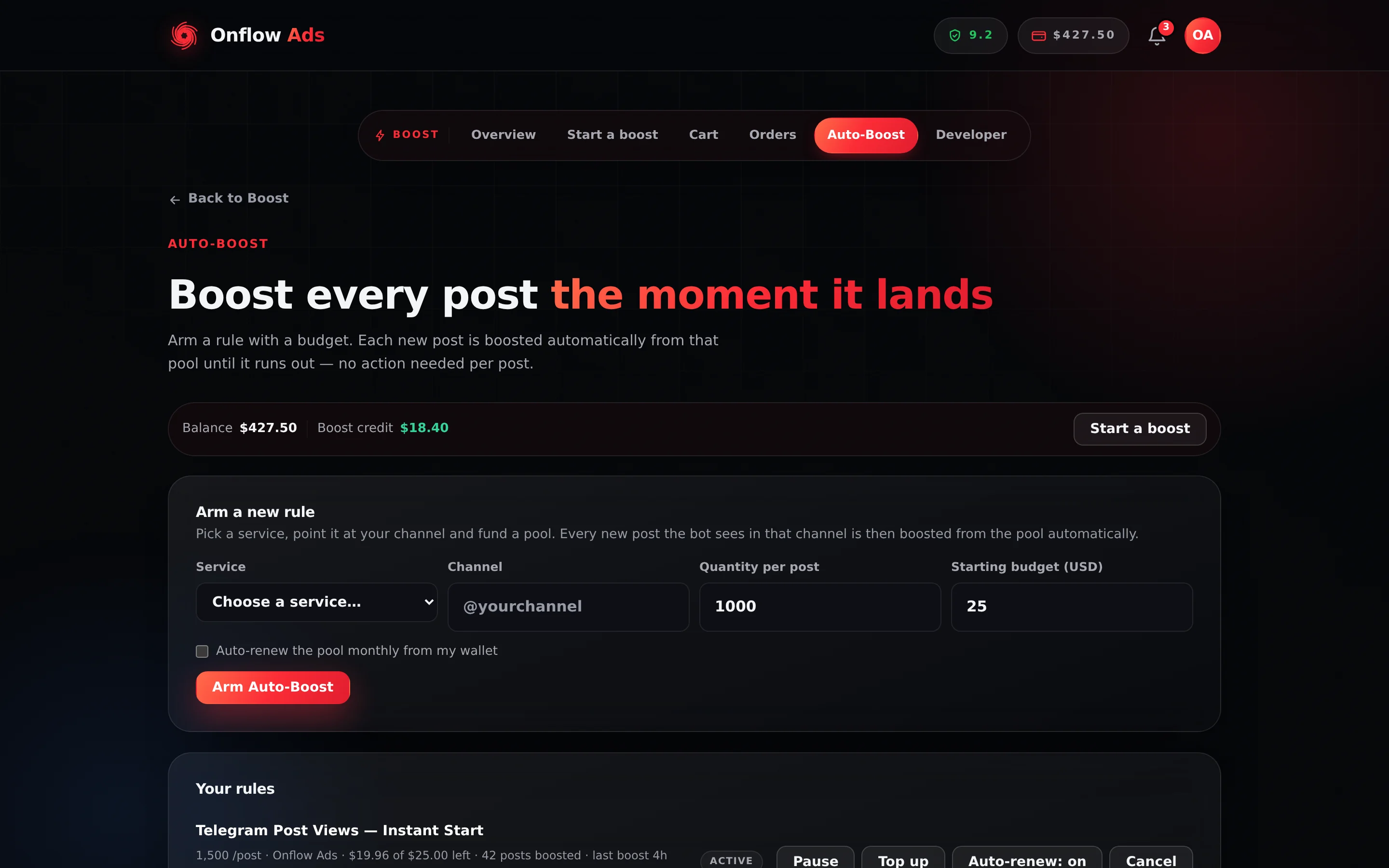
Plus plan · Advertiser. The Auto-Boost page: a wallet strip, the Arm a new rule card, and a Your rules card. Everything you can do to an existing rule is on its own row.
Before you start
- Sign in and clear the onboarding gate, as with every Boost page.
- Rules watch through Telegram. The Onflow Ads bot is what sees a new post in the channel — that is the only part of a rule it does. Everything a rule spends or decides — claiming the pool, placing the order, warning, pausing, renewing, refunding — is done by the website from the post the bot reported.
- The pool is wallet cash. It was funded from cash and it spends as cash.
Arming a rule
- In Arm a new rule, pick the Service every post should get, enter the Channel (its
@usernameor itst.melink), the Quantity per post and a Starting budget in USD. Tick Auto-renew the pool monthly from my wallet if you want it to renew. - The line under the form estimates the cost of one post and how many posts the starting budget covers.
- Press Arm Auto-Boost. The starting budget is taken from your wallet cash straight away and becomes the rule's pool; the rule runs for 30 days.
A rule is refused — and nothing is charged — when your account has no Telegram connected, when the channel is private (an invite link) or cannot be read, when the budget does not cover even one post, when the wallet cannot cover the budget, or when you already have as many active rules as your plan allows (1 on Free, 3 on Lite, 5 on Plus, 8 on Elite, 15 on Master, 50 on Ultimate).
What the page shows
One card, headed Your rules, with one row per rule.
| Element | What it is |
|---|---|
| Service name | Which booster the rule places for each post |
| Sub-line | 5,000 /post · My Channel · $12.40 of $25.00 left · 8 posts boosted · last boost 3h ago |
| Cycle line | Renews 1 Oct 2026 when auto-renew is on, Ends 1 Oct 2026 when it is off |
OFBS-… | The rule's permanent reference, on its own line. One click selects all of it |
| Status badge | The raw status — active, paused, expired or cancelled |
| Pause / Resume | Toggles the rule. Which one you see depends on its current state |
| Top up | Adds wallet cash to the pool. On a rule the engine paused, it also restarts it — unless you are already at your plan's active-rule limit, in which case the money lands and the rule stays paused, and the page says so |
| Auto-renew: on / off | Switches monthly renewal on or off |
| Cancel | Ends the rule permanently and refunds the unspent pool |
Reading the sub-line
| Fragment | What it means |
|---|---|
5,000 /post | The per-post quantity the rule orders |
My Channel | The channel it watches |
$12.40 of $25.00 left | Unspent pool, against this cycle's funding — what is left plus what the rule has spent since it last renewed. Carry-over and any top-up are part of it, so the figure resets to a full pool at each renewal by design |
8 posts boosted | How many posts the rule has boosted since it started |
last boost 3h ago | When the rule last boosted a post. — when it has not boosted one, or when its last boost is older than six months |
How a rule spends
The bot checks watched channels every few minutes and records each new post it finds; the website's Auto-Boost sweep picks the record up within about a minute and a half.
- A new post appears; the rule places a boost for its per-post quantity. The order it produces is an ordinary Boost order, placed by the website exactly as a manual one would be.
- The cost is claimed from the pool as part of placing the order, so two simultaneous posts cannot overspend it — and the same post can never be boosted twice, however many times the bot reports it.
- An album — several photos or videos sent together — is one post and is boosted once, through the link to its first item.
- A post the provider refuses is retried on later passes, up to three times, then skipped so one bad post cannot block the rule. A post older than 48 hours is never boosted — a rule that sat paused for days does not fire a burst of stale boosts when it resumes.
- The pool is cash only. Boost credit is never used by a rule.
- As the pool runs low the engine warns you. When it can no longer cover a post, a rule on auto-renew buys its next month early from your wallet and carries on; a rule without auto-renew — or one whose wallet can't cover the renewal — pauses.
- Rules run on 30-day cycles. A rule that reaches the end of its term without renewing expires.
Pausing and resuming
- Press Pause on an active rule. It stops boosting new posts immediately. The pool is untouched — nothing is refunded and nothing is charged.
- Press Resume on a paused rule to start it again — as long as its 30-day term has not run out in the meantime.
Resuming also clears the low-budget warnings the engine sets, so a rule that paused itself on an empty pool will warn you properly again rather than going quiet.
Both actions are limited to 20 requests per hour.
A rule's 30-day term keeps running while it is paused. When the term ends, the hourly sweep flips the rule to expired — paused rules included — and an expired rule cannot be resumed: Resume answers That rule's month has run out — start a new one, or cancel it to get the unspent budget back. The prepaid pool is not lost, but Cancel is what returns it. If you are pausing for more than a few days, check the Renews / Ends date on the row first.
Cancelling
- Press Cancel. Your browser asks: Cancel this rule? Any remaining budget is returned to your balance.
- Confirm. The rule is set to
cancelled, auto-renew is switched off, and any scheduled renewal is dropped. - The whole unspent pool is refunded to your wallet cash immediately — not on a sweep, not on a delay.
- If part of the pool came from promotional balance, that share goes back locked rather than as withdrawable cash.
A cancelled rule cannot be resumed. Use Pause if you only want to stop it for a while — pausing keeps the pool and the rule intact, and costs nothing. It does not extend the rule's term, though: see Pausing does not stop the clock above before pausing across the end of a cycle.
Renewal, and the one thing that surprises people
A rule with auto-renew switched on takes its monthly fee from your wallet cash, adds it to the pool, pushes the term out by 30 days and un-pauses itself. The website does this — on the renewal date, or early when the pool can no longer cover a post — and tells you with an Auto-Boost renewed notification. A rule with auto-renew off simply expires at the end of its term, with an Auto-Boost expired notification.
It is not a skipped cycle. When the wallet cannot cover the fee, the platform records the failure, sets auto-renew to off, and clears the next renewal date. It never retries on its own — not tomorrow, not after you top up your wallet. Keep enough wallet cash to cover a renewal before its date; if one has already failed, press Auto-renew: off on the rule's row to switch it back on.
What reaches you about a rule
The website notifies you — on the site, by email per your settings, and as a Telegram DM when your Telegram is linked — when a rule pauses, when its budget is running low (under a fifth of its monthly fee), when it renews, and when its term expires. The Auto-Boost paused entry names the channel and the reason.
Where a rule shows up elsewhere
This page is the only place a rule is controlled, but it is not the only place it is reported.
- The boosts it places are ordinary Boost orders. They land on the Orders page with their own
OFB-references, alongside the boosts you placed by hand. - The rule itself appears on the watched channel's own dashboard, if that channel is registered on your account. Open My channels, click the channel, and its activity feed carries one row per rule reading Auto-Boost running, Auto-Boost paused, Auto-Boost ended or Auto-Boost expired, while its Boost Metrics panel counts Posts auto-boosted for that channel.
@username or link — the rule stores the handleThe Channel field accepts either an @username or a t.me link. Either way the rule stores the channel's bare handle, which is what the channel page matches on.
Two things that page will not tell you: it holds no controls (pause, resume and cancel are here and nowhere else), and its Spent figure does not add the rule's per-post cost on top of the orders — the orders the rule placed already carry that money, and counting both would charge every auto-boosted post twice. The full page is documented in A channel's own dashboard.
If something goes wrong
| What you see | What it means | What to do |
|---|---|---|
A rule's badge reads paused and you did not pause it | The row says why: its pool could no longer cover a post, the service became unavailable, or the provider raised its price | For an empty pool, press Top up. Otherwise cancel it to recover the unspent pool |
| The pool went to zero and boosting stopped | Expected. An empty pool pauses the rule | Press Top up, or cancel it to get the remainder back |
| Can't pause a subscription that isn't active. | The rule is already paused or cancelled | Reload the page; the badge shows its real state |
| Can't resume a subscription that isn't paused. | Same, the other way round — the rule is already active, or cancelled | Reload the page; the badge shows its real state |
| That rule's month has run out — start a new one, or cancel it to get the unspent budget back. | The rule's 30-day term ended while it was paused, so the sweep marked it expired. Resuming is no longer possible | Press Cancel to get the unspent pool back, then create a fresh rule |
| That subscription is already cancelled. | Two cancel presses raced each other | The refund was paid once. Check your wallet |
| Couldn't update that rule. | The request failed | Reload and try again; nothing was changed |
| Subscription not found. | The reference does not belong to your account | Reload the page |
| Auto-renew stopped working after a low-balance month | The failed renewal switched it off | Top up your wallet, then press Auto-renew: off on the row to switch it back on |
Pause my Auto-Boost, resume it or cancel it in the chat: the assistant names the rule it is about to change and waits for CONFIRM. Ask my auto-boost rules to see them all. What the assistant can do for you has the full list and the confirmation rule.
Related
- Placing an order — how a single boost is composed
- Cancellations and refunds — how the pool refund behaves
- Tracking your orders — where the boosts a rule places show up
- A channel's own dashboard — where a rule is reported per channel
- Limits and caps — the rate limits on this page