Boost Overview
Boost is the Onflow Ads growth-services store. You buy measurable growth — members, followers, views, likes, reactions, subscribers and more — for the channels and profiles you own, pay from your Onflow Ads wallet, and watch delivery progress as it happens.
Boost covers ten platforms, each with its own public landing page:
- Telegram — members, post views, reactions
- Instagram — followers, likes, views, reel plays
- YouTube — subscribers, views, watch time, likes
- TikTok — followers, likes, video views
- X (Twitter) — followers, likes, reposts, views
- Facebook — page likes, followers, post reactions
- Discord — members and online members
- Spotify — plays, followers, monthly listeners
- Twitch — followers, views, live viewers
- Threads — followers and likes
The exact services available at any moment are listed live on the public price list at https://onflowads.com/boost/prices. The catalogue is curated and changes continuously, so that page — not this one — is the authority on what you can buy today.
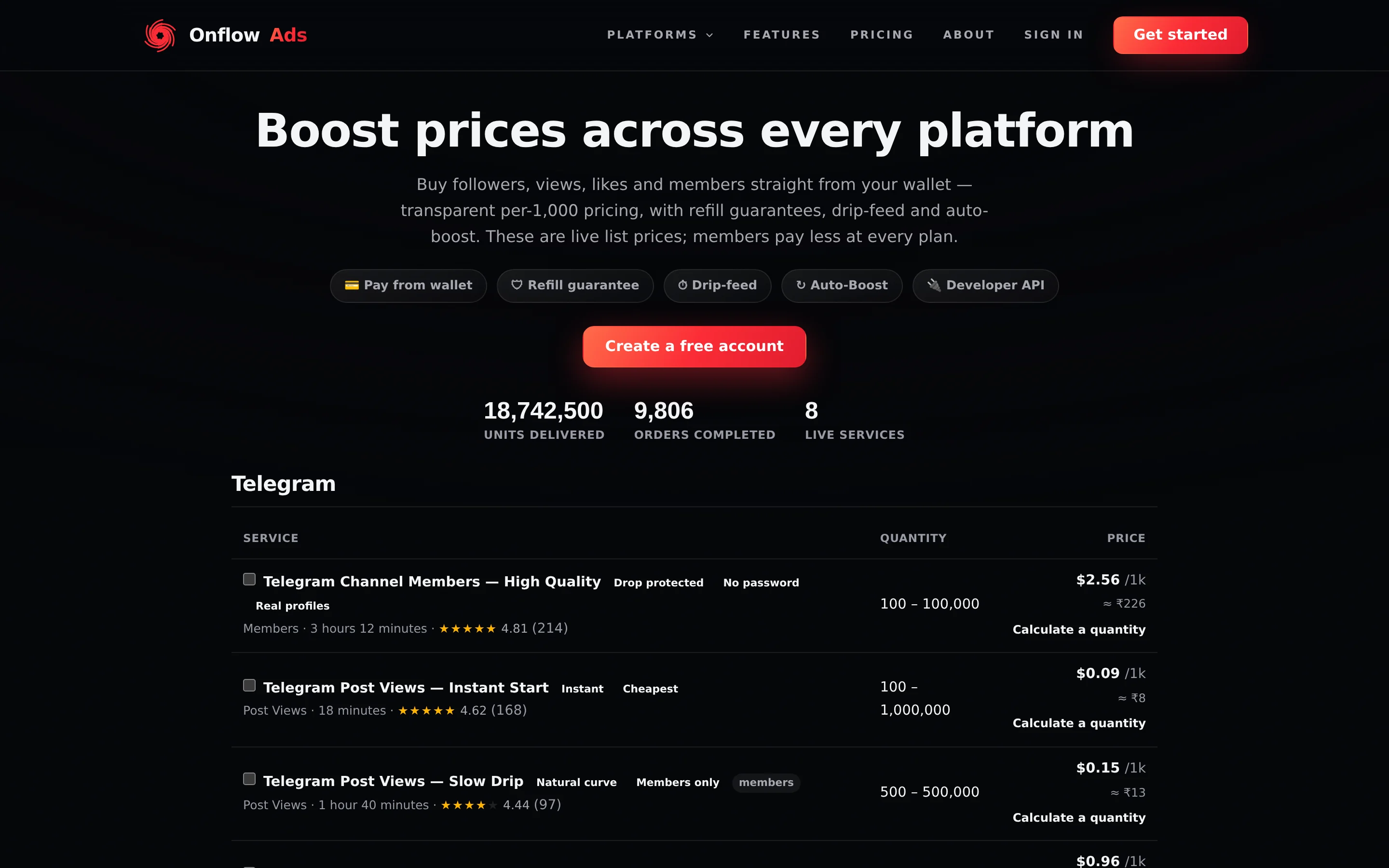
Signed out. The public price list, readable without an account. Look first at the badge row under the headline — it names the five capabilities the store carries — then at the per-platform tables below it.
Who it is for
- Channel and page owners who want to grow an audience, or add social proof to individual posts.
- Creators who want a new channel, video or profile to look active from its first day.
- Developers and resellers who want to place orders from their own code through the Boost API.
How it works in one minute
- Browse the catalogue — publicly at https://onflowads.com/boost/prices, or signed in on the Start a boost page of your Boost dashboard.
- Pick a service, paste the link to your channel, post or profile — never a password, only a public link — and type a quantity.
- Pay from your balance. Any boost credit you hold is spent first, then wallet cash. The Order summary card shows the exact charge before you press Launch boost.
- Track delivery on the Orders page. Completed orders can earn a refill; orders that fail or stop short are refunded automatically.
Boost services need a public link or @username and nothing else. Onflow Ads never asks for your password on Telegram, Instagram, YouTube or any other platform, and no Boost page has a field for one.
Key concepts
| Term | What it means |
|---|---|
| Service (booster) | One thing you can buy — for example "Telegram Channel Members". Each carries its own price, a minimum and maximum quantity, and its own capabilities (refill, cancel, drip-feed). |
| List price | The public price, quoted in USD per 1,000 units. This is what a signed-out visitor sees, and it carries no discount of any kind. |
| Member price | Your price after your plan's standing discount and any volume rate-break you have earned. Paid plans pay less on every order. |
| Wallet | Your Onflow Ads cash balance. Orders are charged to it — there is no card entry per order. |
| Boost credit | A separate, non-withdrawable balance spent before wallet cash on every boost. Earned from deposit bonuses, discount rebates, referral commission and guarantee make-goods. |
| Order ID | Every boost gets an OFB-… reference. You use it to refill, cancel, report a problem and share proof of delivery. It is one of the Onflow Ads IDs every object on the platform carries. |
| Refill | On eligible services, asking the provider to top the count back up if it drops after delivery, inside a protection window. |
| Drip-feed | Delivering an order in batches spread over time rather than in one burst. |
| Auto-Boost | A standing rule that boosts every new post in a Telegram channel from a prepaid budget pool. Each rule carries its own OFBS-… reference. |
The five Boost references
Boost stamps five different references, and they are often mistaken for one another. Each one names a different kind of thing.
| Prefix | What it names | Where you see it |
|---|---|---|
OFB- | One order. | Its own line on the order row, in the CSV export, in the proof-page address, and in every API response under both id and public_id |
OFBS- | One Auto-Boost rule — the standing instruction, not any boost it fires | Its own line on the rule row on the Auto-Boost page |
OFBK- | One API key — the permanent name for a secret that is shown only once | Under each key on the Developer page, and in the dialog that shows a new key |
OFBT- | One movement of boost credit | Quote it to support when a credit movement needs explaining. See Boost credit and referrals |
OFT- | One movement of wallet cash | In your wallet Activity list |
A rule that has boosted forty posts has one OFBS- and forty OFB-s. Quote the OFBS- when the rule itself is wrong (it paused, it is spending too fast); quote an OFB- when one particular delivery is wrong.
A single boost can therefore generate up to four references: the OFB- order, an OFBT- line where boost credit was spent, an OFT- line where wallet cash was spent, and — if it is refunded — further OFBT- and OFT- lines putting each pocket back.
Where everything lives
Public pages sit under /boost/. Everything you sign in for sits under /telegram/dashboard/boost/. The two namespaces are separate, and typing one where you meant the other gives a 404.
One Boost figure lives outside both: a registered channel's own dashboard, under /telegram/dashboard/channels/, carries a Boost Metrics panel totalling that single channel's orders, units and spend. It is the only address anywhere that breaks Boost down per channel instead of per account.
| Page | Address | Sign-in |
|---|---|---|
| Public price list, all platforms | https://onflowads.com/boost/prices | No |
| Per-platform page | https://onflowads.com/boost/telegram — also /boost/instagram, /boost/youtube, /boost/tiktok, /boost/x, /boost/facebook, /boost/discord, /boost/spotify, /boost/twitch, /boost/threads | No |
| One service's page | https://onflowads.com/boost/service/ID-name, linked from every price row | No |
| Compare services | https://onflowads.com/boost/compare?ids=…, built for you from the price list | No |
| Delivery proof for a settled order | https://onflowads.com/boost/proof/YOUR-ORDER-ID | No |
| Boost Overview | https://onflowads.com/telegram/dashboard/boost | Yes |
| Start a boost | https://onflowads.com/telegram/dashboard/boost/new | Yes |
| Cart | https://onflowads.com/telegram/dashboard/boost/cart | Yes |
| Orders | https://onflowads.com/telegram/dashboard/boost/orders | Yes |
| Auto-Boost | https://onflowads.com/telegram/dashboard/boost/auto | Yes |
| Developer | https://onflowads.com/telegram/dashboard/boost/developer | Yes |
| In-product API reference | https://onflowads.com/telegram/dashboard/boost/api | Yes |
| One registered channel's own dashboard, with its Boost panel | https://onflowads.com/telegram/dashboard/channels/YOUR-OFCH-REFERENCE/overview — reached by clicking a row in My channels | Yes |
The six dashboard pages
Every signed-in Boost page carries the same flow bar across the top, with six pills. Those six labels are the whole dashboard:
- Overview — your channels, four live metric tiles, boosts in flight, the delivery feed, and the way in to everything else.
- Start a boost — the catalogue and the order composer: pick a booster, paste the target, set the amount and the delivery options, read the server's quote, launch.
- Cart — place several boosts in one action, or paste a block of rows as a mass order.
- Orders — your recent orders with live progress, plus Refill, Cancel and Report a problem.
- Auto-Boost — pause, resume or cancel your standing rules.
- Developer — API keys and order webhooks.
The Boost dashboard walks through all six.
Signing in is not enough. All seven signed-in Boost addresses are served through the same gate, which sends you to /telegram/link unless your account has both a linked Telegram bot and a real email address you have verified. Free accounts can buy boosts — that is deliberate — but no account reaches the store before the gate is cleared.
What the Telegram bot does
Every boost is ordered and tracked here, on the website. The Onflow Ads Telegram bot (https://t.me/OnflowAdsBot) is how the news reaches you: with Telegram linked, it sends a direct message when an order completes, when it under-delivers and is refunded, and when an Auto-Boost rule pauses or expires. For Auto-Boost the bot does exactly one thing: it watches your channel and records each new post it sees. The website does the rest — it claims the rule's pool, places the boost, warns, pauses, renews and refunds — so no boost is ever ordered or paid for by the bot. See Auto-Boost.
Your Telegram account and your website account are one account, so those messages are about the one wallet, the one boost-credit balance and the one order history you see here.
Boost orders are split by where they were placed. An order you placed on the website settles with a site notification; an order the Auto-Boost engine placed for you settles with a bot direct message. You never get both for the same order, and a missing notification is not a missing order — the Orders page is always the record.
In this section
Every page below is a self-contained walkthrough. Start at The Boost dashboard if you are signed in, or at Browsing services and prices if you are not.
The Boost Dashboard
A tour of the six Boost pages — Overview, Start a boost, Cart, Orders, Auto-Boost and Developer — what every tile, chip and panel on the Overview screen means, and where Boost figures for a single channel are totalled.
Browsing Services and Prices
How to explore the Boost catalogue publicly and signed in — the price list, per-platform pages, service permalinks, the price calculator, the comparison picker and the four sort chips.
Comparing Services
Put two to four boost services side by side on one shareable public page — price, quantity range, delivery, ratings and quality tags.
Getting a Quote
How to find out exactly what a boost will cost before any money moves — the public price calculator, the server-priced Order summary in the composer, and what every line of it means.
Placing an Order
A step-by-step walkthrough of ordering one boost on the Start a boost page — picking a service, the link and quantity fields, the three delivery toggles, the projection chart, the quote and launch.
Cart and Mass Orders
Place several boosts in one action — building a cart, pasting a mass order, the per-plan row limits, and the three things a batch checkout does not do that you must plan around.
Tracking Your Orders
The Orders page and its four tabs, what every order row tells you, the status lifecycle and the guarantees behind it, CSV export, reporting a problem, and the notifications that reach you.
Refills and Delivery Protection
What a refill is, which orders qualify, how to request one by hand, the guarantee windows each plan includes, and exactly how the automatic protection sweep and the guarantee make-good work.
Cancellations and Refunds
How to stop an in-flight boost, which orders can be cancelled, the exact refund rule for every outcome, and how a refund is split back between boost credit and wallet cash.
Pricing and Discounts
How a boost's price is built — list price, the two paid add-ons, the discount stack and its 15% cap, the overflow rebate, coupons, the three volume rungs, and the Wholesale Desk.
Limits and Caps
Every Boost limit stated exactly — per-plan ceilings, rate limits, the duplicate-order guard, quantity and charge ceilings, and the exact message each one produces.
Boost Credit and Referrals
The non-withdrawable boost-credit balance — where every kind of credit comes from, how it is spent and refunded, where to see it, and the Referral Programme that pays into it.
Repeating an Order
The fastest ways to run the same boost again — from a channel metric tile, from your CSV export, or as a pasted mass order — and what a repeat is re-checked against.
Delivery Proof Pages
Every settled boost has a public, shareable proof page — the verified delivery counts and the full timeline, with no price and no buyer identity anywhere on it.
Auto-Boost
Standing rules that boost every new post in a Telegram channel from a prepaid pool — how a rule spends, how to pause, resume and cancel it, and what the refund does.
The Boost API
Drive the Boost store from your own code — the Perfect-Panel-compatible endpoint, minting and revoking keys, every action, the reliability bands on your rate, every refusal the gate can return, what gets a key blocked, and order webhooks with their current limitation.
Boost FAQ and Troubleshooting
Short answers to the questions that come up most in Boost — ordering, delivery, refills, refunds, credit, Auto-Boost and the API — with the exact error text and what clears each one.
Related
- The Boost dashboard — a tour of all six pages
- Placing an order — the walkthrough, step by step
- Pricing and discounts — how a price is built
- A channel's own dashboard — where one channel's Boost orders and spend are totalled