The Onflow Ads guide
This is the official manual for Onflow Ads, the advertising and growth platform for Telegram channels and other social audiences. It documents every screen on the website, every message the Telegram bot sends, and every rule that decides what something costs.
Read it if you want to grow a channel, buy advertising on somebody else's, sell space on your own, or work out which plan you actually need.
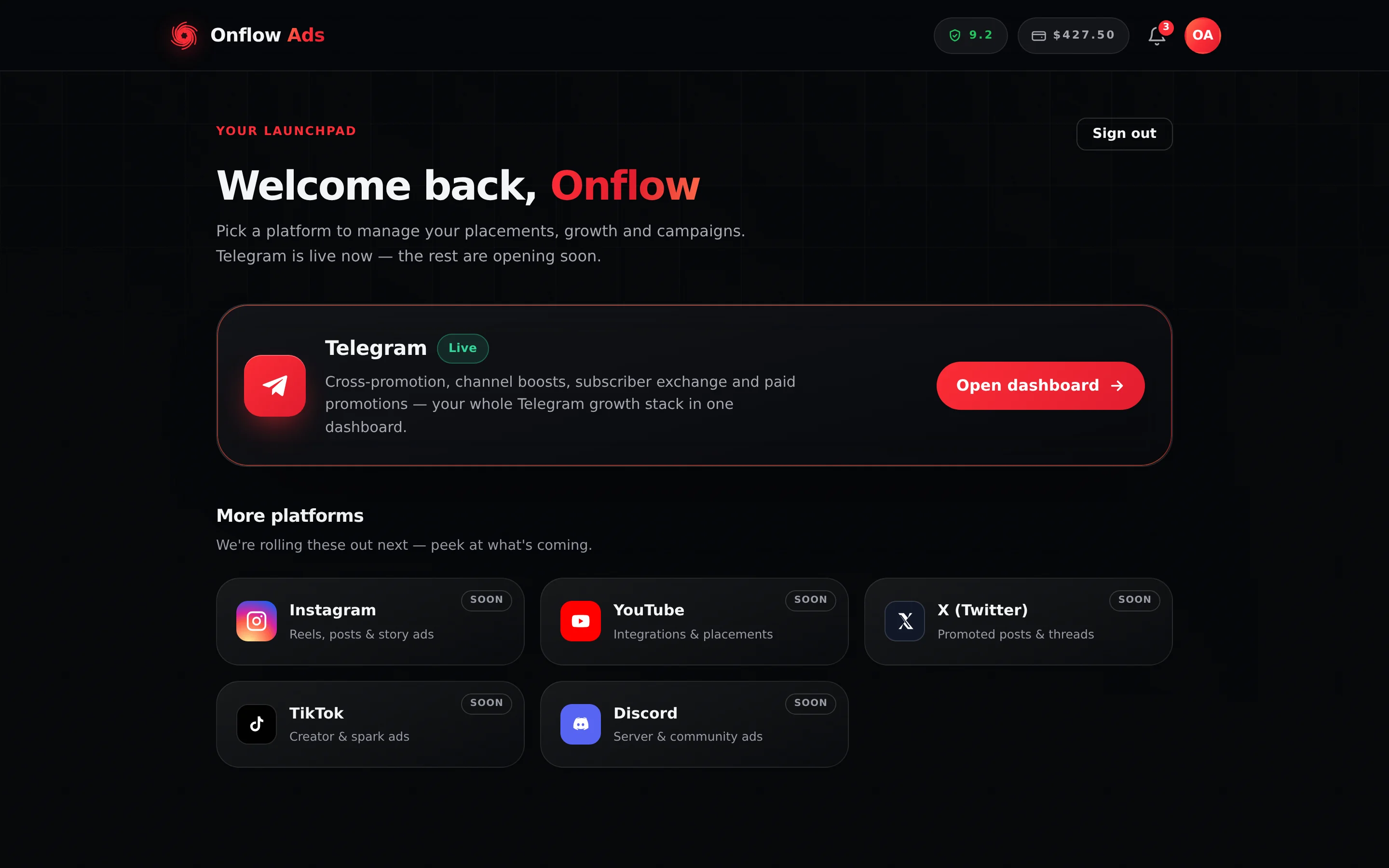
Plus plan · Advertiser. The first screen after you sign in. Telegram is the live platform, so that card is the one that opens; the five below it are placeholders until each platform launches.
Work through Getting Started in order. It takes you from a sign-up form to a verified account with a connected channel, and every other section assumes you have done it.
What Onflow Ads does
Everything runs on one account and one wallet. You do not buy the products separately — one plan sets the limits on all of them at once, on the website and in the Telegram bot alike.
| If you want to | Use | Costs |
|---|---|---|
| Grow a Telegram channel by trading reach | Cross-Promotion — pair with a partner channel and each of you carries the other's post | The swap itself is free; optional add-ons are sold separately |
| Grow a Telegram channel by hosting other people's ads | Subscriber Exchange — host other members' ads, which earns credits and opens the right to run your own across everyone else's | Placements are free and reciprocal, not cash; delivery boosts are a paid extra |
| Buy measurable growth on demand | Boost — members, followers, views, likes, reactions and more, ordered from a price list | Paid from your wallet |
| Advertise on channels other people own | Paid Promotion — Advertisers — book a sponsored post in a verified channel, held in escrow until it is proven to have run | Paid from your wallet |
| Earn from the audience you already have | Paid Promotion — Channel Owners — list your channel, set your rate card, sell slots | You are paid into your wallet |
| Write the ad itself | AI features — the AI writing and image buttons built into each composer | Included, within a daily and monthly allowance set by your plan |
| Move money in and out | Wallet & Payments — top-ups, fees, bonuses, refunds, withdrawals | Fees depend on your plan |
Which platforms are live
Onflow Ads is a Telegram product today. The rest of the platform pages on onflowads.com are announcements, not products.
| Platform | Cross-Promotion, Subscriber Exchange, Paid Promotion | Boost growth services |
|---|---|---|
| Telegram | Live | Live |
| Coming soon | Live | |
| YouTube | Coming soon | Live |
| X (Twitter) | Coming soon | Live |
| TikTok | Coming soon | Live |
| Discord | Coming soon | Live |
| Facebook, Spotify, Twitch, Threads | Not offered | Live |
Boost is the exception: because it delivers to a public link rather than to a connected account, it already sells services for ten platforms, four of which appear nowhere else on the site. See Boost for the price pages.
The Get notified button on the Instagram, YouTube, X, TikTok and Discord pages opens the ordinary sign-up form at onflowads.com/signup. There is no waiting list and no launch alert behind it — creating an account is what puts you in a position to use a platform the day it opens.
How this guide is organised
Fourteen sections, in the order they appear in the sidebar.
| Section | What it covers |
|---|---|
| Getting Started | Creating an account, every way to sign in, verifying your email, linking Telegram, two-factor authentication, sessions, referrals and a tour of the dashboard. |
| Channels & Dashboard | The dashboard hub and the account-wide tools every product shares — the channel registry, adding and verifying a channel, click tracking, notifications and your reliability score. |
| Boost (Growth Services) | The growth-services store: browsing prices, quotes, ordering, carts and mass orders, tracking delivery, refills, cancellations, proof pages and the developer API. |
| Cross-Promotion | Free reach swaps with a partner Telegram channel — finding partners, creating and joining campaigns, schedule proposals, what gets posted, results and the fairness rules. |
| Paid Promotion — Advertisers | Buying sponsored posts in verified channels: the marketplace, channel pages, the cart and checkout, escrow, auctions, links and results, delivery proof and disputes. |
| Paid Promotion — Channel Owners | Selling placements in your own channel: listing it, identity verification, pricing and offers, availability, handling bookings, posting the ad, submitting proof and getting paid. |
| Subscriber Exchange | The free reciprocal exchange: earning and spending credits, hosting ads, reviewing or refusing an ad before it posts, targeting, delivery boosts and fair play. |
| Wallet & Payments | Adding funds by UPI or crypto, deposit fees and bonuses, held funds, invoices and receipts, refunds and where they land, and withdrawing earnings. |
| Plans & Premium Tiers | The six-tier ladder — what each tier costs and unlocks, buying, renewing, upgrading, letting a plan lapse, and where tier limits show up across the products. |
| AI features | Where the AI writing and image buttons actually live inside each composer, what each one costs against your monthly allowance, and the content rules they enforce. |
| Telegram Bot | What the bot does for you — connecting your account, the notifications it sends, the posts it publishes, click tracking, and the checks it runs on your channel. The bot records; every decision it reports is made on the website. |
| Help & Support | Instant answers, the in-dashboard support widget and ticket threads, the public contact form, the status page and maintenance windows. |
| Policies & Trust | Plain-language summaries of the Terms, Privacy and Refund policies, plus reliability, account standing, fraud protection and how to appeal a penalty. |
| Changelog | The live What's New feed — every feature, fix and change the team ships, newest first. |
Where to start
Pick the path that matches what you came to do. Each one is a short reading order, not a checklist you have to finish in one sitting.
- Create and verify your account. Read Create your account, then Verify your email. You cannot reach the dashboard until the email is verified.
- Connect Telegram. Read Connecting your Telegram and Add a channel. Almost every product needs at least one verified channel on your account.
- Choose your first product. Growing for free starts at Cross-Promotion; buying growth starts at Boost; buying advertising starts at Browsing the marketplace; selling advertising starts at Becoming a channel owner.
- Fund the wallet, if the product you chose costs money. Read Adding funds. A plain cross-promotion swap and an ordinary exchange placement need no balance at all; Boost and Paid Promotion take payment from the wallet before anything is delivered, and both free products sell optional paid extras on top.
- Check whether your plan is the right one. Read Comparing the tiers once you know which product you will live in — the limits that matter are different for a buyer and a seller.
The Paid Promotion marketplace asks you to enlist as either an Advertiser or a Channel Owner. That choice is written once and cannot be changed afterwards, by you or by support — a second account is the only way to work the other side. Read Becoming a channel owner before you press Confirm.
Reading this guide
- Every screenshot names whose screen it is. The caption under an image opens with the plan and marketplace side it was captured from — Free plan, Plus plan · Advertiser, Elite plan · Channel owner. Onflow Ads genuinely shows a different dashboard on a different plan, so if your screen does not match the picture, check that label first.
- Prices, fees and limits are quoted from the code that charges you. A build check compares the figures printed here against the platform's own configuration and fails when they drift apart.
- Controls are named exactly as the product spells them, in bold — press Place order, open the Filters panel.
$Xin a button or a message means "the number your account is shown". Some prices and limits move with your plan, with a channel's own rate card, or with what an admin has set, so the guide writes the shape of the control and tells you where the real figure comes from rather than printing one that would be wrong for most readers.- This guide describes the product as it is today. It is not a changelog: you will not find pages about features that have been withdrawn, or instructions for controls that are no longer there.
Paid Promotion — Advertisers and Paid Promotion — Channel Owners describe the two ends of the same marketplace. Your account only ever sees one of them, so read the one that matches the side you enlisted for.
Quick links
- Create an account: onflowads.com/signup
- Sign in: onflowads.com/signin
- Your dashboard: onflowads.com/dashboard
- Pricing and checkout: onflowads.com/pricing
- Public Boost price list: onflowads.com/boost/prices
- Platform status: onflowads.com/status
- Contact the team: onflowads.com/contact
- The Telegram bot: t.me/OnflowAdsBot
Every section of this guide except the changelog is available as one PDF, built from these pages at the moment you ask for it — so it can never be an old copy. Download it, or have it emailed to you; no account is needed.
Every page here is indexed — use the search box in the top bar to jump straight to one. If that does not settle it, Troubleshooting & FAQ collects the questions the team is asked most, and Help & Support lists every way to reach a person.